
When you’re building a digital product whether it’s a custom software platform, eLearning experience, or data visualization dashboard the pressure to get design validation right feels intense. Skip this step, and you risk building something that looks polished but fails to solve real user problems. Rush through it with the wrong approach, and you’ll burn through budget on changes that could have been caught early.
The good news? You have two powerful tools at your disposal: wireframing and prototyping. But knowing when to use each one and how they work together can make the difference between a smooth validation process and a frustrating cycle of revisions.
This guide breaks down the practical differences between wireframing and prototyping for design validation, when each approach makes sense, and how to structure your validation process to catch problems early while keeping stakeholders aligned.
Understanding the Fundamentals: What Each Tool Actually Does
Before diving into validation strategies, let’s clarify what wireframes and prototypes actually accomplish and why the distinction matters for your project timeline and budget.
Wireframes: Structure and Content Hierarchy
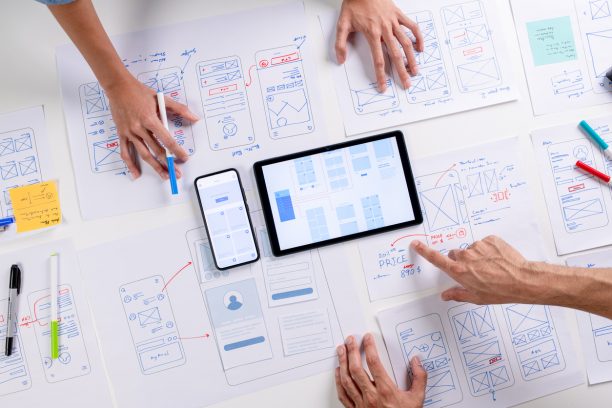
Wireframes are structural blueprints that focus on layout, content placement, and information hierarchy. Research confirms that wireframes serve as visual diagrams that prioritize layout and content structure, emphasizing usability without detailed visual design elements. Think of them as the architectural plans for your digital experience. They deliberately avoid visual design details colors, fonts, imagery to keep stakeholder conversations focused on functionality and user flow.
Key characteristics of wireframes:
- Low-fidelity, usually grayscale or simple line drawings
- Emphasis on content placement and page structure
- Static representations that show individual screens or states
- Quick to create and modify based on feedback
- Ideal for validating information architecture and basic user journeys
Prototypes: Interactive Experience Testing
Prototypes simulate the actual user experience through interactive, clickable models of your digital product. Multiple studies show that prototypes are high-fidelity, interactive models that closely resemble the final product, including clickable links, animations, and transitions that enable realistic user testing. They can range from simple click-through mockups to sophisticated simulations that closely mirror the final product’s behavior.
Key characteristics of prototypes:
- Interactive elements that respond to user actions
- Can be low-fidelity (basic interactions) or high-fidelity (realistic visual design)
- Show transitions, animations, and multi-step workflows
- Allow for usability testing with real user interactions
- More time-intensive to create but provide deeper validation insights
What the research says
Evidence from design and user experience research provides clear guidance on how to structure your validation approach:
- Wireframing first saves time and resources: Studies consistently show that wireframes help identify structural issues early when changes are still inexpensive, preventing costly revisions during prototyping phases.
- Prototypes reveal real usage patterns: Research demonstrates that interactive prototypes uncover usability issues and user behavior patterns that static wireframes cannot detect, particularly for complex workflows and multi-step processes.
- Sequential validation is most effective: Design methodology research indicates that using wireframes for structural validation followed by prototypes for interaction testing produces better outcomes than either approach alone.
- Stakeholder alignment improves with wireframes: Studies show that low-fidelity wireframes help diverse teams focus on functionality rather than visual details, leading to better consensus on core requirements.
- Time investment varies significantly: Research confirms that prototypes require substantially more time and resources to create than wireframes, but this investment pays off through deeper validation insights and reduced development risks.
The Validation Sweet Spot: When to Use Each Approach
The most effective validation strategies combine both wireframing and prototyping at different stages of the design process. Here’s how to sequence your validation efforts for maximum impact:
| Validation Stage | Best Tool | What You’re Testing | Typical Duration |
|---|---|---|---|
| Initial Concept Validation | Wireframes | Information architecture, content priorities, basic user flows | 1-2 weeks |
| Stakeholder Alignment | Wireframes | Feature completeness, business requirements, content strategy | 1 week |
| Usability Testing | Prototypes | Task completion, interaction patterns, user confusion points | 2-3 weeks |
| Technical Feasibility | Prototypes | Complex interactions, performance considerations, integration points | 1-2 weeks |
| Final Design Approval | High-fidelity Prototypes | Visual design, brand alignment, polished user experience | 1 week |
Early Stage: Wireframes for Foundation Setting
Use wireframes when you need to establish consensus on fundamental structure without getting distracted by visual design decisions. Research shows that wireframes facilitate communication and collaborative feedback by preventing distractions from visual design details, allowing teams to align on core functionality and content placement. This is particularly valuable when working with diverse stakeholder groups technical teams, business leaders, and end users often have different priorities that wireframes can help reconcile.
Wireframes excel at validating:
- Content strategy: What information needs to be prominent? What can be secondary?
- Navigation structure: How do users move between different sections or workflows?
- Feature prioritization: Which capabilities are essential versus nice-to-have?
- Responsive behavior: How does the layout adapt across different screen sizes?
Mid-Stage: Prototypes for Interaction Validation
Once your wireframes have established solid structural foundations, prototypes become essential for validating how users actually interact with your digital product. Design research confirms that prototypes expose how users engage with designs in practice and reveal navigation and usability gaps that are not evident in static wireframes. This is where you discover the gaps between theoretical user flows and real-world usage patterns.
Prototypes are particularly valuable for:
- Complex workflows: Multi-step processes like data entry, configuration, or approval chains
- Conditional interactions: Features that behave differently based on user permissions or data states
- Error handling: How the system responds to incomplete information or user mistakes
- Performance expectations: Whether loading states and transitions feel responsive enough for your users
Practical Implementation: Building Your Validation Process
The most effective validation processes integrate both wireframing and prototyping strategically, rather than treating them as competing approaches. Here’s how to structure your validation workflow:
Phase 1: Stakeholder Alignment with Wireframes
Start with low-fidelity wireframes to get early buy-in on core functionality. This phase should focus on eliminating major conceptual disagreements before you invest in detailed interaction design.
Key activities:
- Create wireframes for primary user journeys and key screens
- Run collaborative review sessions with business stakeholders
- Document feature requirements and content needs
- Validate information architecture with card sorting or tree testing
Success metrics: Stakeholders can explain the user journey in their own words, and there’s consensus on what features belong on which screens.
Phase 2: User Testing with Interactive Prototypes
Once wireframes have established structural consensus, build clickable prototypes to test actual user behavior. This phase reveals problems that stakeholder review missed users interact with interfaces differently than stakeholders anticipate.
Key activities:
- Build interactive prototypes for critical user tasks
- Conduct moderated usability testing with representative users
- Test error scenarios and edge cases
- Validate accessibility and responsive behavior
Success metrics: Users can complete primary tasks without confusion, and major usability issues are identified and addressed.
Phase 3: Technical Validation with High-Fidelity Prototypes
Before moving into development, use sophisticated prototypes to validate technical assumptions and complex interaction patterns. This is especially critical for custom software projects where interaction behavior needs to align with underlying data models and system capabilities.
Key activities:
- Create realistic prototypes with actual data or representative content
- Test integration points with existing systems
- Validate performance expectations under realistic usage scenarios
- Confirm technical feasibility with development teams
Common Pitfalls and How to Avoid Them
Even well-intentioned validation efforts can go off track. Here are the most frequent issues we see in B2B digital projects, and how to structure your process to avoid them:
Skipping Wireframes and Jumping to Prototypes
When project timelines feel tight, teams often want to skip wireframing and build interactive prototypes immediately. This usually backfires because prototype feedback focuses on visual design and interactions rather than fundamental structural issues.
The result? You spend weeks refining interactions built on top of flawed information architecture. Wireframes force structural conversations first, when changes are still inexpensive to make.
Over-Investing in Prototype Fidelity Too Early
High-fidelity prototypes that look and feel like finished products can actually hurt validation efforts. Stakeholders and users focus on polish colors, fonts, imagery instead of core functionality and usability.
Keep early prototypes deliberately rough. Use placeholder content, simple interactions, and basic visual design until you’ve validated the underlying experience structure.
Validating with the Wrong Audience
Many B2B projects test wireframes and prototypes primarily with internal stakeholders business sponsors, product managers, technical teams. But these groups interact with digital tools differently than your actual end users.
Always include representative end users in your validation process, even if it takes extra coordination. The insights from a procurement manager, field technician, or learning administrator will be fundamentally different from internal stakeholder feedback.
Tools and Team Considerations
Your choice of wireframing and prototyping tools should align with your team’s skills, project timeline, and collaboration needs. Here’s how to think through the practical considerations:
Wireframing Tools: Speed vs. Sophistication
Simple sketching and digital whiteboarding tools (like Miro, Whimsical, or even hand-drawn sketches) work well when you need to move fast and keep stakeholder focus on structure rather than polish.
Dedicated wireframing platforms (like Balsamiq or Axure) offer more sophisticated layout capabilities and component libraries, but can encourage over-investment in wireframe fidelity.
All-in-one design platforms (like Figma or Sketch) provide the most flexibility but require more design expertise to use effectively for wireframing without getting distracted by visual design.
Prototyping Tools: Complexity vs. Collaboration
Choose prototyping tools based on the complexity of interactions you need to validate and your team’s collaborative workflow:
- Simple click-through prototypes: Figma, InVision, or Marvel for basic navigation testing
- Advanced interaction prototypes: Principle, ProtoPie, or Framer for complex animations and conditional logic
- Code-based prototypes: Custom HTML/CSS/JavaScript for sophisticated functionality that closely mirrors final development
Team Structure and Handoffs
Consider how wireframes and prototypes will move between team members:
- Who creates initial wireframes? Product managers, UX designers, or collaborative workshops?
- Who builds prototypes? Designers, front-end developers, or specialized prototypers?
- How do insights transfer to development? Direct handoff, detailed specifications, or collaborative implementation?
When to Partner with Specialists
Many B2B organizations have the internal capability to create basic wireframes and simple prototypes. But there are scenarios where partnering with experienced design and development teams accelerates validation efforts and improves final outcomes.
Consider working with a specialized team when:
- You’re building complex, multi-stakeholder workflows that require sophisticated interaction design and user research
- Your project integrates with multiple existing systems and needs realistic prototypes to validate technical feasibility
- You need to validate accessibility, security, or compliance requirements that go beyond basic usability testing
- Your timeline requires parallel validation workstreams while internal teams focus on business requirements and technical architecture
An experienced design and development partner can help you avoid common validation pitfalls, accelerate user research activities, and ensure that insights from wireframes and prototypes translate effectively into development requirements.
At Branch Boston, we work with B2B organizations to structure validation processes that balance speed with thoroughness. Our approach combines rapid wireframing for stakeholder alignment with sophisticated prototyping for user validation ensuring that your final digital product solves real problems efficiently. Learn more about our UX/UI design process and how it can support your next digital project.
Making the Decision: Your Next Steps
The choice between wireframing and prototyping isn’t binary it’s about sequencing both approaches strategically to validate different aspects of your digital product at the right time and investment level.
Start with wireframes when:
- You need stakeholder alignment on features and content strategy
- The information architecture hasn’t been validated
- You’re working with diverse stakeholder groups who need to focus on structure first
- Budget or timeline constraints require rapid iteration
Move to prototypes when:
- Core structure and navigation have stakeholder consensus
- You need to test complex interactions or multi-step workflows
- Real user behavior validation is essential for project success
- Technical feasibility of interactions needs confirmation
The most successful digital projects use both approaches in sequence, allowing each validation method to inform and improve the next stage of design development.
Whether you’re building a custom web platform, designing an internal software tool, or developing a comprehensive design system, the key is matching your validation approach to your current needs while keeping the bigger picture in mind.
FAQ
How long should I spend on wireframing before moving to prototypes?
Most B2B projects benefit from 1-2 weeks of wireframing for initial concept validation, followed by another week for stakeholder review and iteration. Move to prototypes once you have clear consensus on information architecture and core functionality. Spending more than 3 weeks on wireframes often indicates that fundamental business requirements haven't been clarified yet.
Can I skip wireframes if I'm already experienced with similar digital products?
Even experienced teams benefit from wireframing, especially when working with multiple stakeholders or complex user workflows. Wireframes force explicit conversations about priorities and structure that assumptions can skip. However, experienced teams can often move through wireframing faster and with less detailed documentation.
What's the minimum level of prototype fidelity needed for useful validation?
For basic navigation and workflow validation, simple click-through prototypes with placeholder content work well. Add interaction fidelity when testing complex workflows, conditional logic, or error handling scenarios. The key is matching prototype sophistication to the specific validation questions you need to answer.
How do I get stakeholders to focus on structure instead of visual design in wireframes?
Use deliberately rough, grayscale wireframes and establish ground rules at the beginning of review sessions. Explicitly ask stakeholders to focus feedback on functionality, content placement, and user flow rather than visual aesthetics. Consider using sketchy or hand-drawn wireframe styles that discourage pixel-perfect feedback.
Should technical teams be involved in wireframing and prototyping validation?
Yes, technical teams should review both wireframes and prototypes to flag feasibility issues early. However, balance technical input with user needs—sometimes the right user experience requires creative technical solutions rather than defaulting to what's easiest to build. Include developers in validation reviews but don't let technical constraints drive user experience decisions without exploring alternatives.