A focused professional woman working on documents at an office desk, showcasing dedication and productivity in a modern workspace environment, surrounded by office tools and natural light.

How to Organize Content with Information Architecture

Your users are lost in your digital product. They can’t find what they need, abandon tasks halfway through, and your support tickets are piling up with navigation complaints. Sound familiar? Research consistently shows that poor information architecture the invisible backbone that determines whether your content makes sense to real people or feels like a digital maze directly leads to user frustration, task abandonment, and increased support requests.

Information architecture (IA) is the practice of organizing, structuring, and labeling content in a way that helps users find information and complete tasks efficiently. For B2B organizations building custom software, data platforms, or eLearning experiences, getting IA right isn’t just about user satisfaction evidence from B2B digital product research shows it’s about whether your digital investment actually delivers business value.

This guide breaks down how to approach information architecture strategically, when to invest in professional IA work, and how to avoid the common pitfalls that derail even well-intentioned content organization efforts.

What Information Architecture Actually Does

Information architecture sits at the intersection of user psychology, business goals, and technical constraints. It’s not just about creating site maps or organizing menu items it’s about creating mental models that match how your users think about their work and goals.

At its core, IA addresses three fundamental questions:

  • Where am I? Users need to understand their current location within your system
  • What can I do here? Available actions and content should be immediately apparent
  • Where can I go next? Clear pathways should guide users toward their goals

For enterprise software or complex data platforms, these questions become even more critical. Your users whether they’re analysts, project managers, or learning coordinators are often dealing with intricate workflows and large volumes of information. Studies of enterprise systems show that poor IA doesn’t just frustrate users; it can completely block them from accomplishing their work by making it impossible to locate information, understand available actions, or determine next steps.

💡 Tip: Before diving into wireframes or visual design, spend time mapping out user mental models. Ask your target users to organize key concepts or features using card sorting exercises this reveals how they naturally group and prioritize information.

The most effective IA work happens early in the design process, but research from UX practitioners confirms it’s never too late to audit and improve existing systems. Whether you’re building from scratch or renovating an existing platform, understanding IA principles helps you make better decisions about content hierarchy, navigation patterns, and feature organization.

The Building Blocks of Effective Content Organization

Good information architecture relies on several interconnected components that work together to create coherent user experiences. Multiple studies emphasize that these systems must integrate seamlessly when organization, labeling, navigation, and search systems send mixed signals, users struggle to understand how your system actually works.

IA ComponentPurposeCommon Applications
Organization SystemsHow content is grouped and categorizedAlphabetical, chronological, topical, task-based, audience-based, or hybrid approaches
Labeling SystemsHow content and features are namedBreadcrumbs, headings, navigation labels, link text, and iconography
Navigation SystemsHow users move through contentPrimary navigation, contextual menus, filters, search, and related links
Search SystemsHow users find specific contentGlobal search, scoped search, filters, faceted search, and search result organization

The key insight many teams miss is that these systems need to work together coherently. Your navigation labels should match your content organization approach. Your search system should surface results in ways that align with user mental models. When these pieces are disconnected, users get mixed signals about how your system actually works.

Choosing the Right Organization Approach

Research shows that most successful digital products use hybrid organization systems that combine multiple approaches based on user context and content type. For example:

  • Task-based organization works well for workflow-heavy applications where users have specific jobs to complete
  • Topic-based organization suits content libraries or knowledge bases where users browse for information
  • Audience-based organization helps when different user roles need distinctly different content or functionality
  • Chronological organization makes sense for activity feeds, project timelines, or process-driven workflows
Read more: Understanding how information architecture fits within the broader UX design process.

The most common mistake is defaulting to organization patterns that reflect your internal business structure rather than user mental models. UX research consistently shows that organizing content based on how your company is structured rather than how users think about their problems leads to navigation confusion and poor user experiences. Just because your company has separate departments for sales, marketing, and support doesn’t mean your users think about their problems in those terms.

What the research says

  • Poor information architecture directly impacts business metrics through increased support costs, higher bounce rates, and reduced task completion rates.
  • Enterprise systems with unclear IA can completely block users from accomplishing critical work tasks, making complex workflows unusable.
  • Hybrid organization systems that combine multiple approaches (task-based, topic-based, audience-based) are used by most successful digital products to accommodate diverse user contexts.
  • The most frequent IA mistake is organizing content around internal business structures rather than user mental models, leading to navigation confusion.
  • Early research suggests that scalable IA design prevents costly redesigns as organizations grow, but more studies are needed on long-term maintenance strategies.
  • Evidence on optimal governance practices for IA is still emerging, with mixed approaches to documentation and review processes across different organization types.

Building IA That Scales With Your Organization

Information architecture isn’t a one-time design decision research on scalable IA shows it’s a foundation that needs to accommodate growth, changing user needs, and evolving business requirements. This is especially important for B2B platforms that often start simple but grow complex over time.

Planning for Content Growth

Successful IA anticipates how content and functionality will expand. Planning for content growth prevents the painful IA redesigns many growing companies face when their original structure can’t accommodate new requirements. Consider these factors when designing your organizational structure:

  • Content volume: How will navigation and search perform when you have 10x more content?
  • Content variety: Will your current categories still make sense when you add new content types or features?
  • User diversity: How will your IA adapt as you serve different user roles or market segments?
  • Workflow complexity: Can your navigation patterns handle more sophisticated user workflows?

This forward-thinking approach prevents the painful IA redesigns that many growing companies face when their original structure can’t accommodate new requirements.

The Role of Governance and Maintenance

Even the best-designed IA will degrade over time without ongoing attention. Studies of IA maintenance show that content gets added inconsistently, new features get bolted on without consideration for existing patterns, and labels drift from their original meanings.

Establishing IA governance involves:

  1. Documentation: Clear guidelines for how new content should be categorized and labeled
  2. Review processes: Regular audits to identify inconsistencies or areas where the IA isn’t serving users well
  3. Owner assignment: Designated team members responsible for maintaining IA consistency
  4. User feedback integration: Systematic collection and analysis of user behavior data and direct feedback

When to DIY vs. When to Bring in IA Expertise

The question of whether to handle information architecture internally or engage specialized help depends on several factors: the complexity of your content, the diversity of your user base, and your team’s existing design capabilities.

Good Candidates for Internal IA Work

Research on IA best practices suggests you can likely handle IA internally if you have:

  • A relatively straightforward content domain with well-understood user workflows
  • Team members with UX or content strategy experience
  • Time and budget to invest in user research and testing
  • Stakeholder alignment on user priorities and business goals

Even if you’re taking a DIY approach, investing in some foundational IA education can pay huge dividends. The community consistently recommends accessible resources like Abby Covert’s courses and Jorge Arango’s workshops as cost-effective ways to build internal capabilities.

💡 Tip: Start with a content audit before making any IA decisions. Document what content you actually have, how it's currently organized, and where users are getting stuck. This baseline assessment often reveals quick wins alongside bigger structural issues.

When to Engage IA Specialists

Consider bringing in specialized help when:

  • You’re dealing with complex, multi-domain content that serves diverse user types
  • Your current IA is causing measurable business problems (high support tickets, low task completion rates, poor adoption)
  • You’re migrating between platforms or consolidating multiple systems
  • Internal stakeholders can’t agree on priorities or user needs
  • Your team lacks the bandwidth for thorough user research and iterative testing

Specialized IA work becomes especially valuable when you’re building custom software or data platforms where poor organization can make complex systems completely unusable. The upfront investment in professional IA design often prevents much more expensive redesign work down the road.

Practical IA Implementation Strategies

Moving from IA planning to actual implementation requires balancing user needs with technical constraints and business realities. Here’s how successful teams approach this transition:

Start With User Flows, Not Site Maps

Many teams jump straight to creating hierarchical site maps, but this approach often misses the dynamic nature of how users actually interact with content. Instead, begin by mapping the key user journeys through your system:

  1. Identify primary user goals: What are the most important tasks users need to accomplish?
  2. Map current paths: How do users currently try to complete these tasks?
  3. Identify friction points: Where do users get stuck, confused, or abandon their goals?
  4. Design ideal flows: What would the most efficient path look like for each key task?
  5. Create supporting structure: Build your organizational system around supporting these optimal flows

This user-centered approach ensures your IA actually serves real workflows rather than just looking organized on paper.

Prototype and Test Early

Information architecture decisions have a huge impact on usability, but they can be difficult and expensive to change once implemented in code. Smart teams test IA concepts before full development:

  • Paper prototypes: Sketch key screens and have users walk through common tasks
  • Card sorting: Have users organize content categories to reveal natural groupings
  • Tree testing: Test navigation structures without visual design distractions
  • First-click testing: Identify where users expect to start their tasks

These research methods cost relatively little but can prevent major usability issues and expensive rework.

How Strategic Partners Can Accelerate Your IA Success

While information architecture is fundamentally about understanding users and organizing content logically, implementing it effectively requires balancing multiple disciplines: user research, content strategy, interaction design, and technical architecture.

A team like Branch Boston brings this multidisciplinary approach to IA challenges, combining UX and UI design expertise with technical implementation capabilities. This integrated approach helps ensure your IA decisions work not just on paper, but in the real constraints of your technical environment and business context.

The most valuable partnerships happen when external teams can quickly understand your domain complexity and user needs, then translate those insights into practical organizational structures that your internal team can maintain and evolve over time.

For organizations building custom software or data platforms, working with experienced software consultants who understand both IA principles and technical implementation can accelerate the entire design and development process. Rather than treating IA as a separate phase, integrated teams can make real-time decisions about content organization, navigation patterns, and user flows as the system architecture evolves.

When evaluating potential partners, look for teams that emphasize user research, have experience with your type of content or users, and can show how their IA work integrates with broader design and development workflows. The best partnerships result in IA solutions that feel natural to users and practical for your team to implement and maintain.

Additionally, teams that understand design systems and component libraries can help ensure your IA decisions translate into reusable patterns that maintain consistency as your product grows.

FAQ

How long does it typically take to design information architecture for a new digital product?

IA design timelines vary significantly based on content complexity and user diversity. Simple applications might require 2-4 weeks for basic IA work, while complex enterprise platforms or multi-audience systems can take 8-12 weeks including user research, testing, and iteration. The key is not to rush this foundation—poor IA decisions become exponentially more expensive to fix after development begins.

Can we change our information architecture after our product is already built and launched?

Yes, but it requires careful planning and usually happens in phases to avoid disrupting existing users. Start with user research to identify the biggest pain points, then prioritize changes that provide maximum impact with minimal disruption. Consider implementing changes in less critical areas first to test user response before tackling core navigation or organization systems.

How do we know if our current information architecture is working effectively?

Look at both quantitative and qualitative signals. High support ticket volumes about navigation, low task completion rates, high bounce rates on key pages, and user feedback about difficulty finding information all suggest IA problems. Regular user testing and analytics review can help identify specific areas where users struggle with your current organization.

Should information architecture be the same across web and mobile versions of our product?

The underlying organizational logic should be consistent, but the presentation and navigation patterns often need to adapt to different screen sizes and interaction methods. Mobile users typically need more focused, task-oriented paths through content, while desktop users can handle more complex navigation and broader overviews.

How do we handle stakeholder disagreements about how content should be organized?

Root disagreements in user data rather than internal preferences. Conduct user research activities like card sorting or tree testing to see how your actual users naturally group and prioritize information. When stakeholders see objective evidence about user mental models, it becomes easier to resolve organizational debates based on user needs rather than internal politics.


Top view of business team write graphic logo on meeting table with colorful sticky notes and design while explain idea. Project manager sharing idea and explain concept art to smart team. Symposium.

How Design Improves Conversion Rate Optimization

For B2B organizations looking to maximize their digital investments, conversion rate optimization has become a critical differentiator. Yet many teams approach CRO as purely a marketing or analytics challenge, overlooking the profound impact that thoughtful design can have on user behavior and business outcomes. The reality is that design and conversion optimization work hand-in-hand and when integrated effectively, research consistently shows they create experiences that not only look great but deliver measurable results.

This intersection of design and conversion optimization is particularly important for organizations managing complex digital ecosystems, from enterprise software platforms to multi-stakeholder eLearning environments. Understanding how visual elements, user experience patterns, and interface decisions directly influence conversion rates can transform your approach to digital product development.

The Psychological Foundation: How Design Influences Decision-Making

Conversion rate optimization isn’t just about A/B testing button colors—it’s about understanding the psychological mechanisms that drive user behavior. Design elements create cognitive pathways that either support or hinder decision-making processes. Research in cognitive psychology confirms that visual elements fundamentally influence how users process information and make decisions.

When users encounter a digital interface, they make split-second judgments about trustworthiness, clarity, and value. These judgments are largely influenced by visual hierarchy, information architecture, and the overall aesthetic coherence of the experience. A well-designed interface reduces cognitive load, making it easier for users to understand their options and take desired actions. Multiple studies demonstrate that reducing cognitive load can increase conversions by up to 25%, with some organizations seeing even greater improvements when they eliminate unnecessary interface elements.

Consider the role of visual hierarchy in guiding attention. Strategic use of contrast, spacing, and typography can direct users toward conversion points without feeling pushy or manipulative. The goal is to create a natural flow that aligns with user intent while supporting business objectives. Research shows that well-executed visual hierarchy helps guide users naturally through webpages toward key conversion points, improving navigation and user flow without overwhelming users.

  • Visual clarity reduces hesitation and builds confidence in the conversion process
  • Consistent design patterns create familiarity and reduce friction across touchpoints
  • Strategic use of white space helps focus attention on key conversion elements
  • Color psychology influences emotional responses and can reinforce brand trust
Read more: Understanding how color choices impact user emotion and engagement.

Beyond Surface-Level Changes: Systems-Level Design Thinking

Many organizations fall into the trap of treating design improvements as cosmetic updates changing colors, adjusting fonts, or moving buttons around without addressing underlying structural issues. This approach often leads to marginal improvements at best, and can sometimes harm conversion rates by disrupting established user patterns.

Effective conversion-focused design requires systems-level thinking that considers the entire user journey, not just individual touchpoints. This means examining how design decisions impact user flow across multiple pages, devices, and interaction contexts. Systems thinking in design connects parts of complex user experiences, enabling improvements that address interdependencies holistically rather than in isolation.

For B2B organizations, this systems approach is particularly important because conversion paths are often complex and involve multiple stakeholders. Industry research confirms that B2B conversion paths typically involve longer sales cycles and multiple decision-makers, with prospects often interacting with your product across several sessions, devices, and contexts before making a decision. Design consistency and logical progression become critical for maintaining engagement throughout this extended evaluation process.

💡 Tip: Map your conversion funnel visually before making design changes. Understanding where users drop off helps prioritize which design improvements will have the greatest impact on overall conversion rates.

What the research says

  • Studies show that reducing cognitive load through simplified interfaces can increase conversions by 20-50%, with some organizations like ASOS achieving 25% improvements by reducing cognitive elements from 138 to 32
  • Visual hierarchy and strategic use of contrast, spacing, and typography consistently guide users toward conversion points more effectively than surface-level design changes
  • Consistent design patterns across touchpoints build familiarity and reduce friction, with research showing this consistency is foundational to building user trust and engagement
  • Cross-functional collaboration between design and marketing teams significantly improves CRO outcomes, though many organizations still struggle with organizational silos that hinder optimization efforts
  • Early research suggests that systems-level design thinking—considering entire user journeys rather than isolated touchpoints—leads to better conversion outcomes, but more comprehensive studies are needed to quantify specific impact across different industries

The Integration Challenge: Bridging Design and Marketing Teams

One of the biggest obstacles to effective conversion rate optimization is organizational silos between design and marketing functions. Research on conversion rate optimization consistently identifies that lack of cross-functional communication creates bottlenecks and hinders the CRO process. Many teams struggle with hybrid roles that require both strategic marketing thinking and hands-on design execution—a challenge that’s particularly acute in smaller organizations where individuals wear multiple hats.

This integration challenge manifests in several ways:

  • Misaligned priorities: Marketing teams focus on lead generation while design teams prioritize user experience, sometimes creating conflicting approaches to conversion optimization
  • Communication gaps: Different vocabularies and success metrics between teams can lead to solutions that optimize for the wrong outcomes
  • Resource constraints: Limited bandwidth forces teams to choose between comprehensive design improvements and quick marketing wins
  • Tool fragmentation: Separate platforms for design, analytics, and testing make it difficult to see the complete picture

Successful conversion rate optimization requires breaking down these silos and creating integrated workflows that leverage both design expertise and marketing insights. This might involve cross-functional teams, shared success metrics, or working with partners who can bridge both disciplines effectively.

Practical Framework: Design Elements That Drive Conversions

Understanding which design elements have the greatest impact on conversion rates helps prioritize improvement efforts. Based on extensive research and real-world implementations, certain design patterns consistently outperform others across different industries and contexts.

Design ElementImpact on ConversionImplementation PriorityCommon Pitfalls
Clear Value PropositionHighCriticalBurying key benefits below the fold
Intuitive NavigationHighCriticalOver-complicated menu structures
Form OptimizationHighHighRequesting unnecessary information
Social Proof IntegrationMedium-HighMediumGeneric testimonials without context
Mobile ResponsivenessHighCriticalTreating mobile as an afterthought
Loading Speed OptimizationHighHighIgnoring image optimization
Trust SignalsMediumMediumOverwhelming users with too many badges

The key insight here is that hierarchy matters. Addressing fundamental issues like value proposition clarity and navigation structure will typically yield better results than optimizing secondary elements like button styles or color schemes.

Industry-Specific Considerations

Different industries and business models require tailored approaches to design-driven conversion optimization. What works for an e-commerce site may not translate directly to a B2B software platform or an enterprise eLearning environment.

B2B Software and Data Platforms: Conversion optimization often involves demonstrating capability and building trust over multiple touchpoints. Design should emphasize clarity, technical credibility, and progressive disclosure of complex information. Interactive demos, detailed case studies, and clear documentation become crucial design elements.

eLearning and Training Platforms: Success depends on balancing engagement with learning outcomes. Design must support both individual learner motivation and organizational reporting needs. This often requires sophisticated information architecture that serves multiple user types simultaneously.

Professional Services: Conversion typically happens through relationship-building rather than immediate transactions. Design should establish expertise, showcase relevant experience, and make it easy for potential clients to begin conversations.

💡 Tip: Test conversion optimization strategies within your specific industry context. Generic best practices often need adjustment based on your audience's unique decision-making processes and expectations.

Measuring Design Impact on Conversions

Effective measurement requires going beyond simple conversion rate percentages to understand how design changes affect user behavior throughout the entire funnel. This involves both quantitative analytics and qualitative insights that reveal the “why” behind user actions.

Key metrics to track include:

  • Micro-conversions: Newsletter signups, content downloads, and demo requests that indicate engagement
  • User flow analysis: How design changes affect movement between pages and sections
  • Time-to-conversion: Whether design improvements accelerate or slow decision-making
  • Device and context performance: How design changes perform across different user environments
  • Qualitative feedback: User testing and feedback that explains quantitative observations

The most successful organizations establish baseline measurements before implementing design changes, then track both immediate impacts and longer-term trends. This approach helps distinguish between temporary novelty effects and sustainable improvements.

When to DIY vs. Partner with Specialists

Many organizations struggle with deciding whether to handle conversion-focused design improvements internally or engage outside expertise. The answer often depends on current team capabilities, project complexity, and strategic timeline.

Consider internal development when:

  • Changes involve straightforward optimizations to existing design systems
  • Your team has both design and analytical skills to measure impact effectively
  • Timeline allows for iterative testing and refinement
  • Budget constraints require maximizing internal resources

Partner with specialists when:

  • Conversion challenges involve complex user experience redesigns
  • Your team lacks integrated design and marketing expertise
  • Multiple stakeholder groups need to be considered in the design process
  • Results need to be achieved within aggressive timelines
  • Technical implementation requires specialized development skills

Organizations that work with integrated teams—those that combine strategic design thinking with technical implementation and marketing insights—often see better results than those that treat these as separate functions. The ability to rapidly iterate between design concepts, technical feasibility, and conversion impact creates more effective solutions.

Building Long-Term Design and Conversion Strategy

Sustainable conversion rate optimization requires thinking beyond individual campaigns or isolated improvements. The most successful organizations develop design systems and processes that support ongoing optimization while maintaining brand consistency and user experience quality.

This involves establishing:

  1. Design principles that prioritize user clarity and conversion support
  2. Testing protocols that ensure design changes are measured consistently
  3. Documentation practices that capture learnings for future projects
  4. Cross-functional workflows that integrate design and marketing decision-making
  5. Technology infrastructure that supports rapid iteration and testing

For organizations building custom software, data platforms, or eLearning experiences, this strategic approach becomes even more important. These complex digital products require sustained attention to user experience optimization, not just initial design implementation.

Teams that can navigate the intersection of design thinking, technical implementation, and business strategy are well-positioned to help organizations achieve both immediate conversion improvements and long-term digital success. This integrated approach recognizes that great design isn’t just about aesthetics—it’s about creating experiences that serve both user needs and business objectives effectively.

FAQ

How quickly can design changes impact conversion rates?

Simple design optimizations like improving form layouts or adjusting call-to-action placement can show results within days or weeks. However, more comprehensive UX improvements typically require 30-90 days to demonstrate sustained impact, as they need time for user behavior patterns to stabilize and for you to gather statistically significant data.

Should we focus on mobile or desktop design first for conversion optimization?

Start with your primary traffic source, but ensure any changes work across all devices. Most B2B organizations still see significant desktop usage for complex conversions, while B2C typically skews mobile. The key is creating consistent conversion paths regardless of device, rather than optimizing platforms in isolation.

How do we balance brand consistency with conversion optimization?

Strong brand guidelines actually support conversion optimization by creating trust and recognition. Focus on optimizing within your brand framework rather than abandoning it. Elements like color psychology, typography hierarchy, and visual consistency can enhance both brand perception and conversion performance when applied strategically.

What's the biggest mistake teams make when optimizing design for conversions?

The most common mistake is making surface-level changes without understanding user behavior. Teams often adjust button colors or move elements around without analyzing why users aren't converting. Start with user research and funnel analysis to identify real friction points before making design changes.

When should we consider working with an outside team for conversion design optimization?

Consider external expertise when your internal team lacks both design and analytics skills, when you need results quickly, or when dealing with complex multi-stakeholder conversion paths. Organizations building custom software or data platforms often benefit from teams that understand both technical constraints and user experience optimization.

UX/UI designer testing prototype on a phone, discussing and brainstorming on wireframes for a website and mobile app prototype, surrounded by sketches of user flow and design tools, in the concept of website and mobile application design concept.

How to Meet WCAG Standards in Web Design

Web accessibility isn’t just a nice-to-have anymore it’s a legal requirement, a competitive advantage, and frankly, the right thing to do. Yet despite widespread awareness of WCAG (Web Content Accessibility Guidelines), many B2B organizations struggle to implement these standards effectively across their digital products.

If you’re a CTO, product owner, or digital leader evaluating accessibility compliance for your websites, custom software, or eLearning platforms, you’re likely facing a common challenge: understanding what WCAG actually requires, who’s responsible for what, and how to maintain standards throughout your development lifecycle.

This guide breaks down the practical realities of WCAG compliance in web design from the foundational principles to the cross-functional coordination required to deliver truly accessible digital experiences.

Understanding WCAG: Beyond Color Contrast and Font Sizes

Most teams start their accessibility journey with the obvious fixes: adjusting color contrast ratios, increasing font sizes, and adding alt text to images. While these visual improvements matter, they represent just the tip of the accessibility iceberg.

WCAG 2.1 organizes accessibility requirements around four key principles:

  • Perceivable: Information must be presentable in ways users can perceive (visual, auditory, or tactile)
  • Operable: Interface components must be operable by all users, including those using keyboards or assistive technologies
  • Understandable: Information and UI operation must be understandable to users with varying cognitive abilities
  • Robust: Content must be robust enough to work with diverse assistive technologies

The gap between basic visual fixes and comprehensive compliance becomes apparent when you consider users with cognitive, motor, or perceptual needs. Research confirms that a visually compliant interface that requires complex mouse interactions, loads users with cognitive overhead, or breaks screen reader navigation fails the broader accessibility test. These failures violate core WCAG principles that require interfaces to work across all input methods and assistive technologies.

💡 Tip: Start accessibility planning during the wireframing phase, not after visual design is complete. Early structural decisions like heading hierarchies and navigation patterns significantly impact screen reader usability and can't be easily retrofitted.

Real accessibility compliance requires understanding how different user groups interact with your digital products and designing systems that work across the full spectrum of abilities and technologies. Multiple accessibility organizations confirm that approximately 70% of screen reader users prefer to navigate by headings, making these structural decisions fundamental to the user experience.

What the research says

  • WCAG 2.1 standards are built on four evidence-based principles (Perceivable, Operable, Understandable, Robust) that address accessibility needs across visual, auditory, physical, speech, cognitive, and neurological disabilities.
  • Screen reader users rely heavily on semantic HTML structure for navigation, with roughly 70% preferring to navigate content by headings rather than other methods.
  • Keyboard operability requirements in WCAG mandate that all web functionality must be accessible via keyboard without specific timing requirements, making structural design planning essential.
  • Research shows that integrating accessibility throughout the development process is significantly more effective than treating it as a final audit step, which consistently leads to missed accessibility barriers.
  • Early evidence suggests that heading hierarchies and navigation patterns require semantic HTML markup that must be built into page structure from the beginning retrofitting these elements creates cognitive confusion for assistive technology users.

The Reality of Roles and Responsibilities

One of the biggest misconceptions about WCAG compliance is that it’s primarily a designer’s responsibility. In reality, accessible web experiences emerge from coordinated efforts across multiple roles, each handling different aspects of the guidelines.

RolePrimary WCAG ResponsibilitiesKey Deliverables
UX/UI DesignersVisual contrast, typography, interaction design, keyboard operabilityAccessible color palettes, semantic wireframes, keyboard navigation flows
Front-End DevelopersSemantic HTML, ARIA attributes, form labels, focus managementScreen reader compatible code, keyboard-accessible components
Content StrategistsPlain language, heading structure, alternative text, error messagingContent that works across reading levels and assistive technologies
QA/TestingAutomated accessibility scanning, manual testing with assistive techAccessibility test results, user journey validation

This distribution of responsibility creates both opportunities and risks. When teams understand their specific accessibility roles, they can build compliance into their normal workflows. However, when accessibility is treated as someone else’s job or relegated to a final review step, critical issues slip through.

Many organizations discover that roughly 90% of WCAG compliance happens in code implementation, while designers influence key structural and visual decisions that either enable or constrain accessible development. This means your UX and UI design processes must be aligned with development capabilities and accessibility requirements from the start.

Keyboard Operability: The Most Overlooked Requirement

If there’s one area where web teams consistently underestimate WCAG requirements, it’s keyboard operability. Every interaction that can be performed with a mouse or touch gesture must be achievable through keyboard navigation ideally within six keystrokes or fewer.

This requirement affects users who:

  • Rely on screen readers for navigation
  • Have motor impairments that prevent precise mouse control
  • Use alternative input devices like switch controls or eye-tracking systems
  • Simply prefer keyboard navigation for efficiency

Common keyboard operability failures include:

  • Custom dropdown menus that only respond to mouse clicks
  • Modal dialogs that don’t trap focus appropriately
  • Interactive elements that aren’t reachable via tab navigation
  • Complex workflows that require dozens of tab presses to complete
Read more: Mobile-first design considerations for accessible interfaces.

Designing for keyboard operability from the start requires thinking structurally about user flows and ensuring that your interaction patterns work across input methods. This is particularly critical for custom software platforms and eLearning interfaces where users need to complete complex tasks efficiently.

Semantic Structure: The Foundation of Accessibility

Screen readers and other assistive technologies rely heavily on semantic HTML structure to help users navigate and understand content. Semantic HTML uses elements according to their meaning rather than appearance, which enables assistive technologies to programmatically determine content structure and relationships.

When designers hand off mockups that only specify visual styling without considering heading hierarchies and content structure, developers face an impossible choice: match the visual design or create accessible markup.

Key semantic considerations include:

  • Heading hierarchies: Use H1-H6 tags to create logical content outlines, not just visual styling
  • Landmark regions: Clearly define navigation, main content, and sidebar areas
  • Form structure: Associate labels with form fields and group related inputs
  • List markup: Use proper list tags for navigation menus and content groups

The best approach is to establish semantic wireframes early in the design process, ensuring that your content structure supports both visual design goals and screen reader navigation before moving into detailed UI work.

Implementing WCAG Across Development Workflows

Successful WCAG compliance requires building accessibility checks into your regular development and review processes. Teams that treat accessibility as a final audit step consistently ship products with significant barriers to access.

Effective implementation strategies include:

Design Phase Integration

  • Include accessibility requirements in design briefs and user stories
  • Use accessibility-first design systems and component libraries
  • Test color combinations and typography choices against WCAG contrast requirements
  • Design keyboard navigation flows alongside mouse-based interactions

Development Phase Controls

  • Integrate automated accessibility testing into CI/CD pipelines
  • Require semantic HTML structure in code review processes
  • Test with actual screen readers during development, not just automated tools
  • Validate keyboard navigation and focus management for custom components

Quality Assurance Expansion

  • Include accessibility testing in standard QA workflows
  • Test with multiple assistive technologies and browser combinations
  • Validate content readability across different user capabilities
  • Conduct usability testing with actual users who rely on assistive technologies
💡 Tip: Don't rely solely on automated accessibility scanning tools. They catch obvious issues like missing alt text but miss complex interaction problems and cognitive load challenges that require human evaluation.

When to Build Internal Capability vs. Partner with Specialists

One of the most common challenges B2B organizations face is determining whether to develop internal accessibility expertise or work with specialized partners for WCAG compliance.

Building internal capability makes sense when:

  • You’re developing multiple digital products that require ongoing accessibility maintenance
  • Your industry has specific accessibility regulations (healthcare, education, government)
  • You have the bandwidth to train existing team members in accessibility best practices
  • Your development workflows can accommodate accessibility testing and review processes

Partnering with accessibility specialists is often more effective when:

  • You need to achieve compliance quickly for a specific project or audit
  • Your team lacks experience with assistive technologies and testing methodologies
  • You’re building complex custom software that requires specialized accessibility architecture
  • You need independent validation of your accessibility implementations

Many successful organizations adopt a hybrid approach: building basic accessibility awareness across their internal teams while partnering with specialists for complex implementations, audits, and training.

If you’re evaluating web design and development services for accessible digital experiences, look for teams that demonstrate both technical accessibility expertise and experience coordinating accessibility requirements across design, development, and content workflows.

Evolving Standards and Future-Proofing

WCAG standards continue to evolve, with WCAG 3.0 in development and new guidance emerging around emerging technologies like voice interfaces and AR/VR experiences. Teams building long-term digital products need to consider how their accessibility approach will adapt to changing requirements.

Current developments worth monitoring include:

  • APCA (Advanced Perceptual Contrast Algorithm): A more nuanced approach to color contrast that may replace current WCAG contrast ratios
  • Cognitive accessibility guidelines: Expanded guidance for users with cognitive and learning differences
  • Mobile accessibility standards: Enhanced requirements for touch interfaces and mobile-specific interaction patterns
  • AI and automation accessibility: Guidelines for making AI-powered interfaces accessible to assistive technologies

The most future-proof approach is to build accessibility thinking into your design and development culture rather than treating it as a compliance checklist. Teams that understand the underlying principles of accessible design can adapt to new standards and technologies more readily than those following rigid rules.

How Branch Boston Approaches WCAG Compliance

At Branch Boston, we’ve found that successful accessibility implementation requires treating WCAG compliance as a design and engineering discipline, not an afterthought. Our approach integrates accessibility considerations throughout our design and development process:

  • Accessibility-first design systems: We build component libraries and design patterns that meet WCAG standards by default
  • Cross-functional accessibility training: Our designers, developers, and strategists understand their specific roles in delivering accessible experiences
  • Real-world testing methodologies: We test with actual assistive technologies and include users with disabilities in our design validation process
  • Sustainable maintenance planning: We help clients build internal processes to maintain accessibility standards as their digital products evolve

Whether you’re building a new digital platform, updating existing software, or developing eLearning experiences, our UX/UI design services include accessibility planning and implementation as a core capability, not an optional add-on.

This approach reflects our broader philosophy: the best digital experiences work well for everyone, and accessibility constraints often lead to cleaner, more usable designs for all users.

FAQ

What's the difference between WCAG AA and AAA compliance?

WCAG AA is the standard most organizations target and what's required by most accessibility laws. It covers the essential accessibility needs for most users. WCAG AAA includes additional requirements that are often impractical for general web content, like requiring sign language interpretation for all audio content. Most legal frameworks and best practices focus on AA compliance.

Can automated testing tools ensure WCAG compliance?

Automated tools are helpful for catching obvious issues like missing alt text or poor color contrast, but they only identify about 20-30% of accessibility barriers. The majority of WCAG compliance requires human evaluation, including testing with actual screen readers, evaluating cognitive load, and validating keyboard navigation flows. Use automated tools as a starting point, not a complete solution.

Who should be responsible for accessibility on our development team?

Accessibility works best as a shared responsibility across roles. Designers handle visual contrast and interaction patterns, developers implement semantic code and ARIA attributes, content creators write accessible copy, and QA validates the experience with assistive technologies. Assigning one person as the 'accessibility owner' often leads to others assuming it's not their responsibility.

How much does WCAG compliance typically add to web development costs?

When accessibility is built into the design and development process from the start, it typically adds 10-15% to project costs. However, retrofitting accessibility after launch can cost 50-100% more due to the need to redesign interactions and rebuild components. The key is planning for accessibility during the initial project scoping and wireframing phases.

What happens if our website doesn't meet WCAG standards?

Beyond legal risks (accessibility lawsuits have increased significantly in recent years), inaccessible websites exclude potential customers and employees. Many large enterprises now require their vendors to meet accessibility standards, making compliance a competitive necessity. Additionally, accessible design often improves usability for all users, potentially increasing conversion rates and user satisfaction.

Midsection Of Person Using Mobile Phone

Why Mobile-First Design Leads to Better UX

When your users are checking emails during their morning commute, reviewing training materials between meetings, or accessing critical business data from a job site, mobile isn’t just another consideration it’s often the primary way people interact with your digital products. Mobile devices now account for approximately 62.5% of global web traffic, yet many B2B organizations still approach mobile as an afterthought, designing for desktop first and then cramming everything into smaller screens.

Mobile-first design flips this approach. By starting with the most constrained environment and working up, you create experiences that are cleaner, more focused, and fundamentally more user-centered. This isn’t just about responsive breakpoints it’s about rethinking how users actually accomplish their goals when they’re on the go, distracted, or working with limited screen real estate.

For B2B teams building custom software, eLearning platforms, or data-driven applications, mobile-first design principles can help improve usability and user adoption, though the impact on business outcomes varies depending on how well mobile and desktop experiences are balanced for complex B2B workflows.

Understanding Mobile-First Design Beyond Device Trends

Mobile-first design isn’t about chasing the latest smartphone features or optimizing for specific devices. The core principle is about designing for context and constraints recognizing that mobile users are often multitasking, have limited attention spans, and need to accomplish tasks quickly and efficiently.

This approach remains relevant regardless of how mobile technology evolves. Whether your users are on phones, tablets, or future devices we haven’t imagined yet, the underlying principles of flexibility, clarity, and user support translate across platforms. The key is focusing on the affordances that mobile environments provide like touch interactions, location awareness, and multimedia capabilities rather than getting caught up in specific technical specifications.

For eLearning and training applications, this means designing for learners who might be accessing content while walking between meetings, during short breaks, or in noisy environments. For business software, it means recognizing that critical decisions often happen away from desks, and your interface needs to support that reality.

The UX Benefits of Starting Small

When you begin with mobile constraints, several UX improvements happen naturally:

The result is what many teams discover: their mobile-first designs actually work better on desktop too. Users don’t have to wade through cluttered interfaces or hunt for key actions buried in complex menus.

💡 Tip: Start your next design project by sketching key user flows on mobile wireframes first, even if desktop will be the primary platform. This constraint-based thinking often reveals simpler, more effective solutions.

Mobile-First Architecture Decisions

Mobile-first design impacts technical architecture from the ground up. Here are the key areas where starting mobile shapes better overall solutions:

Architecture LayerMobile-First ApproachUX Benefit
PerformanceOptimize for slow connections and limited processing powerFaster load times and smoother interactions for all users
Content StrategyProgressive disclosure and modular content chunksReduced cognitive load, easier scanning and navigation
NavigationSimple, thumb-friendly menu structuresMore intuitive wayfinding across all device sizes
Input MethodsTouch-first interactions with keyboard alternativesMore accessible and flexible user interactions
Data LoadingIntelligent caching and offline-capable featuresReliable access even in poor network conditions

These architectural decisions create resilient applications that work well across varying network conditions, device capabilities, and usage contexts not just on mobile devices, but everywhere.

Read more: Understanding the distinction between UX and UI design in mobile-first development.

What the research says

The evidence supporting mobile-first design continues to grow:

  • Research shows that progressive disclosure and modular content chunks significantly reduce cognitive load, making it easier for users to scan and navigate interfaces.
  • Multiple studies confirm that mobile-first design typically improves loading speeds by 30-50% through optimized code structure and resource management, benefiting all users regardless of device.
  • Evidence indicates that starting with mobile constraints forces better content prioritization, which eliminates interface bloat and creates cleaner experiences across all devices.
  • Early research suggests mobile-first approaches can improve user engagement and conversion rates, though the impact on complex B2B workflows requires careful balancing of mobile and desktop experiences.

Practical Implementation Strategies

Moving to mobile-first design requires shifts in both process and mindset. Here’s how successful B2B teams typically approach the transition:

Content and Information Design

Start by auditing your existing content through a mobile lens. What information do users absolutely need to complete their primary tasks? What can be moved to secondary screens or eliminated entirely? This exercise often reveals that desktop interfaces are carrying unnecessary complexity that hurts usability across all devices.

For training and eLearning applications, mobile-first content design means breaking complex concepts into digestible chunks that work for micro-learning scenarios. This doesn’t just benefit mobile learners it creates more focused, effective learning experiences regardless of device.

Progressive Enhancement

Build your core functionality for the most constrained environment, then layer on enhancements for larger screens and more capable devices. This ensures your essential features work everywhere, while taking advantage of additional screen real estate when available.

This approach is particularly valuable for B2B applications where users might switch between devices throughout their workflow starting a task on mobile and finishing it on desktop, or vice versa.

When to Choose Mobile-First vs. Responsive Adaptation

Not every B2B application benefits equally from mobile-first design. Here’s how to evaluate your situation:

Mobile-first makes sense when:

  • Your users frequently access the system while mobile or between locations
  • The primary tasks can be completed effectively on smaller screens
  • You’re building a new system or doing a significant redesign
  • Your user base includes field workers, sales teams, or other mobile-heavy roles

Responsive adaptation might be better when:

Many successful B2B applications use a hybrid approach designing mobile-first for key workflows like approvals, notifications, and data lookup, while maintaining desktop-optimized interfaces for complex administrative tasks.

Measuring Mobile-First Success

Mobile-first design success goes beyond traditional metrics like page views or session duration. Focus on these UX-centered measurements:

  • Task completion rates across different device types and contexts
  • Time to complete critical actions, especially for workflows that span multiple devices
  • User satisfaction scores specifically related to ease of use and accessibility
  • Error rates and recovery patterns in mobile vs. desktop interactions
  • Feature adoption rates for mobile-specific capabilities

The goal isn’t perfect parity across devices, but rather ensuring that each user can accomplish their goals effectively regardless of their current context or device constraints.

Getting Started with Mobile-First

If you’re considering mobile-first design for your next B2B digital project, start with these practical steps:

  1. Audit current usage patterns: Understand how and when your users currently access your systems on mobile devices.
  2. Identify core workflows: Map out the 3-5 most critical user tasks that would benefit from mobile optimization.
  3. Prototype mobile interactions: Before diving into full development, create mobile mockups of key workflows to test assumptions.
  4. Plan progressive enhancement: Design how features will scale up to larger screens rather than down from desktop.
  5. Test across contexts: Evaluate your designs not just on different devices, but in different usage scenarios.

Consider working with a team that understands both the technical architecture and user experience implications of mobile-first design. The transition requires coordination across strategy, design, and development and experience helps avoid common pitfalls that can derail these projects.

Working with Mobile-First Design Specialists

Mobile-first design for B2B applications requires balancing user needs with technical constraints, business requirements, and organizational change management. The most successful projects involve teams that can navigate these complex considerations while maintaining focus on user outcomes.

Look for partners who approach mobile-first design as a strategic decision, not just a technical implementation. This means understanding your users’ actual workflows, the constraints of your technical environment, and how design decisions impact both immediate usability and long-term scalability.

The right team will help you identify which aspects of your digital experience would benefit most from mobile-first treatment, while being honest about where other approaches might be more appropriate. They’ll also help you plan the transition in phases, ensuring that improvements can be validated and refined without disrupting critical business processes.

If you’re evaluating mobile-first design for your organization’s digital products, consider partnering with specialists who combine UX design expertise with technical implementation capabilities, and who understand the unique requirements of B2B applications.

FAQ

Does mobile-first design mean sacrificing functionality for desktop users?

Not at all. Mobile-first design typically leads to cleaner, more focused desktop experiences too. By starting with constraints, you eliminate unnecessary complexity and create interfaces that work better for everyone. Desktop users benefit from clearer navigation, faster loading times, and more intuitive interactions.

How do we handle complex B2B workflows that seem too complicated for mobile?

The key is breaking complex workflows into logical segments and using progressive disclosure. Users don't need to see every option at once—they need to complete their current step efficiently. Many complex B2B tasks can be simplified by understanding what users actually do versus what they theoretically might need to do.

What's the difference between mobile-first and responsive design?

Mobile-first is a design philosophy that starts with mobile constraints and scales up, while responsive design is a technical approach that can start from either direction. You can build responsive sites that aren't mobile-first if you design for desktop and then adapt down. Mobile-first responsive design tends to create better user experiences overall.

How much does mobile-first design typically cost compared to traditional approaches?

Initial development might have comparable costs, but mobile-first often reduces long-term expenses. You avoid costly retrofitting when mobile usage inevitably grows, and the simplified interfaces typically require less ongoing maintenance. The approach can also reduce support costs by creating more intuitive user experiences.

Should we redesign our existing B2B application with mobile-first principles?

It depends on your users' needs and current system performance. If mobile usage is growing or users are struggling with the current interface, a mobile-first redesign can provide significant benefits. Consider starting with specific workflows or sections rather than rebuilding everything at once. A responsive development approach can help you transition incrementally.

Website development UI/UX front end designer reviewing sketched wireframe layout design mockup for responsive web content with AR screen

How to Create Responsive Web Designs That Work Across Every Device

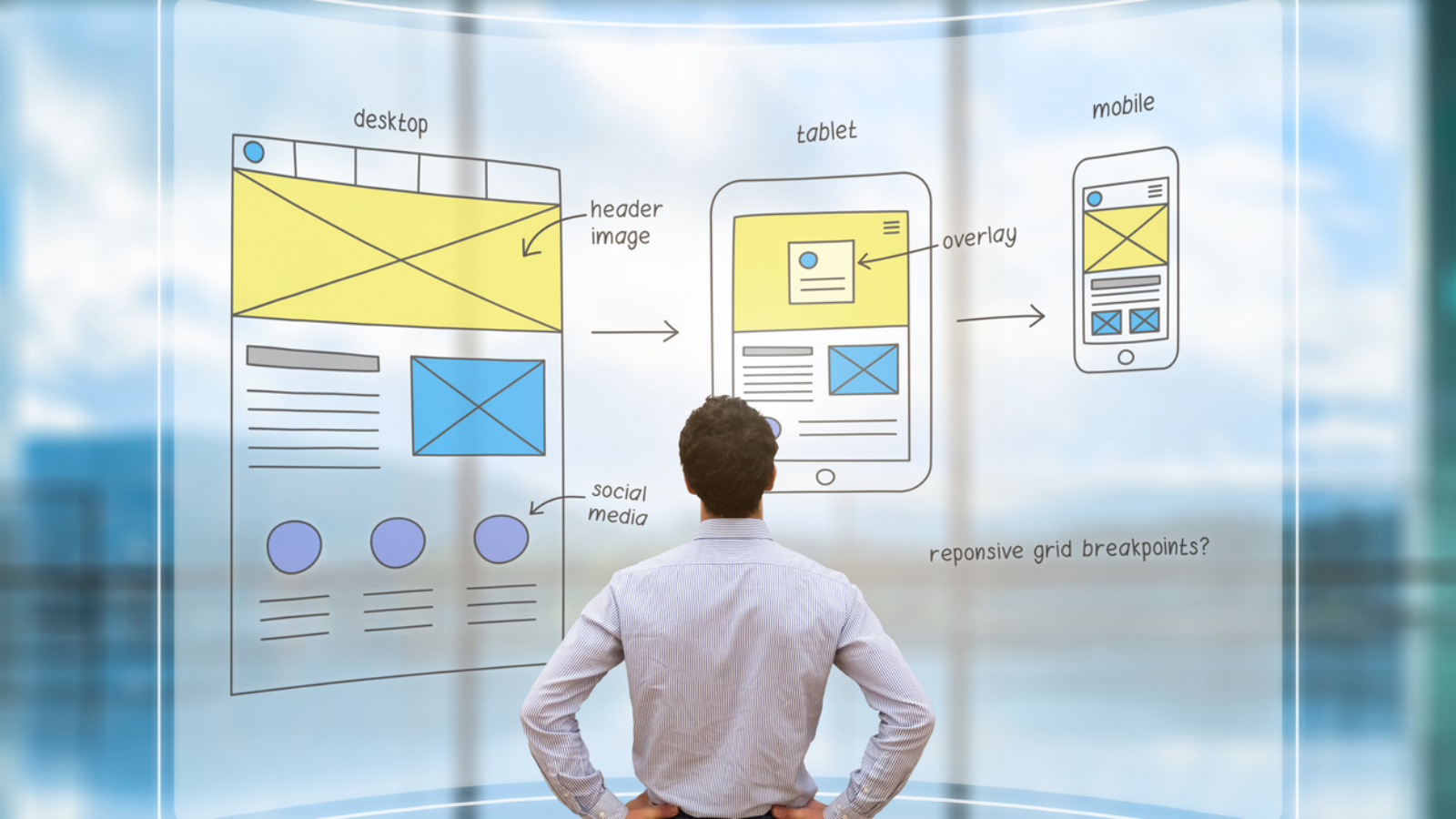
In today’s multi-device world, responsive web design isn’t just a nice-to-have it’s essential for reaching your audience wherever they are. Whether your users are checking your site on their phone during their commute, browsing on a tablet at home, or diving deep on a desktop at work, your web experience needs to adapt seamlessly to every screen size and context.

For B2B organizations, the stakes are even higher. Research consistently shows that responsive design affects everything from lead generation and customer onboarding to employee training platforms and internal tools. A poorly responsive site doesn’t just frustrate users it can directly impact your bottom line and operational efficiency by increasing bounce rates, reducing conversion rates, and creating barriers to critical business functions.

This guide will walk you through the fundamentals of responsive web design, from core technical concepts to practical implementation strategies. We’ll explore when to build custom solutions, when to adapt existing frameworks, and how to make smart decisions about tools and resources that align with your business goals.

Understanding the Mechanics of Responsive Design

Responsive web design relies on three core technical principles that work together to create fluid, adaptable layouts. These fundamental elements form the technical backbone of any successful responsive implementation, and understanding these mechanisms helps you make better decisions about your approach and tooling.

Fluid Grids and Flexible Layouts

Traditional web layouts used fixed pixel widths, which broke on different screen sizes. Responsive design uses relative units like percentages, viewport width (vw), and flexible grid systems that scale proportionally. Modern fluid grid systems ensure that instead of a sidebar being exactly 300 pixels wide, it might occupy 25% of the available space, automatically adjusting as screens get larger or smaller.

Flexible Images and Media

Images and videos need special handling to prevent them from overflowing their containers or appearing too small on large screens. Current best practices include CSS techniques like max-width: 100% and modern responsive image solutions that ensure media scales appropriately while maintaining aspect ratios and loading performance across all device types.

CSS Media Queries

Media queries are the conditional logic that makes responsive design possible. They allow you to apply different styles based on screen characteristics like width, height, orientation, and pixel density. This is where you define breakpoints the specific screen sizes where your layout changes significantly.

Screen CategoryTypical BreakpointDesign ConsiderationsCommon Challenges
Mobile phones320px – 768pxTouch targets, thumb navigation, vertical scrollingLimited screen real estate, slower connections
Tablets768px – 1024pxHybrid touch/mouse input, variable orientationAmbiguous interaction patterns, diverse sizes
Desktop1024px+Mouse precision, keyboard shortcuts, multiple windowsWide screens, accessibility needs, legacy browsers
Large displays1440px+High information density, advanced featuresContent scaling, maintaining readability

Mobile-First vs. Desktop-First: Choosing Your Approach

One of the most important strategic decisions in responsive design is whether to start with mobile or desktop layouts. This choice affects everything from your development workflow to the final user experience and overall business outcomes.

Mobile-First Benefits

  • Content prioritization: Forces you to identify truly essential elements first by working within mobile screen constraints
  • Performance optimization: Encourages lean, fast-loading designs from the start, often improving loading speeds by 30-50%
  • Progressive enhancement: Easier to add features as screen size increases
  • Future-proofing: Aligns with mobile-dominant usage patterns

When Desktop-First Still Makes Sense

While mobile-first is generally recommended, some scenarios call for a desktop-first approach. Organizations building complex B2B applications, data-heavy dashboards, or specialized tools often find their primary users work on desktop. In these cases, designing for the full-featured experience first and then thoughtfully adapting for mobile contexts can be more practical.

Read more: Understanding the difference between UX and UI design principles that guide responsive layouts.

The key is understanding your audience and use cases. If your users primarily engage with your product during focused work sessions on desktop like configuring enterprise software or analyzing complex data sets then designing for that context first ensures you don’t compromise critical functionality.

What the research says

  • Studies show that mobile-first design typically improves website performance by 30-50% through optimized code structure and reduced file sizes, leading to better Core Web Vitals scores.
  • Responsive design significantly impacts conversion rates and user engagement, with poorly optimized mobile experiences leading to higher bounce rates and lost revenue opportunities.
  • CSS frameworks like Bootstrap, Foundation, and Tailwind can accelerate development by providing pre-built responsive grid systems, particularly benefiting teams without deep CSS expertise.
  • Research indicates that treating responsive design as simply “scaling down” desktop layouts leads to poor user experiences effective responsive design requires rethinking navigation and content hierarchy for each device category.
  • Early evidence suggests that B2B applications often benefit from desktop-first approaches when users primarily work on desktop devices, though more research is needed on optimal strategies for complex enterprise tools.

Common Responsive Design Pitfalls and How to Avoid Them

Many responsive design projects encounter similar challenges. Understanding these upfront helps you plan more effectively and avoid costly redesigns.

The “Scaling Down” Trap

One of the most frequent mistakes is treating responsive design as simply making a desktop site smaller. True responsiveness requires rethinking navigation, content hierarchy, and user flows for each device category. A complex dropdown menu that works well with mouse hover might need to become a collapsible accordion or slide-out panel on mobile.

Breakpoint Overload

While it’s tempting to create breakpoints for every possible device size, this leads to maintenance nightmares and inconsistent experiences. Best practices recommend focusing on major breakpoint categories and using flexible layouts that adapt smoothly between them rather than targeting every screen size individually.

💡 Tip: Test your responsive design at 'in-between' sizes like 850px or 950px width not just the standard breakpoints. This reveals layout issues that might only appear on certain devices or browser window sizes.

Content Strategy Misalignment

Responsive design isn’t just about layout it’s about content strategy. What content hierarchy makes sense on mobile? Should you hide certain elements on small screens, or find alternative ways to present them? These decisions need to align with your broader content strategy and user goals.

Technical Implementation Strategies

When it comes to actually building responsive designs, you have several technical approaches to choose from. The right choice depends on your team’s capabilities, timeline, and long-term maintenance plans.

Framework-Based Development

CSS frameworks like Bootstrap, Foundation, or Tailwind CSS provide pre-built responsive grid systems and components. These can dramatically speed up development, especially for teams without deep CSS expertise. However, they often come with design constraints and can lead to “samey” looking websites if not customized thoughtfully.

Custom CSS Architecture

Building your own responsive system gives you complete control but requires more development time and CSS expertise. This approach makes sense when you have specific brand requirements, performance constraints, or complex interaction needs that don’t fit well into standard frameworks.

Hybrid Approaches

Many successful projects combine framework foundations with custom CSS for unique elements. You might use a framework’s grid system while building custom components for key brand moments or specialized functionality.

Planning Your Responsive Design Project

Successful responsive design projects require careful upfront planning. Here’s a practical framework for organizing your approach:

  1. Audit existing content and functionality – What works well currently? What breaks on mobile? What features are most critical to preserve?
  2. Define user contexts – When and where will people use your site on different devices? A customer checking your hours on mobile has different needs than someone configuring software on desktop.
  3. Establish visual hierarchy priorities – What information is most important at each breakpoint? This drives your content strategy decisions.
  4. Plan your breakpoint strategy – Choose 3-4 major breakpoints rather than trying to accommodate every possible screen size.
  5. Test early and often – Use real devices, not just browser dev tools. Screen sizes, touch interactions, and performance can vary significantly.
💡 Tip: Create a simple device testing matrix with 2-3 devices per category (phone, tablet, desktop) and test your key user flows on each. This catches issues that pure browser-based testing might miss.

Design Systems and Responsive Components

Building responsive websites becomes much more manageable when you think in terms of reusable components and design systems. This approach helps maintain consistency across breakpoints while making future updates more efficient.

A responsive design system includes not just visual elements like colors and fonts, but also behavioral specifications for how components adapt across screen sizes. For example, your navigation component might be a horizontal menu bar on desktop but transform into a hamburger menu with slide-out panel on mobile.

Read more: Building visual identity systems that work across all your responsive breakpoints.

This systematic approach is especially valuable for organizations managing multiple digital properties or planning to scale their web presence over time. It ensures consistency while making future responsive projects faster and more cost-effective.

When to DIY vs. Partner with Specialists

The decision to build responsive designs in-house versus working with external specialists depends on several factors:

Consider In-House Development When:

  • Your team has strong CSS and front-end development skills
  • You’re working with simple layouts and established frameworks
  • Timeline is flexible and learning curve is acceptable
  • You have ongoing development capacity for maintenance and updates

Partner with Specialists When:

  • You need complex custom interactions or animations
  • Performance optimization is critical (e.g., high-traffic sites, mobile-first audiences)
  • You’re integrating with complex backend systems or third-party APIs
  • Timeline is tight and you need experienced execution
  • You want to establish a design system for future use

Many successful projects use a hybrid approach: partnering with specialists to establish the foundation, framework, and design system, then handling ongoing updates and minor modifications in-house. This gives you the benefit of expert implementation while building internal capability over time.

Beyond Basic Responsiveness: Advanced Considerations

Once you’ve mastered the fundamentals, several advanced topics can take your responsive designs to the next level:

Performance Optimization

Responsive design affects loading speed, especially on mobile connections. Techniques like responsive images, lazy loading, and conditional resource loading ensure your site performs well across all devices and network conditions.

Accessibility Integration

Good responsive design goes hand-in-hand with accessibility. Screen readers, keyboard navigation, and other assistive technologies need to work seamlessly across your responsive breakpoints.

Progressive Enhancement

This approach starts with a basic, functional experience that works everywhere, then adds enhanced features for devices and browsers that can support them. It’s particularly valuable for B2B applications that need to work reliably across diverse organizational technology environments.

Enhancement LayerBase ExperienceEnhanced ExperienceImplementation
LayoutSingle column, linear flowMulti-column grids, sidebar layoutsCSS Grid with fallbacks
NavigationSimple link listsDropdown menus, hover statesJavaScript-enhanced menus
MediaStandard imagesResponsive images, lazy loadingPicture element, intersection observer
InteractionsClick/tap actionsSmooth transitions, micro-animationsCSS animations with reduced motion respect

How Branch Boston Approaches Responsive Design

At Branch Boston, we’ve found that the most successful responsive design projects start with understanding the real-world contexts where your users will interact with your site. Rather than focusing purely on technical implementation, we begin by mapping user journeys across devices and identifying the moments that matter most to your business goals.

Our process integrates UX/UI design principles with technical responsive implementation, ensuring that design decisions support both user needs and development efficiency. We particularly focus on creating design systems that can evolve with your organization, making future updates and expansions more cost-effective.

For organizations looking to establish responsive web presences that can scale, our website design and development services combine strategic planning with hands-on implementation. We help you navigate the technical decisions while ensuring the final result serves your users effectively across every device and context.

Whether you’re building a new responsive site from scratch or modernizing an existing digital presence, the key is balancing technical best practices with your specific organizational needs and constraints. Our responsive web development approach focuses on creating solutions that work reliably today while positioning you for future growth and change.

FAQ

How many breakpoints should I use in my responsive design?

Most successful responsive designs use 3-4 major breakpoints: mobile (up to ~768px), tablet (768px-1024px), desktop (1024px+), and optionally large screens (1440px+). More breakpoints create maintenance complexity without significant user experience benefits. Focus on flexible layouts that adapt smoothly between these major categories rather than trying to accommodate every possible screen size.

Should I hide content on mobile devices to save space?

Generally, no. Instead of hiding content, reorganize it for mobile contexts. Use progressive disclosure techniques like accordions, tabs, or 'read more' links to make content accessible without overwhelming small screens. If content truly isn't valuable on mobile, question whether it's necessary at all. Users shouldn't receive a fundamentally different experience based on their device.

How do I test responsive designs without owning every device?

Use browser developer tools for initial testing, but supplement with real device testing whenever possible. Services like BrowserStack provide cloud-based device testing, or you can set up a basic device lab with a few representative phones and tablets. Test at various network speeds, not just device sizes—mobile users often deal with slower connections that affect the responsive experience.

What's the difference between responsive and adaptive design?

Responsive design uses flexible layouts that fluidly adjust to any screen size using CSS media queries. Adaptive design detects the device type and serves specific, pre-designed layouts for particular screen sizes. Responsive is more flexible and easier to maintain, while adaptive can offer more tailored experiences but requires more development work and ongoing maintenance.

How much does responsive web design add to project timelines and budgets?

Building responsive from the start typically adds 30-50% to design and development time compared to desktop-only sites, but it's far more efficient than creating separate mobile sites later. The investment pays off through better user engagement, improved search rankings, and reduced maintenance overhead. Retrofitting existing sites for responsiveness usually costs more than building responsive from the beginning.

ux Graphic designer creative sketch planning application process development prototype wireframe for web mobile phone . User experience concept.

UX Design vs UI Design

If you’ve ever found yourself in a meeting where someone confidently declares that your app “needs better UX” while pointing at a button color, you’re not alone. The UX design vs UI design distinction has become one of the most misunderstood topics in digital product development—and frankly, the confusion is costing teams time, money, and sanity.

Here’s the thing: research shows that most talented designers work across both UX and UI, regardless of what their business cards say. But understanding the difference between these disciplines matters enormously when you’re building digital products, hiring design talent, or evaluating agency partners. It’s the difference between solving the right problem and just making things prettier.

This guide cuts through the buzzwords to give you a clear, practical understanding of UX versus UI design—when you need each, how they work together, and what to look for when building your team or choosing a design partner.

The Real Difference: Strategy vs Execution

Let’s start with what these terms actually mean in the real world, not the textbook definitions that make everyone’s eyes glaze over.

User Experience (UX) design is about understanding and solving problems. UX designers dig into why users struggle, what they’re trying to accomplish, and how to make those goals easier to achieve. They’re the ones asking uncomfortable questions like “Should this feature even exist?” and “Are we solving the right problem?”

User Interface (UI) design is about making solutions clear and usable. UI designers focus on the visual and interactive elements that users actually see and touch—buttons, typography, colors, animations, and layouts. They turn strategy into something people can actually use.

Think of it this way: UX is the architect who figures out where the rooms should go and how people move through the building. UI is the interior designer who makes sure you can actually find the light switches and that the whole experience feels cohesive and pleasant.

💡 Tip: When evaluating design work, remember that UI can be judged from screenshots, but UX requires understanding the full user journey and context. Don't let pretty visuals distract from fundamental usability problems.
Aspect UX Design Focus UI Design Focus 
Primary Question “What problem are we solving and why?” “How do we make this clear and usable?”
Key Activities User research, journey mapping, information architecture, prototyping Visual design, interaction design, component systems, accessibility
Success Metrics Task completion rates, user satisfaction, business goal achievement Interface consistency, visual hierarchy, interaction feedback
Deliverables Research insights, user flows, wireframes, strategy recommendations High-fidelity mockups, design systems, interactive prototypes
Evaluation Method User testing, analytics analysis, stakeholder interviews Design reviews, usability heuristics, visual consistency audits

Why the Lines Get Blurry (And Why That’s Actually Fine)

In the wild, the UX versus UI distinction isn’t nearly as clean as industry blog posts suggest. Most successful designers naturally span both areas because great digital products require both strategic thinking and excellent execution.

Here’s what you’ll typically find in practice:

  • Hybrid designers: Many professionals labeled “UX/UI Designer” handle everything from user research to final visual design. This works well for smaller teams and projects where context-switching costs are manageable.
  • Specialized collaborators: Larger projects often benefit from dedicated UX researchers and strategists working alongside UI specialists who focus on visual systems and interaction details.
  • T-shaped skills: The best designers have deep expertise in one area but enough knowledge in the other to collaborate effectively and spot potential issues early.

The key insight? Role labels matter less than actual competencies. When you’re evaluating design talent or agencies, focus on their ability to explain the reasoning behind their decisions, whether that’s user research methodology or visual design choices.

Read more about how UX research and UI execution work together in practice.

What the research says

Understanding how UX and UI design work in practice is supported by extensive industry research and best practices:

  • Most designers work across disciplines: Studies show that successful designers often combine UX and UI skills, with many handling both strategic thinking and visual execution depending on project needs and team size.
  • Larger projects benefit from specialization: Research indicates that complex products perform better when UX researchers focus on user strategy while UI specialists handle visual systems and interaction details.
  • Research-driven design delivers results: Multiple studies demonstrate that UX decisions based on user interviews, usability testing, and data analysis consistently outperform assumption-based design approaches.
  • Visual design impacts usability: While UI focuses on aesthetics, research shows that visual hierarchy, color choices, and interaction design significantly affect task completion rates and user satisfaction.

The Skills That Actually Matter

Whether you’re hiring individual designers or evaluating agency partners, here are the competencies that separate good design work from expensive decoration:

For UX-Focused Roles:

  • Research rigor: Can they design and conduct user interviews, surveys, and usability tests? Do they base decisions on qualitative and quantitative data rather than assumptions?
  • Systems thinking: Do they understand how individual features fit into broader user journeys and business objectives?
  • Problem definition: Can they articulate what problem they’re solving and why it matters to both users and the business?
  • Communication skills: Can they present findings and recommendations clearly to both technical and non-technical stakeholders?

For UI-Focused Roles:

  • Visual hierarchy: Do they understand how typography, color, and spacing guide user attention and comprehension?
  • Interaction design: Can they design micro-interactions and transitions that provide clear feedback and feel responsive?
  • System consistency: Do they build reusable components and patterns that scale across different screens and contexts?
  • Technical awareness: Do they understand implementation constraints and work collaboratively with developers?

Regardless of specialization, strong designers should be able to explain the why behind their decisions. If someone can’t articulate the reasoning for a design choice, that’s a red flag—whether they’re talking about user research methodology or button placement.

When to Prioritize UX vs UI Investment

Understanding when to focus your resources on UX versus UI work can make the difference between a product that solves real problems and one that just looks good in screenshots.

Prioritize UX Investment When:

  • Users consistently struggle to complete key tasks, regardless of how polished the interface looks
  • You’re seeing high abandonment rates or low feature adoption despite technical functionality
  • Stakeholders disagree on priorities or success metrics for the product
  • You’re entering a new market or serving a new user segment
  • Analytics show users taking unexpected paths through your product

Prioritize UI Investment When:

  • Users understand and complete tasks successfully but find the experience frustrating or unprofessional
  • Your brand doesn’t align with your digital touchpoints
  • The interface feels inconsistent across different screens or features
  • Accessibility requirements aren’t being met
  • Development teams struggle to implement designs consistently
Read more about how UI design connects to broader brand strategy and positioning.

In many cases, you’ll need both—but understanding where your biggest challenges lie helps you sequence the work and allocate resources more effectively.

Building Your Design Capability: Internal vs External Options

Once you understand what kind of design support you need, you face the classic build-versus-buy decision. Here’s how to think through your options:

When to Build Internal Design Capability:

  • You have ongoing, high-volume design needs across multiple products or features
  • Deep domain knowledge is critical for design decisions
  • You need designers embedded in cross-functional product teams
  • Design work requires close coordination with proprietary systems or data

When to Partner with External Design Specialists:

  • You need specific expertise (like accessibility compliance or complex data visualization) that doesn’t justify a full-time hire
  • Project timelines require more design capacity than you can reasonably hire
  • You want an outside perspective on entrenched user experience problems
  • Design needs are project-based rather than ongoing

Many successful organizations use a hybrid approach: internal designers who understand the business deeply, supplemented by external specialists for specific projects or expertise gaps.

💡 Tip: When vetting design partners, ask them to walk you through their process for a project similar to yours. Look for clear research methodologies, not just impressive portfolio pieces.

Red Flags to Watch For

Whether you’re hiring individual designers or evaluating agencies, here are warning signs that suggest surface-level understanding of UX and UI principles:

  • Portfolio over process: They show lots of pretty screenshots but can’t explain their research methods or design decisions
  • Persona theater: They create detailed user personas without corresponding research to back them up
  • One-size-fits-all solutions: They propose the same design patterns regardless of your specific user needs or business constraints
  • Resistance to measurement: They can’t define success metrics or seem uncomfortable with data-driven iteration
  • Siloed thinking: UX and UI work happen in isolation without clear handoffs or collaboration

Strong design partners will be curious about your users, your business model, and your technical constraints. They’ll ask uncomfortable questions and push back on assumptions—including their own.

How Branch Boston Approaches UX and UI Design

At Branch Boston, we’ve learned that the most successful digital products emerge when UX strategy and UI execution work hand-in-hand from day one. We don’t believe in throwing wireframes over the wall and hoping for the best.

Our approach blends research-driven problem-solving with thoughtful visual design:

  • Discovery first: We start every project by understanding your users’ actual needs and behaviors, not just what stakeholders think they want
  • Collaborative design: Our UX researchers, UI designers, and developers work together throughout the process, catching potential issues early and ensuring solutions are both user-friendly and technically sound
  • Evidence-based decisions: Every design choice—from information architecture to button colors—ties back to user research, business objectives, or technical constraints
  • Scalable systems: We build design systems that work across your entire product ecosystem, not just the immediate project

Whether you need strategic UX thinking, polished UI execution, or both, we tailor our approach to your specific context and constraints. No cookie-cutter solutions, no design theater—just clear, usable experiences that serve your users and your business.

Read more about our UX and UI design services and approach.

Making It Work: Practical Next Steps

Ready to move beyond the UX versus UI debate and start building better digital experiences? Here’s how to get started:

  1. Audit your current state: Look at your existing digital touchpoints. Where do users struggle? Where do stakeholders disagree? Where does the experience feel inconsistent?
  2. Define success clearly: What does “better design” actually mean for your organization? Higher conversion rates? Reduced support tickets? Improved user satisfaction scores?
  3. Identify your biggest gaps: Do you need strategic thinking about user needs, or execution help making things clearer and more polished?
  4. Start with research: Whether you’re doing this internally or with a partner, begin with real user feedback rather than stakeholder assumptions
  5. Plan for iteration: Great design is rarely right on the first try. Build processes for testing, measuring, and refining based on real usage data

Remember: the goal isn’t perfect UX or flawless UI—it’s creating digital experiences that actually serve your users and advance your business objectives. Sometimes that means beautiful, sometimes it means functional, and ideally it means both.

Read more about building scalable design systems that bridge UX strategy and UI execution.

FAQ

Do I need separate UX and UI designers, or can one person handle both?

It depends on your project complexity and team size. Many skilled designers work effectively across both UX and UI, especially on smaller projects. However, larger, more complex products often benefit from dedicated specialists—UX researchers who focus on user needs and strategy, and UI designers who specialize in visual systems and interaction details. The key is ensuring whoever you work with can explain their reasoning, whether that's research methodology or design decisions.

How can I tell if a designer or agency actually understands UX versus just doing UI work?

Ask them to walk through their research process for a recent project. Strong UX practitioners will describe user interviews, usability testing, or data analysis that informed their decisions. They should be able to explain not just what they designed, but why, and how they validated those choices. Be wary of anyone who shows only polished visuals without explaining the underlying user research or problem-solving approach.

What's more important for my B2B product—getting the UX strategy right or polishing the UI?

Start with UX strategy if users struggle to complete key tasks or if stakeholders disagree on priorities. Focus on UI polish if users can accomplish their goals but find the experience frustrating or unprofessional. Most successful B2B products need both, but understanding your biggest pain points helps you sequence the work and allocate resources more effectively.

How do I know when to hire design help internally versus working with an external agency?

Consider internal hiring for ongoing, high-volume design needs where deep domain knowledge is critical. Partner with external specialists when you need specific expertise, have project-based rather than ongoing needs, or want an outside perspective on entrenched problems. Many successful organizations use both—internal designers who understand the business deeply, supplemented by external specialists for particular projects or skills gaps.

What should I expect to pay for quality UX and UI design work?

Design investment varies widely based on project scope, complexity, and the level of research required. Expect UX research and strategy work to take more time upfront but save costs later by reducing the need for major redesigns. UI design costs depend on the complexity of your visual systems and the level of polish required. Quality design partners will help you understand these trade-offs and prioritize work based on your budget and business objectives.

Brand recognition and style creation tiny person neubrutalism concept. Individuality and identity management with logo, colors and font creation for company visual communication vector illustration.

Design Systems vs Style Guides: Understanding the Difference That Drives Digital Success

If you’re a digital leader evaluating design consistency tools or working with agencies on product interfaces, you’ve likely encountered both “design systems” and “style guides” in project conversations. While these terms are often used interchangeably, understanding their fundamental differences can significantly impact your product’s scalability, team efficiency, and long-term maintenance costs.

The distinction isn’t just semantic it’s operational. Multiple design system experts confirm that style guides document how things should look, while design systems provide reusable, coded components that make those standards functional across your digital products. For B2B organizations managing complex interfaces, multiple stakeholders, or evolving product portfolios, this difference translates directly into faster development cycles, fewer quality assurance issues, and better alignment between design and engineering teams.

What Makes a Style Guide Different from a Design System?

A style guide is fundamentally a reference document. Research from design system practitioners shows that style guides establish visual standards colors, typography, spacing, imagery guidelines that help maintain brand consistency across touchpoints. Think of it as a comprehensive rulebook that says “our primary blue is #1E3A8A” or “use 24px line height for body text.” Style guides are static by nature, serving as the single source of truth for visual decisions.

A design system, by contrast, is a living toolkit. It includes the style guide’s visual standards but extends into functional, coded components that teams can immediately implement. Rather than just documenting button styles, a design system provides an actual button component with built-in states (hover, disabled, loading), accessibility features, and interaction behaviors already coded and tested.

The key difference lies in integration with development workflows. While style guides require developers to interpret and manually implement visual specs, design systems bridge that gap by providing ready-to-use components that maintain consistency automatically.

💡 Tip: When evaluating digital partners, ask specifically about coded component libraries versus documented style guides. Teams offering design systems should demonstrate actual functional components, not just visual documentation.

The Evolutionary Path: From Documentation to Implementation

Most organizations follow a predictable progression in their design maturity:

  1. Style Guides: Visual standards and brand documentation
  2. Component Libraries: Collections of reusable UI elements
  3. Design Systems: Integrated design and code with shared processes
  4. Pattern Libraries: Complex, behavior-driven component ecosystems

Each stage solves different scale challenges. Style guides work well for small teams or single products, but as organizations grow multiple products, larger teams, faster release cycles the manual interpretation of documented standards becomes a bottleneck.

Read more: Understanding UX Design vs UI Design to see how these disciplines intersect with design systems.

Why Design Systems Matter for B2B Organizations

The business case for design systems becomes clearer when you consider the operational challenges facing most B2B product teams:

  • Cross-team consistency: Multiple designers and developers need to create cohesive experiences without constant coordination overhead
  • Faster iteration: Product teams need to ship features quickly while maintaining quality and brand alignment
  • Reduced technical debt: One-off implementations and custom solutions create maintenance burdens over time
  • Accessibility compliance: Built-in accessibility features reduce the risk of compliance gaps

Design systems address these challenges by providing organizational infrastructure, not just design artifacts. They include processes for how teams collaborate, documentation for implementation, and governance structures for maintaining quality at scale. Research consistently shows that comprehensive design systems reduce the need for constant coordination among multiple designers and developers while enabling faster feature delivery.

The Technical Integration Advantage

Modern design systems leverage tools that automatically sync design decisions with code implementation. Design tokens variables that store design decisions like colors, spacing, and typography can be updated in one place and propagated across all touchpoints. This means a color change or accessibility improvement can be implemented system-wide without manual updates to individual components.

For organizations managing multiple products or customer-facing interfaces, this level of systematic control becomes essential for maintaining professional consistency while enabling rapid development.

What the research says

  • Multiple studies confirm that design systems significantly improve cross-team consistency by establishing a shared design language across teams and departments, reducing redundancy and coordination overhead.
  • Organizations using comprehensive design systems report faster feature development cycles and reduced quality assurance issues compared to those relying solely on style guides.
  • Accessibility research demonstrates that design systems with built-in accessibility features help organizations maintain WCAG compliance more consistently than ad-hoc implementations.
  • Design systems that include proper governance structures and documentation are shown to reduce technical debt by preventing one-off implementations and custom solutions.
  • Early evidence suggests that design token systems can reduce design-to-development handoff time, though more research is needed on optimal implementation approaches across different organizational contexts.

When to Choose Style Guides vs Design Systems

The choice between style guides and design systems depends largely on your organization’s scale, technical maturity, and development velocity needs:

FactorStyle Guide Fits WhenDesign System Fits When
Team SizeSmall, co-located teams (2-5 designers/developers)Multiple teams or distributed workforce
Product ScopeSingle product or simple web presenceMultiple products, platforms, or complex interfaces
Development PaceInfrequent updates, stable feature setRapid iteration, frequent feature releases
Technical ResourcesLimited front-end development capacityDedicated engineering support for component maintenance
Consistency NeedsBrand consistency across marketing materialsFunctional consistency across user experiences

Important consideration: Many organizations benefit from starting with a comprehensive style guide and evolving toward a design system as their needs mature. This approach allows teams to establish visual standards before investing in the technical infrastructure required for full design system implementation.

Common Misconceptions and Implementation Realities

One frequent misunderstanding involves confusing well-organized design files with actual design systems. A Figma library with organized components, while valuable, isn’t a design system unless those components are also implemented in code with consistent behavior and accessibility features.

Similarly, many teams underestimate the organizational change management required for design system adoption. Unlike style guides, which primarily affect designers, design systems require buy-in and process changes across design, engineering, product management, and quality assurance teams.

Resource Investment Considerations

Design systems require upfront technical investment but typically provide efficiency gains over time. The initial development of coded components, design tokens, and documentation represents a significant resource commitment. However, this investment pays dividends in faster feature development, reduced QA cycles, and improved consistency.

Style guides, by contrast, require less initial technical investment but may create ongoing inefficiencies as teams manually implement and maintain design standards across multiple touchpoints.

💡 Tip: Consider your team's current workflow friction points. If designers frequently need to explain implementation details to developers, or if QA regularly catches consistency issues, you may benefit from design system components over documented guidelines.

How Digital Partners Can Support Your Design Consistency Goals

Whether you need style guide development or full design system implementation, working with experienced digital partners can accelerate your progress and avoid common pitfalls. Agencies with design system expertise can help you:

  • Audit your current design standards and identify gaps or inconsistencies
  • Establish scalable design tokens and component architectures
  • Create documentation and governance processes for long-term maintenance
  • Train internal teams on design system adoption and contribution workflows

The right partnership approach depends on your internal capabilities and long-term goals. Some organizations benefit from full design system development and handoff, while others prefer collaborative approaches where internal teams learn system creation and maintenance skills alongside external experts.

When evaluating potential partners, look for teams that can demonstrate both design expertise and technical implementation capabilities. The most effective design systems emerge from close collaboration between design and engineering disciplines, not from purely visual or purely technical approaches.

Branch Boston’s design systems and guidelines services focus on this integrated approach, helping B2B organizations build scalable design infrastructure that serves both immediate consistency needs and long-term product growth.

Making the Right Choice for Your Organization

The decision between style guides and design systems ultimately comes down to matching your tool choice with your organization’s current needs and growth trajectory. Consider these key factors:

Start with your biggest pain points. If brand inconsistency across marketing materials is your primary concern, a comprehensive style guide may be the right first step. If development teams struggle with interface consistency or spend significant time recreating similar components, design system investment makes more sense.

Evaluate your technical infrastructure. Design systems work best when your development team can integrate component libraries into existing build processes. Organizations with limited front-end architecture may benefit from style guide establishment before advancing to systematic component implementation.

Consider your timeline and resources. Style guides can typically be developed and implemented more quickly, while design systems require longer-term planning and technical coordination. However, design systems often provide faster returns on investment for teams with frequent interface development needs.

For organizations ready to invest in scalable design infrastructure, exploring comprehensive UX/UI design services that include systematic component development can provide the foundation for long-term consistency and efficiency gains.

Understanding visual identity system development can also help teams see how design systems extend and operationalize brand standards in digital environments.

FAQ

Can we build a design system without starting with a style guide?

While possible, most successful design systems benefit from established visual standards first. Style guides provide the foundation—colors, typography, spacing rules—that inform component design. However, small teams or simple products might successfully develop both simultaneously, especially with experienced design partners.

How long does it typically take to implement a design system versus a style guide?

Style guides often take 4-8 weeks to develop and document, depending on complexity and stakeholder alignment needs. Design systems require 12-24 weeks for initial component development, plus ongoing maintenance. The timeline difference reflects the technical implementation and cross-team coordination required for functional components.

What's the difference in ongoing maintenance between style guides and design systems?

Style guides require periodic updates when brand standards change, typically managed by design teams. Design systems need continuous technical maintenance—component updates, accessibility improvements, new feature integration—requiring dedicated development resources. However, design systems often reduce overall maintenance burden by centralizing changes.

Can existing Figma component libraries be converted into design systems?

Figma components provide excellent starting points for design systems, but they're not design systems themselves until implemented in code. The conversion process involves translating visual components into functional code with proper behavior, accessibility features, and integration with development workflows. This typically requires collaboration between design and engineering teams.

How do we know when our organization has outgrown style guides and needs a design system?

Key indicators include: designers frequently explaining implementation details to developers, QA catching consistency issues regularly, multiple teams recreating similar interface elements, or slow feature development due to component creation overhead. If your team spends significant time on interface consistency rather than user experience innovation, design system investment likely makes sense.

UX/UI designers discussing and brainstorming on wireframes for a website and mobile app prototype, surrounded by sketches of user flow and design tools, in the concept of website and mobile application design concept.

Wireframing vs Prototyping for Design Validation

When you’re building a digital product whether it’s a custom software platform, eLearning experience, or data visualization dashboard the pressure to get design validation right feels intense. Skip this step, and you risk building something that looks polished but fails to solve real user problems. Rush through it with the wrong approach, and you’ll burn through budget on changes that could have been caught early.

The good news? You have two powerful tools at your disposal: wireframing and prototyping. But knowing when to use each one and how they work together can make the difference between a smooth validation process and a frustrating cycle of revisions.

This guide breaks down the practical differences between wireframing and prototyping for design validation, when each approach makes sense, and how to structure your validation process to catch problems early while keeping stakeholders aligned.

Understanding the Fundamentals: What Each Tool Actually Does

Before diving into validation strategies, let’s clarify what wireframes and prototypes actually accomplish and why the distinction matters for your project timeline and budget.

Wireframes: Structure and Content Hierarchy

Wireframes are structural blueprints that focus on layout, content placement, and information hierarchy. Research confirms that wireframes serve as visual diagrams that prioritize layout and content structure, emphasizing usability without detailed visual design elements. Think of them as the architectural plans for your digital experience. They deliberately avoid visual design details colors, fonts, imagery to keep stakeholder conversations focused on functionality and user flow.

Key characteristics of wireframes:

  • Low-fidelity, usually grayscale or simple line drawings
  • Emphasis on content placement and page structure
  • Static representations that show individual screens or states
  • Quick to create and modify based on feedback
  • Ideal for validating information architecture and basic user journeys

Prototypes: Interactive Experience Testing

Prototypes simulate the actual user experience through interactive, clickable models of your digital product. Multiple studies show that prototypes are high-fidelity, interactive models that closely resemble the final product, including clickable links, animations, and transitions that enable realistic user testing. They can range from simple click-through mockups to sophisticated simulations that closely mirror the final product’s behavior.

Key characteristics of prototypes:

  • Interactive elements that respond to user actions
  • Can be low-fidelity (basic interactions) or high-fidelity (realistic visual design)
  • Show transitions, animations, and multi-step workflows
  • Allow for usability testing with real user interactions
  • More time-intensive to create but provide deeper validation insights
💡 Tip: Start with wireframes to validate core functionality and user flow before investing time in interactive prototypes. This approach prevents you from building elaborate interactions on top of flawed information architecture.

What the research says

Evidence from design and user experience research provides clear guidance on how to structure your validation approach:

  • Wireframing first saves time and resources: Studies consistently show that wireframes help identify structural issues early when changes are still inexpensive, preventing costly revisions during prototyping phases.
  • Prototypes reveal real usage patterns: Research demonstrates that interactive prototypes uncover usability issues and user behavior patterns that static wireframes cannot detect, particularly for complex workflows and multi-step processes.
  • Sequential validation is most effective: Design methodology research indicates that using wireframes for structural validation followed by prototypes for interaction testing produces better outcomes than either approach alone.
  • Stakeholder alignment improves with wireframes: Studies show that low-fidelity wireframes help diverse teams focus on functionality rather than visual details, leading to better consensus on core requirements.
  • Time investment varies significantly: Research confirms that prototypes require substantially more time and resources to create than wireframes, but this investment pays off through deeper validation insights and reduced development risks.

The Validation Sweet Spot: When to Use Each Approach

The most effective validation strategies combine both wireframing and prototyping at different stages of the design process. Here’s how to sequence your validation efforts for maximum impact:

Validation StageBest ToolWhat You’re TestingTypical Duration
Initial Concept ValidationWireframesInformation architecture, content priorities, basic user flows1-2 weeks
Stakeholder AlignmentWireframesFeature completeness, business requirements, content strategy1 week
Usability TestingPrototypesTask completion, interaction patterns, user confusion points2-3 weeks
Technical FeasibilityPrototypesComplex interactions, performance considerations, integration points1-2 weeks
Final Design ApprovalHigh-fidelity PrototypesVisual design, brand alignment, polished user experience1 week

Early Stage: Wireframes for Foundation Setting

Use wireframes when you need to establish consensus on fundamental structure without getting distracted by visual design decisions. Research shows that wireframes facilitate communication and collaborative feedback by preventing distractions from visual design details, allowing teams to align on core functionality and content placement. This is particularly valuable when working with diverse stakeholder groups technical teams, business leaders, and end users often have different priorities that wireframes can help reconcile.

Wireframes excel at validating:

  • Content strategy: What information needs to be prominent? What can be secondary?
  • Navigation structure: How do users move between different sections or workflows?
  • Feature prioritization: Which capabilities are essential versus nice-to-have?
  • Responsive behavior: How does the layout adapt across different screen sizes?
Read more: Understanding the difference between UX and UI design to better frame your validation approach.

Mid-Stage: Prototypes for Interaction Validation

Once your wireframes have established solid structural foundations, prototypes become essential for validating how users actually interact with your digital product. Design research confirms that prototypes expose how users engage with designs in practice and reveal navigation and usability gaps that are not evident in static wireframes. This is where you discover the gaps between theoretical user flows and real-world usage patterns.

Prototypes are particularly valuable for:

  • Complex workflows: Multi-step processes like data entry, configuration, or approval chains
  • Conditional interactions: Features that behave differently based on user permissions or data states
  • Error handling: How the system responds to incomplete information or user mistakes
  • Performance expectations: Whether loading states and transitions feel responsive enough for your users

Practical Implementation: Building Your Validation Process

The most effective validation processes integrate both wireframing and prototyping strategically, rather than treating them as competing approaches. Here’s how to structure your validation workflow:

Phase 1: Stakeholder Alignment with Wireframes

Start with low-fidelity wireframes to get early buy-in on core functionality. This phase should focus on eliminating major conceptual disagreements before you invest in detailed interaction design.

Key activities:

  • Create wireframes for primary user journeys and key screens
  • Run collaborative review sessions with business stakeholders
  • Document feature requirements and content needs
  • Validate information architecture with card sorting or tree testing

Success metrics: Stakeholders can explain the user journey in their own words, and there’s consensus on what features belong on which screens.

Phase 2: User Testing with Interactive Prototypes

Once wireframes have established structural consensus, build clickable prototypes to test actual user behavior. This phase reveals problems that stakeholder review missed users interact with interfaces differently than stakeholders anticipate.

Key activities:

  • Build interactive prototypes for critical user tasks
  • Conduct moderated usability testing with representative users
  • Test error scenarios and edge cases
  • Validate accessibility and responsive behavior

Success metrics: Users can complete primary tasks without confusion, and major usability issues are identified and addressed.

Phase 3: Technical Validation with High-Fidelity Prototypes

Before moving into development, use sophisticated prototypes to validate technical assumptions and complex interaction patterns. This is especially critical for custom software projects where interaction behavior needs to align with underlying data models and system capabilities.

Key activities:

  • Create realistic prototypes with actual data or representative content
  • Test integration points with existing systems
  • Validate performance expectations under realistic usage scenarios
  • Confirm technical feasibility with development teams

Common Pitfalls and How to Avoid Them

Even well-intentioned validation efforts can go off track. Here are the most frequent issues we see in B2B digital projects, and how to structure your process to avoid them:

Skipping Wireframes and Jumping to Prototypes

When project timelines feel tight, teams often want to skip wireframing and build interactive prototypes immediately. This usually backfires because prototype feedback focuses on visual design and interactions rather than fundamental structural issues.

The result? You spend weeks refining interactions built on top of flawed information architecture. Wireframes force structural conversations first, when changes are still inexpensive to make.

Over-Investing in Prototype Fidelity Too Early

High-fidelity prototypes that look and feel like finished products can actually hurt validation efforts. Stakeholders and users focus on polish colors, fonts, imagery instead of core functionality and usability.

Keep early prototypes deliberately rough. Use placeholder content, simple interactions, and basic visual design until you’ve validated the underlying experience structure.

Validating with the Wrong Audience

Many B2B projects test wireframes and prototypes primarily with internal stakeholders business sponsors, product managers, technical teams. But these groups interact with digital tools differently than your actual end users.

Always include representative end users in your validation process, even if it takes extra coordination. The insights from a procurement manager, field technician, or learning administrator will be fundamentally different from internal stakeholder feedback.

💡 Tip: When recruiting users for validation testing, prioritize people who will actually use the system daily over senior stakeholders who will primarily see demo presentations. Daily users catch interaction problems that leadership review misses.

Tools and Team Considerations

Your choice of wireframing and prototyping tools should align with your team’s skills, project timeline, and collaboration needs. Here’s how to think through the practical considerations:

Wireframing Tools: Speed vs. Sophistication

Simple sketching and digital whiteboarding tools (like Miro, Whimsical, or even hand-drawn sketches) work well when you need to move fast and keep stakeholder focus on structure rather than polish.

Dedicated wireframing platforms (like Balsamiq or Axure) offer more sophisticated layout capabilities and component libraries, but can encourage over-investment in wireframe fidelity.

All-in-one design platforms (like Figma or Sketch) provide the most flexibility but require more design expertise to use effectively for wireframing without getting distracted by visual design.

Prototyping Tools: Complexity vs. Collaboration

Choose prototyping tools based on the complexity of interactions you need to validate and your team’s collaborative workflow:

  • Simple click-through prototypes: Figma, InVision, or Marvel for basic navigation testing
  • Advanced interaction prototypes: Principle, ProtoPie, or Framer for complex animations and conditional logic
  • Code-based prototypes: Custom HTML/CSS/JavaScript for sophisticated functionality that closely mirrors final development

Team Structure and Handoffs

Consider how wireframes and prototypes will move between team members:

  • Who creates initial wireframes? Product managers, UX designers, or collaborative workshops?
  • Who builds prototypes? Designers, front-end developers, or specialized prototypers?
  • How do insights transfer to development? Direct handoff, detailed specifications, or collaborative implementation?

When to Partner with Specialists

Many B2B organizations have the internal capability to create basic wireframes and simple prototypes. But there are scenarios where partnering with experienced design and development teams accelerates validation efforts and improves final outcomes.

Consider working with a specialized team when:

  • You’re building complex, multi-stakeholder workflows that require sophisticated interaction design and user research
  • Your project integrates with multiple existing systems and needs realistic prototypes to validate technical feasibility
  • You need to validate accessibility, security, or compliance requirements that go beyond basic usability testing
  • Your timeline requires parallel validation workstreams while internal teams focus on business requirements and technical architecture

An experienced design and development partner can help you avoid common validation pitfalls, accelerate user research activities, and ensure that insights from wireframes and prototypes translate effectively into development requirements.

At Branch Boston, we work with B2B organizations to structure validation processes that balance speed with thoroughness. Our approach combines rapid wireframing for stakeholder alignment with sophisticated prototyping for user validation ensuring that your final digital product solves real problems efficiently. Learn more about our UX/UI design process and how it can support your next digital project.

Making the Decision: Your Next Steps

The choice between wireframing and prototyping isn’t binary it’s about sequencing both approaches strategically to validate different aspects of your digital product at the right time and investment level.

Start with wireframes when:

  • You need stakeholder alignment on features and content strategy
  • The information architecture hasn’t been validated
  • You’re working with diverse stakeholder groups who need to focus on structure first
  • Budget or timeline constraints require rapid iteration

Move to prototypes when:

  • Core structure and navigation have stakeholder consensus
  • You need to test complex interactions or multi-step workflows
  • Real user behavior validation is essential for project success
  • Technical feasibility of interactions needs confirmation

The most successful digital projects use both approaches in sequence, allowing each validation method to inform and improve the next stage of design development.

Whether you’re building a custom web platform, designing an internal software tool, or developing a comprehensive design system, the key is matching your validation approach to your current needs while keeping the bigger picture in mind.

FAQ

How long should I spend on wireframing before moving to prototypes?

Most B2B projects benefit from 1-2 weeks of wireframing for initial concept validation, followed by another week for stakeholder review and iteration. Move to prototypes once you have clear consensus on information architecture and core functionality. Spending more than 3 weeks on wireframes often indicates that fundamental business requirements haven't been clarified yet.

Can I skip wireframes if I'm already experienced with similar digital products?

Even experienced teams benefit from wireframing, especially when working with multiple stakeholders or complex user workflows. Wireframes force explicit conversations about priorities and structure that assumptions can skip. However, experienced teams can often move through wireframing faster and with less detailed documentation.

What's the minimum level of prototype fidelity needed for useful validation?

For basic navigation and workflow validation, simple click-through prototypes with placeholder content work well. Add interaction fidelity when testing complex workflows, conditional logic, or error handling scenarios. The key is matching prototype sophistication to the specific validation questions you need to answer.

How do I get stakeholders to focus on structure instead of visual design in wireframes?

Use deliberately rough, grayscale wireframes and establish ground rules at the beginning of review sessions. Explicitly ask stakeholders to focus feedback on functionality, content placement, and user flow rather than visual aesthetics. Consider using sketchy or hand-drawn wireframe styles that discourage pixel-perfect feedback.

Should technical teams be involved in wireframing and prototyping validation?

Yes, technical teams should review both wireframes and prototypes to flag feasibility issues early. However, balance technical input with user needs—sometimes the right user experience requires creative technical solutions rather than defaulting to what's easiest to build. Include developers in validation reviews but don't let technical constraints drive user experience decisions without exploring alternatives.

Woman, business and reading on laptop at work for research, feedback and supply chain for business. Indian, person and planning on pc for logistics, stock administration or package distribution data

What Are the Best User Research Methods?

User research is the foundation of every successful digital product, yet many B2B organizations struggle to choose the right methods for their specific needs. Whether you’re launching a custom software platform, redesigning an existing application, or building a new eLearning experience, understanding which user research methods will give you the clearest insights can make the difference between a product that truly serves your users and one that misses the mark entirely.

For digital decision-makers CTOs, product owners, and operations leaders selecting appropriate user research methods isn’t just about following best practices. It’s about making informed choices that balance thoroughness with timeline constraints, depth with budget realities, and stakeholder needs with user expectations. The right research approach helps you build products that work across your entire organization, from technical teams to non-technical decision-makers.

This guide breaks down the most effective user research methods for B2B digital products, explains when to use each approach, and provides practical guidance for implementing research that actually informs your product decisions.

Understanding User Research in the B2B Context

User research for B2B products differs significantly from consumer research. You’re often dealing with complex workflows, multiple stakeholders, and users who may have varying levels of technical expertise. The research methods you choose need to account for these realities while still providing actionable insights.

B2B user research faces unique challenges:

  • Limited access to end users who are often busy professionals – research consistently shows that professionals such as executives, factory operators, and business owners have extremely limited availability due to lost revenue and productivity when participating in research
  • Complex decision-making processes involving multiple stakeholders – current data indicates that over 80% of B2B buyers involve at least four stakeholders in technology purchasing decisions, with an average of 13 people participating across various organizational roles
  • Products that need to work across different roles and technical skill levels – B2B environments require understanding diverse user types from VPs and engineers to administrative assistants, each with varying technical expertise and daily usage patterns
  • Integration requirements with existing business systems and workflows
  • Compliance and security considerations that may limit research approaches – data protection regulations and security frameworks directly constrain methodology choices and may limit certain research approaches in final deliverables

Successful B2B user research methods need to be efficient, respectful of participants’ time, and capable of uncovering insights about both individual user needs and broader organizational requirements. Multiple expert sources confirm that effective B2B research must accommodate busy professional schedules through shorter sessions and flexible timing while revealing both personal and company-level insights.

What the research says

  • B2B user research consistently faces unique constraints compared to consumer research, with time limitations and complex stakeholder environments being the most significant challenges according to multiple industry studies.
  • Research shows that 8-12 one-on-one interviews typically achieve saturation for most qualitative insights, with studies finding that meaningful patterns emerge between 9-17 interviews across diverse research contexts.
  • Usability testing with 5-8 participants per user role effectively reveals approximately 85% of interface problems, though this recommendation applies specifically to qualitative studies with clearly defined user groups.
  • Early evidence suggests that compliance requirements increasingly shape research methodology choices, particularly in regulated industries where data protection laws may restrict certain approaches.
  • Observational research in natural work environments captures contextual insights that structured interviews and lab testing often miss, though more research is needed on optimal implementation in B2B settings.

Primary User Research Methods for B2B Products

User Interviews

One-on-one interviews remain the gold standard for understanding user motivations, pain points, and mental models. Research consistently shows that interviews are a primary qualitative UX research method that provides deep insights into individual user experiences and attitudes. For B2B products specifically, interviews allow you to dig deep into complex workflows and understand how your product fits into broader business processes, enabling exploration of client workflows and uncovering gaps in real-world usage.

Best for: Understanding user motivations, exploring complex workflows, validating assumptions about user needs

Timeline: 2-4 weeks for recruitment, interviews, and analysis

Participants needed: 8-12 interviews typically provide sufficient insights for most B2B products. Studies on interview saturation show that meaningful patterns typically emerge between 9-17 interviews, with this range falling within established guidance for achieving comprehensive qualitative insights.

💡 Tip: When interviewing B2B users, always ask about their current workarounds and manual processes. These often reveal the most valuable opportunities for your digital solution.

Usability Testing

Observing users as they attempt to complete specific tasks with your product or prototype reveals where interfaces break down and workflows become confusing. Multiple research sources confirm that usability testing effectively identifies interface problems and areas where users struggle by directly observing task completion in real-time. For B2B products, usability testing should focus on realistic scenarios that mirror actual business use cases.

Best for: Identifying interface problems, optimizing task flows, validating design decisions

Timeline: 1-2 weeks for planning, testing, and analysis

Participants needed: 5-8 users per user type or role. Nielsen Norman Group’s research established that 5 users in qualitative usability studies can identify approximately 85% of usability problems, with the key caveat that this applies per distinct user type when testing diverse user segments.

Surveys and Questionnaires

Surveys excel at gathering quantitative data and reaching larger groups of users. They are widely recognized as effective tools for collecting standardized, structured data that can be analyzed statistically and used to corroborate qualitative findings. They’re particularly valuable for understanding feature priorities, satisfaction levels, and demographic information across your user base.

Best for: Gathering quantitative insights, reaching large user groups, measuring satisfaction and priorities

Timeline: 1-3 weeks depending on response targets

Participants needed: 50+ responses for meaningful statistical insights

Observational Research

Watching users in their actual work environment provides context that interviews and lab testing can’t capture. Research confirms that observational studies conducted in users’ real-world environments reveal authentic behaviors, contextual challenges, and environmental factors that structured interviews or controlled lab settings often miss. This method is especially valuable for understanding how your product fits into existing workflows and organizational culture.

Best for: Understanding real-world context, identifying environmental factors, observing natural behaviors

Timeline: 2-3 weeks including planning and analysis

Participants needed: 6-10 observation sessions across different contexts

Read more: Understanding how UX and UI design work together to create effective user experiences.

Secondary Research Methods and Validation Techniques

Card Sorting

Card sorting helps understand how users categorize and organize information, making it invaluable for information architecture and navigation design. For B2B products with complex feature sets, card sorting can reveal user mental models that inform more intuitive organization.

Journey Mapping

Mapping the complete user journey from initial awareness through ongoing use helps identify pain points and opportunities across the entire user experience. This is particularly important for B2B products that often involve long evaluation and onboarding processes.

Competitive Analysis

Understanding how users interact with similar tools provides context for your design decisions and helps identify opportunities for differentiation. Focus on both direct competitors and adjacent tools your users currently employ.

Analytics Review

Existing usage data from current systems or similar products can provide quantitative insights into user behavior patterns, feature adoption, and common drop-off points.

Choosing the Right Research Methods for Your Project

The most effective user research combines multiple methods to build a complete picture of user needs. Your choice of methods should depend on your specific goals, timeline, budget, and the stage of your product development.

Project StagePrimary MethodsSecondary MethodsKey Questions
Early DiscoveryUser Interviews, Observational ResearchCompetitive Analysis, Journey MappingWho are our users? What problems do they need solved?
Concept ValidationUser Interviews, SurveysCard Sorting, Journey MappingDoes our concept address real user needs?
Design & DevelopmentUsability Testing, Card SortingAnalytics Review, SurveysHow can we optimize the user experience?
Pre-LaunchUsability Testing, SurveysAnalytics Review, Journey MappingAre users able to complete key tasks successfully?
Post-LaunchAnalytics Review, SurveysUser Interviews, Usability TestingHow can we improve based on real usage?

Budget considerations: User interviews and observational research typically require the highest investment in time and resources, while surveys and analytics reviews can provide valuable insights with lower resource requirements. Plan your research budget to include at least one qualitative method (interviews or observation) combined with quantitative validation (surveys or analytics).

Implementing User Research: Practical Steps

Planning Your Research

Start by clearly defining what you need to learn and how those insights will inform your product decisions. Vague research questions lead to vague results that don’t support decision-making.

  • Define specific research questions: What exact decisions will this research inform?
  • Identify your target participants: Who represents your actual user base?
  • Set success metrics: How will you know if your research was successful?
  • Plan for analysis time: Budget 40-60% of your research time for analysis and synthesis

Recruitment Strategies

Finding the right B2B participants often requires more effort than consumer research. Consider these approaches:

  • Work with existing clients or prospects who match your target user profile
  • Partner with industry associations or professional networks
  • Use your sales or customer success teams’ connections
  • Offer meaningful incentives that respect participants’ professional time

Conducting Research Ethically

B2B research often involves sensitive business information. Establish clear protocols for data handling, confidentiality, and participant consent. Be transparent about how insights will be used and shared within your organization.

When to DIY vs. Partner with Specialists

Many organizations can successfully conduct basic user interviews and surveys internally, especially with proper planning and some team training. However, certain situations benefit from working with experienced research professionals:

Consider internal research when:

  • You have team members with research experience or strong facilitation skills
  • Your research questions are straightforward and well-defined
  • You have direct access to your target users
  • Timeline allows for learning and iteration

Partner with specialists when:

  • Stakeholders need external validation of research findings
  • Your research involves complex methodologies or statistical analysis
  • You’re exploring entirely new user segments or markets
  • Timeline is critical and you can’t afford research missteps

A UX research and design team can help you plan and execute research that directly informs your product development process, ensuring insights translate into actionable design and development decisions.

Translating Research into Product Decisions

The most comprehensive research is worthless if it doesn’t influence your product decisions. Successful research implementation requires planning for how insights will be communicated and acted upon throughout your organization.

Create research artifacts that support decision-making:

  • User personas that reflect real user goals and constraints
  • Journey maps that highlight specific improvement opportunities
  • Prioritized feature lists based on user needs and business impact
  • Design principles that guide interface and interaction decisions

For custom software projects, research insights should directly inform technical architecture decisions, user interface design, and feature prioritization. This is where having a team that understands both research methodologies and product development becomes invaluable.

Organizations working on custom software development benefit from integrating user research throughout the development process, not just during initial planning phases.

Building Research into Your Development Process

User research shouldn’t be a one-time activity. The most successful digital products incorporate ongoing research throughout development and after launch. This continuous approach helps you adapt to changing user needs and validate that your product continues to solve real problems.

Establish research touchpoints:

  • Discovery research before major feature development
  • Usability validation during design and development sprints
  • Post-launch research to measure success and identify improvement opportunities
  • Regular user feedback collection to stay connected to evolving needs

For organizations building custom eLearning platforms or internal tools, ongoing research is particularly critical because user needs often evolve as people become more comfortable with new systems and workflows.

FAQ

How many users do I need for meaningful research results?

For qualitative research like interviews, 8-12 participants typically provide sufficient insights for most B2B products. For usability testing, 5-8 users per user role usually reveal the majority of interface problems. Quantitative surveys need 50+ responses for meaningful statistical insights, though the exact number depends on your user base size and desired confidence level.

What if my users are too busy to participate in research?

B2B users are indeed busy, but most will participate if you respect their time and provide clear value. Keep interviews to 30-45 minutes maximum, offer flexible scheduling including early/late hours, and provide meaningful incentives. Consider asynchronous methods like surveys or diary studies that users can complete on their own schedule.

How do I handle research when I have multiple types of users?

Segment your research by user role and conduct separate studies for each major user type. A customer-facing application might require research with both end users and administrators, while an internal tool might need input from both managers and individual contributors. Plan for 5-8 participants per user segment to capture role-specific needs.

Should I research with existing users or potential new users?

Both provide valuable insights for different purposes. Existing users help you understand current pain points and optimization opportunities, while potential users reveal whether your product concept resonates with your target market. For most projects, start with existing or similar users to understand core workflows, then validate with potential users to ensure broader market fit.

How early in the development process should I start user research?

Start research during the earliest planning phases, before making major technical or design decisions. Early discovery research helps you understand user needs and validate your core concept before significant development investment. However, research should continue throughout development with usability testing during design phases and validation testing before launch.

Happy mature Latin man using laptop at home - Technology and smart working concept

Protect Your Sites from AI Bots

Home » Web Design and UX/UI

Happy mature Latin man using laptop at home - Technology and smart working concept
 

As artificial intelligence continues to reshape the digital landscape, web administrators need to be aware of a new source of automated traffic: AI agents.

In particular, OpenAI’s latest AI agent—known as Operator—can autonomously browse websites to perform tasks for its users. While these agents are designed to improve productivity by automating everyday tasks such as filling out forms, ordering groceries, or filing expense reports, they can also generate unplanned traffic on your site. In this article, we explain what OpenAI Operator is, how it might impact your website traffic, and what technical measures you can implement to block such unwanted requests.

What Is OpenAI Operator?

OpenAI Operator is one of the company’s first AI agents—a research preview tool currently available to ChatGPT Pro users in the United States. Powered by a model called the Computer-Using Agent (CUA), Operator leverages the vision and reasoning capabilities of GPT-4o to interact with websites as if it were a human user. It can click links, scroll pages, fill out forms, and complete multi-step tasks autonomously.

Potential for Unintended Automated Traffic

While Operator’s primary purpose is to help users automate routine tasks, its ability to navigate and interact with the web means that it can also generate automated requests to websites. For site owners, this can translate into:
  • Increased Crawl Rates: Operator might visit your pages repeatedly or in an unplanned pattern, which could overload your server resources.
  • Scraping and Data Extraction: The agent could inadvertently collect data from your site, possibly violating your content usage policies.
  • Unwanted Interactions: Automated interactions might skew your site’s analytics, affecting metrics such as bounce rate and user engagement.
Since Operator (and similar AI agents) operates by simulating human behavior, its requests may not be easily distinguishable from those of genuine users—unless you implement specific measures to detect and block them.

Using robots.txt

As a first line of defense, you can instruct compliant bots not to crawl your site by adding directives to your robots.txt file. Although robots.txt is voluntary and won’t stop malicious or non-compliant bots, it is a useful method for guiding well-behaved crawlers.
Create or update your robots.txt file with the following content:

User-agent: OAI-SearchBot
Disallow: /

User-agent: ChatGPT-User
Disallow: /

User-agent: GPTBot
Disallow: /

User-agent: anthropic-ai
Disallow: /

How to Block AI Bot Traffic

Web administrators have several options to block requests coming from AI agents like Operator. A common strategy is to examine the User-Agent header in incoming HTTP requests. OpenAI’s agents tend to include distinct substrings in their User-Agent strings—for example:
  • OAI-SearchBot
  • ChatGPT-User
  • GPTBot

Because these identifiers are version agnostic (the version numbers may change over time), you can block any request that contains these key tokens. Below are examples for several popular web server platforms:

Nginx

Add the following snippet inside your server block in your Nginx configuration file. The regular expression is case‑insensitive and matches any User-Agent that contains one of the target tokens:
if ($http_user_agent ~* "(OAI-SearchBot|ChatGPT-User|GPTBot)") {
return 403;
}

Optional: To be more explicit about optional version numbers, you can use:

if ($http_user_agent ~*
"
(OAI-SearchBot(?:\/[\d\.]+)?|ChatGPT-User(?:\/[\d\.]+)?|GPTBot(?:\/[\d\.]+)?)") {
return 403;
}

Apache (.htaccess)

You have two common approaches with Apache—using environment variables or mod_rewrite.
Option 1: Using SetEnvIfNoCase
Place these lines in your site’s .htaccess file:
SetEnvIfNoCase User-Agent "OAI-SearchBot" bad_bot
SetEnvIfNoCase User-Agent "ChatGPT-User" bad_bot
SetEnvIfNoCase User-Agent "GPTBot" bad_bot

Order Allow,Deny
Allow from all
Deny from env=bad_bot
Option 2: Using mod_rewrite
Alternatively, add the following rewrite rules:
RewriteEngine On
RewriteCond %{HTTP_USER_AGENT} (OAI-SearchBot|ChatGPT-User|GPTBot) [NC]
RewriteRule .* - [F,L]

The [NC] flag ensures the match is case‑insensitive.

IIS

For IIS, you can use the URL Rewrite module in your web.config file. Insert this rule inside the section:
<rule name="Block OpenAI Bots" stopProcessing="true">
<match url=".*" / >
<conditions>
<add input="{HTTP_USER_AGENT}"
pattern="(OAI-SearchBot|ChatGPT-User|GPTBot)" />
</conditions>
<action type="CustomResponse" statusCode="403" statusReason="Forbidden"
statusDescription="Access Denied" /&lgt;
</rule>

Caddy (v2)

In Caddy, define a named matcher that uses a regular expression on the User-Agent header. For example, in your Caddyfile:
@openaiBots {
header_regexp User-Agent (?i)(OAI-SearchBot|ChatGPT-User|GPTBot)
}

handle @openaiBots {
respond 403
}
The (?i) flag ensures the regular expression is case‑insensitive.

Final Thoughts

OpenAI’s Operator is an exciting development in AI automation—capable of performing tasks on behalf of its users without constant human oversight. However, if you run a website, you need to be aware that such AI agents may generate automated traffic that could have unintended consequences. Whether you’re concerned about server load, data scraping, or skewed analytics, the techniques outlined above for Nginx, Apache, IIS, and Caddy provide robust options for blocking requests from these agents.
By proactively monitoring and managing your site’s access controls, you can protect your site from unanticipated bot traffic while still welcoming genuine users. Stay vigilant, and consider these configurations as part of your broader web security strategy.

The Latest From Our Blog