
If you’ve ever watched an HR manager manually upload employee training records from an LMS into their HRIS—or worse, maintain two separate spreadsheets—you know the pain of disconnected systems. Learning Management Systems and Human Resources Information Systems should talk to each other seamlessly, but the reality is often messier.
For L&D leaders, CTOs, and operations teams at B2B organizations, integrating your LMS with HRIS isn’t just about eliminating double data entry. Research confirms that this integration creates a unified view of employee development that supports compliance, career progression, and strategic workforce planning. When done right, this integration transforms scattered training data into actionable insights that drive both individual growth and business outcomes.
This guide walks through the practical realities of LMS-HRIS integration—from understanding the technical architecture to making smart decisions about custom builds versus off-the-shelf connectors. We’ll cover what works, what doesn’t, and how to avoid the common pitfalls that turn promising integration projects into expensive headaches.
Why LMS-HRIS Integration Matters (Beyond the Obvious)
The surface-level benefits are clear: no more manual data transfers, fewer errors, and happier HR teams. But the real value of LMS-HRIS integration runs deeper, touching everything from compliance reporting to talent development strategy.
Compliance and audit readiness become dramatically easier when training completion data flows directly into employee records. Industry guidance shows that this automated transfer reduces manual data entry, minimizes errors, and centralizes training records. Instead of scrambling to pull reports from multiple systems during an audit, compliance teams can generate comprehensive training histories with a few clicks. This is particularly crucial for industries with strict regulatory requirements around ongoing education and certification maintenance.
Career development visibility improves when managers can see both performance data and learning progress in a single interface. Studies indicate that these integrated views help managers better identify development needs, track goal progress, and recognize high-potential employees. An employee’s training completion rates, skill development trajectory, and performance reviews paint a more complete picture than either dataset alone. This integrated view helps identify high-potential employees and surface development opportunities that might otherwise be missed.
Workforce analytics become more sophisticated when learning data enriches HR metrics. Questions like “Do employees who complete certain training programs have better retention rates?” or “Which departments have skill gaps based on training completion patterns?” become answerable with integrated data.
Understanding Integration Architecture Options
LMS-HRIS integration isn’t a one-size-fits-all problem. The right approach depends on your existing systems, data complexity, and organizational constraints. Here are the main architectural patterns and when each makes sense:
| Integration Type | Best For | Complexity | Ongoing Maintenance | Typical Cost |
|---|---|---|---|---|
| Pre-built API Connectors | Standard systems with common pairings | Low | Vendor-managed | $500-5,000/month |
| Custom API Integration | Complex data requirements or unique workflows | Medium-High | Internal or partner-managed | $15,000-100,000+ initial |
| Middleware Platform | Multiple system integrations needed | Medium | Platform-managed | $2,000-15,000/month |
| File-based Sync | Legacy systems or simple data transfers | Low-Medium | High (manual oversight) | $5,000-25,000 initial |
Pre-built connectors work well when you’re using popular LMS and HRIS combinations like Cornerstone OnDemand with Workday, or Canvas with BambooHR. Industry analysis confirms these solutions handle the most common data flows with low complexity and vendor-managed maintenance. However, they may not support custom fields or complex business logic unique to your organization.
Custom API integrations give you complete control over data mapping, transformation rules, and error handling. This approach makes sense when your data requirements are sophisticated—for example, if you need to sync custom competency frameworks or handle complex organizational hierarchies that don’t map cleanly to standard connector assumptions.
Read more about strategic approaches to training data integration.Data Flow Design: What Syncs When
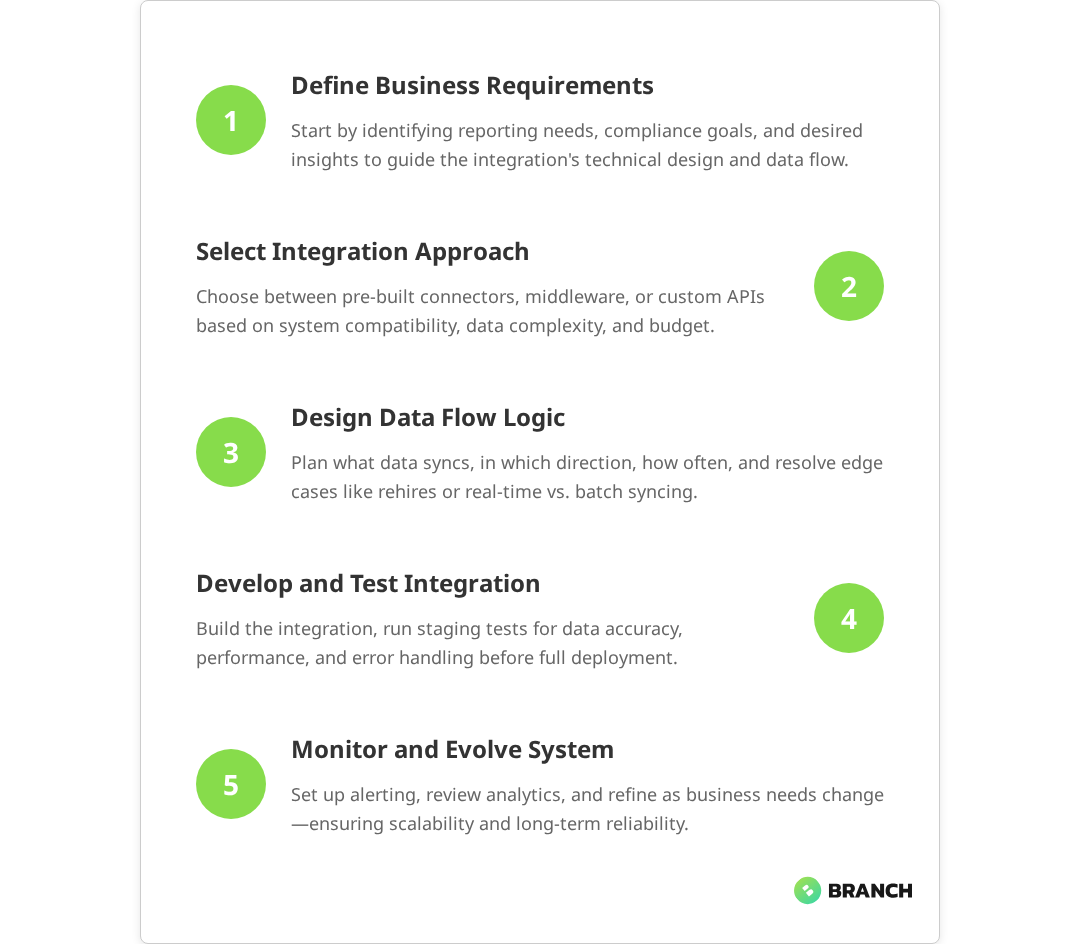
Successful LMS-HRIS integration requires thoughtful consideration of data direction, timing, and business rules. Not all data should flow both ways, and not everything needs to sync in real-time.
Typical Data Flow Patterns
Research confirms that most integrations follow established patterns for data synchronization:
- Employee profile data (HRIS → LMS): Names, employee IDs, department assignments, job titles, manager relationships, and start dates typically flow from HRIS to LMS to ensure accurate user provisioning and appropriate training assignment.
- Training completions (LMS → HRIS): Course completions, certification statuses, skill assessments, and continuing education credits flow back to create comprehensive employee development records.
- Organizational changes (HRIS → LMS): Department transfers, role changes, and manager reassignments need to trigger updates in LMS access permissions and training requirements.
- Compliance tracking (Bidirectional): Required training assignments may originate in HRIS based on role or location, while completion status returns to HRIS for audit and reporting purposes.
The trickiest decisions often involve data timing and conflict resolution. Should training completions sync immediately or in daily batches? What happens when an employee’s name is updated in HRIS while they’re mid-course in the LMS? These edge cases seem minor but can create significant user experience problems if not handled properly.
Handling Data Conflicts and Edge Cases
Real-world integration projects often stumble on scenarios that seem simple but reveal system complexities:
- Employee departures: Should departed employees lose LMS access immediately, or should their training records remain accessible for knowledge transfer? How long do you maintain their certification history?
- Rehires: When someone returns to the company, do you restore their old training records or start fresh? Different compliance requirements may have different answers.
- Bulk organizational changes: During restructures or acquisitions, thousands of employee records might change simultaneously. Your integration needs to handle these volume spikes without breaking.
What the research says
- Multiple studies confirm that integrating LMS with HRIS eliminates double data entry, reduces errors, and streamlines processes like onboarding and record-keeping for HR and IT teams.
- Evidence shows that integrated systems enable managers to maintain a unified view of employee performance and learning progress, improving their ability to identify high-potential employees and development opportunities.
- Research indicates that automated training completion tracking significantly improves compliance and audit readiness, allowing comprehensive training histories to be generated efficiently rather than manually compiled from multiple systems.
- Early studies suggest that pre-built connectors work well for standard system pairings, though organizations with unique compliance requirements or complex workflows may need custom solutions.
- Industry guidance recommends designing integrations for eventual consistency with retry logic rather than real-time synchronization, as this approach proves more reliable and cost-effective for training data.
Technical Implementation Considerations
Moving beyond the conceptual design, successful LMS-HRIS integration requires attention to several technical details that can make or break your project.
API Capabilities and Limitations
Not all LMS and HRIS platforms are created equal when it comes to integration capabilities. Before committing to an integration approach, audit what each system actually supports:
- API comprehensiveness: Can you access all the data fields you need? Some systems have robust APIs for reading data but limited capabilities for creating or updating records.
- Rate limiting and throttling: How many API calls can you make per hour or day? Large organizations with thousands of employees may hit limits during bulk sync operations.
- Authentication and security: What authentication methods are supported? How do you handle API key rotation and secure credential storage?
- Webhook support: Can the system notify your integration when data changes, or do you need to poll continuously for updates?
Some legacy HRIS platforms still rely primarily on SFTP file transfers rather than modern APIs. While this seems outdated, file-based integration can actually be more reliable for bulk data transfers and simpler to debug when things go wrong.
Read more about integration patterns with enterprise backend systems.Security and Compliance Requirements
Employee data integration touches on multiple compliance frameworks—GDPR, CCPA, industry-specific regulations, and internal security policies. Your integration architecture needs to address:
- Data encryption in transit and at rest, with proper key management
- Access logging for audit trails showing who accessed what employee data when
- Data retention policies that align across both systems
- Geographic data residency requirements if you operate internationally
Security isn’t just about the integration code—it’s about operational procedures for monitoring, incident response, and regular access reviews.
Implementation Strategies: Build, Buy, or Partner
The classic build-versus-buy decision becomes more nuanced with LMS-HRIS integration because your options range from fully managed solutions to custom development, with several middle-ground approaches.
When to Use Pre-built Solutions
Off-the-shelf integration platforms like Zapier, MuleSoft, or specialized HR-tech connectors work well when:
- Your LMS and HRIS are both mainstream platforms with existing connector support
- Your data requirements fit standard templates (employee profiles, basic training completions)
- You can adapt your business processes to match the connector’s assumptions
- You prefer predictable monthly costs over upfront development investment
The downside is limited customization. If your organization has unique compliance requirements or complex approval workflows, pre-built solutions may not fit.
When Custom Development Makes Sense
Custom integration development is justified when:
- Your data model includes custom fields or complex relationships not supported by standard connectors
- You need sophisticated business logic for data transformation or validation
- Integration is part of a larger system modernization where you’re building custom middleware anyway
- Long-term total cost of ownership favors upfront development over ongoing subscription fees
Custom solutions require ongoing maintenance and expertise, but they give you complete control over functionality and data handling.
The Partner Approach
Working with an integration specialist combines the flexibility of custom development with the expertise of teams who’ve solved similar problems before. This approach works particularly well for organizations that need customization but lack internal integration expertise.
A good integration partner brings architectural experience, knowledge of common pitfalls, and ongoing support capabilities. They can help you design solutions that balance current needs with future flexibility—avoiding over-engineering while ensuring your integration won’t become a bottleneck as your organization grows.
Planning Your Integration Project
Successful LMS-HRIS integration projects share common characteristics: clear scope, realistic timelines, and strong stakeholder alignment. Here’s how to set your project up for success.
Stakeholder Alignment and Requirements Gathering
Integration projects often fail not because of technical challenges, but because different stakeholders have different expectations. Your project team should include:
- HR operations who understand current data workflows and pain points
- L&D teams who know training requirements and reporting needs
- IT/Security who can assess technical feasibility and compliance requirements
- End users (managers and employees) who will interact with the integrated systems
Spend time mapping current manual processes before designing automated ones. Often, manual workarounds exist because of legitimate business requirements that automated integration needs to preserve.
| Project Phase | Duration | Key Activities | Success Criteria |
|---|---|---|---|
| Discovery & Planning | 2-4 weeks | Requirements gathering, system audit, architecture design | Documented data flows and technical specification |
| Development & Configuration | 4-12 weeks | Integration build, testing, security review | Working integration in staging environment |
| Pilot & Testing | 2-4 weeks | Limited production testing, user feedback, refinement | Successful data sync for pilot group |
| Full Deployment | 1-2 weeks | Production rollout, monitoring, documentation | All users successfully integrated |
Testing and Validation Strategy
Integration testing goes beyond verifying that data transfers correctly. You need to validate business logic, error handling, and user experience across both systems:
- Data accuracy testing: Verify that employee profiles, training records, and organizational hierarchies sync correctly
- Performance testing: Ensure the integration handles your actual data volumes without timing out
- Error scenario testing: What happens when one system is unavailable? How do you handle malformed data or network interruptions?
- User experience testing: Do employees see consistent information across systems? Are there confusing delays or discrepancies?
Ongoing Management and Optimization
Launch day is just the beginning. Successful LMS-HRIS integration requires ongoing monitoring, maintenance, and optimization to deliver sustained value.
Monitoring and Alerting
Set up monitoring that goes beyond basic “is it working” checks:
- Data quality metrics: Track sync success rates, data validation failures, and processing times
- Business impact metrics: Monitor training completion rates, compliance status, and user adoption
- System health indicators: API response times, error rates, and resource utilization
Alert fatigue is real—configure notifications for genuinely critical issues while logging everything else for periodic review.
Evolution and Scaling
Your integration needs will change as your organization grows and your systems evolve. Plan for:
- New data requirements as L&D programs become more sophisticated
- Additional system connections as you add performance management tools or other HR technologies
- Increased data volumes as headcount grows or training programs expand
- Changing compliance requirements that affect data handling or retention policies
Regular architecture reviews help ensure your integration continues to serve your evolving needs rather than constraining them.
When to Bring in Integration Specialists
Some organizations have the internal expertise to handle LMS-HRIS integration in-house, while others benefit from working with specialized partners. Consider external support when:
- Your internal team lacks experience with enterprise system integration
- You’re working with complex or legacy systems that require specialized knowledge
- Timeline pressure makes it impractical to build internal expertise
- Integration is part of a larger digital transformation initiative
The right integration partner brings architectural expertise, knowledge of common pitfalls, and ongoing support capabilities. They can help you avoid expensive mistakes while ensuring your solution scales with your organization’s growth.
At Branch Boston, we’ve helped B2B organizations design and implement integration solutions that bridge learning management systems with broader enterprise infrastructure. Our approach focuses on understanding your unique business requirements and building solutions that work reliably in the real world—not just in perfect test conditions.
Whether you need enterprise systems integration expertise, LMS implementation support, or custom software development to fill integration gaps, we can help you create connected systems that actually serve your people and processes.
FAQ
How long does LMS-HRIS integration typically take?
Timeline varies significantly based on complexity, but most projects take 2-4 months from planning to full deployment. Simple connector-based integrations might complete in 4-6 weeks, while custom integrations with complex business logic can take 4-6 months. The discovery phase is crucial—rushing through requirements gathering often extends overall timeline.
What's the biggest mistake organizations make with LMS-HRIS integration?
Trying to sync everything in real-time without considering whether it's necessary. Most training data doesn't need instantaneous consistency across systems, and over-engineering for real-time sync creates complexity and failure points. Focus on business requirements first, then design the simplest technical solution that meets those needs.
Should we integrate our existing systems or replace them with an all-in-one platform?
It depends on your satisfaction with current functionality and budget for change management. If your LMS and HRIS serve your needs well, integration is usually more cost-effective than platform replacement. However, if you're already planning system upgrades, consider whether modern platforms with built-in integration might serve you better long-term.
How do we handle employee data privacy during integration?
Start with a data audit to understand what personal information you're syncing and why. Implement encryption for data in transit and at rest, maintain detailed access logs, and ensure your integration complies with relevant privacy regulations like GDPR or CCPA. Consider data minimization—only sync the employee information you actually need for business purposes.
What happens if the integration breaks—do we have a backup plan?
Build fallback procedures before you need them. This might include automated daily data exports, manual sync procedures for critical data, and clear escalation paths for integration issues. Most importantly, ensure your systems can operate independently if the integration fails—avoid creating single points of failure that could disrupt core HR or training operations.