Group of businesspeople engaged in a corporate meeting, listening attentively to a presentation while a man takes notes on his laptop, fostering collaboration and teamwork

What Makes Sales Enablement Training Effective?

Sales teams today face an increasingly complex landscape: longer sales cycles, more decision-makers in the buying process, and customers who arrive already 60% through their research journey before engaging with sales representatives. Yet many organizations approach sales enablement training like it’s still 1995—generic presentations, one-size-fits-all content, and crossed fingers that something will stick.

The reality is that effective sales enablement training isn’t about cramming product features into your reps’ heads or running them through the same role-play scenarios every quarter. It’s about creating a strategic learning system that bridges the gap between what your sales team knows and what they need to close more deals, faster.

If you’re a sales leader, L&D professional, or operations executive wondering why your current training programs aren’t moving the needle on revenue, this article will help you understand what actually works—and why most sales training falls short.

Why Most Sales Enablement Training Misses the Mark

Before diving into what makes training effective, let’s acknowledge the elephant in the room: most sales enablement programs are built on shaky foundations. They suffer from three critical flaws that undermine their impact from day one.

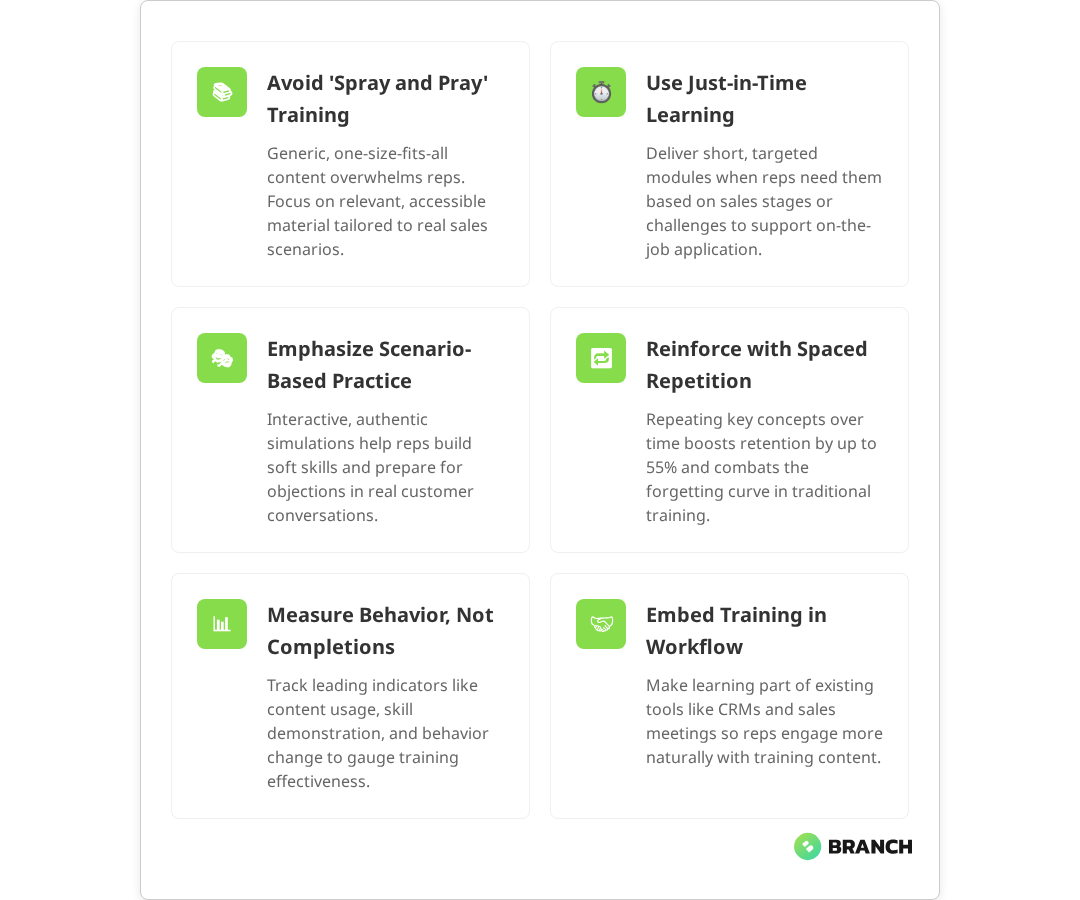
The “Spray and Pray” Content Problem

Too many organizations treat sales enablement like a content dumping ground. Research shows that this approach creates significant problems: 72% of sales leaders agree that training fails when it tries to be one-size-fits-all, and reps struggle to find relevant materials when they actually need them during customer calls. The issue isn’t volume—it’s relevance and accessibility.

Effective sales enablement training starts with understanding that less is more. Your reps need the right information at the right moment, not every piece of information your marketing team has ever produced.

One-and-Done Training Events

The traditional approach of bringing the sales team together for a quarterly training session might feel productive, but it’s pedagogically flawed. Research consistently shows that people forget 70% of new information within 24 hours without reinforcement, and 84% of training content is forgotten within three months without relevance and repetition. Yet most sales training programs are designed like academic lectures rather than skill-building systems.

Disconnection from Real Sales Situations

Here’s where many training programs really fall apart: they’re built by people who haven’t carried a quota in years (if ever) and don’t reflect the messy reality of modern sales conversations. Research indicates that 21-31% of sales leaders report that real-life scenarios and soft skills are missing from their training programs. Your reps need to handle objections about budget, navigate complex procurement processes, and articulate value to technical buyers—not just recite product features.
Read more about building structured learning experiences that actually stick.

The Architecture of Effective Sales Enablement Training

Effective sales enablement training isn’t a single program—it’s an interconnected system that supports reps throughout their entire sales cycle. Multiple studies confirm that the most successful programs integrate ongoing training, content, coaching, and tools to ensure representatives have the right knowledge and resources at each step of the sales process.

Just-in-Time Learning Modules

The best sales enablement platforms deliver bite-sized learning exactly when reps need it. Research from leading sales enablement platforms shows that just-in-time learning reduces ramp-up time and supports real-time decision making by providing contextual, relevant content in the flow of work. Instead of front-loading everything in onboarding, they provide targeted modules that align with specific sales stages or customer types.

For example, when a rep logs an opportunity as “demo scheduled,” the system might surface a 5-minute module on discovery questions specific to that industry, or a quick refresher on the most compelling ROI calculations for similar-sized deals.

Scenario-Based Practice Environments

Effective training creates safe spaces for reps to practice difficult conversations before they happen in real life. This goes beyond basic role-playing to include interactive scenarios that branch based on the rep’s responses, mimicking the unpredictable nature of actual sales calls.

The key is authenticity—scenarios should be based on real objections, real competitive situations, and real customer personas that your team encounters regularly.

Reinforcement and Spaced Repetition

The most successful sales enablement programs borrow from cognitive science research on memory retention. Studies show that spaced repetition can improve sales skills retention by up to 30-55% by moving knowledge into long-term memory and countering the forgetting curve. They use spaced repetition to ensure critical concepts stick, and they provide multiple touchpoints for the same information across different formats and contexts.

Learning MethodRetention RateBest Use CaseImplementation Complexity
Traditional presentation10%Broad overviewsLow
Interactive scenarios65%Skill practiceMedium
Spaced repetition + practice85%Critical processesHigh
Peer coaching + feedback90%Advanced skillsMedium
💡 Tip: Start with your highest-impact, most frequent sales situations. Build deep, repeatable training for those scenarios before expanding to edge cases.

What the research says

  • Studies consistently show that traditional presentations have retention rates of only about 10% after one week, highlighting the need for more engaging training methods.
  • Interactive, scenario-based learning methods show significantly higher engagement and retention rates compared to passive training approaches, though early research suggests effectiveness varies by implementation.
  • Spaced repetition and reinforcement techniques can improve knowledge retention by 30-55% by helping sales reps internalize critical concepts and apply them consistently in real situations.
  • Just-in-time learning delivery has been shown to reduce ramp-up time and improve real-time decision making, but we need more research on optimal timing and content formats.
  • Training programs that focus on customer-centric messaging and practical sales processes tend to correlate more strongly with improved deal velocity and win rates than product-focused training alone.

Content That Actually Moves the Revenue Needle

Not all sales training content is created equal. The most effective programs focus their efforts on the specific knowledge and skills that correlate with deal velocity and win rates, with research showing that targeted training aligned to key sales outcomes has greater impact on revenue performance.

Customer-Centric Messaging Frameworks

Instead of product-focused training that lists features and benefits, effective programs teach reps how to have customer-centric conversations. This means understanding buyer personas at a granular level: their pain points, their decision-making process, and the language they use to describe their challenges.

The best training programs include:

  • Industry-specific talk tracks that resonate with different buyer types
  • Value proposition frameworks that connect features to business outcomes
  • Objection handling that addresses real concerns, not theoretical ones
  • Competitive differentiators that matter to customers, not just to your marketing team

Process Excellence Over Product Knowledge

Here’s a counterintuitive truth: most sales reps already know enough about your products to sell them effectively. What they struggle with is process—how to qualify opportunities, when to involve technical resources, how to navigate complex buying committees.

Effective sales enablement training spends more time on methodology than on product features. It teaches reps how to:

  • Qualify opportunities using consistent criteria
  • Map and influence buying committees
  • Structure discovery conversations that uncover real business impact
  • Create urgency without being pushy
  • Handle pricing conversations with confidence

Tools and Technology Integration

Modern sales teams use dozens of tools—CRM systems, sales engagement platforms, conversation intelligence software, and more. Yet many training programs treat technology as an afterthought, resulting in low adoption and inconsistent data.

Effective programs embed tool training into the sales process itself, showing reps not just how to use the technology, but when and why to use it for maximum impact.

Read more about connecting training effectiveness to actual performance outcomes.

Measuring What Matters: Beyond Completion Rates

The biggest mistake organizations make with sales enablement training is measuring the wrong things. Completion rates and satisfaction scores might make stakeholders feel good, but they don’t predict revenue impact.

Leading Indicators of Training Success

Effective sales enablement programs track metrics that actually correlate with business outcomes:

  • Behavior change: Are reps actually applying what they’ve learned in real sales situations?
  • Content usage: Which training materials do top performers use most often?
  • Skill demonstration: Can reps successfully handle scenarios in practice environments?
  • Time to productivity: How quickly do new reps reach full quota performance?

Connecting Training to Revenue Outcomes

The gold standard for sales enablement measurement is demonstrating a clear connection between training participation and revenue results. This requires:

  • Baseline performance data before training implementation
  • Control groups to isolate training impact from other variables
  • Long-term tracking to account for sales cycle length
  • Segmentation by role, experience level, and territory characteristics

Organizations that invest in robust measurement often discover that their most effective training programs aren’t the ones that feel most comprehensive, but the ones that create the most behavioral change among their reps.

Building vs. Buying: Your Strategic Options

When it comes to sales enablement training, organizations typically face three paths: build it internally, buy an off-the-shelf solution, or partner with a specialist team to create something custom. Each approach has trade-offs that depend on your specific situation.

Internal Development

Building sales enablement training internally works best when you have strong L&D resources and your sales process is relatively unique. The main advantages are control and customization—you can create exactly what your team needs without compromise.

However, internal development often underestimates the complexity of creating effective learning experiences. It’s not enough to have subject matter expertise; you also need instructional design skills, technology capabilities, and the bandwidth to iterate based on feedback.

Off-the-Shelf Solutions

Generic sales training programs can provide a foundation, especially for fundamental skills like discovery questioning or objection handling. They’re typically less expensive and faster to implement than custom solutions.

The downside is that they can’t address your specific products, markets, or competitive landscape. They also tend to focus on theoretical knowledge rather than applied skills in your particular sales environment.

Custom Development Partnership

Working with a specialist team to create custom sales enablement training offers the best of both worlds: professional instructional design expertise combined with content that’s tailored to your specific business needs.

This approach works particularly well for organizations that have unique value propositions, complex sales processes, or specialized industry requirements that off-the-shelf solutions can’t address.

💡 Tip: Start with your biggest pain points and highest-impact opportunities. Don't try to solve every training need at once—focus on the areas that will move the revenue needle most significantly.

Implementation: Getting Your Team to Actually Use the Training

Even the most well-designed sales enablement training will fail if your team doesn’t engage with it consistently. Implementation success comes down to change management, not just content quality.

Leadership Modeling and Reinforcement

Sales managers are the linchpin of successful training adoption. When managers actively reference training content in team meetings, coaching sessions, and deal reviews, reps understand that the training actually matters to their success.

The most effective implementations include manager enablement alongside rep training, ensuring that front-line leaders know how to reinforce and apply the concepts in their day-to-day management activities.

Integration with Existing Workflows

Training that exists in isolation rarely gets used consistently. The most successful programs integrate learning opportunities directly into the tools and processes reps already use—CRM systems, sales meetings, and pipeline reviews.

For example, instead of requiring reps to log into a separate learning platform, effective programs might surface relevant training modules directly in the CRM when reps update opportunity stages or encounter specific deal scenarios.

Peer-to-Peer Learning and Collaboration

Your top performers are often your best teachers. Effective sales enablement programs create structured ways for successful reps to share their approaches, whether through recorded call reviews, peer coaching sessions, or collaborative content creation.

This approach not only improves training quality but also increases buy-in, since the content comes from respected colleagues rather than corporate headquarters.

When to Partner with Sales Enablement Specialists

Creating effective sales enablement training requires a unique combination of skills: instructional design expertise, sales methodology knowledge, technology implementation capabilities, and change management experience. Most organizations don’t have all of these competencies in-house.

Consider partnering with specialists when you’re facing:

  • Complex sales processes: Multi-stakeholder deals, long sales cycles, or technical products that require sophisticated training approaches
  • Rapid growth: Scaling challenges where you need to onboard new reps quickly while maintaining quality
  • Performance gaps: Persistent issues with quota attainment, deal velocity, or competitive win rates
  • Technology integration: Requirements for custom learning platforms or integration with existing sales and marketing tools

A team like Branch Boston brings together strategy, design, and engineering capabilities to create learning experiences that are both pedagogically sound and technically robust. We understand that effective sales enablement isn’t just about content creation—it’s about building systems that drive sustainable behavior change.

The key is finding a partner who takes the time to understand your specific sales challenges, buyer journey, and organizational culture before proposing solutions. Cookie-cutter approaches rarely work in sales enablement, where context and customization are critical to success.

FAQ

How long does it take to see results from sales enablement training?

Most organizations see initial behavioral changes within 30-60 days, but meaningful revenue impact typically takes 3-6 months due to sales cycle length. Leading indicators like content usage and skill demonstration appear much sooner, often within weeks of implementation.

What's the biggest mistake organizations make with sales enablement training?

The most common mistake is treating training as a one-time event rather than an ongoing system. Organizations often invest heavily in initial content creation but fail to plan for reinforcement, updates, and continuous improvement based on feedback and results.

Should we focus on product training or sales skills training first?

In most cases, sales process and methodology training delivers faster ROI than product training. Reps typically already know enough about your products to sell effectively—what they struggle with is qualifying opportunities, handling objections, and navigating complex buying processes.

How do we measure the ROI of sales enablement training?

The most effective approach combines leading indicators (behavior change, content usage, skill demonstration) with lagging indicators (quota attainment, deal velocity, win rates). Establish baseline metrics before training implementation and track changes over time, accounting for sales cycle length and other variables.

What technology infrastructure do we need for effective sales enablement training?

The minimum viable technology stack includes a learning management system that integrates with your CRM, content management capabilities, and basic analytics. More advanced implementations might include video-based coaching platforms, simulation environments, and AI-powered content recommendations, but start simple and build based on actual usage patterns.

People with online education. Man and woman near huge smartphone and books. Students prepare for test or exam. Remote education and training, learning. Flat vector illustration

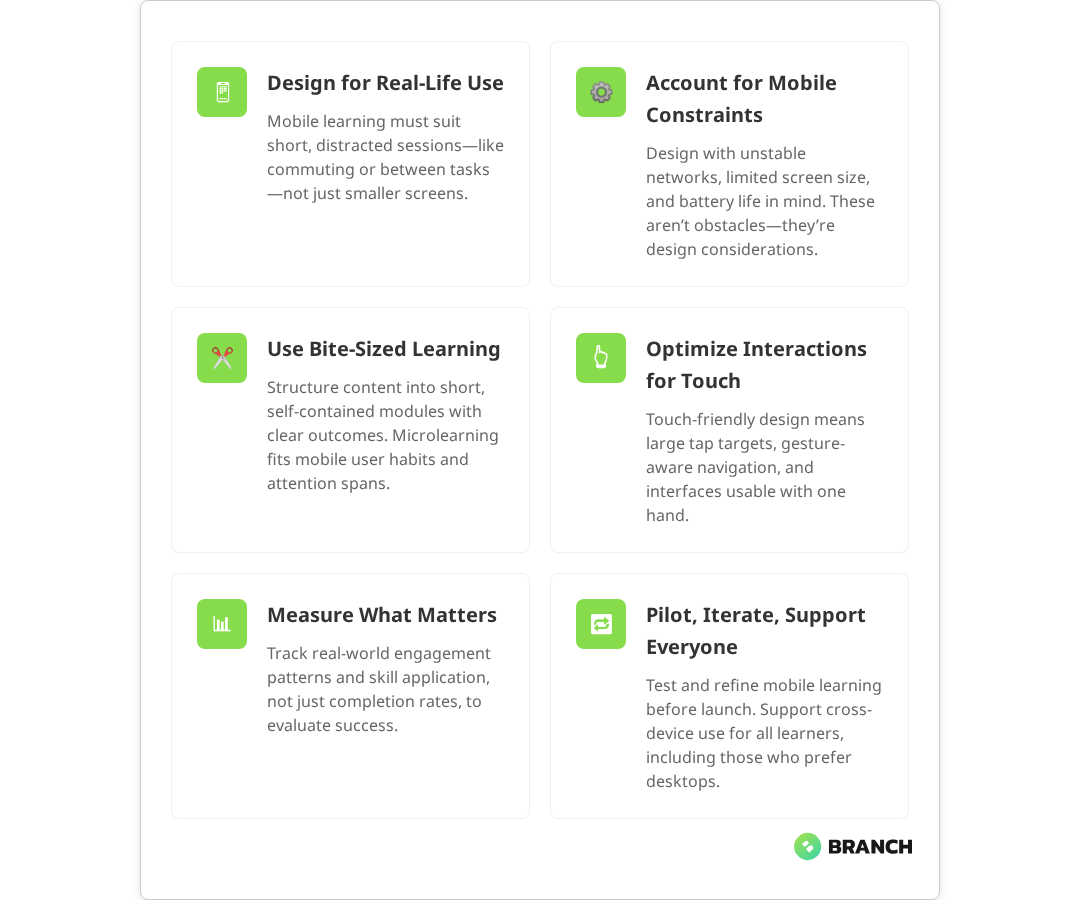
How to Design Mobile Learning for On-the-Go Learners

Your sales team is scattered across three time zones. Your field technicians are troubleshooting equipment in remote locations. Your customer service reps are working hybrid schedules that shift weekly. Meanwhile, your training manager is staring at completion rates that would make a statistician weep.

Sound familiar? You’re not alone. The shift to distributed, mobile-first workforces has left many L&D teams scrambling to figure out how to deliver effective learning experiences to people who are rarely in the same place twice. Traditional desktop-based training modules feel as relevant as fax machines when your learners are trying to squeeze in professional development between client calls or during their commute.

Mobile learning isn’t just about shrinking your existing content to fit smaller screens though that’s unfortunately what many organizations try first. It’s about fundamentally rethinking how people absorb, retain, and apply new skills when they’re on the move, distracted, and working in contexts that change by the hour.

This guide walks through the practical realities of designing mobile learning that actually works for busy, distributed teams. We’ll cover the technical considerations that matter, the design principles that stick, and the implementation strategies that help you avoid the most common pitfalls that turn promising mobile learning initiatives into expensive digital paperweights.

Understanding the Mobile Learning Context

Before diving into interface design or content strategy, it’s worth understanding what “mobile learning” actually means in practice. It’s not just learning that happens on phones it’s learning that fits into the fragmented, interrupted, context-switching reality of modern work.

Mobile learners typically engage with content in short bursts: five minutes between meetings, fifteen minutes during lunch, or while waiting for a delayed flight. Research consistently shows that mobile learning is consumed in brief, frequent sessions, often through microlearning modules lasting 2–5 minutes. They’re often multitasking, partially distracted, and operating with limited cognitive bandwidth. Studies demonstrate that mobile learners frequently face divided attention, which can impact learning performance, even as some adapt to these multitasking behaviors. Their environment changes constantly from quiet offices to noisy coffee shops to moving vehicles.

This context creates unique design challenges. Your content needs to be immediately accessible, cognitively lightweight, and resilient to interruption. Learners should be able to pick up where they left off without losing context, even if they’ve been pulled away for hours or days.

The Technical Reality

Mobile learning operates within real technical constraints that desktop-first designs often ignore. Network connectivity varies dramatically your learners might have blazing fast 5G one moment and spotty 3G the next. Current data from 2025 shows that while 5G covers just over half the global population with average speeds around 184 Mbps, significant coverage gaps remain, especially in rural areas where connectivity quality can drop substantially. Battery life matters when someone’s using their personal device for work-related learning. Screen real estate is limited, and touch interfaces behave differently than mouse-and-keyboard interactions.

These constraints aren’t bugs to work around they’re features of the mobile learning landscape that smart designers leverage rather than fight.

💡 Tip: Start your mobile learning design process by spending a day using your current training content only on your phone, in realistic conditions while commuting, between meetings, or during breaks. You'll quickly identify friction points that your desktop-bound design team might miss.

Core Design Principles for Mobile Learning

Effective mobile learning design rests on several key principles that differentiate it from traditional eLearning approaches. These aren’t just best practices they’re architectural decisions that shape how learners interact with and retain information.

Bite-Sized Content Architecture

The concept of “microlearning” gets thrown around a lot, but it’s often misunderstood. It’s not just about making content shorter it’s about creating complete, self-contained learning experiences that can stand alone while building toward larger learning objectives.

Each learning chunk should have a clear learning outcome, require minimal context to understand, and provide immediate value even if the learner never continues to the next module. Mobile learning design experts emphasize that content should be chunked into bite-sized pieces that are self-contained and designed for short bursts of engagement. Think of it like designing a collection of useful tools rather than chapters in a book.

Progressive Disclosure

Mobile interfaces excel at revealing information gradually, giving learners control over their cognitive load. Instead of presenting everything at once, structure content so that learners can dive deeper into areas that interest them while maintaining a clear path forward.

This might mean starting with key concepts and allowing learners to tap for examples, case studies, or additional detail. Or it could involve organizing content into expandable sections that let learners focus on what’s most relevant to their immediate needs.

Context-Aware Content

Mobile devices know things about their users that desktop computers don’t location, time of day, connectivity status, and usage patterns. Smart mobile learning platforms use this contextual information to deliver more relevant experiences. Research on context-aware mobile learning systems shows that platforms can effectively integrate multiple contextual factors including GPS location, device features, learner behavior patterns, and environmental conditions to provide personalized learning recommendations.

A field service app might surface equipment-specific training based on GPS location. A sales enablement platform could prioritize product updates based on upcoming calendar appointments. The goal isn’t to be creepy it’s to reduce the cognitive overhead of finding relevant information when attention spans are short.

Read more about establishing a structured eLearning development process that accounts for mobile-first design from the start.

What the research says

  • Multiple studies confirm that mobile learners prefer microlearning formats, with optimal engagement occurring in sessions lasting 3–7 minutes, particularly for mobile contexts where attention spans are naturally shorter.
  • Research demonstrates that mobile multitasking significantly impacts learning performance, with divided attention reducing retention even among learners who adapt to multitasking behaviors.
  • Context-aware mobile learning systems that use location, device features, and behavioral patterns to personalize content show improved learning outcomes and engagement rates.
  • Early evidence suggests that progressive web applications (PWAs) provide effective cross-platform compatibility for mobile learning, but more research is needed on long-term retention outcomes compared to native apps.

Interface Design That Works on Small Screens

Mobile learning interface design requires a different mindset than desktop application design. The constraints of small screens and touch interactions create opportunities for more focused, intentional user experiences if you design for them deliberately.

Navigation and Information Architecture

Complex navigation systems that work fine on desktop become usability nightmares on mobile. Successful mobile learning platforms use flat information architectures, clear visual hierarchies, and navigation patterns that feel native to mobile users. Mobile-first eLearning design research emphasizes that effective platforms incorporate simplified, flat information architectures and clear, intuitive navigation optimized for mobile behaviors.

Consider using tab-based navigation for primary sections, progressive disclosure for detailed content, and clear visual indicators for learning progress. The goal is to minimize the number of taps required to access relevant content while maintaining clear wayfinding.

Touch-Friendly Interactions

Designing for touch isn’t just about making buttons bigger. It’s about understanding how people hold and interact with mobile devices in different contexts. Someone using their phone one-handed while standing on a train has different interaction capabilities than someone sitting at a desk with both hands free.

Critical interactive elements should be within easy reach of thumbs, important information should remain visible even when software keyboards are active, and gesture-based interactions should feel natural rather than gimmicky. Accessibility guidelines from W3C specify that mobile tap targets should be a minimum of 44 pixels to accommodate finger size and movement, balancing usability with motor accessibility.

Design ElementDesktop ApproachMobile OptimizationKey Consideration
Button SizePrecise cursor targetingMinimum 44px tap targetsAccommodate finger size and movement
Content LayoutMulti-column layoutsSingle-column, stacked contentOptimize for portrait orientation
NavigationHorizontal menu barsBottom tabs or hamburger menusThumb-reach optimization
Form InputsMultiple fields visibleOne field per screen stepMinimize typing, maximize completion
Media PlaybackEmbedded playersFull-screen optimizationAccount for varying screen sizes

Content Strategy for Mobile Consumption

The best mobile learning interface in the world won’t save poorly structured content. Mobile learners process information differently than desktop users, and your content strategy needs to account for these differences from the ground up.

Scannable Content Structure

Mobile users scan more than they read. Structure your content with clear headings, bulleted lists, and visual breaks that allow learners to quickly identify relevant sections. Use formatting to create clear information hierarchies bold for key concepts, bullets for actionable steps, and white space to prevent cognitive overload.

Each screen should focus on a single concept or task. If you find yourself scrolling through multiple screens of content to complete a single learning objective, consider breaking it into smaller, more focused modules. Industry best practices consistently recommend focusing on single concepts per screen and breaking content into smaller, focused segments that align with microlearning methodology.

Multimedia Optimization

Video and audio content can be incredibly effective for mobile learning, but they require careful optimization. Mobile users often consume content in environments where audio isn’t practical, so provide captions and visual alternatives. Keep video segments short under five minutes and ensure they remain useful even when viewed without sound. Educational video research consistently shows that learner attention drops significantly after 6–9 minutes, with shorter segments proving more effective for retention and accessibility.

Consider the data implications of multimedia content. Auto-playing videos or high-resolution images can quickly consume mobile data allowances, particularly for learners in areas with limited connectivity or expensive data plans.

💡 Tip: Test your mobile learning content on actual mobile data connections, not just WiFi. What feels snappy on office internet can become frustratingly slow on cellular networks, especially in areas with poor coverage.

Technical Implementation Strategies

The technical architecture underlying your mobile learning platform directly impacts user experience, completion rates, and long-term platform sustainability. While learners don’t care about your backend infrastructure, they definitely notice when it doesn’t work smoothly.

Offline-First Design

Mobile connectivity is inconsistent, even in major metropolitan areas. Designing for offline-first use ensures learners can access critical content regardless of network conditions. Technical literature on offline-first development widely supports this approach, recommending that mobile learning apps allow users to download specific modules and use intelligent caching for frequently accessed content to optimize performance and accessibility. This doesn’t mean your entire learning library needs to work offline it means identifying which content is most valuable during network interruptions and ensuring it remains accessible.

Consider allowing learners to download specific modules for offline use, implementing intelligent caching for frequently accessed content, and providing clear indicators about what’s available offline versus what requires network connectivity.

Performance Optimization

Mobile devices have less processing power and memory than desktop computers. Learning platforms need to be optimized for these constraints without sacrificing functionality. This means efficient code, optimized images, and careful attention to how content loads and renders on different devices.

Progressive loading can help display core content immediately while loading additional resources in the background. Lazy loading images and content that’s below the fold can improve initial page load times significantly.

Cross-Platform Considerations

Your learners use different devices, operating systems, and browsers. A truly effective mobile learning platform works consistently across this diversity without requiring separate apps or platform-specific content.

Progressive web applications (PWAs) often provide the best balance between native app functionality and cross-platform compatibility, offering features like offline access and push notifications without requiring app store distribution. Research on PWAs for learning platforms confirms they effectively bridge the gap between native app functionality and web platform reach, with multiple sources noting their ability to increase retention rates and reach learners across mobile devices.

Measuring Success in Mobile Learning

Traditional eLearning metrics completion rates, time spent, quiz scores tell only part of the mobile learning story. Mobile learners engage differently, and your measurement strategy needs to account for these differences.

Context-Aware Analytics

Understanding when, where, and how learners engage with mobile content provides insights that aggregate metrics miss. Are learners dropping off at specific points because the content is too complex, or because they’re consistently interrupted at that stage? Are certain modules more effective when consumed during commutes versus during dedicated study time?

Track engagement patterns alongside learning outcomes to identify optimization opportunities that wouldn’t be visible in traditional analytics dashboards.

Microlearning Metrics

When content is broken into small, focused chunks, traditional completion metrics become less meaningful. Instead, focus on metrics that reflect skill application and behavioral change. Are learners applying concepts from mobile modules in their work? Are they returning to reference specific content when facing real-world challenges?

Read more about custom eLearning development services that prioritize mobile-first design and learner-centered experiences.

Implementation Planning and Change Management

Even the most thoughtfully designed mobile learning platform will fail if the implementation doesn’t account for organizational realities. Rolling out mobile learning requires careful change management, technical planning, and ongoing optimization based on real user behavior.

Piloting and Iteration

Start with a focused pilot program that allows you to test assumptions and refine approaches before full-scale deployment. Choose pilot participants who represent your broader learner population and are willing to provide honest feedback about what works and what doesn’t.

Use pilot feedback to refine content structure, interface design, and technical performance. What seems intuitive to your design team might be confusing to actual users, and early feedback helps identify these disconnects before they become expensive problems.

Supporting Different Learning Preferences

Not everyone learns effectively on mobile devices. Some people prefer desktop experiences for complex content, while others thrive on mobile-first approaches. Design your mobile learning strategy to complement rather than replace existing learning modalities.

Consider offering synchronized experiences that allow learners to start content on mobile and continue on desktop, or vice versa. The goal is meeting learners where they are, not forcing them into artificial constraints.

Working with Mobile Learning Specialists

Mobile learning design requires expertise that spans user experience design, educational psychology, technical architecture, and change management. Few organizations have all these capabilities in-house, making external partnerships valuable for mobile learning initiatives.

When evaluating potential partners, look for teams that understand both the technical constraints of mobile platforms and the pedagogical principles that drive effective learning outcomes. The best mobile learning solutions emerge from close collaboration between learning designers, user experience professionals, and technical implementers who understand how these domains intersect.

A specialized team like Branch Boston brings together comprehensive eLearning capabilities with mobile-first design thinking, helping organizations create learning experiences that work effectively across devices and contexts. This integrated approach ensures that technical implementation supports rather than constrains learning objectives.

Look for partners who emphasize iterative design, user testing with actual learners, and measurement strategies that go beyond basic completion metrics. The goal is creating sustainable learning platforms that evolve with your organization’s needs and your learners’ changing contexts.

The Future of Mobile Learning

Mobile learning continues evolving as device capabilities expand and workplace patterns shift. Emerging technologies like augmented reality, voice interfaces, and adaptive AI create new possibilities for contextual, personalized learning experiences.

However, the fundamentals remain constant: effective mobile learning respects learners’ time, fits into their workflow, and provides immediate value. Technology should enhance these core principles rather than complicate them.

Organizations that invest in thoughtful mobile learning design today position themselves well for whatever technological changes emerge next. By focusing on learner-centered design, technical flexibility, and continuous optimization, mobile learning platforms can adapt to new capabilities without requiring complete rebuilds.

The key is building learning systems that are robust enough to evolve while remaining simple enough for busy people to actually use. That balance between sophisticated capabilities and everyday usability defines successful mobile learning implementations.

FAQ

How do you handle learners who prefer desktop-based training over mobile learning?

The most effective approach is offering synchronized experiences that work across devices rather than forcing learners into mobile-only solutions. Design content that can be started on one device and continued on another, and ensure that mobile learning complements rather than replaces existing learning modalities. Some complex content genuinely works better on larger screens, and acknowledging this creates more learner buy-in for mobile components that do add value.

What's the ideal length for mobile learning modules to maintain engagement?

Most effective mobile learning modules range from 3-7 minutes, but length matters less than completeness and focus. Each module should address a single learning objective with immediate practical value. The key is designing content that can be consumed in realistic mobile contexts during commutes, between meetings, or while waiting rather than arbitrary time limits that might cut off important concepts mid-explanation.

How do you ensure mobile learning content works reliably on different devices and operating systems?

Focus on responsive web design and progressive web applications rather than native apps when possible. Test content across different screen sizes, operating systems, and network conditions during development. Use standard web technologies that work consistently across platforms, and implement progressive loading to ensure core content displays quickly regardless of device capabilities or network speed.

What are the most important metrics for measuring mobile learning effectiveness?

Beyond completion rates, track engagement patterns like when and where learners access content, which modules they return to reference, and how mobile learning translates to behavioral changes in their work. Context-aware analytics help identify whether learners drop off due to content complexity or environmental factors. Focus on metrics that reflect skill application and long-term retention rather than just consumption statistics.

How do you balance comprehensive learning content with the constraints of small screens?

Use progressive disclosure to layer information complexity start with core concepts and allow learners to tap for examples, details, or advanced applications. Structure content into complete, self-contained learning chunks that build toward larger objectives rather than trying to compress lengthy courses into smaller formats. Consider which concepts truly need comprehensive treatment versus what can be effectively taught through focused, mobile-optimized experiences.

An abstract graphic shows a blue cloud symbol linked by glowing lines to server racks, representing cloud technology, data transfer, and digital network infrastructure.

Cloud-Based LMS vs On-Premise Deployment

Choosing between a cloud-based LMS and an on-premise deployment feels like picking between convenience and control—except the reality is far more nuanced. For B2B leaders evaluating learning management systems, this decision affects everything from launch timelines and security postures to long-term operational costs and user adoption rates.

The stakes are real. Deploy too quickly with a cloud solution that can’t scale with your compliance needs, and you’ll be migrating again in 18 months. Go on-premise without the right internal resources, and you might spend more time troubleshooting infrastructure than delivering learning experiences.

This article breaks down the architectural differences, practical trade-offs, and decision points that actually matter when evaluating cloud LMS vs on-premise deployment for your organization.

Understanding the Fundamental Architecture Differences

Cloud-based and on-premise LMS solutions aren’t just different deployment models—they represent entirely different approaches to infrastructure, maintenance, and organizational responsibility.

Cloud-based LMS platforms run on shared infrastructure managed by the vendor. Your learning content, user data, and system configurations live on servers you don’t own or directly manage. Research confirms that these platforms operate on vendor-controlled infrastructure, providing scalability and reduced maintenance burdens while requiring organizations to rely on the vendor for security and system availability. Updates happen automatically, scaling occurs behind the scenes, and your IT team focuses on user management rather than server maintenance.

On-premise LMS deployments put the entire technology stack under your direct control. The learning platform runs on your servers, in your data center, with your team responsible for security patches, backup procedures, and performance optimization. Industry analysis consistently shows that on-premise systems grant organizations complete control over their technology stack but require substantial in-house IT resources for maintenance and security management.

But here’s where it gets interesting: many organizations actually operate in a hybrid middle ground. They might use a cloud-hosted LMS with on-premise single sign-on integration, or deploy a containerized LMS solution that gives them cloud-like flexibility with on-premise control.

💡 Tip: Don't assume your choice is permanent. Many modern LMS platforms support migration between deployment models, though the complexity and cost vary significantly based on your data architecture and integration requirements.
AspectCloud-Based LMSOn-Premise LMS
Infrastructure ResponsibilityVendor manages servers, updates, backupsYour IT team handles all infrastructure
Time to LaunchDays to weeksWeeks to months
Upfront CostsLow (subscription model)High (servers, licenses, setup)
Customization FlexibilityLimited to vendor-provided optionsFull control over codebase and features
Security ControlShared responsibility with vendorComplete organizational control
ScalingAutomatic, vendor-managedManual provisioning required

What the research says

Understanding the evidence behind cloud vs on-premise deployment decisions helps organizations make informed choices rather than relying on assumptions or vendor preferences.

  • Deployment speed differences are significant: Multiple studies confirm that cloud-based LMS platforms can be launched in days or weeks, while on-premise deployments typically require weeks to months due to hardware procurement and setup requirements.
  • Cost structures follow predictable patterns: Research consistently shows cloud solutions require minimal upfront investment through subscription models, while on-premise deployments demand significant initial capital for hardware, software licenses, and setup.
  • Customization trade-offs are real: Cloud platforms are consistently limited to vendor-provided configuration options, while on-premise solutions allow complete control over code and functionality—but this comes with increased technical complexity.
  • Security models vary significantly: Evidence from major cloud providers like AWS and Microsoft Azure shows cloud deployments operate under shared responsibility models, while on-premise solutions place complete security control—and responsibility—on the organization.
  • Scaling approaches differ fundamentally: Cloud platforms provide automatic scaling through vendor management, while on-premise systems require manual provisioning and hardware investment for increased capacity.

When Cloud-Based LMS Makes Strategic Sense

Cloud-based LMS platforms excel in scenarios where speed to market and operational simplicity outweigh the need for deep customization. Organizations with limited IT resources often find cloud solutions provide the fastest path to a functional learning environment.

Small and mid-size organizations particularly benefit from cloud deployments because they can access enterprise-grade infrastructure without the upfront investment in servers and specialized IT staff. The subscription model also makes budgeting more predictable—no surprise hardware refresh costs or emergency server replacements.

Cloud solutions also make sense when your learning needs are relatively standard. If your LMS primarily delivers compliance training, onboarding programs, or traditional course-based learning, most cloud platforms offer robust feature sets without requiring custom development.

Geographic distribution is another cloud advantage. When learners are scattered across multiple time zones or regions, cloud-based LMS platforms typically offer better global performance through content delivery networks and regional data centers.

Read more about the architectural decisions that shape professional eLearning platform development.

Key Cloud LMS Benefits

  • Rapid deployment: Most cloud LMS platforms can be configured and launched within days
  • Automatic updates: Security patches and feature releases happen without internal IT effort
  • Predictable costs: Subscription pricing with clear per-user or per-learner models
  • Built-in redundancy: Vendor-managed backup and disaster recovery procedures
  • Mobile optimization: Most cloud platforms include responsive design and mobile apps

Cloud LMS Limitations

However, cloud-based solutions come with meaningful constraints. Customization options are typically limited to configuration settings, themes, and approved integrations. If your learning strategy requires unique workflows or specialized content types, you might hit platform limitations that can’t be overcome without moving to a different solution.

Data portability can also become an issue. While most reputable cloud LMS vendors provide data export capabilities, moving large volumes of learning records, content libraries, and user progress data between platforms often requires significant migration effort. Migration studies show that transferring complex learning data involves substantial planning, technical expertise, and time to ensure successful transitions without data loss.

Integration complexity increases with cloud solutions when you need deep connections to existing enterprise systems. While most cloud platforms offer APIs and standard connectors, custom integrations often require ongoing maintenance as both systems evolve.

On-Premise LMS: Control, Customization, and Complexity

On-premise LMS deployments appeal to organizations that need maximum control over their learning infrastructure. This typically includes large enterprises with complex compliance requirements, highly regulated industries, or organizations with unique learning workflows that don’t fit standard platform models.

The customization potential with on-premise solutions is essentially unlimited. You can modify source code, create custom learning modules, integrate deeply with proprietary systems, and architect workflows that exactly match your organizational processes.

Security and compliance represent major on-premise advantages for many organizations. When dealing with sensitive training content, proprietary methodologies, or strict data residency requirements, keeping everything within your own infrastructure provides maximum control and auditability.

Long-term cost economics also favor on-premise deployments for larger organizations. While upfront costs are higher, the total cost of ownership over three to five years often becomes more favorable than cloud subscription fees, especially when factoring in reduced per-user costs as your organization grows.

On-Premise LMS Advantages

  • Complete customization: Modify any aspect of the platform to match exact requirements
  • Data sovereignty: Full control over where and how learning data is stored
  • Integration flexibility: Direct database connections and custom API development
  • Performance optimization: Hardware and network tuning for specific use cases
  • Long-term cost control: No ongoing subscription fees after initial investment

On-Premise Challenges

The operational complexity of on-premise LMS deployments can’t be understated. Your IT team becomes responsible for server maintenance, security patching, backup procedures, performance monitoring, and disaster recovery planning. This requires dedicated resources and specialized expertise that many organizations underestimate during initial planning.

Scaling challenges also emerge with on-premise solutions. Adding capacity during peak learning periods requires advance planning and hardware procurement. Unlike cloud platforms that can automatically scale to handle traffic spikes, on-premise systems need manual intervention and potentially additional infrastructure investment.

Software updates become a project rather than an automatic process. Major version upgrades often require testing in staging environments, coordination with integrated systems, and scheduled downtime—all of which can slow your ability to access new features or security improvements.

Hybrid and Modern Deployment Options

The cloud vs on-premise decision isn’t always binary. Many organizations find success with hybrid approaches that balance control and convenience based on specific requirements.

Containerized deployments represent one popular middle path. Platforms like Docker and Kubernetes allow you to run LMS applications with cloud-like portability while maintaining control over the underlying infrastructure. You can deploy the same containerized LMS across development, staging, and production environments, or even move between on-premise and cloud infrastructure as needs change.

Private cloud deployments offer another hybrid option. Services like AWS VPC or Azure Private Cloud provide cloud infrastructure benefits while maintaining network isolation and enhanced security controls. Your LMS runs on cloud infrastructure, but within a private network that you control and configure.

Multi-tenant SaaS with private instances is becoming increasingly common for larger organizations. Cloud LMS vendors offer dedicated server instances that provide platform benefits with enhanced customization options and security isolation.

💡 Tip: Consider your integration architecture early. The complexity of connecting your LMS to existing HR systems, content authoring tools, and business intelligence platforms often drives deployment decisions more than the LMS features themselves.

Making the Right Choice for Your Organization

The cloud vs on-premise decision ultimately depends on your organization’s specific context, resources, and priorities. Rather than starting with technology preferences, begin by evaluating your operational constraints and strategic requirements.

Choose Cloud-Based LMS When:

  • You need to launch quickly (within 30-60 days)
  • IT resources are limited or focused on other priorities
  • Learning requirements fit standard platform capabilities
  • Budget favors predictable operational expenses over capital investment
  • Geographic distribution requires global performance optimization
  • Compliance requirements can be met through vendor certifications

Choose On-Premise LMS When:

  • Customization requirements exceed standard platform capabilities
  • Data must remain within organizational infrastructure for regulatory or security reasons
  • Existing IT infrastructure can support additional application hosting
  • Long-term user projections make ownership economics favorable
  • Integration complexity requires direct database access or custom development
  • Learning workflows are unique enough to warrant custom platform development
Read more about professional LMS implementation approaches and best practices.

Key Decision Framework

Evaluate these factors systematically rather than making deployment decisions based on initial preferences or assumptions:

  1. Timeline pressure: How quickly do you need a functional LMS environment?
  2. Internal IT capacity: Can your team handle ongoing infrastructure management?
  3. Customization requirements: How much do you need to modify standard LMS workflows?
  4. Integration complexity: What systems need to connect to your LMS, and how deeply?
  5. Compliance constraints: Are there regulatory requirements that limit deployment options?
  6. Budget structure: Does your organization prefer operational expenses or capital investments?
  7. User scale and growth projections: How will your learning program evolve over time?

Implementation and Migration Considerations

Regardless of your deployment choice, successful LMS implementation requires careful planning around data migration, user training, and system integration. The deployment model affects the complexity and timeline of these activities, but doesn’t eliminate the need for systematic project management.

Data migration often proves more complex than anticipated, especially when moving from legacy systems with inconsistent data structures. Cloud platforms typically provide migration tools and services, while on-premise deployments may require custom data transformation scripts.

User adoption challenges exist regardless of deployment model, but on-premise solutions often provide more flexibility to customize interfaces and workflows to match existing organizational patterns. Cloud platforms excel at providing polished user experiences but may require more change management effort if they don’t align with current workflows.

Integration testing becomes critical with either approach, but on-premise deployments typically allow more comprehensive testing scenarios. Cloud integrations often depend on API rate limits and vendor-controlled update schedules that can complicate testing procedures.

Read more about custom eLearning development approaches that complement both cloud and on-premise LMS platforms.

Working with Implementation Partners

Whether you choose cloud or on-premise deployment, partnering with experienced implementation teams can significantly improve project outcomes and reduce time-to-value. The key is finding partners who understand both the technical and organizational aspects of LMS deployment.

For cloud-based implementations, look for partners who have deep experience with your chosen platform and can help navigate configuration options, integration requirements, and migration planning. The goal isn’t just technical deployment, but strategic optimization of the platform to match your learning objectives.

On-premise implementations benefit from partners who combine LMS expertise with infrastructure and security knowledge. These projects often require coordination across multiple technical domains, from server architecture to user experience design.

The most effective implementation partners help you think through deployment decisions strategically rather than pushing toward particular technology choices. They should be able to articulate the trade-offs clearly and help you evaluate options based on your specific context and constraints.

A team like Branch Boston approaches LMS deployment decisions by understanding your organizational context first, then recommending deployment approaches that align with your operational realities and strategic objectives. Whether that means optimizing a cloud-based platform, architecting a custom on-premise solution, or designing a hybrid approach that balances control and convenience.

FAQ

How long does it typically take to deploy a cloud-based LMS compared to an on-premise solution?

Cloud-based LMS platforms can typically be configured and launched within 1-4 weeks, depending on customization requirements and data migration complexity. On-premise deployments usually require 2-6 months, including server setup, software installation, security configuration, and integration testing. However, these timelines can vary significantly based on organizational requirements and internal resources.

What are the hidden costs I should consider when evaluating cloud vs on-premise LMS options?

For cloud solutions, watch for per-user scaling costs, integration fees, premium feature add-ons, and data export charges if you need to migrate later. On-premise deployments often have hidden costs in ongoing maintenance, security updates, backup infrastructure, and the opportunity cost of internal IT resources. Don't forget to factor in disaster recovery, compliance auditing, and the cost of system upgrades over time.

Can I migrate from a cloud-based LMS to an on-premise solution later, or vice versa?

Migration is possible but varies in complexity depending on your data structure, integrations, and chosen platforms. Cloud-to-on-premise migrations often require rebuilding custom integrations and may involve data transformation challenges. On-premise-to-cloud migrations can be simpler but may require workflow adjustments to fit the new platform's capabilities. Plan for 3-6 months of migration effort and consider this possibility during your initial platform selection.

How do I handle data security and compliance requirements with each deployment model?

Cloud-based LMS platforms handle security through shared responsibility models—the vendor manages infrastructure security while you control user access and data governance. Verify vendor certifications (SOC 2, GDPR, HIPAA) match your requirements. On-premise deployments give you complete control but make you responsible for all security measures, patches, and compliance procedures. Both approaches can meet strict security requirements with proper implementation.

What level of IT resources do I need for each deployment option?

Cloud-based LMS platforms require minimal IT infrastructure management but need resources for user administration, integration maintenance, and vendor relationship management. On-premise deployments require dedicated server administration, security management, backup procedures, and application maintenance—typically requiring at least one full-time system administrator plus development resources for customizations. Hybrid approaches fall somewhere in between, depending on your specific architecture choices.

Rearview shot of an unrecognizable businesswoman giving a presentation in the office boardroom

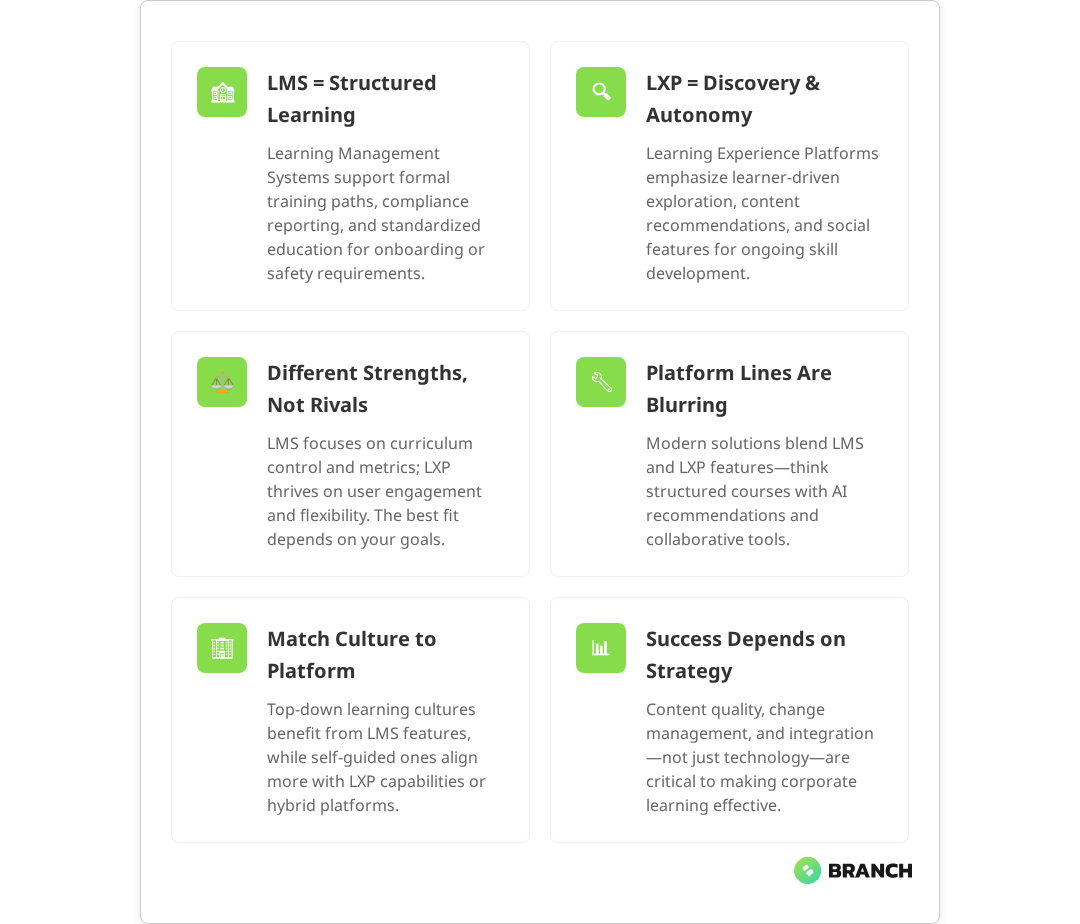
LMS vs LXP for Corporate Learning

When you’re tasked with choosing a corporate learning platform, the alphabet soup of acronyms can feel overwhelming. LMS, LXP, LCMS – and that’s before vendors start throwing around terms like “AI-powered” and “next-generation.” But here’s the thing: behind the marketing jargon are two fundamentally different approaches to how people learn at work.

If you’re a learning and development leader, HR director, or operations manager evaluating digital learning solutions, this guide cuts through the noise. We’ll explore what Learning Management Systems (LMS) and Learning Experience Platforms (LXP) actually do, when each makes sense, and how to navigate the increasingly blurry line between them.

The Core Philosophy: Structure vs. Discovery

Think of an LMS as the digital equivalent of a traditional classroom. Research consistently shows that Learning Management Systems are designed around managed learning – with clear curriculums, assigned courses, tracked progress, and measurable outcomes. An LXP, on the other hand, works more like YouTube for professional development: Learning Experience Platforms prioritize discovery, social learning, and learner autonomy in driving their own educational journey.

This philosophical difference shapes everything else about how these platforms work:

  • LMS approach: “Here’s what you need to learn, when you need to learn it, and how we’ll measure your success.”
  • LXP approach: “Here are learning resources tailored to your interests – explore, share, and learn at your own pace.”

Neither approach is inherently better. The question is which one aligns with your organization’s learning culture, compliance requirements, and business objectives.

💡 Tip Before diving into platform features, clarify whether your primary goal is compliance training (LMS strength) or skill development and engagement (LXP strength). This single distinction will save you hours of evaluation time.

LMS: The Structured Learning Workhorse

Learning Management Systems excel at what their name suggests: managing the learning process. Multiple industry analyses confirm that LMSs are the go-to choice for organizations that need to deliver consistent training, track completion rates, and demonstrate compliance.

Core LMS Capabilities

  • Course administration: Create structured learning paths with prerequisites, deadlines, and automatic enrollment
  • Assessment and testing: Built-in quiz tools with detailed scoring and reporting
  • Compliance tracking: Generate reports for audits, certifications, and regulatory requirements
  • User management: Organize learners by department, role, or location with different access levels
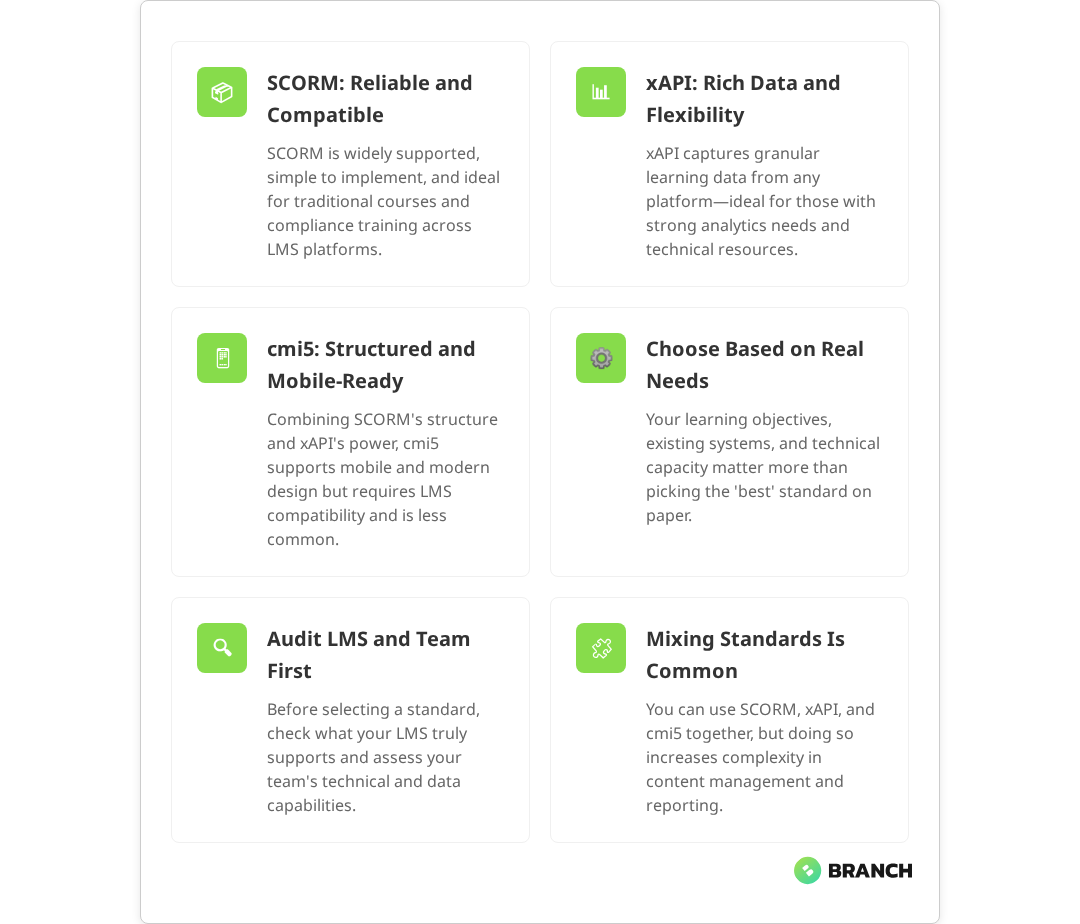
  • SCORM compatibility: Support for industry-standard eLearning content formats

LMS platforms shine in scenarios where consistency and measurability matter most. Industry research demonstrates that LMS platforms are particularly well-suited for onboarding new hires, safety training, regulatory compliance, or any situation where you need to prove that specific learning objectives were met.

Read more about eLearning standards like SCORM and xAPI that impact platform compatibility.

LXP: The Social Learning Discovery Engine

Learning Experience Platforms flip the script by putting the learner in the driver’s seat. Current research shows that LXPs use recommendation algorithms, social features, and user-generated content to create a more engaging, personalized learning environment.

Core LXP Capabilities

  • Content aggregation: Pull learning resources from multiple sources, including external providers and user submissions
  • AI-powered recommendations: Suggest relevant content based on role, interests, and learning history
  • Social learning features: Peer-to-peer content sharing, discussion forums, and collaborative projects
  • Microlearning support: Bite-sized content designed for just-in-time learning
  • Mobile-first design: Optimized for learning on-the-go across devices

Expert analyses indicate that LXPs work best for organizations focused on upskilling, professional development, and creating a culture of continuous learning. They’re particularly effective for knowledge workers who need to stay current with rapidly changing industry trends.

What the research says

  • Platform convergence is real: Industry studies from 2025 confirm that modern hybrid platforms now offer comprehensive support for both structured courses and social learning features, making the traditional LMS vs LXP distinction less relevant.
  • AI personalization delivers results: Research shows that AI-powered recommendation systems in LXPs can effectively tailor learning paths based on user behavior, role requirements, and learning history, leading to higher engagement rates.
  • Compliance tracking remains essential: Multiple sources confirm that robust reporting capabilities for audits and regulatory compliance continue to be a critical differentiator for organizations in regulated industries.
  • Implementation success varies widely: Early studies suggest that platform choice matters less than implementation quality, change management, and content strategy, though more research is needed to establish definitive best practices.

The Reality: Platforms Are Blending Features

Here’s where things get interesting – and slightly frustrating for buyers. Current market analysis reveals that the strict distinction between LMS and LXP is increasingly a marketing construct rather than a technical reality. Modern platforms are adopting features from both camps, creating hybrid solutions that challenge the traditional categories.

Today’s LMS platforms often include social learning features, content recommendation engines, and mobile-responsive designs. Meanwhile, LXP vendors are adding formal course structures, assessment tools, and compliance reporting to appeal to enterprise buyers.

FeatureTraditional LMSTraditional LXPModern Hybrid
Structured coursesCore strengthLimitedComprehensive
Social learningLimitedCore strengthComprehensive
Compliance reportingCore strengthLimitedComprehensive
Content discoveryLimitedCore strengthComprehensive
Mobile optimizationVariableCore strengthExpected standard

This convergence means you should focus less on whether a platform calls itself an LMS or LXP and more on whether its specific capabilities match your organizational needs.

Making the Right Choice: Key Decision Factors

Rather than getting caught up in platform labels, consider these practical factors when evaluating corporate learning solutions:

Organizational Learning Culture

  • Top-down training culture: LMS-heavy approach works well for standardized training programs
  • Self-directed learning culture: LXP features become more valuable for employee engagement
  • Mixed culture: Look for hybrid platforms that support both structured and exploratory learning

Primary Use Cases

  • Compliance and onboarding: LMS capabilities are essential for tracking and reporting
  • Skill development and upskilling: LXP features help with discovery and engagement
  • Leadership development: Often benefits from hybrid approach combining structure with exploration

Technical Requirements

  • Integration needs: How well does the platform connect with your existing HR, payroll, and business systems?
  • Content standards: Do you need SCORM, xAPI, or other specific eLearning format support?
  • Scalability: Can the platform grow with your organization and handle peak usage periods?
Read more about professional eLearning development processes and platform considerations.

Beyond the Platform: Implementation and Success Factors

Choosing between LMS and LXP capabilities is just the first step. The success of your corporate learning initiative depends heavily on how well you implement and integrate the chosen platform with your broader learning strategy.

Content Strategy Matters More Than Platform

The most sophisticated platform won’t drive engagement without quality content that’s relevant to your learners’ daily challenges. Consider how you’ll source, create, and maintain learning materials – whether that’s through internal subject matter experts, external vendors, or user-generated content approaches.

Change Management Is Critical

Any new learning platform represents a change in how employees access professional development. Success requires clear communication about benefits, adequate training on the new system, and ongoing support to build adoption habits.

Measurement and Iteration

Whether you choose an LMS, LXP, or hybrid approach, establish clear metrics for success beyond simple completion rates. Look at engagement patterns, knowledge retention, performance improvements, and employee feedback to continuously refine your learning strategy.

Working with Learning Technology Specialists

Implementing a corporate learning platform involves more than selecting software. It requires understanding your organization’s unique learning needs, integrating with existing systems, and creating a sustainable content strategy.

Experienced eLearning development teams can help you navigate the technical complexities while keeping focus on the human side of learning. They can assess your current training processes, recommend appropriate platform capabilities, and design custom content that works within your chosen system.

Whether you need help with custom eLearning development, LMS implementation services, or want to see how other organizations have successfully deployed learning platforms like our H-E-B corporate LMS case study, the key is finding partners who understand both the technical requirements and the learning objectives.

The Bottom Line: Focus on Learning Outcomes

The LMS vs LXP debate often misses the most important point: successful corporate learning happens when you align platform capabilities with how your people actually work and learn. Some organizations thrive with structured, compliance-focused approaches. Others need discovery-driven, social learning environments. Many need elements of both.

Instead of choosing based on platform labels, evaluate specific capabilities against your organizational needs. Look for vendors who ask about your learning objectives before pitching features. And remember that the best learning platform is the one your employees will actually use to develop skills that matter to your business.

The future of corporate learning isn’t about picking the right acronym – it’s about creating learning experiences that fit naturally into how your team works and grows together.

FAQ

Can an LMS do everything an LXP does, or vice versa?

Modern platforms increasingly blur these lines, with many LMS solutions adding social features and recommendation engines while LXPs incorporate formal course structures. However, platforms still tend to excel in their core strength – LMS for structure and compliance, LXP for discovery and engagement. The key is finding a solution that covers your primary use cases well rather than trying to do everything.

How do I know if my organization needs LMS or LXP capabilities?

Start by identifying your primary learning objectives. If you need to deliver consistent training, track completion for compliance, or manage formal certification programs, LMS capabilities are essential. If your focus is on skill development, employee engagement, and self-directed learning, LXP features become more valuable. Many organizations benefit from hybrid approaches that support both structured and exploratory learning.

What's the typical implementation timeline for a corporate learning platform?

Implementation timelines vary significantly based on platform complexity, integration requirements, and content migration needs. Simple LMS deployments might take 2-3 months, while comprehensive enterprise implementations with custom integrations can take 6-12 months. The content development and user training phases often take longer than the technical setup, so plan accordingly for change management and adoption activities.

How do learning platforms integrate with existing HR and business systems?

Most modern learning platforms offer API integrations with common HR information systems (HRIS), payroll systems, and business applications. This enables automatic user provisioning, single sign-on, and data synchronization. However, integration complexity varies significantly based on your existing tech stack. It's important to map out integration requirements early in the evaluation process and factor in potential custom development work.

Should we build a custom learning platform or buy an existing solution?

Unless you have very unique requirements or significant technical resources, buying an existing platform is typically more cost-effective and faster to implement. However, custom development makes sense if you need highly specific integrations, have complex workflow requirements that don't fit standard platforms, or want to create a learning experience that's tightly integrated with your existing business applications. Consider hybrid approaches that customize or extend existing platforms rather than building from scratch.

Fate loves determination

How Does Single Sign-On Work for LMS Platforms?

Single sign-on (SSO) for learning management systems isn’t just a nice-to-have feature anymore—it’s become table stakes for organizations serious about reducing friction in their training programs. But here’s the thing: while most modern LMS platforms claim SAML support and promise seamless SSO integration, the reality is often more nuanced than the marketing materials suggest.

If you’re a learning and development leader, IT decision-maker, or operations manager evaluating LMS options, you’ve probably noticed that SSO conversations quickly veer into technical territory that feels disconnected from your actual business needs. This guide cuts through the jargon to explain how SSO actually works with LMS platforms, what implementation really looks like, and how to make smart decisions that serve both your users and your team’s bandwidth.

What Single Sign-On Actually Does for LMS Users

At its core, SSO allows your learners to access training materials using credentials they already have—typically their company login or a platform they’re already authenticated with. Instead of creating yet another username and password combination, they click a button, get redirected briefly, and land in the LMS ready to start learning.

For internal training programs, this means employees use their existing Active Directory, Google Workspace, or Okta credentials to access professional development, compliance training, or onboarding materials. For customer-facing training, learners might authenticate through your main product login, reducing the number of accounts they need to manage and creating a more seamless brand experience.

The business value is straightforward: research consistently shows that SSO leads to fewer forgotten passwords, reduced support tickets, higher completion rates, and a more professional user experience that doesn’t make learning feel like a separate, disconnected activity.

The Technical Foundation: How SSO Protocols Work with LMS Platforms

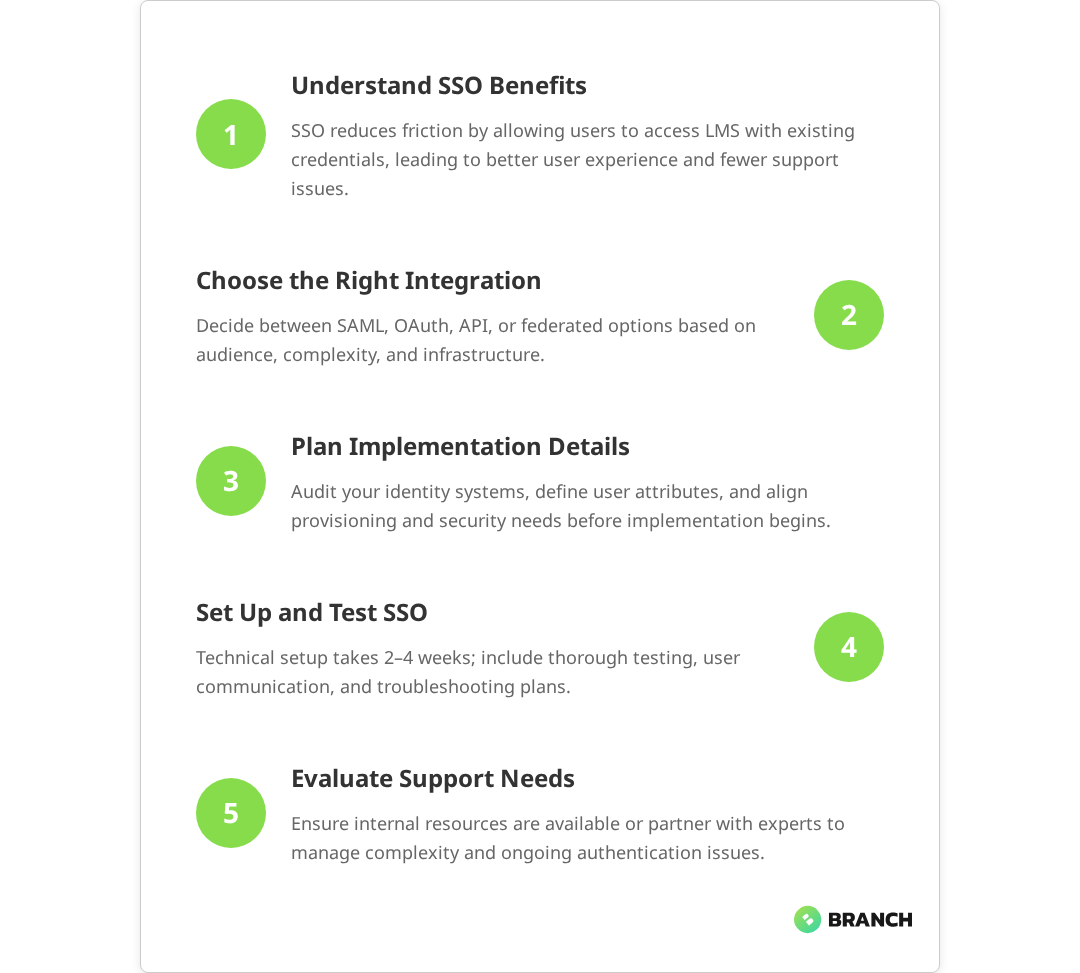
Most enterprise LMS platforms support SSO through standardized protocols, with SAML 2.0 being the most common. Here’s how the handoff actually works:

  1. User initiates login: Learner clicks “Sign in with Company Account” or similar button in the LMS
  2. Redirection to identity provider: LMS sends user to your organization’s identity provider (IdP) like Okta, Azure AD, or Google
  3. Authentication happens: User proves their identity with the IdP (or is already logged in)
  4. Assertion gets created: IdP creates a secure SAML assertion containing user identity and any relevant attributes
  5. User returns to LMS: IdP redirects user back to LMS with the encrypted assertion
  6. LMS validates and logs in: LMS verifies the assertion signature and creates or updates the user session
💡 Tip When evaluating LMS platforms, ask specifically about attribute mapping capabilities. You'll want to pass through not just basic identity info, but also department, role, or custom fields that determine what training content each user should see.

While this process sounds seamless, the devil is in the implementation details. Each identity provider has slightly different ways of formatting assertions, handling user attributes, or managing session timeouts. This is where the gap between “supports SAML” and “works perfectly with your specific setup” becomes apparent.

Common SSO Integration Patterns for LMS Platforms

Different organizations approach LMS SSO integration based on their user base, technical constraints, and business priorities. Here are the most common patterns we see:

Integration PatternBest ForTechnical ComplexityKey Considerations
Direct SAML IntegrationInternal employee trainingMediumRequires IdP configuration, attribute mapping
OAuth/OpenID ConnectConsumer or mixed audiencesMedium-HighMore flexible but requires custom development
API-Based AuthenticationEmbedded training experiencesHighFull control but significant development effort
Federated Identity BridgeMultiple identity sourcesHighComplex but handles diverse user bases

The choice between these patterns depends heavily on your specific context. If you’re rolling out compliance training to 500 employees who all use the same Active Directory, direct SAML integration is probably your most straightforward path. If you’re building customer education that needs to work for users from dozens of different companies, you might need a more sophisticated approach.

Read more about the foundational steps in eLearning platform development and how authentication fits into the broader user experience.

What the research says

  • Multiple studies confirm that SSO implementations provide significant benefits including reduced password-related support tickets and improved user adoption rates in enterprise training programs.
  • Industry research indicates that SAML 2.0 is the most widely adopted SSO protocol for LMS platforms, with OAuth 2.0 and OpenID Connect gaining traction for consumer-facing applications.
  • Implementation studies show that attribute mapping for user roles and department information often requires custom configuration work, even with platforms that advertise “out-of-the-box” SSO support.
  • Early evidence suggests that hybrid authentication models—allowing both SSO and traditional login methods—provide the most flexibility during deployment, though more research is needed on optimal rollout strategies.

The Reality of LMS SSO Implementation

Here’s where we need to have an honest conversation about what “SAML-supported” actually means in practice. While most modern LMS platforms do support standard SSO protocols, implementation often requires more technical work than organizations anticipate.

Common implementation challenges include:

  • Identity provider compatibility: Your LMS might support SAML, but specific IdPs like Google Cloud Identity Platform (GCIP) may require custom configuration work
  • Attribute mapping: Getting user roles, departments, or custom fields to flow correctly between systems often needs developer attention
  • User provisioning: Deciding whether users are created automatically on first login or need to be pre-provisioned
  • Session management: Coordinating session timeouts between your IdP and LMS to avoid confusing user experiences
  • Group and role assignment: Ensuring users land in the right courses or learning paths based on their organizational attributes

The most common pain point we see is the assumption that IT teams will prioritize LMS integration work. Training and development initiatives often compete with core business applications for developer time, and SSO setup can sit in limbo while engineering teams focus on revenue-generating features.

💡 Tip Before committing to an LMS platform, validate your internal development capacity for SSO integration work. If your team is stretched thin, look for vendors that offer white-glove implementation services or consider working with a specialized integration partner.

When SSO Makes Sense (and When It Doesn’t)

Not every LMS deployment needs SSO, and rushing into complex authentication setups can sometimes create more problems than it solves. Here’s how to think through the decision:

SSO is usually worth the effort when:

  • You’re deploying training to more than 50 regular users
  • Learning is part of a larger workflow or business process
  • You’re dealing with compliance requirements that make abandoned accounts a risk
  • Users are already authenticated in related systems (your main product, intranet, etc.)
  • You have technical resources available for proper implementation and testing

Simple username/password might be fine when:

  • You’re running short-term training programs or one-off events
  • Your audience is primarily external customers who don’t have company accounts
  • Technical resources are limited and user adoption isn’t dependent on seamless login
  • The LMS is used infrequently enough that login friction isn’t a major barrier

The key insight here is that SSO should solve a real user experience or administrative problem, not just check a technical box. If your learners are already comfortable managing training credentials separately, or if the implementation effort would delay your program launch significantly, sometimes the simpler approach wins.

Read more about LMS system integrations and how training data flows connect with broader enterprise systems.

Implementation Planning and Resource Requirements

Successful LMS SSO integration requires coordination across multiple teams and careful attention to both technical and user experience details. Here’s what realistic planning looks like:

Pre-implementation discovery:

  • Audit your existing identity infrastructure and user directories
  • Map out required user attributes and how they should influence LMS access
  • Define user provisioning and de-provisioning workflows
  • Identify any compliance or security requirements that affect authentication flows
  • Establish testing procedures for different user scenarios

Implementation phase considerations:

  • Technical setup: 2-4 weeks for standard SAML integration, longer for custom requirements
  • Testing and iteration: 1-2 weeks to work through edge cases and user scenarios
  • User communication: Plan for change management if users are switching from existing login methods
  • Monitoring and support: Establish processes for troubleshooting SSO-related login issues

The most successful implementations we’ve seen treat SSO setup as a collaborative effort between IT, learning teams, and end users, rather than a purely technical project handed off to developers.

Choosing Between Off-the-Shelf and Custom Solutions

When existing LMS platforms don’t quite fit your SSO requirements, you have several paths forward. The right choice depends on your specific constraints, timeline, and long-term learning strategy.

Extending existing LMS platforms works well when you love most aspects of a platform but need specific SSO capabilities. Many enterprise LMS vendors offer professional services to handle complex integration requirements, though this obviously increases your total cost of ownership.

Custom LMS development makes sense when your learning requirements are unique enough that off-the-shelf solutions feel limiting, or when tight integration with your existing product ecosystem is critical. The trade-off is significantly higher upfront investment and ongoing maintenance responsibility.

Hybrid approaches are increasingly common—using a standard LMS for most functionality while building custom authentication and user management layers that provide the exact experience your users need.

Read more about eLearning standards and how technical requirements like SCORM compliance interact with authentication systems.

Working with Implementation Partners

Many organizations find that LMS SSO projects benefit from external expertise, particularly when internal development resources are limited or when you’re dealing with complex identity requirements.

The right implementation partner brings experience with both the technical integration work and the organizational change management aspects of rolling out new authentication systems. They can help you navigate the gap between vendor promises and implementation realities, while ensuring your solution actually serves your users’ needs.

Key capabilities to look for include experience with your specific LMS platform, familiarity with your identity infrastructure, and a track record of delivering projects that balance technical requirements with user experience priorities. The best partnerships feel collaborative rather than transactional—your implementation partner should understand your learning goals, not just execute technical specifications.

For organizations building custom learning platforms or extending existing LMS capabilities significantly, working with a team that combines LMS implementation expertise with enterprise systems integration capabilities can streamline the entire project while ensuring all the pieces work together seamlessly.

Making Your SSO Decision

The path forward depends on your specific context, but here are the key questions that should guide your decision:

  • How many users will regularly access your LMS, and what’s their current authentication experience?
  • Do you have internal technical resources available for integration work, or will you need external support?
  • How critical is seamless authentication to your learning program’s success?
  • What other systems need to integrate with your LMS beyond authentication?
  • Are you building something that needs to scale significantly, or solving a specific near-term need?

The best SSO implementations serve your actual users and business requirements, rather than checking technical boxes or following industry best practices that don’t fit your reality. Sometimes that means accepting some login friction in exchange for faster deployment. Sometimes it means investing in custom development to create exactly the experience your users need.

If you’re evaluating LMS platforms with SSO requirements, or considering custom eLearning development that includes sophisticated authentication, the most important step is honest assessment of your technical capacity, user needs, and timeline constraints. From there, you can make informed trade-offs that serve your learning objectives without overcomplicating your technology stack.

Ready to explore how SSO integration might work for your specific LMS requirements? Let’s talk about your learning platform goals and what implementation approaches make sense for your organization.

FAQ

Do all modern LMS platforms really support SSO out of the box?

Most enterprise LMS platforms support SAML 2.0, but 'out of the box' can be misleading. While the technical capability exists, implementation often requires configuration work, attribute mapping, and testing with your specific identity provider. The gap between 'supports SSO' and 'works seamlessly with your setup' is where many organizations get surprised by the technical effort required.

How much developer time should I budget for LMS SSO integration?

For standard SAML integration with common identity providers, expect 2-4 weeks of developer time including setup, testing, and troubleshooting. More complex requirements like custom attribute mapping, multiple identity sources, or OAuth implementations can extend this to 6-8 weeks. The challenge is often securing developer time rather than the technical complexity itself.

Is SSO worth implementing for external customer training programs?

It depends on your customer base and how the training fits into their workflow. If customers are already logged into your main product and training is part of their user journey, SSO provides significant value. But if training is standalone or customers come from diverse organizations without unified identity systems, simple account creation might be more practical.

What happens when SSO integration breaks or users can't log in?

SSO issues typically stem from certificate expiration, identity provider configuration changes, or session timeout mismatches. Having fallback authentication methods and clear troubleshooting procedures is essential. Most LMS platforms allow bypass options for administrators, and good implementation includes monitoring and alerting for authentication failures.

Can we implement SSO gradually, or does it need to be all-or-nothing?

Most LMS platforms support hybrid authentication, allowing some users to authenticate via SSO while others use traditional login methods. This lets you roll out SSO to specific user groups, test thoroughly, and migrate users gradually. It's often the safest approach for large organizations or complex user bases.

Dedicated African American Female Student Engaged in Online Learning at a Modern Library. Young Woman Using Laptop for Research, Surrounded by Books and Academic Environment.

SCORM vs xAPI vs CMI5 for eLearning Standards

If you’re planning an eLearning project, you’ve probably stumbled across acronyms like SCORM, xAPI, and cmi5 and maybe wondered if choosing the wrong one could doom your training program before it starts. The good news? It’s not as dramatic as all that. The even better news? Understanding these standards isn’t rocket science, and making the right choice comes down to knowing what you’re actually trying to accomplish.

This guide is for learning and development teams, CTOs, and product owners who need to make informed decisions about eLearning standards without getting lost in technical jargon. Whether you’re building a custom training platform, selecting an LMS, or trying to figure out if your current setup is holding you back, we’ll walk through the practical differences between these three standards and help you choose the one that makes sense for your situation.

Here’s what we’ll cover: how each standard actually works, what problems they solve (and which ones they don’t), and the real-world trade-offs you’ll face when implementing them. No buzzwords, no vendor pitches just clear guidance based on what we’ve learned building eLearning solutions for organizations that range from scrappy startups to enterprise training departments.

The Standards Landscape: What Each One Actually Does

Before diving into comparisons, let’s establish what these standards are designed to accomplish. At their core, SCORM, xAPI, and cmi5 are communication protocols they define how eLearning content talks to learning management systems (LMS) and what data gets tracked along the way.

Think of them like different languages your training content can speak. Just as you’d choose Spanish over Mandarin depending on your audience, you pick an eLearning standard based on what kind of learning experiences you’re creating and what data you need to collect.

SCORM: The Reliable Workhorse

SCORM (Sharable Content Object Reference Model) has been around since 2001, making it the granddaddy of eLearning standards. SCORM 1.2 was released in October 2001 and became one of the most widely adopted versions of the standard. It defines how content packages are structured, launched, and tracked within an LMS environment covering everything from packaging content into standardized ZIP files to enabling consistent tracking across platforms.

What SCORM does well:

  • Universal compatibility virtually every LMS supports it, ensuring content works across platforms
  • Proven reliability for traditional course structures with straightforward completion tracking
  • Straightforward implementation and debugging
  • Comprehensive packaging standards for content portability

What SCORM struggles with:

  • Limited to browser-based learning within an LMS it requires an active browser session and can’t track offline or mobile app-based learning
  • Basic tracking mostly completion, scores, and time spent, with limited detail on learner interactions
  • Can’t track learning that happens outside the LMS environment
  • Sequential, course-centric approach doesn’t fit modern learning patterns

xAPI: The Ambitious Data Collector

xAPI (Experience API), also known as Tin Can API, emerged around 2013 through a research project led by the Advanced Distributed Learning initiative. Unlike SCORM’s LMS-centric approach, xAPI was designed with bigger ambitions: capturing learning activities wherever they happen mobile apps, simulations, job performance, even offline experiences.

What xAPI does well:

  • Tracks learning beyond traditional eLearning courses across diverse platforms and contexts
  • Rich data collection through statement-based tracking that captures detailed learner interactions
  • Works across platforms, devices, and environments, including offline scenarios
  • Supports complex learning analytics and reporting with granular behavioral data

What xAPI struggles with:

  • Implementation complexity requires significantly more technical expertise than SCORM
  • Needs a Learning Record Store (LRS) to function properly, adding infrastructure complexity
  • Data quality depends heavily on thoughtful implementation
  • Limited value unless you actively use the rich data it collects

cmi5: The Best-of-Both-Worlds Attempt

cmi5, finalized in 2016, tries to combine SCORM’s simplicity with xAPI’s flexibility. It uses xAPI for data transport but adds more structure around course launching and tracking requirements.

What cmi5 does well:

  • Leverages xAPI’s data richness with more standardization
  • Better mobile and responsive design support than SCORM
  • Cleaner separation between content and LMS
  • More reliable than pure xAPI implementations

What cmi5 struggles with:

  • Still relatively new with limited industry adoption
  • Fewer vendor tools and resources available
  • Requires LMS support that many systems lack
  • Added complexity compared to SCORM without always delivering proportional benefits
💡 Tip: Before getting excited about advanced analytics capabilities, audit your current data usage. If you're not actively analyzing completion rates and scores from your existing training, jumping to xAPI's rich data streams won't magically create a data-driven culture.

What the research says

Industry evidence provides clear guidance on when each standard works best:

  • SCORM’s widespread adoption is well-documented multiple studies confirm that virtually all major LMS platforms support SCORM, making it the most compatible choice for organizations needing broad platform support.
  • xAPI’s technical complexity is consistently reported research shows implementations require significantly more technical expertise, API integration skills, and ongoing system maintenance compared to SCORM.
  • Mobile learning limitations are clear for SCORM evidence confirms SCORM cannot track learning outside browser environments, making it unsuitable for offline or mobile app-based training.
  • Early evidence on cmi5 shows promise but limited adoption while combining benefits of both standards, industry adoption remains modest due to limited LMS support and fewer available tools.
  • Data utilization gaps are commonly reported organizations often choose xAPI for advanced analytics but fail to develop processes to analyze and act on the rich data it provides.

When to Choose Each Standard: A Practical Framework

The choice between SCORM, xAPI, and cmi5 isn’t about picking the “best” standard it’s about matching the right tool to your specific context and goals. Here’s a framework to help you decide:

StandardBest forSkip ifImplementation Effort
SCORMTraditional course delivery, regulatory compliance, broad LMS compatibility needsYou need mobile learning, complex analytics, or tracking outside the LMSLow
xAPILearning analytics, multi-platform experiences, performance support trackingYou lack technical resources or won’t actively use rich dataHigh
cmi5Modern course structure with better mobile support and some analyticsYour LMS doesn’t support it or you need maximum compatibilityMedium

SCORM Makes Sense When:

You’re building traditional eLearning courses that need to work across multiple LMS platforms. This is especially true for organizations that:

  • Prioritize compatibility over innovation when you need content that works everywhere without vendor-specific modifications
  • Focus on compliance training where simple completion tracking and basic scoring meet regulatory requirements
  • Have limited technical resources SCORM’s maturity means abundant tools, documentation, and vendor support
  • Work with external training vendors most off-the-shelf eLearning content comes in SCORM format

A healthcare organization rolling out mandatory safety training across multiple hospital systems would likely choose SCORM. They need reliable tracking, broad compatibility, and don’t require sophisticated analytics just proof that staff completed required modules.

xAPI Makes Sense When:

You’re serious about learning analytics and need to track diverse learning activities. Consider xAPI if you:

  • Track learning beyond formal courses mobile apps, job aids, simulations, or real-world performance
  • Have analytics capabilities and intent dedicated staff to analyze rich data and act on insights
  • Support complex learning ecosystems multiple platforms, informal learning, social learning components
  • Need granular reporting detailed learner journeys, competency mapping, or personalized learning paths

A software company building an internal developer training program might choose xAPI to track everything from code commits and peer reviews to formal course completions, creating a comprehensive picture of skill development.

Read more: Deep dive into technical implementation details for SCORM, xAPI, and cmi5 standards.

cmi5 Makes Sense When:

You want some of xAPI’s benefits without full complexity, and your LMS supports it. Consider cmi5 if you:

  • Need better mobile experiences than SCORM provides but don’t require full cross-platform tracking
  • Want structured analytics more than SCORM offers, but with less implementation complexity than xAPI
  • Have modern LMS infrastructure that supports cmi5 and you’re not constrained by legacy systems
  • Plan to evolve toward richer analytics cmi5 can be a stepping stone to full xAPI implementation

A mid-sized consulting firm updating their learning infrastructure might choose cmi5 to modernize their training delivery while maintaining structured course formats their learning team understands.

Implementation Reality Check: What Actually Happens

Theory is one thing; implementation reality is another. Based on what we see in practice, here are the factors that often matter more than technical specifications:

The LMS Compatibility Question

Your LMS choice often constrains your standard options more than your ideal learning strategy does. Many organizations discover their “modern” LMS has spotty xAPI support or no cmi5 capability at all. Before falling in love with a standard, audit what your current (or planned) LMS actually supports not what the marketing materials claim.

Development Resource Requirements

SCORM development can often be handled by instructional designers with basic technical skills and readily available authoring tools. xAPI implementations typically require developers who understand JSON, REST APIs, and learning record store architecture. cmi5 falls somewhere in between but requires specialized knowledge that’s still scarce in the market.

Content Authoring Tool Limitations

Most off-the-shelf authoring tools Articulate, Captivate, Lectora export primarily to SCORM with limited xAPI support. If you’re planning to use these tools, xAPI or cmi5 might add development overhead that negates their benefits.

The Data Analysis Gap

This is the big one: many organizations that choose xAPI for its rich analytics never actually analyze the rich data. They get excited about granular learner statements and detailed interaction tracking, then discover they lack the staff, tools, or processes to turn that data into actionable insights. It’s like buying a race car when you mostly drive to the grocery store.

Making the Decision: A Step-by-Step Process

Rather than starting with technical features, begin with your actual requirements and constraints. Here’s a practical decision process:

Step 1: Define Your Tracking Requirements

Be honest about what you actually need to measure:

  • Compliance tracking: Did employees complete required modules? (SCORM handles this fine)
  • Basic progress monitoring: How far did learners get, what scores did they achieve? (SCORM or cmi5)
  • Learning analytics: What specific interactions, behaviors, or learning paths lead to better outcomes? (xAPI)
  • Cross-platform tracking: Learning that happens in mobile apps, on the job, or across multiple systems? (xAPI)

Step 2: Assess Your Technical Capabilities

Evaluate your team’s current skills and bandwidth:

  • Do you have developers comfortable with APIs and data integration?
  • What authoring tools does your team currently use?
  • How much time can you realistically dedicate to implementation and maintenance?
  • Do you have data analysis capabilities to make use of rich tracking data?

Step 3: Review Your Infrastructure

Check what your current systems actually support:

  • LMS capabilities and roadmap
  • Learning record store availability (for xAPI)
  • Integration requirements with other systems
  • Mobile and responsive design requirements

Step 4: Consider Your Timeline and Budget

Different standards have different implementation costs:

  • SCORM: Lower upfront costs, abundant vendor options, faster implementation
  • xAPI: Higher development costs, need for LRS, ongoing data management overhead
  • cmi5: Medium complexity, fewer vendor options, potential future-proofing benefits
💡 Tip: Start with a small pilot project to test your chosen standard in practice. Build one course or learning module using your selected approach before committing to organization-wide implementation. You'll uncover integration issues, workflow problems, and team capabilities that aren't obvious from theoretical planning.

When to Build Custom vs. Extend Existing Tools

Sometimes the standard you choose matters less than whether you build custom solutions or work within existing platform constraints. Here’s when each approach makes sense:

Extend Existing Tools When:

  • Your current LMS meets most needs with minor gaps
  • You have limited development resources
  • Compliance and basic tracking satisfy your requirements
  • Your learning team is comfortable with existing workflows

Build Custom When:

  • Your learning requirements don’t fit standard LMS patterns
  • You need tight integration with performance support tools
  • Advanced analytics are central to your learning strategy
  • You have development resources and long-term maintenance capability

Partner with Specialists When:

You know what you want to achieve but lack the internal expertise to implement it effectively. A team like Branch Boston can help you navigate the technical complexity while keeping focus on your actual learning objectives whether that means building custom eLearning platforms that support multiple standards or implementing LMS solutions that align with your chosen approach.

The key is finding partners who understand both the technical capabilities of different standards and the practical realities of learning and development teams. You want implementers who ask about your learning objectives before they start talking about APIs.

Looking Forward: Trends and Practical Recommendations

The eLearning standards landscape continues evolving, but slowly. SCORM isn’t disappearing anytime soon too much content and too many systems depend on it. xAPI adoption is growing but remains concentrated in organizations with specific analytics needs and technical capabilities. cmi5 is gaining traction as a middle path, but adoption varies significantly by industry and use case.

Our practical recommendations:

  • Default to SCORM unless you have specific requirements it can’t meet. It’s boring, but it works.
  • Choose xAPI when you have clear analytics goals, technical resources, and commitment to acting on rich data.
  • Consider cmi5 when your LMS supports it and you want some modernization without full xAPI complexity.
  • Plan for evolution build your eLearning infrastructure in ways that allow you to add capabilities over time rather than requiring complete rebuilds.

Most importantly, remember that the standard is just the plumbing. Great learning experiences depend more on instructional design, user experience, and organizational commitment than on which technical standard you choose. Pick the one that fits your current reality and capabilities, then focus on creating training that actually helps people do their jobs better.

If you’re looking to understand the broader eLearning development process or need help integrating training data with performance management systems, those decisions will likely have more impact on your program’s success than standard selection. But getting the standard choice right ensures your technical foundation supports rather than constrains your learning objectives.

Want to explore how these standards might work in your specific context? Our eLearning services team helps organizations navigate these decisions based on real requirements rather than theoretical capabilities. We’ve implemented all three standards across different industries and can help you cut through the complexity to find what actually works for your situation.

FAQ

Can I use multiple eLearning standards within the same LMS?

Yes, most modern LMS platforms support multiple standards simultaneously. You might use SCORM for legacy content, xAPI for new analytics-driven modules, and cmi5 for mobile-optimized courses. However, this creates complexity in content management and reporting that should be weighed against the benefits of standard-specific features.

Is xAPI worth the implementation complexity if I just want better mobile support?

Probably not. If mobile compatibility is your primary concern, cmi5 offers better mobile support than SCORM with less implementation overhead than full xAPI. Alternatively, responsive SCORM content or mobile-optimized authoring tools might meet your needs without changing standards at all. Reserve xAPI for situations where you genuinely need its cross-platform tracking and rich analytics capabilities.

What happens to my existing SCORM content if I switch to xAPI or cmi5?

Your existing SCORM content will continue working in any LMS that supports SCORM which is virtually all of them. You don't need to convert everything at once. Many organizations run mixed environments, using SCORM for stable content while building new experiences in xAPI or cmi5. Conversion is possible but often not worth the effort unless content needs significant updates anyway.

Do I need a Learning Record Store (LRS) to use xAPI, and what does that involve?

Yes, xAPI requires an LRS to store and retrieve learning statements. This can be standalone software, a cloud service, or functionality built into your LMS. The LRS becomes another system to maintain, backup, and secure. You'll also need processes for data management, privacy compliance, and integration with other systems that need access to learning data.

How do I know if my current LMS actually supports the standard I want to use?

Test with real content, don't rely on marketing claims. Many LMS vendors claim xAPI or cmi5 support but have limited implementations that don't work with all content types or authoring tools. Request a technical demo with sample content similar to what you plan to build, and ask specific questions about features like mobile support, offline capabilities, and data export options.

Hand, business and sticky note with planning, ideas and creativity for novel and schedule for writing.

Professional eLearning Development Process – Part 1


Details of the eLearning Development Process

Many efforts get key steps of the eLearning development process wrong, yet having the right approach is vital to the success of your project. There is a lot of talk today about competing methodologies (Agile, Spiral, etc.). To understand how these new models might be applied to online training, you must first have a solid grasp on the details of a good, traditional approach.
In another article, we covered the traditional eLearning development process at a very high level. We also briefly outlined some alternatives. It is helpful to dive into the traditional development approach in more detail. After all, the details of planning virtual learning courses are what people often get wrong, even those who have been doing this a while. Whether you are new and trying to develop your first project plan or schedule or you are a client looking to grasp the steps involved in professional eLearning development, you will benefit from understanding the details.
In the first segment of this detailed, two-part series on the professional eLearning development process, we cover the steps from the project kickoff to final storyboard approval. In part 2, we will cover a recommended media development approach.

Steps of the eLearning Development Process

1) Project Kick-Off Meeting

This initial meeting will cover several things:

  • Team introductions
  • Target audience
  • Identification of key influencers and approvers for the project
  • Overall project goals
  • Plan for tracking development progress
  • Other means of communication
  • Target platforms and devices
  • Schedule of content review meetings
  • Project limits such as:
  • Total desired length of eLearning
  • Financial limitations
  • Final deadline
  • Dangers to scope

Often those creating the training are far more invested in the content than the target audience.

During the team introductions, it is vital to establish the Subject Matter Experts (SMEs) for various parts of the project. Also, never underestimate the value of a good discussion about the target audience. To be successful, you must figure out how to make the training valuable to the target audience. Understanding the target audience drives the eLearning content more than any other factor.
It’s vital to establish the key influencers and approvers for the project. A common mistake clients make is waiting until AFTER the first version of the eLearning is created to get the key approvers involved. This tactic is tempting because this phase of development is easiest to review and takes the least amount of time or communication. Nonetheless, it is VITAL that anyone who can stop approval of the project be involved in every approval step if at all possible. Otherwise, a key approver can introduce changes to scope at a point when there may not be adequate time or budget to implement those changes.
It is worth noting that a full schedule is usually not established at this point because the content needs to be reviewed before an accurate schedule can be developed. Often clients WANT a full schedule at this meeting, but it is like trying to build a detailed schedule for building a house when a rough blueprint has not even been created yet. At this point, you may be able to estimate general phases, but any attempts at a detailed schedule are really educated guesswork. Instead, put together a plan for when a full schedule can be established and schedule the content review meetings. While the best time to finalize a full detailed schedule is after the outline is fully created and approved, the development team can often publish a draft detailed schedule before this, modifying it after the outline is approved.
The meeting should also cover a list of things that could increase the scope of the project, especially since these are often these are not obvious to the client or even the development team. (We will cover a list of potential scope dangers in another post.)

2) Content Meeting(s)

The size of the project often dictates how many content meetings are needed. For small projects, you may only need one, but very large projects, there may actually be a series of meetings.
Content meetings may involve anything from reviewing previous course material to taking notes as content experts talk and answer questions.

These meetings should be recorded, if at all possible.

The instructional designer will both focus and the content and ask what related visual assets may already exist. Since this is the primary person on the development team who knows where the content is going, the instructional designer must take the lead in gathering assets.
Failing to take advantage of existing visual assets can have a couple of consequences. It can either drive the cost of the project up as the creative team recreates things they don’t know already exist, or it can makes the project less visually appealing as those key elements are missed.
To make sure the collected assets are high enough quality to actually be used, the instructional designer must be educated in video and file formats and communicate the necessary specifications. The instructional designer must also verify the rights to the assets being used.
Again, it does not make sense to push this asset gathering work onto a different resource. The instructional designer knows best where the content will go and has the most contact with the SMEs. For an efficiently run project, the instructional designer is the right person to lead asset gathering.

3) Research and Study of Content

The instructional designer studies the content further and also works to understand the audience fully. This process often involves reviewing client-provided materials, as well as other outside material created on the subject. The instructional designer may communicate with the client via email or phone to get any questions answered.
Several issues are commonly encountered during this phase:

These are all potential challenges the instructional designer must anticipate and know how to address.

  • The client wants to cover far more content than the time allotted for the eLearning.
  • The client’s content is contradictory. One place it says one thing, and, in another place, it says something else. Even the client SMEs may be in disagreement.
  • The client’s content is so high level and lacking in detail that it would not really be a benefit to the target audience.
When issues such as these arise, the instructional designer works with the project manager to arrange additional client meetings. Sometimes these issues are easily remedied with a single meeting. Other times, it takes getting all the client SME’s in the same room so they can debate the issues and reach a consensus.

4) Course Outline Creation

Once all big issues are sorted out, the instructional designer creates an outline with learning objectives. Good instructional design organizes the content in a logical flow for the target audience. Even though the outline is often brief, it usually accomplishes several key things, including:
  • Referencing in detail the source material to be used both for content and visual assets;
  • Providing high-level descriptions of the types of interactions that will be created;
  • Estimating the length of each major part of the outline; and
  • Listing what NEW assets need to be created, including graphics, video, animation, and audio requirements.
Eighty percent of the instructional design happens during this step. After this point, the ID work focuses more on writing and storytelling.

5) Internal Outline Review and Detailed Schedule for eLearning Development

The project manager, instructional designer, and creative lead should meet together to review the outline. The creative lead is often able to provide vital input to make the interactive or animated segments better or alternative ideas to be included in the outline as possibilities.
A high-level schedule may have been drafted a little earlier in the process as the content requirements became clear. At this point, it is time for the team to create a full detailed schedule, which will show the client when the various review cycles are during the eLearning development process. (We will detail what this schedule may include in a later post.)
The common mistake associated with this step is trying to schedule any portion of the creative work before content is fully approved. It is the primary way money and time are wasted in eLearning media development.

6) Outline and eLearning Development Schedule Review Meeting

The purpose of this meeting is to review the outline document and collect client feedback. In most cases, no or minimal changes are needed. That’s because the content meetings held earlier in the process tend to develop a clear picture of how the eLearning needs to unfold, and the outline is a reflection of this. Also during this step, the schedule is reviewed and adjusted, as needed.

7) Outline and eLearning Development Schedule Edits

If any changes were requested to the outline, that document must be updated, which usually only takes a few days at most. The exception is when new content was added. If this happens, additional content meetings are scheduled, as needed. Whenever changes are made to the outline, the draft schedule must also be revisited to see if updates are necessary.

8) Outline and Final eLearning Development Schedule Approval Meeting

If any other changes to the outline or schedule are needed, they are usually made during this meeting so final approval can be given.

9) Scripting / Light Storyboard Development

Next, the instructional designer creates a script or storyboard with visual asset notes. The initial draft typically does not include test questions because changes to the storyboard could require them to be reworked.
During the writing process, we almost always involve a second editor or writer. We have a saying about writing that we apply even to ourselves: “People like two types of writing: good writing and their own writing.”

People like two types of writing: good writing and their own writing.

Even the best writers are not always the best evaluators of their own work.

Another step we always take is listening to the script being read aloud, either by another team member or computer-generated audio. We have never seen a script escape important changes as a result of this auditory review.

10) Internal Script Review Meeting

People called to develop creative and interactive elements must have the opportunity to review the ideas for them. Very small tweaks at this point can often dramatically improve the final eLearning experience. Unrealistically scripted interactions can be modified to be in line with the budget and schedule. The team can ask questions about existing assets, and the list of new assets can be considered in light of the development budget. Even the narrative flow can be evaluated against planned visual ideas. When this review step is skipped and issues are recognized after client approval, it is very awkward to correct them.

One of the worst mistakes you can make at this point is to send a script or storyboard off for client review without giving representatives of the whole team a chance to review the script.

Also, if a visual or interaction described is unclear, a graphic or quick sketch can be created and included in the storyboard to communicate the vision of what is to be developed. Even grabbing a screenshot from a previous project can be helpful. For instance, “The game described here will look similar to this image from another course.”

Now we have seen a lot of development teams expend a lot of effort at this point in new asset creation. We strongly recommend against doing so. Right now in the process, the client has only approved an outline. It is much better to save your development hours for a more fully approved script. The client may still have some really good ideas coming that could totally change the planned graphics. If you limit yourself during this step to descriptions and existing visual examples, incorporating any new good ideas from the client is quite painless.

11) Client Script Review Meeting

Normally this script or storyboard document is also reviewed in a client meeting, and feedback is recorded. Depending upon the client’s experience eLearning development and the complexity of the project, a storyboard walk-through and narrative read can be helpful here.

12) Application of Client Feedback

Client feedback is incorporated into the storyboard. If the feedback was significant, another round of meetings is necessary. If the feedback was extremely minor, the document can simply be sent back to the client for for approval. Test questions should also be created and included with this final storyboard draft.

Again, the key is to value everyone on the team and get their buy-in before sending something back to the client for approval.

If changes were made to parts that impact creative media, the instructional designer runs these by the creative media team before sending the storyboard back to the client. After all, a single out-of-place sentence can throw a wrench in a planned animation. Also, something that seems like a small requirement change to a game or interaction may make a bigger development impact than a non-developer might realize. Involving the team again at this step avoids many potential issues later.

13) Client Approval Meeting

This meeting is usually held to review changes made to the storyboard since the last draft, make any remaining tweaks, and get final approval. Now that you have a final storyboard, you are ready for full production to begin.

Continue Reading

We cover related topics in these articles:

A Professional Partner in the Process

If you are looking for a team of eLearning professionals to guide you through these steps as well as media development, Branch Boston has the resources and expertise for successful results. We deliver quality solutions to large corporations, small businesses, and non-profits. Contact us to learn more about our custom eLearning courses, eLearning games, creative video production, and dynamic websites and applications.

Other Articles on This Topic on Other Sites

Here are some similar articles on this topic:

The Latest From Our Blog