Woman watching online video course, training conference inside office at workplace. Office worker in headphones using laptop for remote meeting, writing data in notebook.

How to Test SCORM Compliance in eLearning

Testing SCORM compliance isn’t just about checking boxes it’s about ensuring your eLearning content actually works when real learners need it most. Whether you’re a learning and development leader evaluating a new course or a product owner launching an enterprise training platform, SCORM compliance testing can make the difference between seamless learning experiences and frustrated users stuck with modules that won’t load, track, or report properly.

The challenge? SCORM testing often gets treated as an afterthought, squeezed into tight project timelines with makeshift processes that miss critical issues. Many teams rely on rigid Excel checklists that don’t capture the nuanced ways eLearning content can fail across different learning management systems, devices, and user scenarios.

This guide walks through a practical approach to SCORM compliance testing covering what to test, when to test it, and how to structure your QA process for reliable results without endless back-and-forth.

Understanding SCORM Compliance Beyond the Basics

SCORM (Sharable Content Object Reference Model) compliance means your eLearning content can communicate effectively with any SCORM-conformant LMS. Research confirms that SCORM compliance enables seamless interoperability between eLearning content and SCORM-compatible platforms, allowing consistent delivery and tracking without custom coding. But “compliance” isn’t binary there are degrees of compatibility, and real-world performance depends on how well your content handles the specific quirks of different learning platforms.

At its core, SCORM defines three key areas of interaction:

  • Launch and initialization: Can the LMS successfully start your content and establish communication?
  • Runtime communication: Does your content properly send completion status, time spent, scores, and other tracking data?
  • Content packaging: Are all files correctly bundled and referenced so the LMS can import and deploy your content?

Industry analysis shows that these three components work together to enable content packaging, runtime environment communication via JavaScript API, and proper sequencing. Most compliance failures happen not because teams ignore SCORM requirements, but because they test in controlled environments that don’t reflect real deployment scenarios. A course that works perfectly in your authoring tool’s preview might struggle with specific LMS configurations, network conditions, or user behaviors.

💡 Tip Test SCORM compliance early in development, not just at the end. Catching packaging or communication issues during content creation saves significant rework compared to discovering them during final QA or after deployment.

What the research says

Multiple studies and industry analyses reveal key insights about effective SCORM compliance testing:

  • Early testing significantly reduces development costs: Industry best practices show that testing during content creation rather than at project end prevents delays and ensures smoother LMS integration.
  • Both technical and experiential validation are necessary: Effective testing must cover technical aspects like API communication and user experience elements such as navigation and responsiveness across devices.
  • Package integrity issues are the most common failure points: Studies of SCORM troubleshooting reveal that missing file references, case sensitivity mismatches, and incomplete resource declarations account for the majority of deployment problems.
  • Cross-platform compatibility varies significantly: Research indicates that content working in one LMS may behave differently in another due to browser compatibility, security policies, and platform-specific implementations.
  • Mobile testing is increasingly critical: With growing mobile learning adoption, testing across devices is essential but often overlooked in traditional compliance processes.

Building a Systematic Testing Workflow

Effective SCORM testing requires both technical validation and user experience verification. Research shows that comprehensive testing must cover functional aspects like data verification alongside learner-facing elements such as navigation usability and cross-platform compatibility. Many teams focus heavily on the technical side checking that API calls work and data transfers correctly while overlooking how real users will interact with the content across different contexts.

Here’s a structured approach that addresses both dimensions:

Testing PhaseFocus AreaKey CheckpointsTools & Methods
Pre-deploymentPackage integrityManifest validation, file structure, metadata accuracySCORM validators, manual package inspection
Initial integrationLMS communicationLaunch success, API initialization, basic data flowLMS test environments, browser dev tools
Functional testingLearning experienceNavigation, content display, interaction responsivenessCross-device testing, user scenario walkthroughs
Data validationTracking accuracyCompletion tracking, score reporting, time calculationsLMS reporting tools, data export verification
Edge case testingError handlingNetwork interruptions, browser crashes, incomplete sessionsControlled disruption testing, recovery scenarios

The key insight from teams who do this well: collaborative testing tools significantly outperform rigid spreadsheet checklists. Rather than passing around Excel files with static checkboxes, successful teams use visual feedback platforms and project management tools that allow testers to attach screenshots, tag specific issues, and track resolution progress in real-time.

Read more about structuring professional eLearning development workflows for better quality outcomes.

Common Compliance Issues and How to Catch Them

Most SCORM compliance problems fall into predictable categories. Understanding these patterns helps you design more targeted testing that catches issues before they reach learners.

Package and Manifest Problems

These are often the easiest to fix but can completely break content deployment. Troubleshooting guides consistently identify these common manifest issues:

  • Missing or incorrect file references in the manifest (imsmanifest.xml)
  • Case sensitivity issues where file names don’t match exactly between manifest and actual files
  • Incomplete resource declarations that leave out CSS, JavaScript, or media files
  • Incorrect SCORM version declarations that don’t match your content’s actual implementation

Runtime Communication Failures

These issues typically surface during actual learning sessions. Technical analysis reveals that proper initialization timing and data formatting are critical for successful SCORM communication:

  • Initialization timing problems where content tries to communicate with the LMS before the API is ready
  • Data format mismatches in how scores, completion status, or learner responses are structured
  • Session management issues when learners pause, resume, or navigate away from content
  • Character encoding problems that corrupt text or break data transmission

Cross-Platform Inconsistencies

Content that works in one LMS might behave differently in another:

  • Browser compatibility variations in how different LMS platforms render content
  • Security policy differences that block certain JavaScript functions or external resources
  • Mobile responsiveness gaps where content doesn’t adapt properly to smaller screens
  • Network handling differences in how various LMS handle slow connections or timeouts
💡 Tip Create a testing checklist specific to your organization's LMS landscape. If you primarily use Moodle and Canvas, focus your compliance testing on those platforms' specific behaviors rather than trying to test against every possible LMS configuration.

Choosing the Right Testing Tools and Processes

The testing tools you choose significantly impact both the thoroughness of your QA process and how efficiently your team can collaborate on fixes. Based on how successful eLearning teams actually work, here are the most effective approaches:

Technical Validation Tools

Collaborative QA Platforms

Instead of managing testing through static spreadsheets, teams are increasingly adopting visual feedback tools that integrate with their existing project management workflows:

  • Visual feedback platforms allow testers to capture screenshots with annotations directly on the content being tested
  • Task export capabilities let you push identified issues directly into tools like Trello, Asana, or Jira for developer assignment and tracking
  • Progress tracking features give stakeholders real-time visibility into testing status without constant status meetings

The shift toward more dynamic, visual testing approaches reflects a broader recognition that eLearning QA involves both technical validation and user experience evaluation areas where static checklists often fall short.

When to Test In-House vs. When to Engage Specialists

SCORM compliance testing sits at the intersection of technical implementation and learning experience design. For many organizations, the question isn’t whether to test, but how much testing expertise to develop internally versus when to bring in specialized help.

Good Candidates for In-House Testing

  • Organizations with consistent LMS platforms and predictable content types
  • Teams that regularly produce eLearning content and can develop institutional testing knowledge
  • Projects with straightforward SCORM requirements and minimal custom interactions
  • Situations where internal learning and development teams have bandwidth for systematic QA processes

When Specialist Support Makes Sense

  • Multi-LMS deployments: Testing across multiple learning platforms requires deep knowledge of platform-specific quirks
  • Custom interactions and assessments: Complex content with unique tracking requirements needs specialized SCORM implementation expertise
  • High-stakes deployments: Mission-critical training programs where compliance failures have significant business impact
  • Tight timelines: When internal teams lack the capacity to develop robust testing processes quickly
Read more about SCORM, xAPI, and cMI5 standards implementation and how they impact your eLearning strategy.

The key insight: SCORM compliance testing is most effective when it’s integrated into your broader eLearning development process, not treated as a separate, final-stage activity. Whether you handle testing internally or work with specialists, the goal is creating systematic feedback loops that catch issues early and ensure consistent quality across all your learning content.

Getting Started: Your First SCORM Testing Implementation

If your organization is moving from ad hoc testing to a more systematic approach, start with these practical steps:

  1. Audit your current process: Document how SCORM testing currently happens (or doesn’t happen) in your content development workflow
  2. Identify your critical test scenarios: Based on your actual LMS environment and learner contexts, define the most important compatibility and functionality tests
  3. Choose appropriate tools: Select testing and collaboration tools that integrate well with your existing development and project management systems
  4. Pilot with a single project: Test your new process on one eLearning project to identify gaps and refine your approach before rolling it out broadly
  5. Build institutional knowledge: Document lessons learned and create resources that help your team consistently apply effective testing practices

For organizations building significant eLearning capabilities, consider how SCORM compliance testing fits into your broader technology and content strategy. Testing isn’t just about avoiding immediate problems it’s about building reliable, scalable processes that support your organization’s learning goals over time.

💡 Tip Start measuring your testing process effectiveness by tracking metrics like time-to-fix for discovered issues, number of post-deployment problems, and user satisfaction scores. These metrics help you refine your approach and demonstrate the value of systematic compliance testing.

Working with eLearning Development Partners

When working with external eLearning development teams, SCORM compliance testing becomes a shared responsibility that requires clear coordination. The most successful partnerships establish testing protocols early and maintain ongoing communication throughout the development process.

Effective collaboration typically involves:

  • Shared testing environments: Both teams need access to realistic test scenarios that mirror your actual deployment conditions
  • Clear responsibility mapping: Who handles initial technical validation versus user experience testing versus final deployment verification
  • Iterative feedback loops: Regular testing checkpoints that catch issues while they’re still easy to fix
  • Documentation standards: Consistent approaches to documenting testing results, issues, and resolutions

Teams experienced in eLearning standards implementation bring valuable expertise in anticipating platform-specific issues and designing content that works reliably across different LMS environments. This expertise becomes particularly valuable for organizations managing complex learning ecosystems or deploying content across multiple platforms.

The key is finding development partners who treat SCORM compliance as an integral part of the learning experience design process, not just a technical checkbox to complete at project end.

FAQ

How long should SCORM compliance testing typically take?

Testing duration depends on content complexity and deployment scope, but plan for 15-25% of your total development timeline. Simple, single-LMS deployments might need just a few days, while complex, multi-platform content can require 2-3 weeks of thorough testing. Starting testing early in development, rather than saving it for the end, significantly reduces overall timeline impact.

Can we test SCORM compliance without access to our production LMS?

Yes, but with limitations. Tools like SCORM Cloud provide excellent initial validation and cross-LMS compatibility testing capabilities. However, you'll still need to test in an environment that closely matches your production LMS configuration, including user roles, security settings, and integration specifics. Many organizations use LMS staging environments or sandbox instances for realistic testing.

What's the difference between SCORM 1.2 and SCORM 2004 for testing purposes?

SCORM 2004 offers more sophisticated tracking capabilities and better error handling, but also introduces more complexity in testing. SCORM 1.2 is simpler and more widely supported, making it easier to test and troubleshoot. Your choice should align with your specific tracking requirements and LMS capabilities. Most testing processes can handle both, but SCORM 2004 may require additional validation steps for advanced features.

How do we handle SCORM testing when content includes custom JavaScript or external integrations?

Custom code requires additional testing layers, including security policy validation, cross-browser compatibility checks, and API integration verification. Test these elements separately before full SCORM package testing, and pay special attention to how different LMS platforms handle external resources and JavaScript execution. Document any platform-specific requirements or limitations for future reference.

Should we test SCORM compliance on mobile devices?

Absolutely, especially if your learners access content on tablets or smartphones. Mobile testing should cover touch interactions, responsive layout behavior, and offline capability (if supported). Many SCORM compliance issues only surface on mobile devices due to different browser behaviors, network conditions, and user interaction patterns. Include representative mobile devices in your standard testing process.


Cloud technology, cloud computing symbol, random numbers and others elements which creating abstract 3D information technology illustration

What Are the Key Benefits of Cloud Migration for Enterprise Organizations

Enterprise cloud migration has become more than just a technology trend—it’s a strategic necessity for organizations looking to stay competitive and agile in today’s digital landscape. Yet despite widespread adoption, many enterprise leaders still grapple with fundamental questions: What tangible benefits will cloud migration deliver for their specific organization? How can they avoid common pitfalls that lead to cost overruns or failed implementations?

This guide examines the real-world benefits of cloud migration for enterprise organizations, drawing from practical experience and addressing the concerns that keep CTOs, IT leaders, and digital decision-makers up at night. We’ll explore not just the promised advantages, but also the mechanisms that make them work—and the conditions under which they deliver genuine value.

The Operational Foundation: How Cloud Migration Transforms Enterprise IT

Before diving into specific benefits, it’s crucial to understand how cloud migration fundamentally changes enterprise operations. The shift from on-premises infrastructure to cloud services isn’t simply about moving servers—it’s about adopting entirely different operational models that can unlock new capabilities.

Cloud platforms provide infrastructure-as-code capabilities, allowing teams to provision, configure, and manage resources through automated scripts rather than manual processes. Research shows that this approach can dramatically reduce deployment times—turning processes that once took weeks into tasks completed in minutes while enabling consistent, repeatable deployments that reduce human error and improve reliability.

The shared responsibility model of cloud providers also fundamentally shifts how enterprises think about infrastructure management. Under this model, cloud providers handle the underlying hardware, networking, and core security infrastructure while organizations retain control over their applications and data. This division of labor allows internal teams to focus on business-differentiating activities rather than maintaining servers.

Elastic Resource Management

Perhaps the most transformative aspect of cloud infrastructure is its elastic nature. Traditional on-premises deployments require organizations to provision for peak capacity, leaving resources idle during normal operations. Cloud platforms automatically scale resources up or down based on actual demand, fundamentally changing both cost structures and operational capabilities. Studies show this elasticity can reduce overprovisioning costs by up to 23% on average, while some organizations see reductions in excess capacity costs of up to 40%.

Speed and Agility: Accelerating Development and Time-to-Market

One of the most immediate benefits enterprises experience after cloud migration is dramatically faster development cycles. Multiple studies confirm that development teams can spin up new environments, test configurations, and deploy applications at a pace that would be impossible with traditional infrastructure.

This speed advantage manifests in several ways:

  • Rapid prototyping and experimentation: New services, databases, or computing resources can be provisioned instantly, enabling teams to test ideas and validate concepts without lengthy approval processes or hardware procurement delays.
  • Infrastructure-as-code deployment: Entire application stacks can be deployed consistently across development, testing, and production environments using automated scripts. This approach eliminates configuration drift and environment-specific issues that commonly plague traditional deployments.
  • Parallel development workflows: Multiple teams can work simultaneously on different components without resource conflicts, each with their own isolated cloud environments.

The real-world impact can be striking. Industry reports show that development teams can deliver features in weeks that previously took months, not because they’re coding faster, but because they spend less time waiting for infrastructure and more time building actual functionality.

💡 Tip: When evaluating cloud migration benefits, focus on measuring deployment frequency and lead time for changes rather than just infrastructure costs. These operational metrics often reveal the greatest value of cloud adoption.

Cost Optimization Through Dynamic Resource Allocation

While cloud migration doesn’t automatically reduce costs, it fundamentally changes how organizations can optimize their spending. The shift from capital expenditure (CapEx) to operational expenditure (OpEx) model allows for much more precise alignment between resource consumption and actual business needs.

Usage-Based Economics

Traditional on-premises infrastructure requires organizations to invest in hardware based on projected peak capacity. This leads to significant over-provisioning, as most systems operate well below their maximum capacity most of the time. Cloud platforms enable pay-for-what-you-use models that can dramatically reduce waste—with some organizations achieving 20-40% reductions in total cost of ownership by eliminating over-provisioning inefficiencies.

Key cost optimization mechanisms include:

  • Auto-scaling groups: Automatically add or remove compute resources based on actual demand, ensuring you’re not paying for idle capacity during low-traffic periods.
  • Reserved instance pricing: Commit to longer-term usage for predictable workloads to receive significant discounts compared to on-demand pricing.
  • Spot instance utilization: Use surplus cloud capacity at reduced rates for non-critical or batch processing workloads.
  • Storage tiering: Automatically move infrequently accessed data to lower-cost storage tiers without manual intervention.

However, cost optimization requires active management. Organizations that simply “lift and shift” their existing architectures to the cloud without redesigning for cloud-native patterns often see higher costs than their previous on-premises deployments. This occurs because these migrations fail to take advantage of cloud efficiencies and may result in overprovisioning that can be up to 15% more expensive in the long run.

Read more: How to optimize cloud costs after migration and avoid common spending pitfalls.

Enhanced Reliability and Disaster Recovery

Enterprise-grade reliability and disaster recovery capabilities that were once prohibitively expensive for most organizations are now accessible through cloud platforms. Major cloud providers operate multiple data centers across different geographic regions, offering levels of redundancy that would cost millions for enterprises to build independently.

What the research says

  • Cloud providers maintain geographically distributed infrastructure with 99.999% availability through advanced redundancy systems, including locally redundant storage and geo-replication capabilities.
  • Hardware redundancy with automatic failover can limit service interruptions to just seconds or minutes when component failures occur within a data center.
  • Enterprise organizations report significant improvements in disaster recovery capabilities, with cloud-based solutions offering faster recovery times and more comprehensive geographic protection.
  • While cloud security concerns persist, early evidence suggests that well-implemented cloud migrations often result in improved security postures compared to on-premises infrastructure.

Built-in Redundancy and Failover

Cloud platforms provide several layers of redundancy that improve overall system reliability:

Redundancy LevelProtection AgainstImplementationBusiness Impact
Hardware RedundancyServer, disk, or network failuresAutomatic failover within data centerMinimal service interruption (seconds to minutes)
Availability Zone RedundancyData center outagesMulti-AZ deploymentsContinued operation during facility issues
Regional RedundancyNatural disasters, regional outagesMulti-region active-passive or active-activeBusiness continuity during major events
Provider RedundancyCloud provider issuesMulti-cloud architectureUltimate resilience (complex to implement)

The key advantage is that these capabilities are available as managed services rather than requiring specialized expertise to design and maintain. Organizations can implement sophisticated disaster recovery strategies without dedicated disaster recovery sites or complex replication systems.

Automated Backup and Recovery

Cloud platforms offer automated backup services that can protect data across multiple geographic locations with minimal configuration. Point-in-time recovery, automated failover, and cross-region replication become straightforward to implement and maintain.

Improved Security Posture and Compliance

Contrary to early concerns about cloud security, well-implemented cloud migrations often result in improved security postures for enterprise organizations. Cloud providers invest billions in security infrastructure and employ specialized security teams that most individual organizations cannot match.

Shared Security Advantages

The shared responsibility model means organizations benefit from:

  • Physical security: Data centers with military-grade physical security, biometric access controls, and 24/7 monitoring.
  • Network security: DDoS protection, network segmentation, and advanced threat detection at the infrastructure level.
  • Compliance certifications: Cloud providers maintain certifications for major compliance frameworks (SOC 2, HIPAA, PCI DSS, etc.), reducing audit burden.
  • Security updates: Automatic patching and updates for underlying infrastructure components.

Organizations remain responsible for securing their applications, data, and user access, but they benefit from a much more secure foundation than most could build independently.

Organizational and Cultural Benefits

Beyond technical advantages, cloud migration often catalyzes positive organizational changes. IT teams can shift from reactive maintenance to proactive innovation, focusing on projects that directly support business objectives rather than keeping legacy systems operational.

Skill Development and Career Growth

Cloud platforms expose technical teams to modern development practices, including:

  • Infrastructure-as-code and automated deployment pipelines
  • Microservices architectures and container orchestration
  • Advanced monitoring and observability tools
  • Modern data processing and machine learning capabilities

These skills make team members more valuable and engaged, improving retention and enabling the organization to tackle more sophisticated projects.

Faster Innovation Cycles

With infrastructure concerns largely handled by the cloud provider, development teams can experiment with new technologies and approaches more freely. The ability to quickly provision resources for proof-of-concepts or pilot projects lowers the barrier to innovation.

Strategic Decision Points: When and How to Migrate

Not all workloads benefit equally from cloud migration. Understanding which applications and systems to prioritize—and which migration approaches to use—is crucial for maximizing benefits while managing risks and costs.

Migration Strategy Options

Different migration approaches offer different benefit profiles:

  • Lift and shift: Fastest to implement but provides limited cloud-native benefits. Best for getting off legacy hardware quickly.
  • Replatform: Make minimal changes to take advantage of cloud services (e.g., managed databases). Balances speed with improved capabilities.
  • Refactor/rearchitect: Redesign applications for cloud-native patterns. Maximizes cloud benefits but requires significant development investment.
  • Replace: Move to SaaS alternatives rather than migrating existing applications. Often the most cost-effective option for standard business functions.

Workload Prioritization

Consider these factors when prioritizing applications for migration:

  • Business criticality and user impact
  • Technical complexity and dependencies
  • Compliance and regulatory requirements
  • Current maintenance costs and pain points
  • Potential for cloud-native improvements
💡 Tip: Start with applications that have variable resource demands or high maintenance overhead. These typically show the clearest ROI from cloud migration and help build organizational confidence in the platform.

Working with Cloud Migration Partners

While cloud platforms provide powerful capabilities, successful enterprise migration requires careful planning, architecture design, and implementation. Many organizations benefit from working with experienced partners who can help navigate the complexity and avoid common pitfalls.

A skilled cloud migration partner brings several advantages:

  • Architecture expertise: Design cloud-native solutions that maximize platform benefits rather than simply replicating on-premises patterns.
  • Migration experience: Proven methodologies for assessing, prioritizing, and migrating enterprise workloads with minimal business disruption.
  • Cost optimization: Understanding of cloud pricing models and optimization strategies to avoid budget surprises.
  • Security and compliance: Knowledge of how to implement enterprise security requirements within cloud environments.

The right partner should focus on transferring knowledge to your internal team rather than creating long-term dependencies. Look for organizations that emphasize collaborative approaches and provide clear documentation and training as part of their engagement.

Branch Boston’s cloud migration and modernization services help enterprise organizations navigate this transition thoughtfully, focusing on sustainable solutions that your teams can manage and evolve over time. Our approach emphasizes understanding your specific business context and constraints rather than applying generic cloud patterns.

Measuring Success and Optimizing Results

Successful cloud migration requires ongoing attention to optimization and measurement. The initial migration is just the beginning—the real benefits often come from iterative improvements and better utilization of cloud-native capabilities over time.

Key Metrics to Track

Focus on metrics that reflect business impact rather than just technical performance:

  • Deployment frequency: How often can you release new features or fixes?
  • Lead time for changes: How quickly can you go from concept to production?
  • Mean time to recovery: How fast can you resolve incidents or outages?
  • Resource utilization: Are you efficiently using provisioned capacity?
  • Cost per transaction/user: Are you achieving better economics as you scale?

These metrics help distinguish between technical migration success and business value delivery.

FAQ

How long does enterprise cloud migration typically take?

Enterprise cloud migration timelines vary significantly based on application complexity and migration strategy. A typical phased approach might take 6-18 months for core systems, with simpler applications migrating in weeks and complex, interconnected systems requiring longer timeframes. The key is starting with less critical systems to build expertise and confidence before tackling mission-critical workloads.

Will cloud migration definitely reduce our IT costs?

Cloud migration doesn't automatically reduce costs—it changes cost structures from fixed to variable. Organizations often see higher initial costs during transition periods, but can achieve significant savings through better resource utilization, reduced maintenance overhead, and elimination of hardware refresh cycles. Cost benefits typically emerge 6-12 months post-migration as teams optimize their cloud usage.

How do we handle security and compliance requirements in the cloud?

Major cloud providers offer extensive compliance certifications and security tools that often exceed what most organizations can implement independently. The key is understanding the shared responsibility model: the provider secures the infrastructure while you secure your applications and data. Most compliance frameworks have specific cloud guidance, and experienced migration partners can help navigate these requirements.

What happens if we want to change cloud providers later?

Avoiding vendor lock-in requires architectural planning from the beginning. Use containerized applications, standard APIs, and avoid proprietary services where possible for maximum portability. However, some platform-specific services offer significant value and may justify deeper integration. The key is making conscious decisions about where to accept lock-in for meaningful benefits versus maintaining portability.

How do we ensure our team has the skills needed for cloud operations?

Cloud platforms require different skills than traditional IT operations. Invest in training for infrastructure-as-code, cloud architecture patterns, and platform-specific services. Many organizations benefit from working with experienced partners during migration to transfer knowledge while building internal capabilities. Consider cloud certification programs and hands-on training with non-critical systems first.

Students watching online training video with teacher and chart on tablet. Online teaching, share your knowledge, english teacher online concept. Bright vibrant violet vector isolated illustration

How to Make Compliance Training More Engaging

If you’ve ever watched employees’ eyes glaze over during mandatory compliance training, you’re not alone. Most organizations struggle to balance regulatory requirements with actual learning outcomes—and let’s be honest, traditional compliance training often feels like digital broccoli: necessary but far from appetizing.

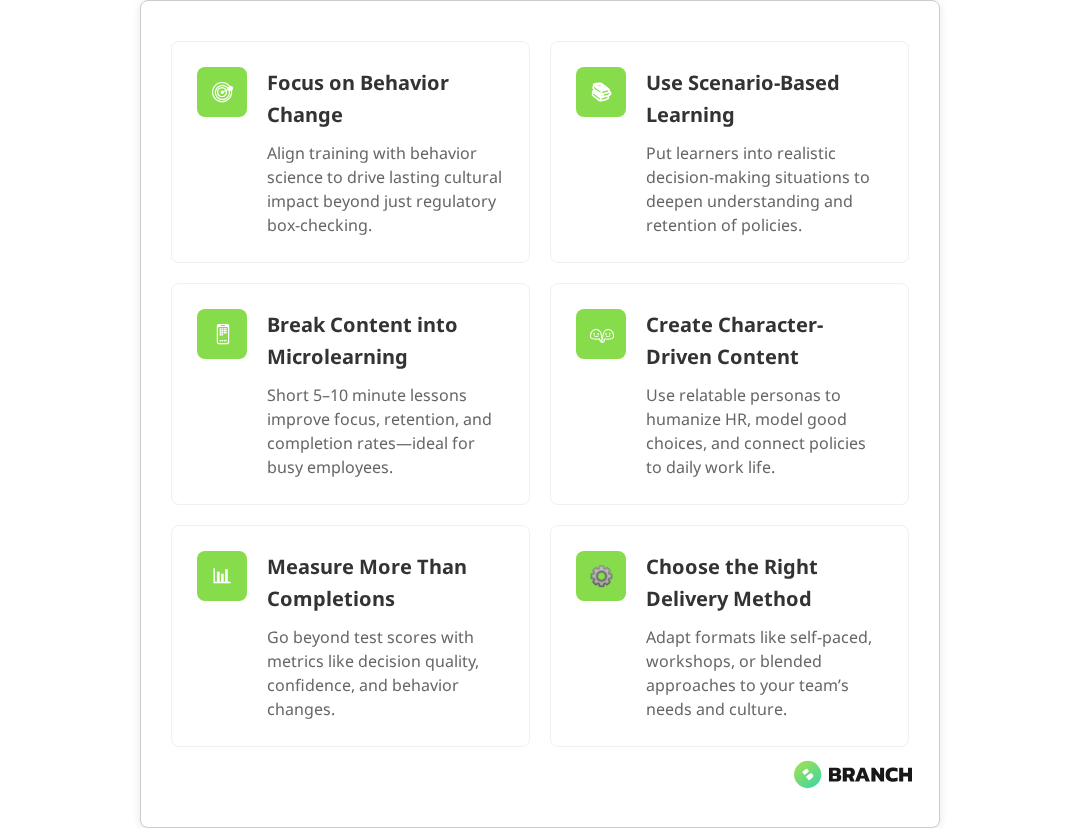
The challenge isn’t just about checking boxes. Effective compliance training needs to change behaviors, not just satisfy auditors. Research shows that sustainable compliance programs must incorporate behavior change science and real-world relevance to achieve measurable cultural transformation. When employees genuinely understand policies and feel equipped to make good decisions, organizations see fewer violations, better workplace culture, and reduced legal risk. The key is transforming compliance from a necessary evil into engaging, practical learning that people actually retain and apply.

This guide walks through proven strategies for making compliance training more engaging, based on real-world implementation insights and practical design approaches that work for busy teams and skeptical learners alike.

Why Traditional Compliance Training Falls Flat

Most compliance training fails because it treats learners like passive recipients of information rather than active decision-makers. The typical approach—lengthy modules crammed with policy text, followed by obvious multiple-choice questions—creates what learning professionals call “click-through compliance.” Studies indicate that a substantial proportion of employees either click through mandatory training without properly engaging or only skim-read content, showing they haven’t internalized the actual decision-making skills they need when facing real workplace dilemmas.

The problem compounds when organizations prioritize completion rates over comprehension. Multiple sources confirm that focusing solely on compliance training completion rates rather than comprehension leads to disengagement and negative perceptions. When training feels like a time-wasting obstacle rather than useful preparation, employees develop negative associations with both the content and the HR teams behind it. This skepticism makes future training efforts even harder to execute effectively.

The good news? Research shows that small but targeted changes in design and delivery—such as using microlearning, realistic scenarios, and more contextual learning—can significantly increase engagement, retention, and application of compliance knowledge.

Read more about the professional eLearning development process that creates effective training experiences.

Scenario-Based Learning: Moving Beyond Policy Recitation

The most effective compliance training puts learners in realistic workplace situations where they must apply policy knowledge to make decisions. Multiple studies show 30-50% improvement in exam scores and 70% improvement in knowledge retention when using scenario-based learning compared to traditional lecture-based training. Instead of asking “What does the harassment policy say about reporting timelines?” scenario-based training presents a situation: “Your colleague mentions feeling uncomfortable about jokes made during team meetings. What’s your next step?”

Effective scenarios share several characteristics:

  • Realistic context: Situations that learners might actually encounter, not extreme edge cases
  • Non-binary choices: Multiple options that aren’t obviously right or wrong, forcing critical thinking
  • Consequences shown: Clear demonstration of how different choices play out over time
  • Policy integration: Natural connection between scenario decisions and underlying policies

The key is creating branching scenarios where learners can explore “less correct” paths without being immediately shut down. Evidence shows this approach helps people understand the nuances of policy application rather than just memorizing rules. When learners can see why certain choices lead to better outcomes, they’re more likely to make similar decisions in real workplace situations.

💡 Tip: Design scenarios with characters who represent different roles within your organization. This helps learners see how policies apply across departments and hierarchies, making the training feel more relevant to everyone.

Microlearning and Modular Design

Breaking compliance training into shorter, focused modules serves both learning science and practical constraints. Research demonstrates that microlearning (5–10 minute modules) significantly improves attention span and knowledge retention compared to traditional hour-long sessions, with studies showing up to 80% better retention rates and 83% completion rates versus 20–30% for conventional courses.

Effective microlearning modules focus on specific decision points or skills rather than trying to cover entire policy areas. For example, instead of a comprehensive “Code of Conduct” module, you might create separate focused pieces on:

  1. Recognizing conflicts of interest
  2. Appropriate use of company resources
  3. Social media and confidentiality guidelines
  4. Reporting concerns and escalation paths

This modular approach allows for more targeted delivery—new employees get the full sequence, while experienced staff might only need refreshers on updated policies. It also makes maintenance easier when policies change, since you can update individual modules rather than rebuilding entire courses.

Read more about using video and animation to create engaging microlearning experiences.

What the research says

  • Scenario-based learning consistently outperforms traditional training methods, with organizations adopting this approach reporting higher policy adherence and fewer compliance incidents over time.
  • Microlearning approaches can improve knowledge retention by up to 80% compared to traditional methods, while reducing cognitive overload and fitting better into busy work schedules.
  • Training programs that focus on behavior change science—rather than just regulatory box-ticking—achieve measurable improvements in workplace culture and decision-making quality.
  • Early evidence suggests that branching scenarios allowing exploration of multiple decision paths help learners grasp policy nuances more effectively than linear training modules.
  • While completion rates remain important for compliance documentation, research shows that measuring decision quality and real-world application provides better indicators of training effectiveness.

Humanizing HR Through Character-Driven Content

One overlooked aspect of compliance training is how it shapes employees’ perceptions of HR and company leadership. When training feels punitive or disconnected from reality, it reinforces negative stereotypes about HR being the “policy police” rather than a supportive business function.

Character-driven training can help address this perception. Instead of faceless policy statements, use consistent characters or personas who guide learners through scenarios and explain the reasoning behind policies. These characters can model good decision-making while acknowledging the real constraints and pressures employees face.

Effective character development includes:

  • Relatable backgrounds: Characters from different departments and experience levels
  • Realistic motivations: Showing why people might struggle with policy decisions
  • Growth over time: Characters learning from mistakes and improving their judgment
  • Positive HR interactions: Demonstrating how HR can be a resource rather than an obstacle

This approach works particularly well when combined with light humor or storytelling elements that make the content more memorable without undermining the seriousness of compliance issues.

Implementation Strategies and Delivery Options

Even the most engaging content will fail if the implementation doesn’t match your organization’s culture and constraints. The table below outlines different delivery approaches and their trade-offs:

Delivery MethodBest ForTime InvestmentEngagement PotentialScalability
Self-paced online modulesGeographically distributed teamsLow ongoingMediumHigh
Facilitated workshopsComplex policy changesHighHighLow
Microlearning sequencesBusy schedules, mobile workforceMediumMedium-HighHigh
Blended approachCritical compliance areasHighHighMedium

Most successful implementations combine multiple approaches rather than relying on a single delivery method. For example, you might use self-paced modules for foundational knowledge, followed by facilitated discussions for complex scenarios, with microlearning reinforcements delivered over time.

💡 Tip: Offer a 'test-out' option for experienced employees who can demonstrate competency upfront. This respects their existing knowledge while ensuring compliance, and it often improves overall reception of the training program.

Measuring Success Beyond Completion Rates

Traditional compliance training metrics focus on completion rates and test scores, but these don’t tell you whether the training is actually changing behaviors or reducing risk. More meaningful metrics include:

  • Time to competency: How quickly employees can apply policy knowledge in realistic scenarios
  • Decision quality: Performance on complex, branching scenarios rather than simple recall questions
  • Self-reported confidence: Employees’ comfort level with handling policy-related situations
  • Behavior indicators: Changes in reporting rates, policy violations, or help-seeking behavior
  • Feedback quality: Depth and specificity of learner comments about the training experience

The most valuable metric might be reduction in repeat violations or policy-related incidents over time. This indicates that training is actually preventing problems rather than just documenting that education occurred.

Read more about eLearning standards that enable sophisticated tracking and measurement of learning outcomes.

When to Build In-House vs. Partner with Specialists

The decision between developing compliance training internally or working with specialists depends on several factors: your team’s capacity, the complexity of your compliance requirements, and how critical these training programs are to your organization’s risk management.

Consider building in-house when:

  • You have dedicated learning and development resources
  • Your compliance requirements are straightforward and stable
  • You need frequent updates and iterations
  • Your organization has unique cultural considerations that outsiders might miss

Consider partnering with specialists when:

  • You need sophisticated interactivity or multimedia production
  • Compliance requirements are complex or changing rapidly
  • You want to leverage proven instructional design methodologies
  • Internal teams lack bandwidth for a major training overhaul

Many organizations find success with a hybrid approach: partnering with specialists to design the foundational architecture and most complex modules, while handling simpler updates and customizations internally. This approach provides professional design quality while maintaining ongoing flexibility.

Getting Buy-In and Managing Change

Even excellent compliance training can fail if employees approach it with negative expectations. Successful rollouts require intentional change management that addresses both practical and emotional barriers to engagement.

Pre-training communication from leadership helps set appropriate expectations and context. When managers can explain how compliance training connects to organizational values and business success, rather than just regulatory requirements, employees are more likely to engage meaningfully with the content.

Consider gathering anonymous feedback from employees about their current perceptions of HR and compliance processes. This intelligence can inform both content design and communication strategy, helping you address specific concerns or misconceptions that might otherwise undermine the training’s effectiveness.

Read more about our specialized approach to developing compliance training that balances engagement with regulatory requirements.

Working with Digital Learning Partners

Organizations that choose to work with external partners for compliance training development benefit most when they approach the relationship as a collaboration rather than a simple vendor transaction. The most effective partnerships involve:

Clear stakeholder alignment from the start, including legal, HR, and operational teams who understand both the compliance requirements and the practical realities of your workplace culture.

Iterative design processes that allow for testing and refinement based on real user feedback, rather than trying to perfect everything before any employees see the content.

Knowledge transfer that leaves your internal team equipped to make updates and modifications as policies evolve, rather than creating dependency on external resources for every small change.

Teams like Branch Boston specialize in translating complex compliance requirements into engaging, human-centered learning experiences. We work with organizations to design training that satisfies auditors while actually improving workplace decision-making—because the best compliance training is the kind people want to complete and remember how to apply.

FAQ

How long should compliance training modules be to maintain engagement?

Most effective compliance training modules run 5-10 minutes each, focusing on specific decisions or skills rather than trying to cover entire policy areas. This length respects learners' attention spans while allowing sufficient depth for meaningful scenarios. Breaking content into shorter modules also enables better scheduling flexibility and makes updates easier when policies change.

What's the best way to handle employees who rush through compliance training just to get it done?

Design scenarios with branching paths and realistic consequences that require genuine consideration rather than obvious answers. Implement 'test-out' options for experienced employees to demonstrate competency upfront, which respects their knowledge while ensuring compliance. Focus on measuring decision quality in complex scenarios rather than just completion speed or simple recall questions.

How can we make compliance training feel less punitive and more supportive?

Use character-driven content that shows HR as a helpful resource rather than policy enforcers. Include scenarios where characters learn from mistakes and grow over time, demonstrating that compliance is about making good decisions rather than avoiding punishment. Pre-training communication from leadership should frame compliance as part of company values and ethical culture, not just regulatory obligations.

Should we customize compliance training for different departments or keep it standardized?

A hybrid approach works best: standardized core content ensures consistent policy understanding across the organization, while department-specific scenarios help employees see how policies apply to their actual work situations. This maintains compliance consistency while improving relevance and engagement for different roles and responsibilities within your organization.

How do we measure whether compliance training is actually changing behavior, not just completion rates?

Track metrics like decision quality in complex scenarios, self-reported confidence levels, reduction in policy violations over time, and changes in help-seeking behavior when employees face policy questions. Anonymous feedback about training relevance and applicability can also indicate whether employees feel prepared to handle real workplace situations covered by your compliance policies.

Millennial and Gen Z new investing using Ai finanace interact with an AI data finance assistant on a tablet, showcasing the integration of artificial intelligence in financial management.

How to Build an Effective Data Pipeline for Real-Time Analytics

Real-time analytics has moved from a nice-to-have to a business imperative for many organizations. Whether you’re tracking customer behavior on an e-commerce platform, monitoring IoT sensor data, or analyzing financial transactions as they happen, research suggests that processing and acting on data within seconds or minutes can create significant competitive advantages, often improving decision speed by 30% to 80%.

But here’s the reality: building an effective data pipeline for real-time analytics isn’t just about choosing the latest streaming technology. It requires careful consideration of your actual business requirements, architectural decisions that balance complexity with reliability, and operational practices that keep everything running smoothly when things inevitably go wrong. Multiple industry studies confirm that effective real-time pipelines require aligning business objectives with architectural design and operational management—balancing system complexity with performance while maintaining production stability.

This guide walks through the practical considerations, common pitfalls, and proven approaches for building real-time data pipelines that actually deliver value—not just technical sophistication for its own sake.

When Real-Time Analytics Actually Makes Sense

Before diving into the technical implementation, it’s crucial to establish whether your organization truly benefits from real-time data processing. Research confirms that the complexity and cost of streaming systems are substantial—requiring advanced hardware, sophisticated engineering, and continuous infrastructure maintenance—while many use cases can be adequately served by faster batch processing approaches.

Clear indicators you need real-time processing:

  • Fraud detection systems that must block suspicious transactions within milliseconds—industry evidence shows this capability is critical for preventing fraudulent activity before damage occurs
  • Dynamic pricing engines that respond to market conditions or inventory levels
  • Operational dashboards for monitoring critical infrastructure or manufacturing processes
  • Personalization engines that adapt content based on immediate user behavior
  • Alert systems for security incidents or system failures

When faster batch processing might suffice:

  • Business reporting and analytics that inform strategic decisions
  • Customer segmentation and marketing campaign optimization
  • Historical trend analysis and forecasting
  • Compliance reporting with daily or weekly refresh requirements
💡 Tip: Before building a real-time pipeline, try reducing your batch job intervals to 15-30 minutes. Many teams discover this provides sufficient freshness without the complexity of full streaming architecture.

A practical middle ground involves building incremental batch jobs that run frequently. Industry implementations show that this approach can deliver near real-time freshness—often within 5-15 minutes—while maintaining the simpler operational model of batch processing. You can always evolve to true streaming later if business requirements demand it.

Core Components of Real-Time Data Pipelines

Effective real-time analytics pipelines share several key architectural elements. Understanding how these components work together helps in making informed technology choices and avoiding common integration pitfalls.

Data Ingestion and Streaming

Reliable data ingestion from various sources is the foundation of any real-time pipeline. Technical literature confirms that effective ingestion ensures data is immediately available for processing, directly impacting the pipeline’s integrity, accuracy, and timeliness. This typically involves:

Event-driven sources: Applications that emit events naturally, such as web applications logging user clicks, mobile apps tracking interactions, or IoT devices sending sensor readings. These sources can stream directly to message brokers like Apache Kafka.

Database changes: Many organizations need real-time access to data stored in transactional databases. Change Data Capture (CDC) tools monitor database transaction logs and emit events when rows are inserted, updated, or deleted—enabling efficient, near real-time streaming of data updates to target systems. For databases that don’t support CDC natively, you can implement “high water mark” strategies that regularly check for new or modified records based on timestamps.

Read more: Change Data Capture (CDC): The Complete Guide to Real-Time Data Sync.

File-based sources: Some data arrives as files dropped into cloud storage or SFTP locations. While not naturally real-time, you can use file system watchers or cloud storage events to trigger processing as soon as files arrive.

Stream Processing and Transformation

Once data is flowing, you need systems to process, clean, and transform it in real-time. Popular options include:

TechnologyStrengthsBest ForConsiderations
Apache Kafka + Kafka StreamsNative integration, exactly-once processingEvent sourcing, stateful transformationsRequires Kafka expertise
Apache Spark Structured StreamingFamiliar SQL interface, batch + stream unifiedComplex analytics, ML integrationHigher latency than pure stream processors
Apache FlinkLow latency, advanced event time handlingFinancial trading, real-time ML inferenceSteeper learning curve
Cloud-native (Kinesis Analytics, Dataflow)Managed service, auto-scalingRapid prototyping, ops-light teamsVendor lock-in, cost at scale

Data Storage and Serving

Real-time pipelines often implement a layered storage approach:

Bronze layer (raw data): Stores data exactly as received, providing an audit trail and enabling reprocessing if transformation logic changes.

Silver layer (cleaned data): Contains validated, deduplicated, and standardized data that’s reliable for downstream consumption.

Gold layer (business-ready data): Aggregated, enriched data optimized for specific analytics use cases, often pre-computed to enable fast query responses.

This layered approach improves data quality, enables easier debugging, and allows different downstream systems to consume data at the appropriate level of processing.

What the research says

  • Real-time processing provides substantial competitive advantages through faster decision-making, with studies showing 30-80% improvements in decision speed and notable increases in revenue and customer satisfaction
  • Streaming systems involve significantly higher complexity and costs compared to batch processing, requiring advanced hardware and sophisticated engineering expertise
  • Fraud detection systems demonstrate the critical need for millisecond-level response times, as delays of even seconds can allow fraudulent activity to cause substantial damage
  • Change Data Capture (CDC) has become the standard approach for real-time database synchronization, enabling efficient streaming of incremental changes without full table scans
  • Many business use cases—including reporting, analytics, and compliance—can be adequately served by frequent batch processing rather than full streaming architectures
  • Early evidence suggests that incremental batch processing at 15-30 minute intervals can provide a practical middle ground, though organizations should evaluate their specific latency requirements carefully

Technology Stack Decisions

Choosing the right technologies for your real-time pipeline depends on factors like data volume, latency requirements, team expertise, and operational capabilities. Here’s how to evaluate your options:

Message Brokers and Event Streaming

Apache Kafka has become the de facto standard for event streaming, offering strong durability guarantees, horizontal scalability, and a rich ecosystem of connectors. Kafka Connect provides pre-built integrations for common data sources, reducing the development effort for initial ingestion.

For teams preferring managed services, cloud providers offer Kafka-compatible options (Amazon MSK, Confluent Cloud) or native alternatives (Amazon Kinesis, Google Pub/Sub, Azure Event Hubs). These services handle infrastructure management but may limit flexibility or increase costs at scale.

Stream Processing Engines

The choice between processing engines often comes down to team skills and specific requirements:

Choose Apache Spark when your team already has Spark experience, you need to mix batch and streaming workloads, or you’re implementing complex analytics that benefit from Spark’s DataFrame API and ML libraries. Industry analysis confirms that Structured Streaming provides a familiar SQL interface and unified batch+stream model, though it typically has higher latency than pure stream processors due to its micro-batch architecture.

Choose Apache Flink for low-latency requirements (sub-second processing), complex event processing with precise event time semantics, or stateful streaming applications that need advanced windowing capabilities. Technical reviews indicate that Flink excels at latency-sensitive applications like financial trading and real-time ML inference, though it has a steeper learning curve.

Choose Kafka Streams when you’re already using Kafka extensively, need lightweight processing that can be embedded in applications, or want to avoid operating a separate cluster for stream processing. Research shows that Kafka Streams offers native integration and exactly-once processing, but this advanced functionality requires solid Kafka expertise.

💡 Tip: Start with the stream processing technology your team knows best. The operational complexity of learning a new system often outweighs minor technical advantages, especially in early implementations.

Data Storage for Analytics

Real-time analytics often requires multiple storage systems optimized for different access patterns:

  • Time-series databases (InfluxDB, TimescaleDB) excel at storing and querying metrics and sensor data with time-based patterns
  • Columnar stores (ClickHouse, Apache Druid) provide fast aggregation queries over large datasets
  • Search engines (Elasticsearch) enable flexible text search and log analysis
  • Key-value stores (Redis, DynamoDB) serve pre-computed results for low-latency lookups
  • Data lakes (S3, Delta Lake) provide cost-effective storage for raw and processed data

Many successful implementations combine multiple storage systems, with stream processing populating each store according to its strengths. The key is avoiding over-engineering—start with fewer systems and add complexity only when specific requirements demand it.

Implementation Patterns and Best Practices

Building reliable real-time pipelines requires attention to operational concerns that aren’t always obvious during initial design. Here are patterns that help ensure your system works reliably in production:

Handling Failures and Recovery

Real-time systems must gracefully handle various failure modes without losing data or creating duplicate records. Key strategies include:

Idempotent processing: Design your transformations so that processing the same input multiple times produces the same output. This allows safe retries when transient failures occur.

Exactly-once semantics: Where possible, choose technologies that guarantee each record is processed exactly once, even in the presence of failures. Kafka Streams and some Flink configurations provide this guarantee.

Checkpointing and state management: Regularly save processing state so that failed jobs can resume from the last successful checkpoint rather than reprocessing all data from the beginning.

Monitoring and Observability

Real-time pipelines can fail silently or fall behind on processing, making robust monitoring essential:

  • Lag monitoring: Track how far behind your processing is compared to the incoming data stream
  • Throughput metrics: Monitor records processed per second to detect performance degradation
  • Error rates: Alert on increases in processing errors or data quality issues
  • End-to-end latency: Measure time from data creation to availability in analytics systems
  • Data freshness: Verify that downstream systems are receiving recent data

Consider implementing automated healing mechanisms that can restart failed jobs, scale processing resources, or route traffic around problematic components.

Schema Evolution and Data Quality

Real-time systems need strategies for handling schema changes and ensuring data quality without stopping the pipeline:

Schema registry: Maintain a centralized registry of data schemas with versioning support. This enables backwards-compatible evolution and helps downstream consumers adapt to changes.

Dead letter queues: Route records that fail processing to separate queues for manual inspection and reprocessing once issues are resolved.

Data validation: Implement validation rules that can flag anomalous data without blocking processing. This might include range checks, required field validation, or statistical outlier detection.

Scaling and Performance Optimization

As data volumes grow, real-time pipelines require careful scaling strategies to maintain performance while controlling costs:

Horizontal Scaling Strategies

Most stream processing systems scale by increasing parallelism—running more instances of processing tasks across multiple machines. Key considerations include:

Partitioning strategy: How you partition your data streams affects both parallelism and the ability to maintain order. Common approaches include partitioning by customer ID, geographic region, or time windows.

State partitioning: For stateful processing (like windowed aggregations), ensure related data is processed by the same instances to maintain consistency.

Auto-scaling policies: Implement metrics-based scaling that adds processing capacity when lag increases or removes capacity during low-traffic periods.

Performance Tuning

Real-time pipeline performance depends on optimizing several layers:

  • Batch sizing: Processing records in small batches often improves throughput while maintaining low latency
  • Memory management: Configure appropriate memory limits and garbage collection settings for your processing engines
  • Network optimization: Minimize network overhead through compression, connection pooling, and local data processing where possible
  • Storage layout: Use appropriate partitioning and indexing strategies for your storage systems

When to Build vs. Buy vs. Partner

The decision to build real-time analytics capabilities in-house, adopt vendor solutions, or work with a specialist partner depends on several factors:

Build In-House When:

  • You have experienced data engineers and platform teams
  • Your requirements are highly specific or rapidly evolving
  • Real-time analytics is a core competitive differentiator
  • You have the capacity to operate complex distributed systems

Consider Vendor Solutions When:

  • You need rapid time-to-value with standard analytics use cases
  • Your team lacks streaming technology expertise
  • You prefer operational simplicity over customization
  • Budget allows for higher per-unit processing costs

Partner with Specialists When:

  • You need custom solutions but lack internal expertise
  • The project has challenging integration requirements
  • You want to build internal capabilities while delivering immediate value
  • Risk tolerance is low and you need proven implementation patterns

Many organizations find success with hybrid approaches—using managed services for infrastructure while partnering with specialists for custom analytics logic and integration work.

Working with a Data Engineering Partner

If you’re considering external expertise for your real-time analytics initiative, look for partners who demonstrate several key capabilities:

Proven streaming architecture experience: Ask for specific examples of real-time pipelines they’ve built, including the challenges they faced and how they solved them. Look for experience with your data volumes and latency requirements.

Technology agnosticism: Strong partners recommend technologies based on your specific needs rather than pushing a particular vendor or tool. They should understand the trade-offs between different approaches.

Operational readiness focus: Beyond building the initial pipeline, ensure they have experience with monitoring, alerting, disaster recovery, and the other operational concerns that keep systems running reliably.

Organizations like Branch Boston bring together the strategy, engineering, and operational expertise needed to design and implement real-time analytics systems that solve business problems rather than just demonstrating technical capabilities. Our streaming data and real-time analytics services focus on building systems that deliver measurable business value while remaining maintainable for your team.

When evaluating potential partners, consider their approach to knowledge transfer and team enablement. The best engagements leave your team more capable of operating and evolving the systems independently. Look for partners who provide documentation, training, and ongoing support options that match your team’s needs.

Additionally, consider how the partner handles data strategy and architecture planning. Real-time analytics pipelines are significant investments that should align with your broader data architecture and business strategy. Partners who help you think through these connections often deliver more sustainable solutions.

FAQ

How do I know if my use case really needs real-time processing versus faster batch jobs?

The key test is whether delays of 15-30 minutes significantly impact business outcomes. If your use case involves fraud detection, real-time personalization, or operational monitoring where immediate action is required, you likely need true streaming. For reporting, analytics, and most business intelligence use cases, frequent batch processing often provides sufficient freshness at lower complexity and cost.

What's the biggest operational challenge teams face with real-time data pipelines?

Monitoring and debugging distributed streaming systems is consistently the biggest operational challenge. Unlike batch jobs that either succeed or fail clearly, streaming systems can fall behind, process duplicates, or fail silently. Implementing comprehensive monitoring for lag, throughput, error rates, and end-to-end latency is essential for reliable operations.

Should I start with cloud-managed services or open-source tools for my first real-time pipeline?

Start with managed services if you need to deliver value quickly and don't have streaming expertise in-house. They handle operational complexity but may limit flexibility later. Choose open-source tools if you have the expertise to operate them and need greater control over customization and costs. Many teams successfully start with managed services and migrate to self-managed solutions as they scale.

How do I handle schema changes in real-time pipelines without breaking downstream systems?

Implement a schema registry with versioning support, design your data formats to be backwards-compatible (adding fields rather than changing existing ones), and build downstream systems that can gracefully handle missing or new fields. Use dead letter queues for records that fail processing due to schema mismatches, allowing you to fix issues without losing data.

What's a reasonable timeline for implementing a production-ready real-time analytics pipeline?

For a basic pipeline with standard technologies and simple transformations, expect 8-12 weeks from requirements to production. Complex integrations, custom analytics logic, or high-availability requirements can extend this to 3-6 months. Factor in additional time for team training, monitoring setup, and operational runbooks. Starting with a proof-of-concept for 2-4 weeks helps validate the approach before full implementation.

Modern creative concept for video streaming and multimedia online player . Business vector illustration for social media, banner or presentation template

Motion Graphics vs Animation for Marketing

When B2B marketing teams plan their next video campaign, one question consistently surfaces: should we use motion graphics or animation? While these terms are often used interchangeably, understanding their distinct approaches can mean the difference between a compelling marketing asset and a misaligned creative investment.

For digital decision-makers evaluating video content strategies, the choice between motion graphics and animation affects everything from budget allocation to timeline planning. Industry research confirms that motion graphics excel at communicating complex data, abstract concepts, and brand messaging through kinetic typography and geometric movement. Animation, particularly character-driven storytelling, builds emotional connections and guides viewers through narrative experiences.

The distinction matters because each approach requires different creative processes, technical expertise, and resource allocation. Getting this decision right early helps marketing teams scope projects accurately, set realistic expectations with stakeholders, and ultimately produce video content that serves their strategic goals.

Understanding the Core Differences

Motion graphics and animation operate on fundamentally different creative principles, though they share common technical foundations. Motion graphics focus on bringing static design elements to life—think animated logos, data visualizations, explainer video graphics, and kinetic typography. The emphasis is on movement, timing, and visual hierarchy rather than character development or storytelling.

Animation, in contrast, creates the illusion of life and movement in characters, objects, or environments. This includes everything from 2D character animation to 3D product demonstrations, with storytelling and emotional engagement as primary objectives. Marketing psychology research shows that character-driven animation effectively builds emotional connections by assigning relatable human traits and emotions to animated characters.

AspectMotion GraphicsAnimation
Primary FocusDesign elements in motionCharacter and narrative storytelling
Typical Use CasesExplainer videos, data visualization, brand presentationsProduct demos, training content, emotional marketing
Technical ComplexityModerate—focus on timing and transitionsHigh—requires rendering, lighting, complex dynamics
Production TimelineGenerally faster to produceLonger due to character development and rendering
Content TypeAbstract, informationalNarrative, character-driven

The creative processes also differ significantly. Motion designers often work with style frames and design systems, rapidly iterating on visual concepts using tools like After Effects, Photoshop, or Cinema 4D. Their expertise lies in translating static brand elements into dynamic, engaging movement that reinforces messaging hierarchy.

Animators, however, face more complex technical challenges. They must consider lighting, rendering constraints, and often need to rebuild elements from scratch when initial design specifications prove unrealistic in motion. Technical analysis shows that animation involves sophisticated processes including rendering, lighting effects, and complex character dynamics, particularly in 3D animation. This technical depth typically requires longer production cycles and more specialized expertise.

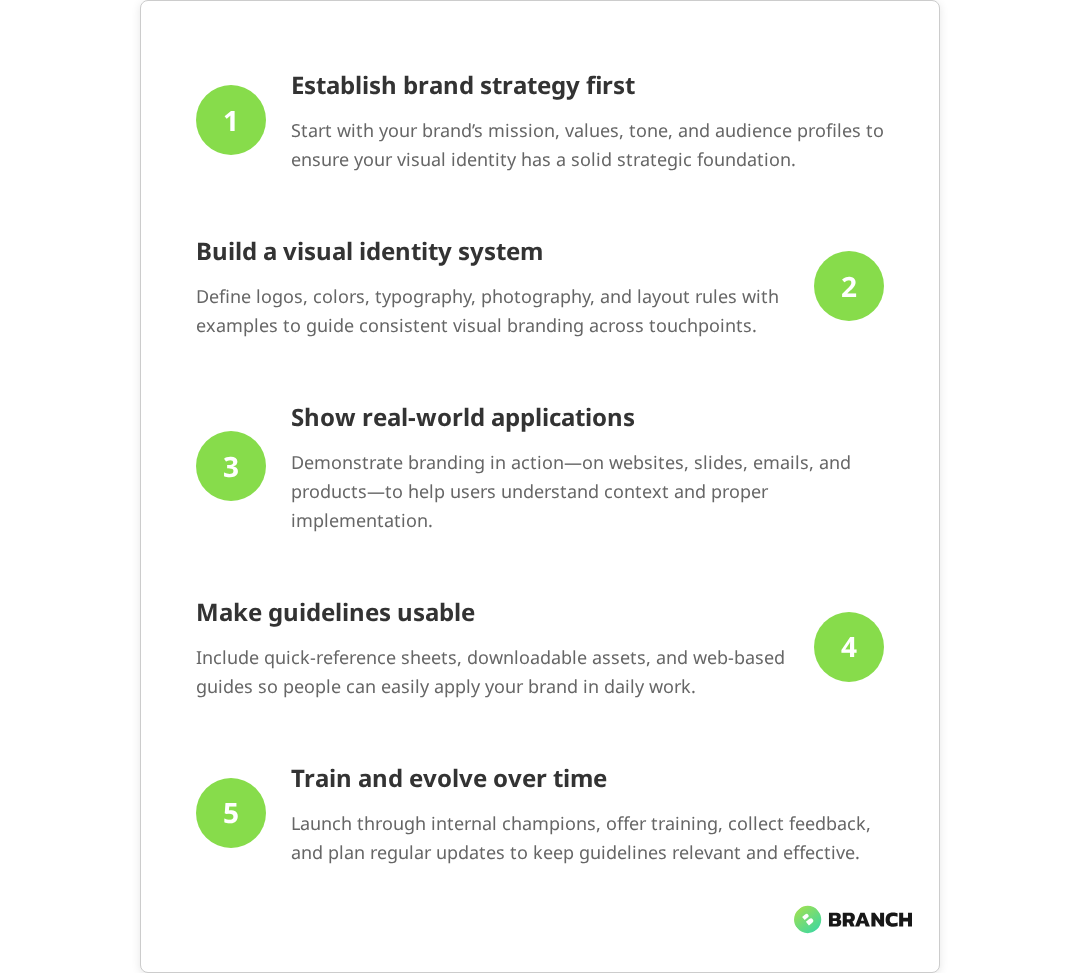
Read more: Building a consistent visual identity system that works across motion and static content.

The Creative Process Behind Each Approach

Understanding how motion graphics and animation projects unfold helps marketing teams plan resources and set stakeholder expectations appropriately. The creative process reveals why seemingly simple requests can involve substantial pre-production work.

Motion Graphics Workflow

Motion graphics projects typically begin with style frame development—static compositions that establish visual direction, color palette, typography, and movement principles. Industry standards confirm that style frames are a critical early step in motion graphics workflows, helping teams align on visual direction and streamlining production. This phase is crucial because it sets the foundation for all subsequent animation work. Teams might create dozens of style frame variations during pitch phases, refining concepts before any motion work begins.

Motion designers must be exceptionally resourceful, often using creative workarounds to deliver compelling visuals quickly. They might combine Photoshop compositions with After Effects motion, integrate 3D elements from Cinema 4D, or even use advanced tools like Houdini for complex procedural effects—all while maintaining brand consistency and meeting tight deadlines.

  • Concept and style frame development—establishing visual language and motion principles
  • Asset creation and preparation—designing individual elements for animation
  • Motion testing—creating short sequences to validate timing and transitions
  • Full production—animating complete sequences with sound design
  • Revision and refinement—adjusting timing, transitions, and visual details

Animation Production Process

Animation projects involve more complex pre-production phases, including character design, storyboarding, and technical planning. Production research shows that character animation requires extensive planning around personality development, movement principles, and emotional expression, with consistency maintained throughout all scenes. The process requires careful coordination between creative vision and technical feasibility, as animation decisions made early in production significantly impact final rendering and post-production work.

Character animation, in particular, demands extensive planning around personality, movement principles, and emotional expression. Unlike motion graphics, where design elements can be adjusted relatively easily, animated characters require consistent development across all scenes and interactions.

  • Pre-production planning—storyboarding, character design, technical specifications
  • Asset development—character modeling, environment creation, texture work
  • Animation production—keyframe animation, motion capture, or procedural animation
  • Lighting and rendering—technical implementation of visual effects and atmosphere
  • Post-production—compositing, color correction, sound integration
💡 Tip: Factor style frame development into your project timeline and budget. Professional motion graphics projects often require weeks of pre-visualization work before animation begins—this isn't overhead, it's essential for stakeholder alignment and project success.

What the research says

  • Multiple studies demonstrate that motion graphics are typically 30-50% less expensive than comparable animation projects and can be completed in significantly shorter timeframes, making them more cost-effective for informational content.
  • Animation projects consistently show higher audience engagement and emotional connection rates, particularly when character-driven storytelling is used to guide viewers through complex decision-making processes.
  • Technical analysis reveals that motion graphics leverage existing design assets and streamlined workflows, while animation requires specialized roles including lighting artists, technical directors, and rendering specialists.
  • Early research suggests that hybrid approaches combining motion graphics with selective animation elements can balance engagement benefits with production efficiency, though more comprehensive studies are needed to establish best practices.

Choosing the Right Approach for Your Marketing Goals

The decision between motion graphics and animation should align with your specific marketing objectives, audience needs, and content strategy. Each approach excels in different contexts and serves distinct communication goals.

When Motion Graphics Work Best

Motion graphics shine when you need to communicate complex information clearly and maintain strong brand presence throughout the content. Research confirms that they’re particularly effective for B2B marketing scenarios where data visualization, process explanation, or concept clarification takes precedence over emotional storytelling.

Consider motion graphics for:

  • Data-heavy presentations—financial reports, market analysis, performance dashboards
  • Process explanations—workflows, system architecture, step-by-step procedures
  • Brand-forward content—corporate presentations, product launches, capability overviews
  • Abstract concept communication—values, strategies, theoretical frameworks
  • Social media content—short-form, attention-grabbing promotional pieces

When Animation Delivers Better Results

Animation becomes the stronger choice when your marketing strategy requires emotional connection, narrative development, or demonstration of complex interactions. Character-driven content can build empathy and guide viewers through more nuanced decision-making processes.

Animation works particularly well for:

  • Customer journey mapping—showing user experiences and pain point resolution
  • Product demonstrations—interactive features, user interface walkthroughs
  • Training and educational content—scenario-based learning, skill development
  • Emotional marketing campaigns—brand storytelling, value proposition communication
  • Complex product visualization—3D product tours, technical demonstrations
Read more: Strategic brand positioning approaches that inform your motion graphics vs animation decision.

Resource Planning and Team Considerations

Budget and timeline planning differs significantly between motion graphics and animation projects. Understanding these resource implications helps marketing teams make informed decisions and avoid mid-project scope adjustments.

Motion Graphics Resource Requirements

Motion graphics projects typically require smaller, more agile teams with emphasis on design expertise and rapid iteration capabilities. The key roles include motion designers who can work across multiple tools and adapt quickly to changing requirements or tight deadlines.

Timeline considerations for motion graphics often depend more on concept development and stakeholder feedback cycles than technical production constraints. However, the pre-production phase—particularly style frame development—can be more substantial than many organizations anticipate. Industry analysis shows that professional projects often require several weeks of pre-visualization work including style frames and concept refinement before animation begins.

Animation Team Structure and Timeline

Animation projects require more specialized roles and longer production cycles. Teams typically include character designers, animators, technical directors, lighting artists, and rendering specialists. The interdependency between these roles means that delays in one area can significantly impact overall project timelines.

Animation also involves more technical risk. Design decisions made during early concept phases might prove unrealistic during animation production, requiring rebuilds or significant workarounds. This technical complexity necessitates more buffer time and contingency planning.

Project AspectMotion GraphicsAnimation
Team Size2-4 specialists4-8+ specialists
Key RolesMotion designer, art director, editorAnimator, character designer, technical director, lighting artist
Timeline (60-second piece)3-6 weeks6-12 weeks
Primary BottlenecksConcept approval, stakeholder feedbackRendering time, technical complexity
Revision FlexibilityHigh—changes relatively easy to implementLower—structural changes require significant rework
💡 Tip: When evaluating creative partners, look for teams that can demonstrate adaptability with tools and techniques. The best motion graphics specialists can pivot between Photoshop, After Effects, Cinema 4D, or even advanced tools like Houdini depending on project needs—this versatility often determines project success under tight deadlines.

Working with Creative Partners

Whether you choose motion graphics or animation, working with the right creative team significantly impacts project outcomes. Understanding how to evaluate and collaborate with creative partners helps ensure your investment delivers the intended marketing results.

Evaluating Creative Capabilities

When assessing potential creative partners, look beyond portfolio aesthetics to understand their process, technical depth, and strategic thinking. Teams that can articulate why they recommend motion graphics over animation—or vice versa—for your specific use case demonstrate the strategic insight that leads to successful marketing outcomes.

Strong creative partners should be able to explain their workflow, show examples of style frame development, and demonstrate how they handle stakeholder feedback and revisions. They should also be transparent about technical constraints and realistic about timelines given your project’s complexity.

Setting Up for Success

Successful motion graphics and animation projects require clear communication about objectives, target audiences, and success metrics from the project outset. Teams that take time to understand your broader marketing strategy—not just the immediate creative brief—can make better recommendations about visual approach and execution.

Consider establishing clear approval processes for concept phases, particularly style frame development in motion graphics projects. The more iterations and feedback cycles you allow during early creative phases, the stronger your final output will be.

For organizations planning multiple video marketing initiatives, establishing ongoing relationships with creative teams familiar with your brand guidelines, audience preferences, and approval processes can significantly improve both efficiency and consistency across content pieces.

Branch Boston’s approach to motion graphics and animation projects emphasizes this strategic alignment from the outset. Our teams work closely with clients to understand not just what they want to create, but why they’re creating it and how it fits into their broader digital marketing ecosystem. This collaboration helps ensure that whether we recommend motion graphics or animation, the final creative solution serves your specific marketing objectives effectively.

Explore our video production services to learn more about how we approach motion graphics and animation projects, or review our post-production capabilities for comprehensive video marketing support.

FAQ

How much should I budget for motion graphics versus animation?

Motion graphics typically cost 30-50% less than comparable animation projects due to simpler production requirements and shorter timelines. However, the exact budget depends on complexity, length, and revision cycles. Factor in pre-production costs—style frame development for motion graphics or character design for animation—as these often represent 20-30% of total project cost.

Can motion graphics and animation be combined in the same marketing video?

Absolutely, and this hybrid approach is increasingly popular for B2B marketing content. You might use motion graphics for data visualization segments and character animation for user story portions within the same video. However, combining approaches requires careful planning to maintain visual consistency and may extend production timelines.

Which approach works better for social media marketing?

Motion graphics generally perform better for social media due to their ability to communicate quickly without sound, maintain brand recognition, and adapt easily across different platform formats. Animation can work for social media but requires more careful consideration of platform-specific viewing behaviors and attention spans.

How do I know if my internal team can handle motion graphics in-house?

Evaluate your team's proficiency with tools like After Effects, their understanding of motion principles and timing, and their capacity to handle both creative and technical aspects of production. Motion graphics require design skills, technical execution, and project management—if any of these areas are weak, consider partnering with specialists for better results.

What's the biggest mistake companies make when choosing between motion graphics and animation?

The most common mistake is choosing based on aesthetic preference rather than strategic fit. Animation isn't automatically 'better' than motion graphics—it's about matching the approach to your communication goals, audience needs, and available resources. Additionally, many organizations underestimate the pre-production phase, leading to rushed concepts and suboptimal results regardless of which approach they choose.

UX/UI designer testing prototype on a phone, discussing and brainstorming on wireframes for a website and mobile app prototype, surrounded by sketches of user flow and design tools, in the concept of website and mobile application design concept.

How to Meet WCAG Standards in Web Design

Web accessibility isn’t just a nice-to-have anymore it’s a legal requirement, a competitive advantage, and frankly, the right thing to do. Yet despite widespread awareness of WCAG (Web Content Accessibility Guidelines), many B2B organizations struggle to implement these standards effectively across their digital products.

If you’re a CTO, product owner, or digital leader evaluating accessibility compliance for your websites, custom software, or eLearning platforms, you’re likely facing a common challenge: understanding what WCAG actually requires, who’s responsible for what, and how to maintain standards throughout your development lifecycle.

This guide breaks down the practical realities of WCAG compliance in web design from the foundational principles to the cross-functional coordination required to deliver truly accessible digital experiences.

Understanding WCAG: Beyond Color Contrast and Font Sizes

Most teams start their accessibility journey with the obvious fixes: adjusting color contrast ratios, increasing font sizes, and adding alt text to images. While these visual improvements matter, they represent just the tip of the accessibility iceberg.

WCAG 2.1 organizes accessibility requirements around four key principles:

  • Perceivable: Information must be presentable in ways users can perceive (visual, auditory, or tactile)
  • Operable: Interface components must be operable by all users, including those using keyboards or assistive technologies
  • Understandable: Information and UI operation must be understandable to users with varying cognitive abilities
  • Robust: Content must be robust enough to work with diverse assistive technologies

The gap between basic visual fixes and comprehensive compliance becomes apparent when you consider users with cognitive, motor, or perceptual needs. Research confirms that a visually compliant interface that requires complex mouse interactions, loads users with cognitive overhead, or breaks screen reader navigation fails the broader accessibility test. These failures violate core WCAG principles that require interfaces to work across all input methods and assistive technologies.

💡 Tip: Start accessibility planning during the wireframing phase, not after visual design is complete. Early structural decisions like heading hierarchies and navigation patterns significantly impact screen reader usability and can't be easily retrofitted.

Real accessibility compliance requires understanding how different user groups interact with your digital products and designing systems that work across the full spectrum of abilities and technologies. Multiple accessibility organizations confirm that approximately 70% of screen reader users prefer to navigate by headings, making these structural decisions fundamental to the user experience.

What the research says

  • WCAG 2.1 standards are built on four evidence-based principles (Perceivable, Operable, Understandable, Robust) that address accessibility needs across visual, auditory, physical, speech, cognitive, and neurological disabilities.
  • Screen reader users rely heavily on semantic HTML structure for navigation, with roughly 70% preferring to navigate content by headings rather than other methods.
  • Keyboard operability requirements in WCAG mandate that all web functionality must be accessible via keyboard without specific timing requirements, making structural design planning essential.
  • Research shows that integrating accessibility throughout the development process is significantly more effective than treating it as a final audit step, which consistently leads to missed accessibility barriers.
  • Early evidence suggests that heading hierarchies and navigation patterns require semantic HTML markup that must be built into page structure from the beginning retrofitting these elements creates cognitive confusion for assistive technology users.

The Reality of Roles and Responsibilities

One of the biggest misconceptions about WCAG compliance is that it’s primarily a designer’s responsibility. In reality, accessible web experiences emerge from coordinated efforts across multiple roles, each handling different aspects of the guidelines.

RolePrimary WCAG ResponsibilitiesKey Deliverables
UX/UI DesignersVisual contrast, typography, interaction design, keyboard operabilityAccessible color palettes, semantic wireframes, keyboard navigation flows
Front-End DevelopersSemantic HTML, ARIA attributes, form labels, focus managementScreen reader compatible code, keyboard-accessible components
Content StrategistsPlain language, heading structure, alternative text, error messagingContent that works across reading levels and assistive technologies
QA/TestingAutomated accessibility scanning, manual testing with assistive techAccessibility test results, user journey validation

This distribution of responsibility creates both opportunities and risks. When teams understand their specific accessibility roles, they can build compliance into their normal workflows. However, when accessibility is treated as someone else’s job or relegated to a final review step, critical issues slip through.

Many organizations discover that roughly 90% of WCAG compliance happens in code implementation, while designers influence key structural and visual decisions that either enable or constrain accessible development. This means your UX and UI design processes must be aligned with development capabilities and accessibility requirements from the start.

Keyboard Operability: The Most Overlooked Requirement

If there’s one area where web teams consistently underestimate WCAG requirements, it’s keyboard operability. Every interaction that can be performed with a mouse or touch gesture must be achievable through keyboard navigation ideally within six keystrokes or fewer.

This requirement affects users who:

  • Rely on screen readers for navigation
  • Have motor impairments that prevent precise mouse control
  • Use alternative input devices like switch controls or eye-tracking systems
  • Simply prefer keyboard navigation for efficiency

Common keyboard operability failures include:

  • Custom dropdown menus that only respond to mouse clicks
  • Modal dialogs that don’t trap focus appropriately
  • Interactive elements that aren’t reachable via tab navigation
  • Complex workflows that require dozens of tab presses to complete
Read more: Mobile-first design considerations for accessible interfaces.

Designing for keyboard operability from the start requires thinking structurally about user flows and ensuring that your interaction patterns work across input methods. This is particularly critical for custom software platforms and eLearning interfaces where users need to complete complex tasks efficiently.

Semantic Structure: The Foundation of Accessibility

Screen readers and other assistive technologies rely heavily on semantic HTML structure to help users navigate and understand content. Semantic HTML uses elements according to their meaning rather than appearance, which enables assistive technologies to programmatically determine content structure and relationships.

When designers hand off mockups that only specify visual styling without considering heading hierarchies and content structure, developers face an impossible choice: match the visual design or create accessible markup.

Key semantic considerations include:

  • Heading hierarchies: Use H1-H6 tags to create logical content outlines, not just visual styling
  • Landmark regions: Clearly define navigation, main content, and sidebar areas
  • Form structure: Associate labels with form fields and group related inputs
  • List markup: Use proper list tags for navigation menus and content groups

The best approach is to establish semantic wireframes early in the design process, ensuring that your content structure supports both visual design goals and screen reader navigation before moving into detailed UI work.

Implementing WCAG Across Development Workflows

Successful WCAG compliance requires building accessibility checks into your regular development and review processes. Teams that treat accessibility as a final audit step consistently ship products with significant barriers to access.

Effective implementation strategies include:

Design Phase Integration

  • Include accessibility requirements in design briefs and user stories
  • Use accessibility-first design systems and component libraries
  • Test color combinations and typography choices against WCAG contrast requirements
  • Design keyboard navigation flows alongside mouse-based interactions

Development Phase Controls

  • Integrate automated accessibility testing into CI/CD pipelines
  • Require semantic HTML structure in code review processes
  • Test with actual screen readers during development, not just automated tools
  • Validate keyboard navigation and focus management for custom components

Quality Assurance Expansion

  • Include accessibility testing in standard QA workflows
  • Test with multiple assistive technologies and browser combinations
  • Validate content readability across different user capabilities
  • Conduct usability testing with actual users who rely on assistive technologies
💡 Tip: Don't rely solely on automated accessibility scanning tools. They catch obvious issues like missing alt text but miss complex interaction problems and cognitive load challenges that require human evaluation.

When to Build Internal Capability vs. Partner with Specialists

One of the most common challenges B2B organizations face is determining whether to develop internal accessibility expertise or work with specialized partners for WCAG compliance.

Building internal capability makes sense when:

  • You’re developing multiple digital products that require ongoing accessibility maintenance
  • Your industry has specific accessibility regulations (healthcare, education, government)
  • You have the bandwidth to train existing team members in accessibility best practices
  • Your development workflows can accommodate accessibility testing and review processes

Partnering with accessibility specialists is often more effective when:

  • You need to achieve compliance quickly for a specific project or audit
  • Your team lacks experience with assistive technologies and testing methodologies
  • You’re building complex custom software that requires specialized accessibility architecture
  • You need independent validation of your accessibility implementations

Many successful organizations adopt a hybrid approach: building basic accessibility awareness across their internal teams while partnering with specialists for complex implementations, audits, and training.

If you’re evaluating web design and development services for accessible digital experiences, look for teams that demonstrate both technical accessibility expertise and experience coordinating accessibility requirements across design, development, and content workflows.

Evolving Standards and Future-Proofing

WCAG standards continue to evolve, with WCAG 3.0 in development and new guidance emerging around emerging technologies like voice interfaces and AR/VR experiences. Teams building long-term digital products need to consider how their accessibility approach will adapt to changing requirements.

Current developments worth monitoring include:

  • APCA (Advanced Perceptual Contrast Algorithm): A more nuanced approach to color contrast that may replace current WCAG contrast ratios
  • Cognitive accessibility guidelines: Expanded guidance for users with cognitive and learning differences
  • Mobile accessibility standards: Enhanced requirements for touch interfaces and mobile-specific interaction patterns
  • AI and automation accessibility: Guidelines for making AI-powered interfaces accessible to assistive technologies

The most future-proof approach is to build accessibility thinking into your design and development culture rather than treating it as a compliance checklist. Teams that understand the underlying principles of accessible design can adapt to new standards and technologies more readily than those following rigid rules.

How Branch Boston Approaches WCAG Compliance

At Branch Boston, we’ve found that successful accessibility implementation requires treating WCAG compliance as a design and engineering discipline, not an afterthought. Our approach integrates accessibility considerations throughout our design and development process:

  • Accessibility-first design systems: We build component libraries and design patterns that meet WCAG standards by default
  • Cross-functional accessibility training: Our designers, developers, and strategists understand their specific roles in delivering accessible experiences
  • Real-world testing methodologies: We test with actual assistive technologies and include users with disabilities in our design validation process
  • Sustainable maintenance planning: We help clients build internal processes to maintain accessibility standards as their digital products evolve

Whether you’re building a new digital platform, updating existing software, or developing eLearning experiences, our UX/UI design services include accessibility planning and implementation as a core capability, not an optional add-on.

This approach reflects our broader philosophy: the best digital experiences work well for everyone, and accessibility constraints often lead to cleaner, more usable designs for all users.

FAQ

What's the difference between WCAG AA and AAA compliance?

WCAG AA is the standard most organizations target and what's required by most accessibility laws. It covers the essential accessibility needs for most users. WCAG AAA includes additional requirements that are often impractical for general web content, like requiring sign language interpretation for all audio content. Most legal frameworks and best practices focus on AA compliance.

Can automated testing tools ensure WCAG compliance?

Automated tools are helpful for catching obvious issues like missing alt text or poor color contrast, but they only identify about 20-30% of accessibility barriers. The majority of WCAG compliance requires human evaluation, including testing with actual screen readers, evaluating cognitive load, and validating keyboard navigation flows. Use automated tools as a starting point, not a complete solution.

Who should be responsible for accessibility on our development team?

Accessibility works best as a shared responsibility across roles. Designers handle visual contrast and interaction patterns, developers implement semantic code and ARIA attributes, content creators write accessible copy, and QA validates the experience with assistive technologies. Assigning one person as the 'accessibility owner' often leads to others assuming it's not their responsibility.

How much does WCAG compliance typically add to web development costs?

When accessibility is built into the design and development process from the start, it typically adds 10-15% to project costs. However, retrofitting accessibility after launch can cost 50-100% more due to the need to redesign interactions and rebuild components. The key is planning for accessibility during the initial project scoping and wireframing phases.

What happens if our website doesn't meet WCAG standards?

Beyond legal risks (accessibility lawsuits have increased significantly in recent years), inaccessible websites exclude potential customers and employees. Many large enterprises now require their vendors to meet accessibility standards, making compliance a competitive necessity. Additionally, accessible design often improves usability for all users, potentially increasing conversion rates and user satisfaction.

Midsection Of Person Using Mobile Phone

Why Mobile-First Design Leads to Better UX

When your users are checking emails during their morning commute, reviewing training materials between meetings, or accessing critical business data from a job site, mobile isn’t just another consideration it’s often the primary way people interact with your digital products. Mobile devices now account for approximately 62.5% of global web traffic, yet many B2B organizations still approach mobile as an afterthought, designing for desktop first and then cramming everything into smaller screens.

Mobile-first design flips this approach. By starting with the most constrained environment and working up, you create experiences that are cleaner, more focused, and fundamentally more user-centered. This isn’t just about responsive breakpoints it’s about rethinking how users actually accomplish their goals when they’re on the go, distracted, or working with limited screen real estate.

For B2B teams building custom software, eLearning platforms, or data-driven applications, mobile-first design principles can help improve usability and user adoption, though the impact on business outcomes varies depending on how well mobile and desktop experiences are balanced for complex B2B workflows.

Understanding Mobile-First Design Beyond Device Trends

Mobile-first design isn’t about chasing the latest smartphone features or optimizing for specific devices. The core principle is about designing for context and constraints recognizing that mobile users are often multitasking, have limited attention spans, and need to accomplish tasks quickly and efficiently.

This approach remains relevant regardless of how mobile technology evolves. Whether your users are on phones, tablets, or future devices we haven’t imagined yet, the underlying principles of flexibility, clarity, and user support translate across platforms. The key is focusing on the affordances that mobile environments provide like touch interactions, location awareness, and multimedia capabilities rather than getting caught up in specific technical specifications.

For eLearning and training applications, this means designing for learners who might be accessing content while walking between meetings, during short breaks, or in noisy environments. For business software, it means recognizing that critical decisions often happen away from desks, and your interface needs to support that reality.

The UX Benefits of Starting Small

When you begin with mobile constraints, several UX improvements happen naturally:

The result is what many teams discover: their mobile-first designs actually work better on desktop too. Users don’t have to wade through cluttered interfaces or hunt for key actions buried in complex menus.

💡 Tip: Start your next design project by sketching key user flows on mobile wireframes first, even if desktop will be the primary platform. This constraint-based thinking often reveals simpler, more effective solutions.

Mobile-First Architecture Decisions

Mobile-first design impacts technical architecture from the ground up. Here are the key areas where starting mobile shapes better overall solutions:

Architecture LayerMobile-First ApproachUX Benefit
PerformanceOptimize for slow connections and limited processing powerFaster load times and smoother interactions for all users
Content StrategyProgressive disclosure and modular content chunksReduced cognitive load, easier scanning and navigation
NavigationSimple, thumb-friendly menu structuresMore intuitive wayfinding across all device sizes
Input MethodsTouch-first interactions with keyboard alternativesMore accessible and flexible user interactions
Data LoadingIntelligent caching and offline-capable featuresReliable access even in poor network conditions

These architectural decisions create resilient applications that work well across varying network conditions, device capabilities, and usage contexts not just on mobile devices, but everywhere.

Read more: Understanding the distinction between UX and UI design in mobile-first development.

What the research says

The evidence supporting mobile-first design continues to grow:

  • Research shows that progressive disclosure and modular content chunks significantly reduce cognitive load, making it easier for users to scan and navigate interfaces.
  • Multiple studies confirm that mobile-first design typically improves loading speeds by 30-50% through optimized code structure and resource management, benefiting all users regardless of device.
  • Evidence indicates that starting with mobile constraints forces better content prioritization, which eliminates interface bloat and creates cleaner experiences across all devices.
  • Early research suggests mobile-first approaches can improve user engagement and conversion rates, though the impact on complex B2B workflows requires careful balancing of mobile and desktop experiences.

Practical Implementation Strategies

Moving to mobile-first design requires shifts in both process and mindset. Here’s how successful B2B teams typically approach the transition:

Content and Information Design

Start by auditing your existing content through a mobile lens. What information do users absolutely need to complete their primary tasks? What can be moved to secondary screens or eliminated entirely? This exercise often reveals that desktop interfaces are carrying unnecessary complexity that hurts usability across all devices.

For training and eLearning applications, mobile-first content design means breaking complex concepts into digestible chunks that work for micro-learning scenarios. This doesn’t just benefit mobile learners it creates more focused, effective learning experiences regardless of device.

Progressive Enhancement

Build your core functionality for the most constrained environment, then layer on enhancements for larger screens and more capable devices. This ensures your essential features work everywhere, while taking advantage of additional screen real estate when available.

This approach is particularly valuable for B2B applications where users might switch between devices throughout their workflow starting a task on mobile and finishing it on desktop, or vice versa.

When to Choose Mobile-First vs. Responsive Adaptation

Not every B2B application benefits equally from mobile-first design. Here’s how to evaluate your situation:

Mobile-first makes sense when:

  • Your users frequently access the system while mobile or between locations
  • The primary tasks can be completed effectively on smaller screens
  • You’re building a new system or doing a significant redesign
  • Your user base includes field workers, sales teams, or other mobile-heavy roles

Responsive adaptation might be better when:

Many successful B2B applications use a hybrid approach designing mobile-first for key workflows like approvals, notifications, and data lookup, while maintaining desktop-optimized interfaces for complex administrative tasks.

Measuring Mobile-First Success

Mobile-first design success goes beyond traditional metrics like page views or session duration. Focus on these UX-centered measurements:

  • Task completion rates across different device types and contexts
  • Time to complete critical actions, especially for workflows that span multiple devices
  • User satisfaction scores specifically related to ease of use and accessibility
  • Error rates and recovery patterns in mobile vs. desktop interactions
  • Feature adoption rates for mobile-specific capabilities

The goal isn’t perfect parity across devices, but rather ensuring that each user can accomplish their goals effectively regardless of their current context or device constraints.

Getting Started with Mobile-First

If you’re considering mobile-first design for your next B2B digital project, start with these practical steps:

  1. Audit current usage patterns: Understand how and when your users currently access your systems on mobile devices.
  2. Identify core workflows: Map out the 3-5 most critical user tasks that would benefit from mobile optimization.
  3. Prototype mobile interactions: Before diving into full development, create mobile mockups of key workflows to test assumptions.
  4. Plan progressive enhancement: Design how features will scale up to larger screens rather than down from desktop.
  5. Test across contexts: Evaluate your designs not just on different devices, but in different usage scenarios.

Consider working with a team that understands both the technical architecture and user experience implications of mobile-first design. The transition requires coordination across strategy, design, and development and experience helps avoid common pitfalls that can derail these projects.

Working with Mobile-First Design Specialists

Mobile-first design for B2B applications requires balancing user needs with technical constraints, business requirements, and organizational change management. The most successful projects involve teams that can navigate these complex considerations while maintaining focus on user outcomes.

Look for partners who approach mobile-first design as a strategic decision, not just a technical implementation. This means understanding your users’ actual workflows, the constraints of your technical environment, and how design decisions impact both immediate usability and long-term scalability.

The right team will help you identify which aspects of your digital experience would benefit most from mobile-first treatment, while being honest about where other approaches might be more appropriate. They’ll also help you plan the transition in phases, ensuring that improvements can be validated and refined without disrupting critical business processes.

If you’re evaluating mobile-first design for your organization’s digital products, consider partnering with specialists who combine UX design expertise with technical implementation capabilities, and who understand the unique requirements of B2B applications.

FAQ

Does mobile-first design mean sacrificing functionality for desktop users?

Not at all. Mobile-first design typically leads to cleaner, more focused desktop experiences too. By starting with constraints, you eliminate unnecessary complexity and create interfaces that work better for everyone. Desktop users benefit from clearer navigation, faster loading times, and more intuitive interactions.

How do we handle complex B2B workflows that seem too complicated for mobile?

The key is breaking complex workflows into logical segments and using progressive disclosure. Users don't need to see every option at once—they need to complete their current step efficiently. Many complex B2B tasks can be simplified by understanding what users actually do versus what they theoretically might need to do.

What's the difference between mobile-first and responsive design?

Mobile-first is a design philosophy that starts with mobile constraints and scales up, while responsive design is a technical approach that can start from either direction. You can build responsive sites that aren't mobile-first if you design for desktop and then adapt down. Mobile-first responsive design tends to create better user experiences overall.

How much does mobile-first design typically cost compared to traditional approaches?

Initial development might have comparable costs, but mobile-first often reduces long-term expenses. You avoid costly retrofitting when mobile usage inevitably grows, and the simplified interfaces typically require less ongoing maintenance. The approach can also reduce support costs by creating more intuitive user experiences.

Should we redesign our existing B2B application with mobile-first principles?

It depends on your users' needs and current system performance. If mobile usage is growing or users are struggling with the current interface, a mobile-first redesign can provide significant benefits. Consider starting with specific workflows or sections rather than rebuilding everything at once. A responsive development approach can help you transition incrementally.

Glowing lines representing invisible wireless connections in the city. 3D render

When IT Becomes a Business Bottleneck and How to Fix It

Every business leader has been there: a promising initiative stalls because IT can’t deliver quickly enough. A critical integration takes months instead of weeks. Support tickets pile up while teams wait for fixes. What started as technology meant to accelerate growth has become the very thing slowing it down.

When IT becomes a business bottleneck, the symptoms are unmistakable missed deadlines, frustrated stakeholders, and a growing gap between what the business needs and what technology can deliver. This is a challenge many organizations address by working with a managed IT services provider supporting businesses in Houston, gaining better visibility into workloads, improving prioritization, and ensuring systems are designed to scale with operational demands. Often, the root causes run deeper than resource constraints or technical debt. They stem from misaligned incentives, poor visibility into work streams, and technology environments that weren’t built to evolve alongside the business.

This guide explores the real mechanisms behind IT bottlenecks and provides practical strategies for business leaders, CTOs, and operations teams who need to break through these constraints without compromising quality or burning out their teams.

The Hidden Mechanics of IT Bottlenecks

IT bottlenecks rarely happen overnight. They develop gradually as organizations grow, priorities shift, and technical systems accumulate complexity. Understanding the underlying mechanisms is the first step toward effective solutions.

Contractor Dependencies and Quality Gaps

Many organizations rely heavily on external contractors to scale their development capacity quickly. While this can provide short-term relief, it often creates long-term quality and accountability issues. Contractors typically focus on delivering immediate functionality rather than maintainable, well-documented code. When bugs surface or requirements change, internal teams inherit the technical debt while contractors move on to their next engagement.

The result is a vicious cycle: internal teams spend increasing amounts of time fixing contractor-generated issues instead of building new capabilities. This erodes both velocity and team morale, as skilled developers find themselves constantly in reactive mode.

Observability and Debugging Challenges

Poor system visibility compounds IT bottlenecks by making problems harder to diagnose and resolve. When teams lack comprehensive monitoring, distributed tracing, or meaningful dashboards, even simple issues can consume days of investigation time. This is especially problematic in environments where contractors don’t have production access internal teams become the sole bottleneck for any production issues.

Organizations with strong observability practices can quickly isolate problems, assign accountability, and prevent similar issues in the future. Those without it find themselves constantly firefighting with limited information about what’s actually broken.

Read more: How DataOps practices can streamline IT workflows and reduce operational bottlenecks.

Fragmented Leadership and Decision-Making

Technical bottlenecks often reflect organizational ones. Without clear technical leadership whether from a CTO, engineering director, or senior architect cross-functional initiatives struggle with fragmented decision-making. Teams work in silos, duplicate effort, and make architectural choices that create future constraints.

Effective technical leaders don’t just manage people; they create coherent technical strategies that align diverse stakeholders around common goals. When this leadership is missing, even well-intentioned teams can inadvertently create more bottlenecks than they solve.

Diagnosing Your IT Bottleneck Pattern

Different organizations experience different types of IT bottlenecks. Identifying your specific pattern helps target the most effective interventions.

Bottleneck TypeKey SymptomsRoot CausesImpact on Business
Resource ConstraintsLong queues, delayed projects, overworked teamsUnder-staffing, poor capacity planningMissed deadlines, reduced innovation
Quality DebtFrequent bugs, difficult changes, system instabilityContractor dependencies, rushed deliveryCustomer satisfaction issues, high support costs
Process InefficiencyManual handoffs, unclear requirements, rework cyclesLack of automation, poor communicationSlow time-to-market, resource waste
Architecture LimitationsHard-to-integrate systems, performance issuesLegacy constraints, poor initial designLimited scalability, competitive disadvantage
Knowledge GapsKey-person dependencies, difficult troubleshootingPoor documentation, contractor turnoverBusiness continuity risk, slow problem resolution
💡 Tip: Track unplanned work alongside your main project backlog. Hidden support tasks and technical debt often consume 30-50% of development capacity but remain invisible to business stakeholders.

Making Problems Visible to Management

One of the biggest challenges in addressing IT bottlenecks is getting leadership buy-in for necessary changes. Technical teams often struggle to translate operational pain into business terms that resonate with decision-makers.

The key is framing issues with measurable data and cost implications rather than emotional appeals. Instead of “the system is frustrating to work with,” present concrete metrics: “support escalations have increased 40% this quarter, requiring an additional 2.5 engineer-weeks per month.” This approach helps managers understand both the scope of the problem and the business case for investment.

  • Quantify time costs: Track time spent on unplanned work, support escalations, and rework cycles
  • Measure quality trends: Monitor bug rates, deployment frequency, and time-to-resolution metrics
  • Calculate opportunity costs: Estimate the business value of projects delayed due to IT constraints
  • Document risk factors: Identify key-person dependencies and potential points of failure

What the Research Says

Understanding IT bottlenecks benefits from examining both organizational research and industry best practices. While each organization’s context is unique, certain patterns emerge consistently across studies and practitioner reports.

  • Organizations that implement structured monitoring and observability practices typically see 40-60% reductions in mean time to resolution for production issues, according to industry surveys from major DevOps research initiatives.
  • Teams with clear technical leadership and decision-making authority demonstrate measurably better project delivery outcomes compared to those with fragmented oversight structures.
  • The hidden cost of technical debt is often underestimated research suggests that unplanned work and maintenance activities can consume 30-50% of development capacity in organizations with significant legacy systems.
  • Early evidence indicates that organizations investing in comprehensive developer tooling and automation see improvements in both delivery velocity and developer satisfaction, though the specific metrics vary significantly by organizational context.
  • Contractor dependency patterns show mixed results across different studies success appears to correlate strongly with governance structures and quality oversight rather than the simple presence or absence of external teams.

Strategic Approaches to Breaking Through IT Bottlenecks

Effective solutions address both immediate constraints and underlying structural issues. The best approach depends on your organization’s specific context, but most successful interventions combine tactical improvements with longer-term architectural and organizational changes.

Improving Team Structure and Accountability

If contractor dependencies are creating quality issues, consider restructuring your team composition and accountability frameworks. This doesn’t necessarily mean eliminating external help, but rather creating clearer ownership models and quality gates.

  • Implement code review requirements: Ensure all contractor work goes through internal review before merging
  • Define clear handoff criteria: Establish documentation and testing standards for contractor deliverables
  • Create rotation policies: Avoid long-term contractor dependencies by rotating assignments and cross-training internal staff
  • Establish accountability metrics: Track post-delivery defect rates and assign responsibility for fixes

Investing in Observability and Tooling

Better system visibility pays dividends across multiple dimensions faster debugging, clearer accountability, and more informed architectural decisions. Modern observability tools can transform reactive firefighting into proactive system management.

Key investments include distributed tracing for complex service interactions, comprehensive logging with searchable indexes, and dashboards that make system health visible to both technical teams and business stakeholders. The goal is reducing the time from “something’s broken” to “here’s exactly what’s wrong and how to fix it.”

💡 Tip: When building business cases for observability tooling, calculate the cost of engineer time spent debugging without proper visibility. Even a modest reduction in investigation time often justifies significant tooling investments.

Architectural Modernization

Sometimes IT bottlenecks stem from fundamental architectural constraints that can’t be solved through process improvements alone. Legacy systems may lack the APIs needed for modern integrations. Monolithic applications may not scale to meet growing demands. Database architectures may create performance bottlenecks under increased load.

Architectural modernization requires careful planning and execution, but it can unlock dramatic improvements in both capability and velocity. The key is taking an incremental approach that delivers value throughout the transition rather than requiring a complete system replacement.

Build vs. Buy vs. Partner: Making Strategic Technology Decisions

When addressing IT bottlenecks, organizations face fundamental choices about how to acquire the capabilities they need. Each approach involves different trade-offs in terms of cost, control, timeline, and long-term flexibility.

When to Build Internal Capabilities

Building internal capabilities makes sense when the required functionality is core to your business differentiation, when you have the necessary expertise and capacity, and when you can invest in long-term maintenance and evolution.

However, building custom solutions requires more than just initial development. You need ongoing maintenance, security updates, feature enhancements, and often integration with changing external systems. Make sure you’re prepared for the full lifecycle, not just the initial delivery.

When to Buy Commercial Solutions

Commercial software can provide faster time-to-value and lower maintenance overhead, especially for non-differentiating capabilities. However, purchased solutions often require significant customization to fit specific business processes, and vendor dependencies can create new types of bottlenecks.

Evaluate not just the initial fit but also the vendor’s roadmap alignment with your needs, integration capabilities with existing systems, and the total cost of ownership including licensing, customization, and ongoing support.

When to Partner with Specialist Teams

Partnering with specialized development teams can provide the best of both worlds custom solutions tailored to your specific needs without the overhead of building internal expertise in every domain.

This approach works especially well when you need capabilities that require deep expertise but aren’t core to your business, when you want to accelerate delivery without compromising quality, or when you’re exploring new technological domains without making permanent organizational commitments.

Look for partners who understand not just the technical requirements but also your business context and constraints. The best partnerships combine external expertise with internal ownership and long-term thinking.

Read more: How strong data engineering foundations can eliminate common IT bottlenecks and unlock business agility.

How Branch Boston Helps Organizations Break Through IT Bottlenecks

At Branch Boston, we’ve helped dozens of organizations transform their IT constraints into competitive advantages. Our approach combines strategic thinking with hands-on implementation, ensuring that solutions work not just technically but also organizationally.

We start with discovery and assessment to understand your specific bottleneck patterns, stakeholder needs, and technical constraints. This isn’t just about cataloging problems it’s about understanding the business context that makes certain solutions viable and others impractical.

Our software consulting services help organizations evaluate their options and develop clear technical strategies. We work with your teams to design solutions that address immediate pain points while building foundations for long-term growth.

For organizations that need custom development, our custom software development team builds solutions that integrate seamlessly with existing systems while providing the flexibility to evolve with changing business needs.

When architectural challenges are the root cause, our solution architecture services help design and implement systems that can scale with your organization’s growth and adapt to changing requirements.

For data-heavy environments, our data strategy and architecture services create the foundation for reliable, scalable data operations that support both operational efficiency and advanced analytics.

We believe in building solutions that work for humans, not just systems. That means considering not just technical requirements but also team capabilities, organizational culture, and practical constraints. The best technology solution is the one your teams can actually implement, maintain, and evolve over time.

FAQ

How do I know if my IT challenges are really bottlenecks or just normal growing pains?

IT bottlenecks typically show specific patterns: work queues that grow faster than capacity, repeated delays on similar types of projects, and teams spending more time on maintenance than new development. Growing pains usually have clear resolution paths and timelines, while bottlenecks persist despite adding resources or time.

Should we hire more developers or invest in better tools and processes first?

Start with visibility into your current workflows before adding resources. Often, process improvements and better tooling can unlock significant capacity from existing teams. Adding developers to inefficient processes just scales the inefficiency. Focus first on removing friction, then scale the improved processes.

How do we balance fixing technical debt with delivering new business features?

Technical debt should be treated as operational overhead, not as separate from feature delivery. Build quality practices into your development process rather than creating separate 'debt sprints.' Aim to spend 20-30% of development capacity on platform improvements that make future features easier to build.

What's the typical timeline for resolving IT bottlenecks?

Process and tooling improvements often show results within 2-4 weeks, while architectural changes may take 3-6 months to fully implement. The key is taking an incremental approach that delivers value throughout the transition. Most organizations see meaningful improvement within the first month of focused effort.

How do we maintain business continuity while making major IT infrastructure changes?

Use a parallel development approach where possible build new capabilities alongside existing systems, then gradually migrate workloads. Plan changes in phases with clear rollback procedures. Most importantly, involve business stakeholders in planning to ensure critical operations aren't disrupted during transitions.

Corporate identity template set. Business stationery mock-up with logo. Branding design.

How to Develop Brand Guidelines That Work

Your brand is more than a logo slapped on a business card. It’s the sum of every touchpoint, every piece of content, and every interaction someone has with your organization. But here’s the thing: without clear, practical brand guidelines, that carefully crafted brand identity becomes a game of telephone played across departments, vendors, and platforms.

Good brand guidelines don’t just preserve your visual identity—they make it usable. They turn abstract brand concepts into concrete tools that help everyone from your marketing coordinator to your external web developer create consistent, on-brand experiences. The difference between guidelines that gather digital dust and ones that actually get used comes down to how thoughtfully you approach their creation.

Why Most Brand Guidelines Miss the Mark

Walk into most organizations and you’ll find brand guidelines that fall into one of two camps: the intimidating 80-page PDF that no one reads, or the sparse style sheet that leaves too much to interpretation. Research indicates that only about 25-30% of companies have widely accessible or regularly enforced guidelines, suggesting that many existing guidelines are either too complex to use or too minimal to provide practical direction.

The best brand guidelines recognize that your brand needs to live across multiple contexts and skill levels. Your customer success team needs to write emails that sound like your brand. Your sales team needs slide templates that look professional. Your external vendors need enough guidance to create content that doesn’t make you cringe. One-size-fits-all rarely fits anyone.

Here’s what separates guidelines that work from those that don’t:

  • They include practical examples across different media and use cases
  • They balance consistency with flexibility to match your team’s real workflow
  • They address both visual and verbal identity with equal attention
  • They come with ready-to-use assets rather than just specifications
💡 Tip: Start with a one-page reference sheet before building the full guidelines. If your team can't use the condensed version effectively, your comprehensive guide won't fare much better.

The Architecture of Effective Brand Guidelines

Think of brand guidelines as a toolkit rather than a rulebook. The best ones provide both the what (specifications, assets, examples) and the why (brand strategy, tone, intent) in formats that match how different stakeholders actually work.

Foundation Layer: Brand Strategy and Voice

Before diving into color palettes and font choices, establish the strategic foundation that informs all creative decisions. This includes:

  • Brand mission and values – The ‘why’ behind every design choice
  • Target audience profiles – Who you’re speaking to and how they prefer to be addressed
  • Tone of voice guidelines – Specific examples of how your brand sounds across different contexts
  • Brand personality traits – The human characteristics your brand embodies

This foundation layer often gets skipped in favor of jumping straight to visual elements, but it’s what prevents your brand from feeling hollow or inconsistent across different applications. As one branding expert notes, “It’s like putting a new coat of paint on a house without a strong foundation—it may look good initially, but it won’t provide the deeper coherence needed for long-term brand success.”

Read more about building strategic brand foundations that inform effective guidelines.

Visual Identity System

The visual layer translates your brand strategy into concrete design elements. But specifications alone aren’t enough—you need usage examples and context.

ElementWhat to IncludeWhy It Matters
Logo UsageMultiple formats, clear space rules, do’s and don’ts with visual examplesPrevents logo misuse across different applications
Color PaletteHex, RGB, CMYK, and Pantone values plus accessibility-compliant combinationsEnsures color consistency across digital and print media
TypographyFont hierarchies, fallback options, usage in different contextsMaintains readability and brand personality across platforms
Photography StyleExample images, composition guidelines, editing treatmentsCreates cohesive visual storytelling across all content
Layout GridsGrid systems for different formats (web, print, social)Provides structure for non-designers creating branded materials

Application Layer: Real-World Usage

This is where your guidelines prove their practical value. Instead of just showing what your brand elements look like in isolation, demonstrate how they work together across different contexts:

  • Website applications – Headers, navigation, content layouts
  • Marketing materials – Email templates, social media posts, presentation slides
  • Product applications – User interfaces, documentation, onboarding flows
  • Communications – Email signatures, letterheads, customer service responses
Read more about creating comprehensive design systems that scale across applications.

What the research says

  • Effective brand guidelines that include practical examples across different media and use cases help ensure consistency and make guidelines more accessible to both internal teams and external partners.
  • Guidelines that balance consistency with flexibility enable teams to work dynamically and creatively within a clear framework, adapting to changing market conditions without losing brand coherence.
  • Research suggests that ready-to-use assets—rather than just specifications—are essential components of effective brand guidelines, making them more actionable and encouraging proper implementation.
  • Early evidence indicates that starting with a condensed, one-page reference sheet before developing comprehensive guidelines fosters team engagement and helps identify potential usability issues before investing in detailed documentation.
  • Studies show that only 25-30% of companies have widely accessible or regularly enforced brand guidelines, suggesting that many existing guidelines are either too complex or too minimal to be practically useful.

Making Guidelines Actually Usable

The gap between beautiful brand guidelines and ones that get used consistently comes down to usability. Here’s how to bridge that gap:

Create Multiple Entry Points

Different people need different levels of detail. A graphic designer working on a major campaign needs comprehensive specifications. A customer success manager writing a follow-up email needs quick reference points.

  • Quick reference sheet – One-page summary with key colors, fonts, and tone descriptors
  • Comprehensive guide – Full specifications, examples, and strategic context
  • Asset library – Downloadable logos, templates, and approved imagery
  • Interactive style guide – Searchable, web-based version with copy-paste color codes

Include Ready-to-Use Assets

Don’t just tell people what your brand should look like—give them the tools to make it happen. Digital, practical guidelines that provide downloadable assets and templates help ensure consistency and empower teams to create on-brand content. This means:

  • Logo files in multiple formats (SVG, PNG, EPS)
  • PowerPoint and Keynote templates for presentations
  • Email signature templates
  • Social media post templates
  • Approved stock photography or image style examples

The easier you make it for people to do the right thing, the more likely they are to actually do it.

💡 Tip: Test your guidelines with someone outside the marketing team. If they can't quickly create something on-brand using your materials, you need to simplify or add more examples.

Addressing Common Implementation Challenges

Even well-designed guidelines face predictable obstacles. Here’s how to anticipate and solve the most common ones:

The Accessibility Imperative

Brand guidelines that ignore accessibility create future problems. As digital experiences become more regulated and inclusive design becomes standard practice, your brand needs to work for everyone.

  • Color contrast ratios that meet WCAG standards
  • Alternative text guidelines for images and graphics
  • Typography choices that support readability across different abilities
  • Interactive element specifications that work with assistive technologies

Cross-Platform Consistency

Your brand needs to feel cohesive whether someone encounters it on your website, in an email, or on a mobile app. This requires thinking beyond individual elements to consider how they work as a system.

  • Responsive behavior – How logos and layouts adapt to different screen sizes
  • Platform-specific adaptations – Social media profile images, email header constraints
  • Technical limitations – Fallback fonts for email, simplified logos for favicons
Read more about developing cohesive visual identities that work across platforms.

Implementation and Rollout Strategy

Creating the guidelines is only half the battle. Getting your organization to actually use them consistently requires a thoughtful rollout approach.

Start with Internal Champions

Identify the people in your organization who create the most customer-facing content. Get them involved early in the guidelines development process and make sure they understand not just the what but the why behind each decision.

Provide Training and Support

Don’t just email the guidelines PDF and hope for the best. Plan for:

  • Department-specific training sessions focusing on their most common use cases
  • Regular check-ins to address questions and refine guidelines based on real usage
  • Clear escalation paths for situations not covered in the guidelines
  • Success celebrations when teams nail the brand implementation

Plan for Evolution

Brand guidelines aren’t set-it-and-forget-it documents. As your organization grows and changes, your guidelines need to evolve too. Build in regular review cycles and clear processes for updating and communicating changes.

When to Bring in External Help

Some organizations have the internal resources and expertise to develop comprehensive brand guidelines from scratch. Others benefit from external perspective and specialized skills.

Consider working with a partner when you need:

  • Strategic brand foundation work that requires objective outside perspective
  • Complex visual identity systems that need to work across multiple products or brands
  • Technical implementation for digital style guides or design systems
  • Training and change management for large-scale rollouts

A team like Branch Boston can help bridge the gap between brand strategy and practical implementation, ensuring your guidelines work for both your brand vision and your team’s real-world needs.

Read more about comprehensive branding and design services that bring guidelines to life.

Getting Started

The perfect brand guidelines don’t exist—but functional ones that actually get used are infinitely better than comprehensive ones that sit ignored. Start with the basics, test with real users, and iterate based on how your team actually works.

Remember: the goal isn’t to control every pixel and word choice. It’s to provide enough structure and inspiration that everyone in your organization can contribute to a cohesive brand experience, regardless of their design background or technical expertise.

Your brand guidelines should feel like a helpful toolkit, not a restrictive rulebook. When you get that balance right, you’ll see the difference in everything from customer emails to major product launches—and your brand will finally start feeling as intentional as it was designed to be.

FAQ

How detailed should our brand guidelines be?

The right level of detail depends on your team's needs and design experience. Start with essential elements like logos, colors, fonts, and tone of voice examples. Add more detailed specifications as your team encounters specific situations that need guidance. A good rule of thumb: if multiple people are asking the same question about brand usage, it belongs in your guidelines.

Should we create separate guidelines for digital and print applications?

While the underlying brand elements remain consistent, digital and print applications often require different technical specifications and usage considerations. Consider creating a unified guideline document with sections dedicated to platform-specific requirements, such as web color codes versus CMYK values for print, or responsive logo behavior for digital applications.

How do we ensure our guidelines stay up-to-date as our brand evolves?

Build regular review cycles into your brand management process—quarterly for rapidly growing companies, annually for more established organizations. Assign ownership to someone who can track usage patterns, gather feedback from users, and coordinate updates. Most importantly, establish a clear communication process for rolling out changes so everyone stays aligned.

What's the best way to handle situations not covered in our guidelines?

Create a clear escalation process with designated brand decision-makers who can provide guidance for edge cases. Document these decisions and consider adding them to future guideline updates if they come up repeatedly. The goal is to provide enough structure for common scenarios while maintaining flexibility for unique situations.

How can we measure whether our brand guidelines are actually working?

Track both usage metrics and quality outcomes. Usage metrics include how often people access the guidelines, download assets, or ask brand-related questions. Quality outcomes involve periodic brand audits across different touchpoints, customer feedback about brand consistency, and internal team confidence in creating on-brand content. Regular check-ins with different departments can reveal gaps between the guidelines and real-world needs.

Businessman walking in VR environment. 3D generated image.

What is Solution Architecture and Why Does Your Business Need It

When your business reaches a certain level of complexity—multiple systems talking to each other, data flowing between departments, or ambitious digital transformation goals—ad hoc technology decisions start breaking down. Research shows that without proper architectural planning, organizations experience fragmented systems, siloed decision-making, and operational inefficiencies. You might find engineering teams building in silos, executives pushing for tools that don’t integrate well, or promising initiatives stalling because no one has a clear technical roadmap.

This is where solution architecture becomes essential. It’s the discipline of designing comprehensive technical systems that align technology choices with business objectives, ensuring everything works together coherently. Multiple sources confirm that solution architecture provides a framework for avoiding costly missteps and fragmented implementations by creating clear blueprints that integrate different technological components effectively. For B2B organizations managing complex operations, custom software needs, or multi-departmental digital initiatives, solution architecture provides the strategic foundation that prevents costly missteps and fragmented implementations.

In this article, we’ll explore what solution architecture really entails, when your business needs it most, and how to approach it strategically—whether you’re planning an internal hire or considering external expertise.

Understanding Solution Architecture: Beyond Just “Tech Planning”

Solution architecture goes far deeper than selecting technologies or drawing system diagrams. At its core, it’s about creating a holistic blueprint that addresses technical, business, and organizational realities simultaneously.

A solution architect serves as a translator between business stakeholders who understand problems and opportunities, and technical teams who build the systems to address them. They design architectures that consider:

  • Technical feasibility and scalability: Will this system handle your projected growth? Can it integrate with existing tools?
  • Business constraints and priorities: What are the real deadlines, budget limitations, and success metrics?
  • Organizational dynamics: How do different departments work together? What are the political realities of decision-making?
  • Risk management: What happens if key components fail? How do we maintain security and compliance?

The most effective solution architects don’t just theorize—they test technologies, build prototypes, and demonstrate solutions to build confidence across technical and non-technical stakeholders. This hands-on approach, supported by established verification and validation practices, helps validate architectural decisions before major investments are made.

Read more: How backend architecture choices impact modern AI-driven solutions.

When Your Business Needs Solution Architecture

Not every business needs dedicated solution architecture from day one. But several scenarios signal that strategic architectural planning has become critical:

Complex System Integration Requirements

If your organization is trying to connect multiple platforms—CRM systems, data warehouses, custom applications, or third-party APIs—without a clear integration strategy, you’re likely headed for technical debt and maintenance headaches. Research indicates that lacking a unified integration strategy when connecting multiple platforms results in increased complexity, fragmented middleware, and costly maintenance overhead. Solution architecture provides the framework for making these systems work together efficiently.

Digital Transformation Initiatives

Moving to cloud infrastructure, adopting new data platforms, or implementing AI solutions requires more than just “lift and shift” migrations. Industry guidance consistently emphasizes that successful digital transformation involves comprehensive architectural planning that goes beyond simple migration approaches. True transformation involves rethinking how technology supports business processes, which demands architectural planning that considers both current constraints and future possibilities.

Cross-Departmental Technology Projects

When initiatives span multiple departments—like implementing analytics platforms that serve both operations and marketing teams—solution architecture ensures that different stakeholder needs are balanced and that the final system actually gets adopted across the organization. Studies show that cross-departmental collaboration improves alignment across stakeholders and fosters organization-wide adoption of initiatives.

Custom Software Development

Building bespoke applications, whether for internal operations or customer-facing products, requires architectural decisions about databases, frameworks, deployment strategies, and integration points. Industry research confirms that these choices have long-term implications for maintainability, scalability, and development velocity—making upfront architectural planning essential for sustainable custom solutions.

💡 Tip: If you're experiencing 'tech stack sprawl'—where different teams are adopting overlapping tools without coordination—it's a strong signal that architectural oversight could prevent redundant investments and integration problems.

What the research says

  • Risk reduction through proper planning: Multiple studies confirm that solution architects who incorporate risk management from the design phase—including component failure planning, security measures, and compliance considerations—create more resilient systems with fewer costly surprises.
  • Cross-functional collaboration drives adoption: Research consistently shows that when solution architecture facilitates collaboration across departments, organizations see better stakeholder alignment, balanced requirements, and higher rates of system adoption.
  • Prototype-driven validation works: Evidence from software engineering best practices demonstrates that architects who build prototypes and test solutions before major investments significantly reduce project risks and improve outcomes.
  • Integration strategy prevents technical debt: Studies indicate that organizations with clear, platform-based integration approaches experience less complexity and maintenance overhead compared to those using fragmented, ad hoc integration methods.
  • Early evidence on transformation success: While research is still emerging, initial studies suggest that digital transformation initiatives guided by comprehensive solution architecture are more likely to achieve their intended business outcomes, though more long-term data is needed to establish definitive patterns.

The Role of a Solution Architect in Practice

Understanding what solution architects actually do day-to-day helps clarify the value they bring to complex technology initiatives:

PhaseKey ActivitiesDeliverables
Discovery & ScopingStakeholder interviews, technical audits, requirement gathering, feasibility analysisArchitecture requirements document, technology recommendations, risk assessment
Design & PlanningSystem design, technology selection, integration mapping, prototype developmentArchitecture diagrams, technical specifications, proof-of-concept demonstrations
Implementation SupportDevelopment guidance, code reviews, problem-solving, stakeholder communicationImplementation guidelines, technical documentation, progress reports
Optimization & EvolutionPerformance monitoring, scaling planning, technology updates, continuous improvementOptimization recommendations, upgrade roadmaps, maintenance procedures

Effective solution architects often wear multiple hats. During pre-sales or project scoping, they help organizations understand what’s technically possible within their constraints. During implementation, they serve as senior technical advisors who can resolve complex integration challenges. Throughout the process, they act as communication hubs between different verticals—data science, engineering, operations, and business leadership.

The political and cultural aspects of this role shouldn’t be underestimated. Successful architects understand organizational dynamics and can navigate situations where different departments have competing priorities or where executive preferences might conflict with technical best practices.

In-House vs. External Solution Architecture

Organizations face a strategic decision about how to access solution architecture expertise. Each approach has distinct advantages depending on your situation:

Building Internal Architecture Capability

When it makes sense:

  • Large, ongoing technology initiatives requiring sustained architectural oversight
  • Complex organizational structures where deep institutional knowledge is crucial
  • Industries with specialized compliance or security requirements
  • Organizations with the budget and timeline to develop architectural expertise internally

Key considerations: Hiring experienced solution architects is competitive and expensive, with average salaries ranging from $130,000 to over $180,000 annually in the US market. The role requires a unique combination of technical depth, business acumen, and communication skills. Many organizations find that promoting senior developers into architectural roles requires significant additional training and support to bridge the gap between coding expertise and strategic architectural thinking.

External Solution Architecture Services

When it makes sense:

  • Project-based initiatives with defined timelines and scope
  • Organizations needing immediate expertise without long-term hiring commitments
  • Complex technical challenges that benefit from diverse industry experience
  • Situations where independent, third-party architectural guidance adds credibility

Key advantages: External architects bring experience from multiple organizations and technology stacks. They can often identify solutions and avoid pitfalls that internal teams might not recognize. They also provide political neutrality when navigating competing internal priorities.

Read more: How customized architectures better support AI strategies.

Common Solution Architecture Challenges and How to Address Them

Even with skilled architects, organizations often face predictable challenges during architectural initiatives:

Balancing Current Needs with Future Flexibility

Architects must design systems that solve immediate problems while remaining adaptable as business requirements evolve. This often means choosing more modular, API-driven approaches over monolithic solutions, even when the simpler approach might seem faster initially.

Managing Stakeholder Expectations

Different departments often have competing priorities and timelines. Effective architectural planning includes explicit stakeholder alignment processes and clear communication about trade-offs and constraints.

Technology Selection in Rapidly Changing Landscapes

With new tools and platforms constantly emerging, architects need frameworks for evaluating technologies based on long-term organizational fit rather than just current capabilities or market hype.

Integration Complexity

The more systems you connect, the more potential failure points you create. Good architecture minimizes unnecessary integrations while ensuring that necessary connections are robust, monitored, and well-documented.

💡 Tip: Insist that your solution architect provides working prototypes or proof-of-concept demonstrations for critical architectural decisions. Abstract diagrams and documentation aren't enough—seeing the solution work builds confidence and reveals hidden complexity early.

How Solution Architecture Enables Business Success

Organizations that invest in thoughtful solution architecture typically see benefits that extend beyond just technical outcomes:

Reduced Technical Risk: Well-architected systems have fewer single points of failure, clearer upgrade paths, and more predictable maintenance requirements. This translates to less downtime and more reliable operations.

Faster Decision-Making: When technical capabilities and constraints are clearly understood, business stakeholders can make informed decisions about priorities, timelines, and resource allocation without getting stuck in endless technical debates.

Improved Cross-Departmental Collaboration: Shared technical platforms and clear integration strategies reduce friction between teams and enable new forms of collaboration and data sharing.

Better Return on Technology Investments: Coordinated technology choices avoid redundant spending and ensure that new systems integrate well with existing infrastructure, maximizing the value of each investment.

Scalability and Growth Support: Systems designed with growth in mind can accommodate increased users, data volumes, and functionality without requiring complete rebuilds.

Working with Solution Architecture Partners

If you’re considering external solution architecture support, look for partners who demonstrate several key capabilities:

  • Cross-functional expertise: The ability to work effectively with business stakeholders, technical teams, and executive leadership
  • Hands-on validation: A track record of building prototypes and testing solutions, not just creating documentation
  • Industry experience: Understanding of your sector’s specific technical challenges, compliance requirements, and business dynamics
  • Implementation support: Capability to stay involved during development to ensure architectural decisions are implemented correctly

The best partnerships combine strategic architectural planning with practical implementation support. Organizations that invest in this comprehensive approach—whether through dedicated solution architecture services or broader software consulting engagements—typically see better project outcomes and stronger long-term technical foundations.

For businesses dealing with complex data requirements, specialized data strategy and architecture services can provide the focused expertise needed to build scalable, reliable data platforms that support analytics, reporting, and decision-making across the organization.

Read more: How solution architecture ties into efficient data practices like DataOps.

Making the Business Case for Solution Architecture

When advocating for solution architecture investment within your organization, focus on concrete business outcomes rather than technical features:

Risk Mitigation: Calculate the potential cost of system failures, data breaches, or integration problems that good architecture could prevent. Include both direct costs (downtime, recovery efforts) and indirect costs (customer impact, regulatory issues).

Efficiency Gains: Identify current inefficiencies caused by poor system integration, manual data processes, or technology limitations. Quantify the time and resources that better architecture could save.

Growth Enablement: Demonstrate how current technical constraints limit business opportunities. Show how architectural improvements could support new products, markets, or operational capabilities.

Competitive Advantage: Highlight how better technology capabilities could differentiate your organization or enable new business models that competitors can’t easily replicate.

The most compelling business cases combine short-term risk reduction with long-term growth enablement, showing that architectural investment pays dividends across multiple time horizons.

FAQ

How long does a typical solution architecture project take?

The timeline varies significantly based on scope and complexity. Initial architectural assessments and recommendations typically take 2-6 weeks. Comprehensive architecture planning for major initiatives often requires 2-4 months, including stakeholder alignment and prototype development. Implementation support can extend throughout the development process, which might span 6-18 months for complex projects.

What's the difference between solution architecture and enterprise architecture?

Solution architecture focuses on specific business problems or initiatives, designing systems to address particular requirements within defined constraints. Enterprise architecture takes a broader view, establishing organization-wide standards, governance frameworks, and long-term technology roadmaps. Solution architecture often operates within the guidelines established by enterprise architecture.

Do we need a solution architect if we're using cloud services and SaaS tools?

Yes, often more than ever. While cloud services reduce infrastructure complexity, they introduce new challenges around service integration, data flow, security boundaries, and vendor management. Solution architecture helps you choose the right mix of services and design integration patterns that avoid vendor lock-in while maximizing the benefits of cloud platforms.

How do we know if our solution architect is making the right technical choices?

Look for architects who can clearly explain their decisions in business terms, provide working prototypes or proof-of-concepts, and demonstrate how their choices align with your organization's constraints and goals. Good architects also establish success metrics upfront and can show progress against those metrics throughout the project.

What happens if our business requirements change during the architecture process?

Experienced solution architects build flexibility into their designs specifically to accommodate changing requirements. The key is establishing clear change management processes upfront, including how requirement changes will be evaluated, prioritized, and incorporated. Good architecture should be modular enough to evolve as your business needs shift without requiring complete redesigns.