Professionals creating content in a modern photography studio

What Defines Corporate Photography Styles?

Corporate photography has evolved far beyond the stiff, sterile headshots that once dominated business communications. Today’s B2B organizations recognize that visual identity—including photography style—directly impacts how clients, partners, and talent perceive their brand. Whether you’re building a company website, updating LinkedIn profiles, or creating marketing materials, understanding corporate photography styles helps you make informed decisions that align with your broader business goals.

For digital decision-makers at growing B2B companies, photography style isn’t just an aesthetic choice—it’s a strategic brand asset that influences trust, memorability, and cultural perception. Research shows that consistent, high-quality photography helps communicate brand values and builds emotional connections with stakeholders. The challenge lies in balancing professional credibility with authentic personality, especially when working with distributed teams or scaling visual assets across multiple channels.

The Foundations of Modern Corporate Photography

Corporate photography styles are defined by several key elements that work together to create a cohesive visual language. Understanding these components helps you evaluate options and communicate effectively with photographers or creative teams.

Lighting Approach and Mood

Lighting plays a crucial role in shaping how your team and company culture are perceived. Natural light photography creates warmth and approachability—though early evidence suggests its effectiveness for startups varies depending on execution and context. Dramatic lighting with controlled studio setups can project sophistication and authority, and while it requires technical expertise, research on industry preferences remains mixed.

Many organizations benefit from offering multiple lighting options within a cohesive style framework. Professional lighting techniques like clamshell, Rembrandt, and power lighting provide flexibility to bring out different moods while maintaining brand consistency—particularly valuable when photographing diverse leadership teams or distributed workforces.

Environmental Context and Props

Modern corporate photography increasingly incorporates environmental elements that reflect company culture and values. Rather than generic gray backgrounds, consider:

  • Workspace environments that showcase your actual office culture and working style
  • Industry-relevant props that subtly communicate expertise without being overly literal
  • Company-specific elements like branded materials, office pets, or signature design details
  • Outdoor or contextual locations that align with your brand’s personality and market positioning
💡 Tip: Include 2-3 different background or environmental options in your photography style guide. This gives individuals choice while maintaining visual consistency across your team's professional images.

Technical Quality and Equipment Considerations

The technical approach to corporate photography significantly impacts the final result’s quality and versatility. Medium format cameras provide exceptional detail and depth of field, creating images that work well across print and digital applications. However, the choice between different camera systems should align with your intended use cases and budget constraints.

Consider how your images will be used: high-resolution needs for print materials require different technical specifications than social media profile photos. Working with photographers who understand these technical requirements ensures your investment delivers maximum value across all intended applications.

Read more: How to Build a Visual Identity System

Popular Corporate Photography Styles and When to Use Them

Different photography styles serve different strategic purposes. Here’s how to evaluate the most common approaches for B2B organizations:

StyleBest ForKey CharacteristicsConsider When
Clean MinimalTech companies, consultantsNeutral backgrounds, even lighting, focus on subjectYou need versatile images that work across many contexts
Environmental PortraitCreative agencies, startupsNatural settings, contextual props, storytelling elementsCompany culture and personality are key differentiators
Dramatic StudioFinancial services, law firmsControlled lighting, sophisticated composition, formal toneAuthority and expertise are primary brand attributes
Lifestyle CorporateHealth/wellness, educationNatural light, candid moments, approachable feelingHuman connection and relatability drive business relationships

Emerging Trends: AI-Enhanced and Hybrid Approaches

Technology is reshaping corporate photography options, particularly for organizations with distributed teams or budget constraints. AI-generated headshots now offer professional quality with personality and polish, though they work best as complements to—rather than replacements for—custom photography.

Some companies successfully combine traditional photography with AI refinement, using technology to ensure consistency across large teams while maintaining the authentic quality that comes from working with skilled photographers.

Creative Interpretations and Differentiation

Standing out in crowded markets sometimes requires creative reinterpretation of traditional corporate imagery. Renaissance-inspired portraits, artistic lighting techniques, or unexpected color palettes can create memorable brand assets while preserving professional credibility.

However, creative approaches require careful execution. What reads as innovative for a design agency might undermine credibility for a financial services firm. The key is understanding your audience’s expectations and finding creative elements that enhance rather than distract from your core message.

What the research says

Understanding the evidence behind corporate photography effectiveness helps inform strategic decisions:

  • Visual identity significantly impacts brand perception: Multiple studies confirm that consistent, high-quality photography directly influences how clients, partners, and talent perceive brands, affecting trust and memorability.
  • Environmental portraits work well for culture-focused companies: Research shows that environmental portraits effectively capture workplace culture and personality, making them particularly suitable for creative agencies and startups where culture is a key differentiator.
  • Authenticity builds trust across distributed teams: Evidence indicates that authentic employee photography helps humanize brands and strengthen company culture, which is especially important when scaling visual assets across multiple channels.
  • Technical specifications matter for different applications: Studies confirm that print materials require significantly higher resolution and different technical approaches than digital applications, supporting the need for strategic planning around intended usage.
  • Lighting research shows mixed results: While soft lighting can create approachable atmospheres and dramatic lighting can convey authority, early evidence on industry-specific preferences remains inconclusive, suggesting that context and execution matter more than rigid style rules.

Practical Implementation: From Style Guide to Scalable System

Defining a corporate photography style is only the first step. Successful implementation requires systems that work across different scenarios, team members, and budget constraints.

Building Your Photography Style Framework

Rather than rigid rules, create a flexible framework that accommodates different needs while maintaining consistency:

  1. Define your brand personality in 3-4 key attributes (e.g., innovative, approachable, expert, collaborative)
  2. Establish technical standards for resolution, color profiles, and file formats
  3. Create mood boards showing acceptable variations in lighting, composition, and environmental context
  4. Document decision criteria for when to use different style variations

This framework should integrate with your broader brand consistency strategy, ensuring photography reinforces rather than conflicts with other visual brand elements.

Working with Photography Partners

Whether engaging freelancers, agencies, or building internal capabilities, clear communication about style requirements prevents misalignment and costly reshoots. Share your style framework early in the process, along with examples of what works (and doesn’t work) for your brand.

Professional photographers bring valuable expertise about lighting, composition, and technical execution, but they need strategic context to deliver images that serve your business goals. The most successful collaborations balance creative expertise with clear brand direction.

💡 Tip: When evaluating photography partners, ask to see examples of their work with similar B2B brands or industries. Style versatility matters, but relevant experience often leads to better results with less back-and-forth.

Integration with Broader Brand Strategy

Corporate photography style doesn’t exist in isolation—it should reinforce your positioning, support your marketing objectives, and align with your overall visual identity system. This integration becomes particularly important when photography appears across multiple touchpoints, from websites and sales materials to social media and event presentations.

Consider how photography style supports your market positioning. If you’re differentiating on innovation and agility, stiff studio portraits might undermine that message. Conversely, if expertise and reliability are key differentiators, casual environmental shots might not build the right associations.

Scalability and Resource Planning

Growing B2B organizations need photography solutions that scale efficiently. This might mean:

  • Standardized shoots that capture multiple team members in consistent style during single sessions
  • Template systems for common use cases like new hire photos or event coverage
  • Hybrid approaches combining professional photography with AI tools for specific applications
  • Style guidelines that enable multiple photographers to deliver consistent results

The goal is creating systems that maintain quality and consistency while accommodating growth and change. This often requires upfront investment in planning and documentation, but pays dividends in long-term brand coherence and efficiency.

When to Engage Professional Support

Many B2B organizations can handle basic photography needs internally, but professional support becomes valuable when:

  • Photography is a significant component of your brand differentiation strategy
  • You need to photograph large teams or multiple locations consistently
  • Technical requirements (print quality, specialized lighting) exceed internal capabilities
  • Integration with broader creative projects requires coordinated expertise

Teams like Branch Boston work with clients to develop photography strategies that align with broader digital and brand initiatives. Rather than treating photography as a standalone project, we integrate it into comprehensive visual identity systems that work across web, print, and digital marketing applications.

This integrated approach is particularly valuable when photography needs to coordinate with brand strategy and positioning work, ensuring all visual elements reinforce consistent messaging and positioning.

For organizations ready to invest in comprehensive visual assets, professional photography and videography services can create coordinated content libraries that serve multiple marketing and communication needs. This approach often proves more cost-effective than piecemeal photography projects, while ensuring greater consistency and strategic alignment.

FAQ

How much should we budget for professional corporate photography?

Corporate photography costs vary significantly based on scope, team size, and intended usage. A basic headshot session for 5-10 people typically ranges from $2,000-5,000, while comprehensive brand photography covering multiple locations and use cases can range from $10,000-25,000+. Factor in usage rights, post-production, and any special technical requirements when budgeting.

Can AI-generated headshots replace traditional corporate photography?

AI headshots work well for certain applications, particularly when you need consistent style across large distributed teams or have budget constraints. However, they're best used as supplements to traditional photography rather than complete replacements. For key leadership, client-facing materials, or brand-critical applications, professionally shot images typically provide better results and authenticity.

How often should we update our corporate photography?

Most B2B organizations benefit from refreshing corporate photography every 2-3 years, or when significant team changes occur. However, the timing also depends on how prominently photography features in your marketing and whether your brand positioning has evolved. Companies in fast-moving industries might need more frequent updates to maintain a current, relevant appearance.

What's the best way to ensure consistency across different photographers?

Create a detailed style guide that includes technical specifications, lighting examples, composition guidelines, and sample images showing your preferred aesthetic. Share this guide with any photographer you work with, along with examples of what doesn't work for your brand. Consider doing test shots before major sessions to ensure alignment.

Should corporate photography style vary by department or role level?

While maintaining overall brand consistency, some variation can be appropriate. For example, creative teams might have more environmental or casual styling, while C-suite executives might use more formal approaches. The key is ensuring all variations clearly belong to the same brand family and support your overall positioning strategy.

3D illustration of colorful human figures representing diversity and inclusion, with different skin tones and patterns symbolizing equality, respect and unity in a multicultural environment.

How to Create Effective Diversity and Inclusion Training

Diversity and inclusion training has become a workplace staple, but let’s be honest: most of it falls flat. You’ve probably sat through those mandatory sessions where everyone checks their phones while someone clicks through slides about unconscious bias. The real challenge isn’t understanding why D&I matters—it’s creating programs that actually change hearts, minds, and behaviors.

The difference between effective and ineffective diversity and inclusion training often comes down to design. When training feels like a checkbox exercise, it becomes one. But when it’s built around engaging experiences that connect with people’s real-world challenges, it can spark genuine understanding and lasting change.

This guide will walk you through the essential elements of creating D&I training that works—from understanding what makes people actually pay attention to designing experiences that stick long after the session ends.

Why Most Diversity Training Misses the Mark

Traditional diversity training often fails because it treats complex social dynamics like technical procedures. You can’t PowerPoint your way to empathy, and you definitely can’t lecture people into being more inclusive. Research consistently shows that many traditional diversity training programs are ineffective because they oversimplify complex social issues, often using generic, lecture-based formats that do not produce lasting behavioral changes. The most common mistakes include:

  • Passive consumption: Sitting through presentations about bias without opportunities for reflection or practice
  • One-size-fits-all content: Generic scenarios that don’t reflect your organization’s actual challenges
  • Defensive positioning: Framing D&I as compliance rather than competitive advantage
  • Lack of follow-through: Single sessions with no ongoing reinforcement or skill-building

The result? Participants walk away feeling either lectured at or confused about how to apply what they’ve learned. Some may even become more resistant to D&I initiatives, viewing them as performative rather than meaningful. Studies show that mandatory or compliance-focused trainings can trigger resistance or backlash, and tend not to increase diversity in management roles over time.

💡 Tip: Start your D&I program design by asking participants what inclusion looks like in their day-to-day work. Their answers will tell you where to focus your training efforts.

The Science of Engagement in D&I Training

Effective diversity and inclusion training leverages how adults actually learn. Research consistently shows that interactive, story-driven experiences create stronger retention and behavior change than traditional lecture formats.

The key is moving from telling people about diversity to helping them experience different perspectives. This might sound touchy-feely, but it’s grounded in solid learning science. Multiple studies demonstrate that when people actively engage with content—whether through problem-solving activities, personal reflection, or group discussions—they’re more likely to internalize and apply the concepts.

Traditional ApproachEngagement-Focused ApproachWhy It Works Better
Statistics about workplace biasInteractive scenarios based on real situationsParticipants practice applying concepts in context
Definitions of microaggressionsRole-playing exercises with guided reflectionBuilds empathy through perspective-taking
Company policies on inclusionCase studies from your actual organizationShows relevance to participants’ daily experience
Generic best practicesTeam-specific action planningCreates concrete next steps for behavior change
Read more about how professional eLearning programs are designed for maximum engagement and retention.

What the research says

Evidence from systematic reviews and organizational studies reveals key insights about what makes diversity and inclusion training effective:

  • Multi-session programs work better: Research shows that 85.7% of multi-session DEI trainings reported significant improvements in measured outcomes, compared to just 46.7% of single-session programs.
  • Active engagement drives results: Interactive training that includes problem-solving, reflection, and group discussion significantly outperforms passive lecture formats in changing attitudes and behaviors.
  • Timing and context matter: Training delivered when people are making actual decisions—like hiring or promotions—produces more behavioral change than standalone awareness sessions.
  • Personal narratives create connection: Stories and real experiences help participants relate to abstract concepts and develop empathy more effectively than hypothetical scenarios.
  • Evidence on mandatory training is mixed: While ensuring consistent messaging, required training can sometimes trigger resistance, especially when framed as compliance rather than skill development.

Interactive Formats That Actually Work

The most impactful D&I training sessions share one thing: participants are actively engaged, not just passively listening. Here are formats that consistently drive results:

Story-Driven Learning

Personal narratives make abstract concepts concrete. When team members share their own experiences—both positive and challenging—it creates authentic learning moments that resonate far more than hypothetical scenarios. Research shows that personal narratives increase relatability and emotional connection, enhancing empathy and perspective-taking. The key is creating safe spaces where people feel comfortable being vulnerable.

Problem-Solving Activities

Present real workplace challenges and have teams work through solutions together. This might involve analyzing communication breakdowns, designing more inclusive meeting practices, or troubleshooting bias in hiring processes. Evidence demonstrates that collaborative problem-solving builds both skills and buy-in while increasing motivation and ownership of outcomes through active participation.

Gamified Learning Experiences

Games and simulations can make difficult topics more approachable. Custom trivia about your company’s diversity initiatives, inequality-focused board games, or digital simulations that let people experience different perspectives can all be powerful learning tools when thoughtfully designed.

Activity-Based Sessions

Short, focused activities often outperform lengthy presentations. A well-designed 30-minute exercise that highlights communication differences can create more “aha” moments than an hour of slides. The key is choosing activities that connect directly to your learning objectives.

💡 Tip: Build your D&I activities around actual workplace scenarios your teams face. Generic examples feel academic; specific situations feel relevant and actionable.

Designing for Your Context

Effective diversity and inclusion training starts long before you create the first slide or activity. The foundation is understanding your specific organizational context, audience, and goals.

Know Your Audience

Demographics matter, but culture matters more. A startup with 30 employees needs different approaches than a Fortune 500 company with global teams. Consider:

  • Current diversity representation and inclusion challenges
  • Existing company values and how D&I connects to them
  • Previous training experiences (what worked, what didn’t)
  • Leadership support and messaging around D&I initiatives
  • Time constraints and competing priorities

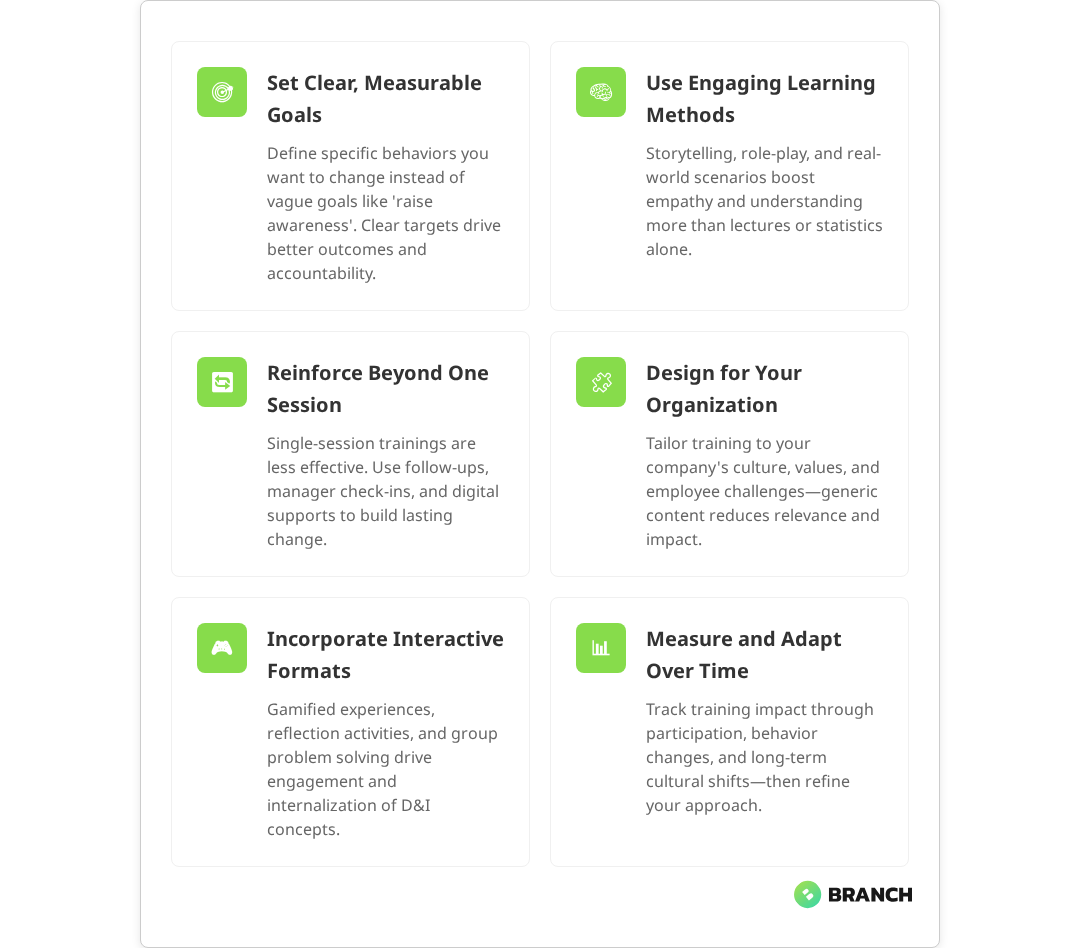
Set Clear, Measurable Goals

Vague objectives lead to vague outcomes. Instead of aiming to “increase awareness,” define specific behaviors you want to see change. Research emphasizes that measurable, specific goals are essential for tracking progress and determining program effectiveness. Examples might include:

  • Improved participation from underrepresented team members in meetings
  • Reduced bias in hiring and promotion decisions
  • Increased psychological safety scores in team surveys
  • Better conflict resolution around cultural differences
Read more about how D&I training integrates with broader compliance and organizational development frameworks.

Building Content That Sticks

The best diversity and inclusion training doesn’t just inform—it transforms. This requires thoughtful content design that balances education with application.

Start With Self-Reflection

Before diving into group activities, give participants time to examine their own experiences and assumptions. Self-awareness is the foundation of inclusive behavior, and rushing past it undermines everything that follows. Studies show that DEI training incorporating self-reflection promotes lasting change more effectively than programs that skip this critical step.

Use Real Examples

Draw from your organization’s actual challenges and successes. If your company struggled with inclusive leadership during rapid growth, build scenarios around that experience. If certain teams have found innovative ways to collaborate across differences, showcase those practices. Research demonstrates that training grounded in practical, real-world scenarios leads to more meaningful behavior change and improved outcomes.

Make It Actionable

Every session should end with specific next steps. This might be individual commitments, team agreements, or organizational process changes. Without clear action items, even the most engaging training becomes just an interesting conversation.

Build in Reinforcement

One-and-done training rarely creates lasting change. Plan for follow-up sessions, peer coaching, manager check-ins, or digital reinforcement tools that keep D&I concepts front of mind.

Delivery Options and Trade-offs

How you deliver your diversity and inclusion training affects both engagement and outcomes. Each format has strengths and limitations:

Delivery MethodBest ForConsiderations
In-person workshopsDeep discussion, team building, sensitive topicsHigher cost, scheduling complexity, geographic limitations
Virtual sessionsDistributed teams, consistent messaging, cost efficiencyEngagement challenges, technical barriers, screen fatigue
Self-paced eLearningIndividual reflection, flexible scheduling, scalabilityLower engagement, reduced discussion, isolation
Blended approachCombining individual prep with group applicationDesign complexity, multiple platforms, coordination needs

The most effective programs often combine multiple delivery methods, using each format’s strengths to reinforce key messages and skills.

Read more about integrating D&I concepts into structured employee onboarding workflows.

Measuring Impact and Iteration

Creating effective diversity and inclusion training is an iterative process. What works for one organization—or even one team—may need adjustment for another context.

Leading Indicators

Track engagement metrics during training: participation rates, question frequency, activity completion, and immediate feedback scores. These tell you whether your content is connecting.

Behavioral Changes

The real test is whether behavior changes after training. This might include manager observations, peer feedback, inclusion survey results, or analysis of meeting participation patterns.

Long-term Outcomes

Ultimate success shows up in retention rates, promotion patterns, employee engagement scores, and the overall health of your workplace culture. These metrics take time but provide the clearest picture of training effectiveness.

When to Partner With Specialists

Many organizations start diversity and inclusion training with internal resources—HR teams, learning and development staff, or external consultants. This can work well, especially for foundational concepts and company-specific content.

However, creating truly engaging, behavior-changing D&I programs requires specialized expertise in instructional design, adult learning principles, and inclusive content creation. Consider partnering with specialists when:

  • Your internal team lacks eLearning development experience
  • You need interactive, multimedia content that goes beyond slides
  • Previous training attempts haven’t driven desired behavior changes
  • You’re scaling programs across multiple locations or business units
  • Leadership wants measurable ROI from D&I investments

The right development partner brings both technical expertise and fresh perspective, helping you avoid common pitfalls while creating programs tailored to your organization’s unique needs. Look for teams that combine instructional design skills with deep understanding of diversity, equity, and inclusion principles.

A thoughtful approach to diversity and inclusion training can transform workplace culture, but only if it’s built on solid learning foundations and genuine commitment to change. The investment in getting it right—whether through internal development or external partnership—pays dividends in employee engagement, innovation, and organizational resilience.

FAQ

How long should diversity and inclusion training sessions be?

Effective D&I training often works better in shorter, focused sessions rather than day-long workshops. Consider 30-60 minute activities that allow for deep engagement without overwhelming participants. Multiple shorter sessions with time for reflection and practice between them typically drive better behavior change than single marathon sessions.

Should diversity training be mandatory or voluntary?

This depends on your organizational culture and goals. Mandatory training ensures everyone receives consistent messaging but can create resistance. Voluntary programs often see higher engagement but may miss people who most need the content. Many successful programs start voluntary and become part of standard professional development as they prove their value.

How do we handle resistance or pushback during D&I training?

Resistance often signals that people feel defensive or don't see personal relevance. Address this by focusing on business outcomes, using data to ground discussions, and creating safe spaces for questions and concerns. Frame D&I as skills development rather than correction, and acknowledge that these conversations can feel uncomfortable while remaining important.

What's the difference between diversity training and inclusion training?

Diversity training typically focuses on understanding differences and reducing bias, while inclusion training emphasizes behaviors that make everyone feel valued and able to contribute. The most effective programs address both, helping people recognize differences AND develop skills to create environments where everyone can thrive.

How much should we budget for effective D&I training?

Costs vary widely based on scope, delivery method, and customization level. Basic online modules might cost a few thousand dollars, while comprehensive custom programs can require tens of thousands. Consider the cost of not addressing D&I issues—turnover, reduced innovation, legal risks—when evaluating your investment. Most organizations find that thoughtful D&I training pays for itself through improved retention and engagement.

Woman following online courses on her laptop at home.

What Are the Best Methods for Soft Skills Training?

Your team needs better communication. Collaboration feels stilted. Managers struggle to give feedback effectively. Sound familiar? You’re not alone—soft skills gaps consistently rank among the top workforce challenges, yet recent research shows that only one-fifth of employees feel they receive effective soft skills training from their organizations.

The problem isn’t a lack of content. There’s no shortage of leadership modules, communication courses, or teamwork workshops out there. The real challenge is choosing methods that drive genuine behavioral change rather than just ticking compliance boxes. Whether you’re a learning and development leader, HR director, or operations manager tasked with upskilling your team, you need approaches that work in the real world—not just in theory.

Let’s explore the most effective methods for soft skills training, the trade-offs you’ll face, and how to design programs that actually change how people work together.

Why Most Soft Skills Training Falls Flat

Before diving into what works, let’s acknowledge what doesn’t. Generic soft skills content—the kind that gets rolled out enterprise-wide with minimal customization—typically sees adoption rates of just 5-10%. That’s not because employees don’t value communication or leadership skills. It’s because the training doesn’t connect to their daily reality.

Research has identified three common failure modes that plague soft skills training:

  • Solution without a problem: Content that isn’t tied to specific business challenges your organization faces
  • Digital-only delivery: Relying purely on eLearning modules without human reinforcement or coaching
  • One-size-fits-all approach: Generic content that doesn’t reflect your team’s roles, industry, or organizational culture

The most effective soft skills training flips these problems on their head. Instead of starting with content, start with the specific performance gaps you need to address.

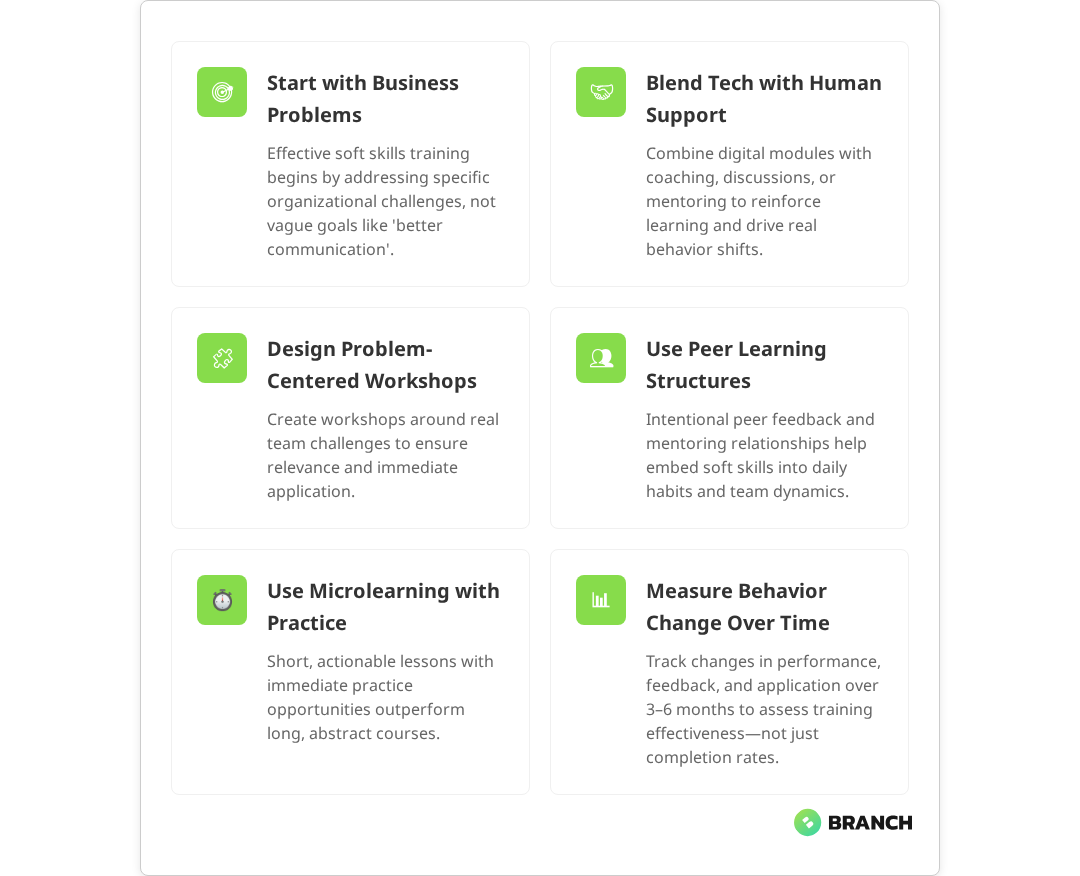
💡 Tip Before investing in any soft skills training, identify 2-3 specific business problems it should solve. 'Better communication' is too vague—'reducing project delays caused by unclear stakeholder feedback' gives you something measurable.

The Four Most Effective Training Methods

Based on what actually works in practice, here are the four methods that consistently deliver behavioral change:

1. Blended Learning with Human Support

Pure digital content rarely drives culture change on its own. Research consistently shows that the most successful soft skills programs combine digital resources with human-led elements like facilitated discussions, peer learning sessions, or one-on-one coaching.

This hybrid approach works because soft skills are inherently interpersonal. You can’t truly practice active listening or conflict resolution through a screen—you need real interactions with feedback and guidance.

2. Problem-Centered Workshops

Instead of abstract training on “leadership principles,” focus workshops on specific challenges your team faces. For example, if project handoffs consistently create confusion, design a session around stakeholder communication and documentation practices.

These workshops work best when they:

  • Address real scenarios from your organization
  • Include role-playing with actual team dynamics
  • Produce actionable tools or templates participants can use immediately
Read more about designing effective learning experiences that stick.

3. Peer Learning and Mentoring Programs

Some of the most powerful soft skills development happens through structured peer interactions. This might include cross-functional project teams, mentoring relationships, or regular feedback partnerships.

The key is making these interactions intentional rather than hoping they happen organically. Provide frameworks for giving and receiving feedback, templates for difficult conversations, and regular check-ins to ensure the relationships are productive.

4. Microlearning with Practical Application

Rather than lengthy courses, break soft skills training into bite-sized lessons tied to immediate application. Recent studies show that a 10-minute module on giving constructive feedback, followed by a template and an assignment to practice with a real team member, often proves more effective than a two-hour workshop.

This approach works because it reduces cognitive load and creates multiple opportunities for practice and reinforcement.

What the research says

  • Blended approaches outperform single methods: Multiple studies confirm that combining digital content with human-led elements like coaching and facilitated discussions leads to better skill retention and application than purely digital training.
  • Microlearning boosts engagement and outcomes: Research shows that bite-sized training modules can reduce training time by up to 80% while improving engagement by 50% and enhancing real-world skill application.
  • Business alignment is crucial: Training programs that address specific organizational challenges rather than generic skills see significantly higher adoption rates and measurable business impact.
  • Manager involvement is critical: Studies indicate that manager buy-in and active participation can influence up to 70% of training effectiveness, making leadership support essential for success.
  • Measurement needs time: Early research suggests that while initial enthusiasm may appear within weeks, genuine behavior change typically requires 3-6 months to become visible and measurable.

Choosing the Right Approach for Your Organization

The best training method depends on your specific context. Here’s a framework for making that decision:

Your SituationRecommended ApproachKey Success Factors
Small team (under 50), specific skill gapsProblem-centered workshopsAddress real scenarios; include all stakeholders
Large organization, broad skill developmentBlended learning programStrong managerial support; clear success metrics
Remote or distributed teamsMicrolearning + peer partnershipsStructured interaction frameworks; regular check-ins
Leadership development focusMentoring + targeted workshopsExecutive sponsorship; real project assignments
Limited budget or pilot programCurated content + facilitated discussionsStrong curation; consistent facilitation quality

Building vs. Buying: Your Content Options

Once you’ve selected your delivery method, you need to decide on content. You have three main options, each with distinct trade-offs:

Off-the-Shelf Solutions

Best for: Common skill areas with broad applicability (basic communication, time management)

Pros: Quick deployment, lower upfront cost, professionally produced

Cons: Generic scenarios, limited customization, may not reflect your culture

Curated and Customized Content

Best for: Organizations with specific industry context or unique challenges

Pros: Relevant scenarios, aligned with company values, can incorporate real examples

Cons: Higher upfront investment, longer development timeline

Fully Custom Development

Best for: Complex skill development tied to specific business processes or unique organizational dynamics

Pros: Perfectly aligned with business needs, can integrate with existing workflows

Cons: Significant time and budget investment, requires ongoing maintenance

💡 Tip Start with pilot testing before committing to any approach. Test different content types with small groups and measure both engagement and behavior change before scaling up.

Measuring Success Beyond Completion Rates

The metrics that matter for soft skills training go beyond traditional learning analytics. While completion rates and quiz scores provide basic data, they don’t tell you if behavior actually changed.

Expert frameworks recommend more meaningful metrics including:

  • Performance indicators: Project success rates, stakeholder satisfaction scores, conflict resolution times
  • 360-degree feedback: Pre- and post-training assessments from peers, direct reports, and managers
  • Application tracking: Evidence that participants are using tools or frameworks from training in real work situations
  • Business impact: Improvements in collaboration, communication effectiveness, or team performance tied to training initiatives

The key is establishing baseline measurements before training begins and tracking changes over 3-6 month periods, not just immediate post-training surveys. Multiple training specialists emphasize that this extended timeframe allows you to measure sustained behavioral change rather than just initial enthusiasm.

Read more about how Branch Boston designs measurable soft skills training programs.

When to Partner with Specialists

While some organizations successfully develop soft skills training internally, others benefit from working with experienced learning design partners. Consider external help when:

  • You need custom content that reflects complex business processes or unique organizational challenges
  • Your internal team lacks instructional design expertise or bandwidth
  • You want to integrate multiple delivery methods (digital + facilitated + coaching) into a cohesive program
  • You need to scale training across multiple locations or business units while maintaining consistency

The right partner will start by understanding your specific business problems, not pushing a predetermined solution. They should be able to demonstrate experience with both content development and program implementation, including change management support.

At Branch Boston, we’ve found that the most successful soft skills training programs combine thoughtful instructional design with deep understanding of how teams actually work. Rather than generic modules, we create learning experiences tied to real business outcomes—whether that’s leadership development for emerging managers or communication training for cross-functional project teams.

Getting Started: A Practical Framework

Ready to design soft skills training that actually works? Here’s a step-by-step approach:

  1. Identify specific problems: What business challenges could better soft skills address? Be concrete.
  2. Choose your pilot group: Start small with 10-20 participants who are motivated to participate and represent your broader audience.
  3. Select delivery method: Use the decision framework above to choose an approach that fits your constraints and culture.
  4. Design measurement strategy: Establish baseline metrics and plan for tracking both learning and behavior change.
  5. Test and iterate: Run your pilot, gather feedback, and refine before scaling.

Remember, effective soft skills training is less about finding the perfect content and more about creating consistent opportunities for practice, feedback, and reflection. The organizations that see real results treat skill development as an ongoing process, not a one-time event.

Whether you build internally or work with a partner like Branch Boston for custom eLearning development, focus on creating learning experiences that connect directly to how your team works—and the business problems you’re trying to solve.

FAQ

How long does it take to see results from soft skills training?

Genuine behavior change typically takes 3-6 months to become visible and measurable. You might see initial engagement and enthusiasm within weeks, but sustainable changes in communication patterns, leadership behaviors, or collaboration effectiveness require consistent practice and reinforcement over several months.

What's the biggest mistake organizations make with soft skills training?

Rolling out generic content without tying it to specific business problems. When training feels disconnected from daily work challenges, adoption rates plummet. Start by identifying 2-3 concrete performance gaps, then design training to address those specific issues rather than general 'communication skills.'

Can soft skills training work for remote teams?

Absolutely, but it requires different approaches than in-person training. Focus on microlearning modules paired with structured peer partnerships or mentoring relationships. Virtual role-playing sessions and regular practice opportunities through video calls can be highly effective when well-facilitated.

How much should we budget for effective soft skills training?

Budget varies widely based on approach and scale. Simple curated content with internal facilitation might cost $500-1,500 per participant, while fully custom blended programs with coaching support can range from $2,000-5,000 per participant. The key is aligning investment with expected business impact and measuring ROI through performance improvements.

Do managers need special training to support soft skills development?

Yes, manager buy-in and participation dramatically increases training effectiveness. Managers need frameworks for reinforcing learning, giving feedback on skill application, and modeling the behaviors you're trying to develop. Consider training managers first or running parallel manager development alongside employee programs.

Mid adult businessman typing an e-mail on a computer in the office. His colleagues are in the background.

ADDIE vs SAM vs Agile Instructional Design Models

If you’ve spent any time in the eLearning world, you’ve probably encountered the acronym soup: ADDIE, SAM, Agile. These instructional design models promise to bring structure and predictability to learning development projects. But here’s the thing that most practitioners won’t tell you upfront the gap between theory and practice is often wider than the Grand Canyon.

Whether you’re a learning and development leader evaluating your team’s approach or a digital decision-maker considering custom eLearning development, understanding when and how these models actually work (versus when they don’t) can save you from costly missteps and scope creep nightmares.

Let’s cut through the LinkedIn thought leadership fluff and examine what ADDIE, SAM, and Agile instructional design really look like when they hit the messy reality of stakeholder politics, changing requirements, and tight deadlines.

The Reality Check: How Models Actually Get Used

Before diving into the specifics of each model, let’s acknowledge an uncomfortable truth that experienced instructional designers know well: most teams claim to follow formal models but adapt them heavily in practice. This isn’t necessarily a failure it’s often smart pragmatism.

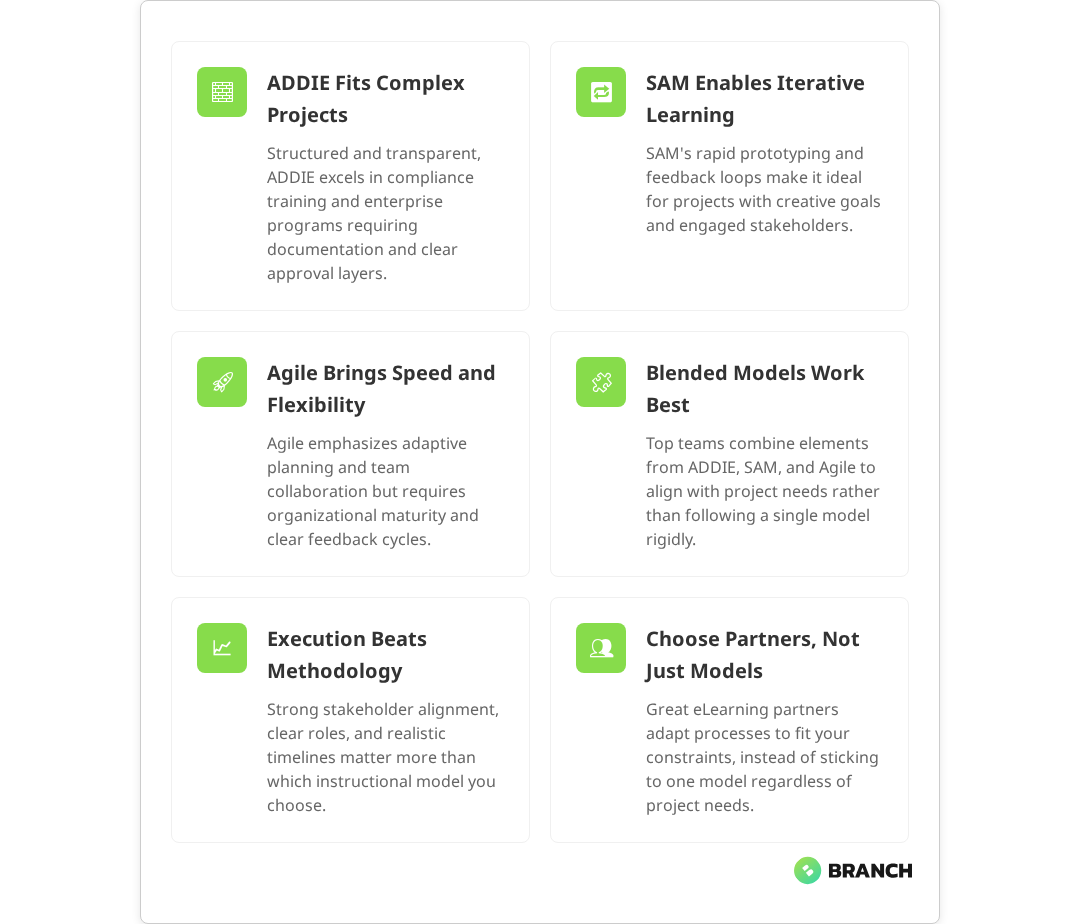
Research shows that the most effective learning development teams blend methodologies based on project constraints, stakeholder needs, and organizational culture. They might use ADDIE’s structure to communicate with unfamiliar clients, SAM’s iterative approach for rapid prototyping, and Agile principles for stakeholder collaboration sometimes all within the same project. This hybrid approach allows teams to match their process to project realities rather than forcing projects to fit rigid methodological frameworks.

💡 Tip: When evaluating eLearning partners, ask for specific examples of how they've adapted their process to different project constraints. Rigid adherence to any single model is often a red flag.

ADDIE: The Structured Workhorse

ADDIE (Analysis, Design, Development, Implementation, Evaluation) remains the most widely recognized instructional design model, and for good reason. Multiple sources confirm that it provides a clear, linear framework that’s particularly valuable when working with complex stakeholder groups or clients new to learning development.

When ADDIE Works Best

  • Complex compliance training where documentation and approval processes are critical
  • Large enterprise projects with multiple subject matter experts and approval layers
  • Clients unfamiliar with instructional design who need transparent, step-by-step guidance
  • High-stakes learning programs where thorough upfront analysis prevents costly mistakes

ADDIE’s Real-World Challenges

The linear nature of ADDIE can feel rigid when requirements change mid-project (and they always do). Research indicates that once ADDIE development has begun, it does not adapt well to mid-project changes, and shifting project goals can throw the entire process back to the analysis phase. The model works well when you have stable requirements and cooperative subject matter experts, but it can become a bureaucratic burden when stakeholders want to see something tangible quickly.

Additionally, ADDIE’s emphasis on comprehensive upfront analysis can slow initial momentum, leading to pushback from stakeholders who confuse activity with progress. Studies show this front-loaded approach can result in lengthy development cycles, with some courses taking up to two years from approval to delivery.

SAM: ADDIE’s Agile Cousin

The Successive Approximation Model (SAM) emerged as a response to ADDIE’s perceived rigidity. Research confirms that SAM emphasizes iterative development through rapid prototyping and frequent stakeholder feedback cycles, making it more adaptable to changing requirements.

SAM’s Two-Tier Approach

SAM1 works well for smaller, less complex projects with minimal stakeholders. SAM2 adds more formal project management and evaluation phases for larger initiatives.

When SAM Makes Sense

  • Innovative learning experiences where the final product isn’t clearly defined upfront
  • Projects with engaged stakeholders who can provide timely, meaningful feedback
  • Learning programs where user experience and engagement are primary concerns
  • Teams comfortable with ambiguity and iterative refinement

SAM’s Hidden Pitfalls

While SAM promises faster delivery through iteration, it requires disciplined scope management. Without clear boundaries, the “successive approximation” can become successive scope creep. Studies highlight that the frequent changes and overlapping phases in SAM can extend timelines and increase costs if scope is not managed carefully. The model also assumes stakeholders understand their role in providing timely, actionable feedback an assumption that often proves optimistic.

Read more: How professional eLearning development processes actually work in practice.

Agile Instructional Design: Promise vs. Practice

Agile principles have migrated from software development into instructional design, bringing concepts like user stories, sprints, and retrospectives to learning development. However, the implementation often falls short of the ideals.

True Agile Characteristics in Learning Design

  • Cross-functional collaboration between designers, developers, and stakeholders
  • Working prototypes delivered in short iterations
  • Adaptive planning based on user feedback and changing requirements
  • Continuous improvement through regular retrospectives

Where “Agile” Goes Wrong

Many organizations slap the “Agile” label on chaotic processes that lack clear ownership, defined scope, or meaningful user feedback loops. True Agile requires organizational maturity and stakeholder buy-in that many teams simply don’t possess.

The result? Projects that ping-pong between unclear requirements, with “Agile” becoming an excuse for poor planning rather than a framework for adaptive excellence.

What the research says

  • Blended approaches outperform single models: Multiple studies show that teams combining elements from different models achieve better outcomes than those rigidly following one approach
  • ADDIE remains valuable for complex projects: Research consistently supports ADDIE’s effectiveness for compliance training and large enterprise initiatives requiring extensive documentation
  • SAM requires stakeholder maturity: Evidence indicates SAM’s success depends heavily on engaged stakeholders who can provide meaningful, timely feedback throughout iterative cycles
  • Agile principles work across models: Cross-functional collaboration and continuous improvement practices enhance outcomes regardless of the primary methodology chosen
  • Context matters more than methodology: Early research suggests that project constraints and organizational readiness are stronger predictors of success than model selection, though more studies are needed to establish definitive best practices

Choosing Your Approach: A Practical Framework

Rather than asking “Which model should we use?” the more useful question is “What constraints and goals shape our project?” Here’s a practical decision framework:

Project CharacteristicsRecommended Primary ApproachKey Adaptations
Complex compliance with multiple approversADDIE-basedAdd SAM-style prototyping for stakeholder alignment
Innovative UX with engaged stakeholdersSAM-basedInclude Agile retrospectives and user story mapping
Ongoing learning platform developmentAgile-basedUse ADDIE analysis phase for foundational research
Tight timeline with clear requirementsModified SAM1Front-load analysis, compress iteration cycles
Uncertain scope with exploratory goalsDesign thinking + AgileExtended discovery phase before development sprints

Making Models Work in the Real World

Successful instructional design projects share certain characteristics regardless of the underlying model:

Clear Stakeholder Roles and Expectations

Define who provides input, who makes decisions, and who has final approval authority. Ambiguous ownership kills more projects than methodology choices.

Realistic Timeline and Scope Boundaries

Whether you’re using ADDIE’s phases, SAM’s iterations, or Agile sprints, scope creep is the enemy of every model. Build change management processes into your approach from day one.

Meaningful User Feedback Loops

All three models depend on stakeholder input, but they differ in when and how that feedback gets incorporated. Match your feedback approach to your stakeholders’ availability and expertise.

Flexible Documentation

ADDIE traditionally emphasizes comprehensive documentation, while Agile favors working software over documentation. The sweet spot is usually somewhere in between enough documentation to maintain quality and enable handoffs, but not so much that it becomes bureaucratic overhead.

When to Partner with Specialists

Custom eLearning development requires more than choosing the right model it demands expertise in learning science, user experience design, and technical implementation. Consider partnering with specialists when:

  • Your internal team lacks experience with iterative development approaches
  • The project involves complex technical integrations or custom functionality
  • Stakeholder alignment and change management are proving challenging
  • You need to balance multiple competing priorities across different organizational levels

A thoughtful digital partner can help you adapt instructional design models to your specific constraints while maintaining focus on learning outcomes rather than process orthodoxy. They bring experience with what actually works across different organizational contexts, not just what sounds good in theory.

💡 Tip: Look for partners who can articulate how they've successfully modified standard models for different client needs. The best teams blend approaches based on evidence, not ideology.

Beyond the Model Wars: What Really Matters

Here’s what experienced practitioners know: the model matters less than execution quality and stakeholder alignment. A well-executed ADDIE project will outperform a poorly managed Agile effort every time.

Focus on these fundamentals regardless of your chosen approach:

  • Learning objectives that connect to business outcomes
  • User research that informs design decisions
  • Stakeholder communication that prevents surprises
  • Quality assurance that catches problems before launch
  • Success metrics that measure actual learning transfer

The teams that succeed understand that instructional design models are tools, not religions. They adapt their approach based on project realities while maintaining unwavering focus on creating learning experiences that actually work for end users.

Whether you’re building custom eLearning development projects, implementing LMS platforms, or developing structured learning courses, success comes from matching your process to your context, not from following any particular model perfectly.

FAQ

Do most instructional design teams actually follow ADDIE, SAM, or Agile strictly?

No, most experienced teams blend elements from different models based on project needs. They might use ADDIE's structure for stakeholder communication, SAM's rapid prototyping for user testing, and Agile principles for team collaboration often within the same project. Pure adherence to any single model is less common than adaptive, hybrid approaches.

How do I know if my team is ready for Agile instructional design?

Successful Agile requires organizational maturity: stakeholders who can provide timely feedback, teams comfortable with ambiguity, and leadership that supports iterative refinement over upfront perfection. If your organization struggles with scope creep or has unclear decision-making authority, address those issues before adopting Agile approaches.

Is SAM just a repackaged version of ADDIE?

While SAM and ADDIE share similar phases, SAM emphasizes iterative development and rapid prototyping where ADDIE follows a more linear progression. SAM's key difference is building working prototypes early and often, while ADDIE typically develops the full solution after comprehensive upfront analysis. However, many practitioners blend both approaches in practice.

What's the biggest mistake teams make when choosing an instructional design model?

The biggest mistake is choosing a model based on what sounds innovative rather than what fits the project constraints. Teams often underestimate the organizational change required for newer approaches like Agile, or they dismiss ADDIE as outdated when its structure would actually help manage complex stakeholder environments.

How should I evaluate an eLearning partner's approach to instructional design models?

Ask for specific examples of how they've adapted their process to different client needs and constraints. Look for partners who can explain the trade-offs between different approaches rather than promoting one model as universally superior. The best partners match their methodology to your project reality, not the other way around.

Young adult Black woman having job interview online using laptop in modern coworking

How to Design Employee Onboarding Programs That Work

Employee onboarding isn’t just about filling out forms and watching compliance videos—though plenty of programs still feel that way. Done right, research shows that effective onboarding programs can improve retention by over 80% and increase productivity by more than 70%, transforming nervous first-day energy into confident, productive team members who stick around. Done wrong, it’s a bureaucratic slog that leaves new hires questioning their decision to join your organization.

The challenge? Most onboarding programs are built around internal convenience rather than human experience—a problem supported by recent data showing that only about 12% of employees rate their onboarding as satisfactory. They scatter tasks across disconnected systems, burden managers with complex workflows they’ll inevitably skip, and treat learning like a checklist instead of a journey. The result is predictable: inconsistent experiences, frustrated stakeholders, and new employees who feel more lost after onboarding than before.

This guide breaks down how to build employee onboarding programs that actually work—combining structured learning pathways, practical task management, and the kind of thoughtful design that makes complex processes feel surprisingly simple.

Why Most Onboarding Programs Miss the Mark

The fundamental problem with most employee onboarding programs isn’t a lack of good intentions—it’s a mismatch between ambitious goals and practical execution. Organizations want comprehensive, engaging experiences that cover everything from culture to compliance. What they often get are fragmented systems that create more confusion than clarity.

Consider the typical onboarding experience: new hires log into one platform for HR paperwork, another for training modules, receive a separate checklist from their manager (if they’re lucky), and somehow need to track their progress across all three. Meanwhile, managers juggle their own set of tasks—facility tours, equipment setup, introductions—often with no systematic way to ensure nothing falls through the cracks.

This fragmentation creates several cascading problems that research confirms are widespread across organizations:

  • Accountability gaps: When tasks span multiple systems and stakeholders, research shows that only 36% of HR leaders describe the handoff between recruiting, HR, and hiring managers as seamless, making it easy for critical steps to get lost or delayed.
  • Inconsistent experiences: Different departments or managers deliver wildly different onboarding quality, creating unfair advantages for some new hires. Studies indicate that nearly one in three HR leaders report new hires receive no guidance at all.
  • Manager resistance: Complex workflows that don’t fit into managers’ existing routines often get abandoned in favor of informal, ad-hoc approaches—a pattern consistently observed when onboarding systems are too complex or time-consuming for busy managers.
  • Poor visibility: HR teams struggle to understand where onboarding breaks down or which elements actually drive retention and performance, with many organizations lacking the data needed to continuously improve their processes.
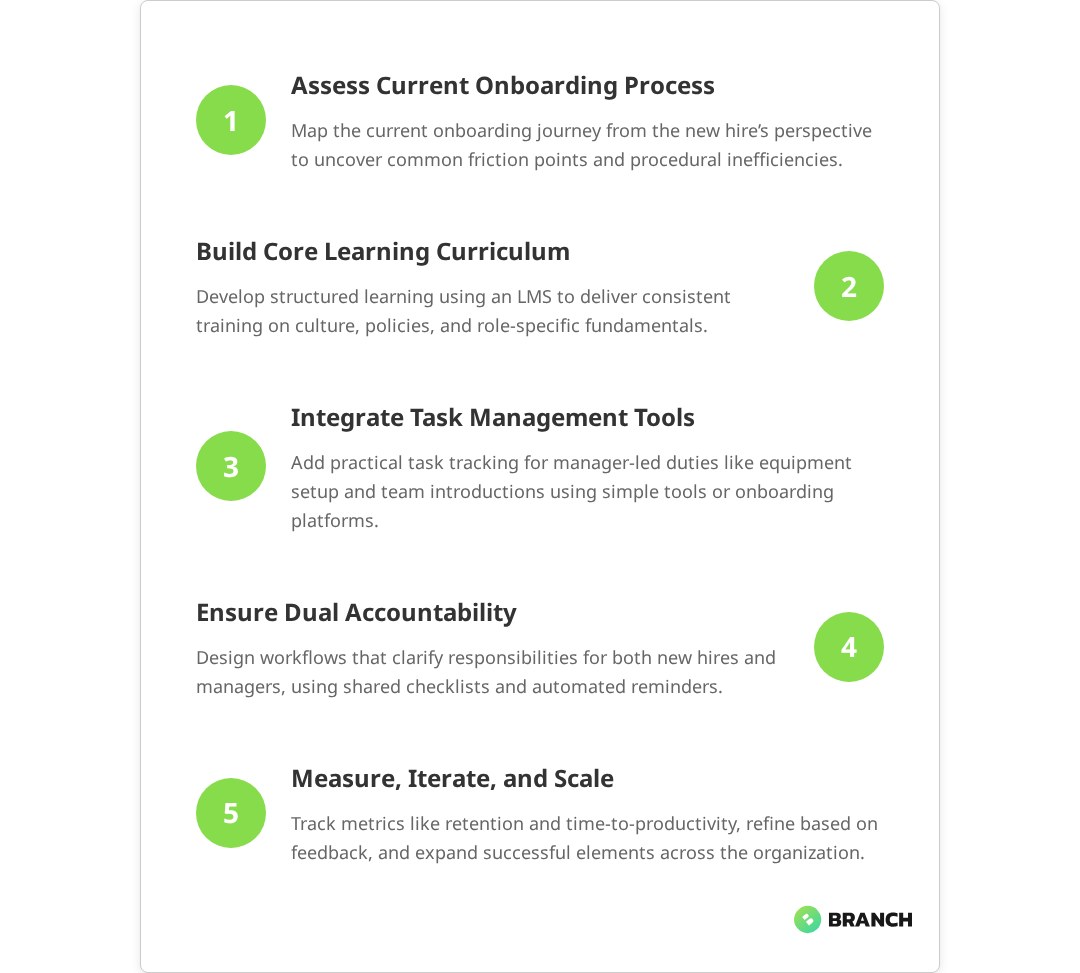
💡 Tip: Before building any onboarding solution, map out your current process from the new hire's perspective. Include every login, handoff, and waiting period—the friction points become obvious quickly.

The solution isn’t necessarily more sophisticated technology—it’s better-designed processes that account for how people actually work. This means understanding the constraints and motivations of every stakeholder, from busy hiring managers to overwhelmed new employees trying to absorb an organization’s worth of information in their first few weeks.

Read more about structured eLearning development processes that support complex organizational workflows.

What the research says

Multiple studies and industry analyses reveal consistent patterns about what makes onboarding programs successful:

  • Structured approaches deliver measurable results: Organizations with formal onboarding processes see significantly higher retention rates and faster time-to-productivity compared to informal approaches.
  • Consistency matters more than sophistication: Research indicates that standardized onboarding experiences, even simple ones, outperform inconsistent high-touch approaches in terms of new hire satisfaction and outcomes.
  • Manager engagement is critical but often missing: Studies show that nearly 29% of new hires receive inadequate guidance from their managers, highlighting a key gap in most onboarding programs.
  • Integration challenges are widespread: The majority of organizations struggle with fragmented onboarding systems, with less than half reporting seamless coordination between different departments and platforms.
  • Early evidence suggests technology alone isn’t the solution: While digital platforms can improve efficiency, the research shows that human connection and clear process design remain the strongest predictors of onboarding success.

The Architecture of Effective Onboarding

Successful employee onboarding programs share a common architecture: they combine structured learning pathways with flexible task management, all wrapped in systems that make it easy for both employees and managers to stay on track. Research confirms that effective onboarding programs blend formal learning, informal mentoring, and flexible delivery methods to ensure both engagement and consistency. The key is understanding which elements belong in formal learning platforms versus lightweight collaboration tools.

Learning Management Systems: The Structured Core

Modern Learning Management Systems (LMS) excel at delivering structured, trackable learning experiences. Features like learning pathways or curriculums allow you to sequence courses, documents, and assessments in logical progression, complete with due dates and prerequisites. This structure is particularly valuable for onboarding because it provides consistency while accommodating role-specific variations—a capability that multiple studies confirm improves both retention and employee productivity.

For example, all new hires might complete a foundational curriculum covering company culture, policies, and basic systems training. Role-specific paths then branch off—sales team members get CRM training and pipeline methodology, while engineering hires dive into development workflows and code review processes. The LMS tracks completion across all paths, giving HR teams visibility into progress and bottlenecks.

The most effective onboarding curriculums blend multiple content types:

  • Self-paced eLearning modules for foundational knowledge and policies
  • Virtual instructor-led training (VILT) for interactive sessions requiring discussion or practice
  • Document libraries for reference materials and job aids
  • Assessment checkpoints to verify understanding and completion

Task Management: The Practical Layer

While LMS platforms handle structured learning well, they often struggle with the practical, relationship-heavy tasks that make onboarding successful. Equipment setup, facility tours, team introductions, and workspace assignments typically require coordination between the new hire and their manager—and these interactions don’t always fit neatly into course-based workflows.

This is where lightweight task management becomes critical. Research suggests that while simple tools—shared spreadsheets, project management platforms, or even built-in LMS checklists—can track these less formal but equally important elements, purpose-built onboarding platforms with integrated task management significantly outperform generic approaches as organizations scale. The key is keeping manager-facing workflows as simple as possible while maintaining visibility for HR teams.

Read more about integrating training data with HCMS for streamlined HR workflows.

Design Principles for Onboarding That Sticks

Effective employee onboarding programs are built on a few core design principles that prioritize human experience over administrative convenience. These principles help navigate the inevitable trade-offs between comprehensiveness and simplicity, structure and flexibility.

Start with Stakeholder Reality

The best onboarding designs begin with honest assessment of how different stakeholders actually work. New hires are drinking from a fire hose—every additional login, platform, or process adds cognitive load. Hiring managers are typically juggling their regular responsibilities alongside onboarding duties—complex workflows get deprioritized or skipped entirely.

This reality check often reveals that simpler approaches work better than sophisticated ones. A shared spreadsheet that managers actually use trumps an elegant LMS workflow they ignore. A single learning pathway with embedded manager checkpoints often works better than separate systems for learning and task management.

Design for Dual Accountability

Successful onboarding requires coordination between new employees and their managers, but tracking shared accountability can be tricky. Some tasks are purely employee-driven (completing training modules), others require manager action (equipment setup, introductions), and many involve both parties (goal-setting conversations, role-specific training).

The most effective programs make this dual accountability explicit rather than hoping it happens naturally. This might mean:

  • Manager-verified completion steps in learning curriculums
  • Automated reminders to both parties when collaborative tasks are approaching deadlines
  • Separate but linked tracking systems that give each party visibility into their responsibilities
  • Clear escalation paths when tasks get stuck between stakeholders
Onboarding ElementBest Platform TypeKey StakeholdersSuccess Metrics
Company culture & policiesLMS curriculumNew hire, HRCompletion rates, assessment scores
Role-specific trainingLMS with manager verificationNew hire, manager, subject expertsCompetency demonstrations, manager feedback
Equipment & workspace setupSimple task trackerManager, IT, facilitiesSetup completion time, new hire satisfaction
Team introductions & networkingCalendar integration or task listManager, team membersIntroduction completion, relationship quality
Goal setting & expectationsCollaborative documents or formsNew hire, managerGoal clarity scores, alignment feedback
💡 Tip: Create manager onboarding checklists that are separate but synchronized with employee-facing materials. This prevents overwhelming new hires with manager-specific tasks while keeping everyone aligned.

Implementation Strategies: From Planning to Launch

Building an effective employee onboarding program requires careful orchestration of content, technology, and stakeholder needs. The most successful implementations follow a structured approach that prioritizes quick wins while building toward comprehensive solutions.

Phase 1: Foundation and Core Content

Start with the elements that provide immediate value and are least dependent on complex integrations. This typically means focusing on structured learning content that can live in a single platform—company culture, policies, basic systems training, and role-specific fundamentals.

During this phase, invest time in content quality rather than technological sophistication. Well-designed learning modules that new hires can complete independently provide immediate value while you work on more complex coordination elements. This also gives you time to observe how different stakeholders interact with the system and where friction points emerge.

Phase 2: Task Integration and Workflow Optimization

Once your core learning content is solid, layer in the practical elements that require coordination between stakeholders. This is where you’ll need to make critical decisions about platform integration versus separation.

Some organizations find success with all-in-one LMS platforms that include task management features. Others prefer best-of-breed approaches that connect specialized learning platforms with dedicated project management tools. The right choice depends on your stakeholder preferences, existing technology stack, and organizational complexity.

Key considerations for this phase:

  • Manager adoption barriers: Will hiring managers consistently use complex workflows, or do you need simpler alternatives?
  • Integration complexity: How much technical effort is required to connect different systems, and is that effort justified by the benefits?
  • Scalability requirements: Will your approach work as well for high-volume hiring periods as it does for steady-state onboarding?
  • Measurement and improvement: What data do you need to continuously optimize the experience, and can your chosen tools provide it?

Phase 3: Measurement, Iteration, and Advanced Features

Once your basic onboarding architecture is stable and adopted, focus on measurement systems that help you understand what’s working and what isn’t. This goes beyond simple completion metrics to include engagement quality, stakeholder satisfaction, and business outcomes like retention and time-to-productivity.

Advanced features—personalized learning paths, AI-powered content recommendations, sophisticated progress analytics—become valuable only after you’ve solved the fundamental design and adoption challenges. These enhancements can provide significant value, but they’re not substitutes for clear processes and stakeholder-friendly workflows.

Read more about Branch Boston's approach to custom employee onboarding program development.

When to Build Custom vs. Extend Existing Platforms

One of the most consequential decisions in onboarding program development is whether to work within existing platforms, extend them with custom features, or build something entirely new. Each approach has distinct advantages and constraints that become more pronounced as your onboarding requirements grow more sophisticated.

Working Within Existing Platforms

Most organizations already have HR systems, learning management platforms, or collaboration tools that can support basic onboarding workflows. This approach offers the fastest path to implementation and lowest ongoing maintenance burden, but may require compromising on ideal user experiences or specific functionality needs.

Existing platforms work best when your onboarding process is relatively straightforward and aligns well with the platform’s intended use cases. For example, if you have an LMS with robust curriculum features and your onboarding is primarily learning-focused, you might achieve 80% of your goals with configuration rather than custom development.

The limitation comes when your process requires coordination across multiple stakeholders, complex conditional logic, or integration with specialized systems. Forcing these requirements into platforms that weren’t designed for them often creates awkward user experiences and maintenance headaches.

Custom Extensions and Integrations

Sometimes the middle path makes most sense: keeping your core platforms while building custom components that address specific gaps or integration needs. This might mean developing custom dashboards that aggregate data from multiple systems, building workflow automation that connects your LMS to task management tools, or creating specialized interfaces for managers who need simplified access to onboarding oversight functions.

This approach requires more technical sophistication but can provide significant advantages in user experience and operational efficiency. The key is identifying the minimum viable extensions that solve your most critical problems while avoiding the complexity trap of over-engineering solutions.

When Custom Development Makes Sense

Fully custom onboarding platforms become appropriate when your organizational needs, compliance requirements, or stakeholder workflows are sufficiently unique that existing solutions create more problems than they solve. This typically happens in highly regulated industries, complex organizational structures, or situations where onboarding is closely integrated with performance management and career development systems.

Custom development also makes sense when onboarding quality is a significant competitive advantage—either for talent attraction or operational efficiency—and the investment in bespoke solutions provides measurable business returns.

ApproachBest ForTypical InvestmentTime to ValueLong-term Flexibility
Existing platform configurationStraightforward processes, standard workflowsLowWeeksLimited by platform capabilities
Custom extensions & integrationsGood platforms with specific gapsMediumMonthsHigh for targeted improvements
Fully custom developmentComplex requirements, competitive advantageHighMonths to quartersComplete control over evolution
💡 Tip: Start with the simplest viable approach, then invest in custom development only where platform limitations create measurable business problems. Most organizations underestimate how much value they can extract from thoughtful configuration of existing tools.

Making the Business Case for Better Onboarding

Employee onboarding improvements often get delayed because the benefits feel soft and long-term while the costs are immediate and visible. Building a compelling business case requires connecting onboarding quality to measurable business outcomes and demonstrating that thoughtful design pays for itself through improved retention, faster productivity ramp, and reduced administrative overhead.

Quantifying the Current State

Before proposing solutions, establish baseline metrics that capture both the direct costs of poor onboarding and the opportunity costs of suboptimal experiences. Direct costs include administrative time spent managing fragmented processes, IT support for confused new hires, and manager time devoted to ad-hoc onboarding tasks.

Opportunity costs are often larger but harder to measure: new hires who leave during their first 90 days, extended time-to-productivity periods, and inconsistent experiences that create unfair advantages for some employees while leaving others behind. These costs compound over time and become particularly visible during high-growth periods when onboarding volume increases.

Connecting Experience to Outcomes

The most compelling business cases connect specific onboarding improvements to measurable business outcomes. This might mean demonstrating how structured learning paths reduce time-to-first-sale for sales hires, how streamlined task management improves manager satisfaction scores, or how integrated systems reduce HR administrative burden.

These connections become stronger when you can point to specific friction points in your current process and explain how proposed improvements address them. For example, if new hires frequently report feeling lost during their first week, you can connect improved coordination workflows to engagement scores and early retention rates.

Partnering with Specialized Teams

Organizations often underestimate the specialized expertise required to build truly effective onboarding experiences. Learning design, user experience optimization, systems integration, and stakeholder workflow analysis each require different skill sets that may not exist in-house.

This is where partnerships with teams like Branch Boston become valuable. Rather than trying to build internal expertise in every required discipline, you can leverage specialists who understand both the technical and human elements of effective onboarding design. This approach often provides faster time-to-value and better long-term outcomes than attempting to build everything internally.

The key is finding partners who understand that good onboarding isn’t just about technology—it’s about creating human-centered experiences that work within your organizational constraints and stakeholder realities.

Read more about custom eLearning development for complex organizational workflows.

Getting Started: Your Onboarding Design Roadmap

Building better employee onboarding programs doesn’t require massive upfront investments or months of planning—but it does require systematic thinking about stakeholder needs and realistic assessment of organizational capabilities. Here’s how to approach your onboarding improvements strategically.

Assessment and Discovery

Start by mapping your current onboarding experience from multiple perspectives. What does the process look like for new hires? What tasks and coordination points burden managers? Where do HR teams spend time on manual processes or problem-solving?

This discovery phase often reveals that the biggest problems aren’t technological—they’re process design issues that create unnecessary friction or confusion. Understanding these pain points helps prioritize which improvements will provide the most value.

Pilot and Iterate

Rather than attempting to solve every onboarding challenge at once, focus on one or two high-impact improvements that you can implement and measure quickly. This might mean creating a structured learning curriculum for one department, streamlining task coordination for managers, or building better visibility into onboarding progress for HR teams.

Successful pilots provide both immediate value and learning about how your organization responds to process changes. This learning is critical for designing larger-scale improvements that actually get adopted and sustained.

Scale What Works

Once you’ve identified approaches that work within your organizational culture and constraints, scaling becomes a matter of extending successful patterns rather than rebuilding from scratch. This is where investments in more sophisticated technology, custom development, or specialized partnerships often make sense—after you’ve proven the value and refined the approach.

The organizations that build consistently excellent onboarding experiences are those that treat it as an ongoing design challenge rather than a one-time implementation project. They measure, iterate, and continuously align their processes with both business needs and stakeholder realities.

FAQ

Should we use one platform for all onboarding tasks or separate systems for different elements?

The best approach depends on your stakeholder preferences and process complexity. Integrated platforms work well when your onboarding is primarily learning-focused and managers are comfortable with more sophisticated workflows. Separate systems often work better when you need to keep manager-facing tasks simple while providing rich learning experiences for new hires. The key is ensuring clear coordination between whatever systems you choose.

How do we get managers to actually follow onboarding processes instead of doing things informally?

Manager adoption depends more on workflow design than platform sophistication. Keep manager-facing tasks as simple as possible, integrate with tools they already use, and provide clear value for their time investment. Many successful programs use lightweight task tracking (even spreadsheets) for manager coordination while putting structured learning in dedicated platforms. The goal is supporting their natural workflows, not forcing them into new ones.

What's the best way to track onboarding tasks that involve both employees and managers?

Dual accountability requires explicit design rather than hoping coordination happens naturally. This might mean manager-verified completion steps in learning curriculums, automated reminders to both parties when collaborative tasks approach deadlines, or separate but synchronized tracking systems. The key is making each party's responsibilities clear while providing visibility into overall progress.

How long should employee onboarding programs take, and how do we structure the timeline?

Effective onboarding typically spans 30-90 days, but the structure matters more than the length. Front-load essential information and systems access in the first week, focus on role-specific skills and relationship building in weeks 2-4, then transition to ongoing development and integration. Build in regular check-ins and flexibility for role-specific variations rather than one-size-fits-all timelines.

When does it make sense to build custom onboarding solutions versus using existing platforms?

Start with existing platforms unless they create significant friction or missing capabilities. Custom development becomes worthwhile when your organizational needs, compliance requirements, or stakeholder workflows are unique enough that standard solutions create more problems than they solve. Most organizations can achieve 80% of their goals through thoughtful configuration of existing tools—invest in custom development only where platform limitations create measurable business problems.

Close-up of hands typing on a laptop with glowing programming code and binary graphics, symbolizing cybersecurity technology coding or software development.

How to Integrate LMS with HRIS Systems

If you’ve ever watched an HR manager manually upload employee training records from an LMS into their HRIS—or worse, maintain two separate spreadsheets—you know the pain of disconnected systems. Learning Management Systems and Human Resources Information Systems should talk to each other seamlessly, but the reality is often messier.

For L&D leaders, CTOs, and operations teams at B2B organizations, integrating your LMS with HRIS isn’t just about eliminating double data entry. Research confirms that this integration creates a unified view of employee development that supports compliance, career progression, and strategic workforce planning. When done right, this integration transforms scattered training data into actionable insights that drive both individual growth and business outcomes.

This guide walks through the practical realities of LMS-HRIS integration—from understanding the technical architecture to making smart decisions about custom builds versus off-the-shelf connectors. We’ll cover what works, what doesn’t, and how to avoid the common pitfalls that turn promising integration projects into expensive headaches.

Why LMS-HRIS Integration Matters (Beyond the Obvious)

The surface-level benefits are clear: no more manual data transfers, fewer errors, and happier HR teams. But the real value of LMS-HRIS integration runs deeper, touching everything from compliance reporting to talent development strategy.

Compliance and audit readiness become dramatically easier when training completion data flows directly into employee records. Industry guidance shows that this automated transfer reduces manual data entry, minimizes errors, and centralizes training records. Instead of scrambling to pull reports from multiple systems during an audit, compliance teams can generate comprehensive training histories with a few clicks. This is particularly crucial for industries with strict regulatory requirements around ongoing education and certification maintenance.

Career development visibility improves when managers can see both performance data and learning progress in a single interface. Studies indicate that these integrated views help managers better identify development needs, track goal progress, and recognize high-potential employees. An employee’s training completion rates, skill development trajectory, and performance reviews paint a more complete picture than either dataset alone. This integrated view helps identify high-potential employees and surface development opportunities that might otherwise be missed.

Workforce analytics become more sophisticated when learning data enriches HR metrics. Questions like “Do employees who complete certain training programs have better retention rates?” or “Which departments have skill gaps based on training completion patterns?” become answerable with integrated data.

💡 Tip Start with your reporting requirements first, not your technical architecture. Map out what insights you actually need from integrated data—this will guide your integration design and help you avoid over-engineering solutions for data you'll never use.

Understanding Integration Architecture Options

LMS-HRIS integration isn’t a one-size-fits-all problem. The right approach depends on your existing systems, data complexity, and organizational constraints. Here are the main architectural patterns and when each makes sense:

Integration TypeBest ForComplexityOngoing MaintenanceTypical Cost
Pre-built API ConnectorsStandard systems with common pairingsLowVendor-managed$500-5,000/month
Custom API IntegrationComplex data requirements or unique workflowsMedium-HighInternal or partner-managed$15,000-100,000+ initial
Middleware PlatformMultiple system integrations neededMediumPlatform-managed$2,000-15,000/month
File-based SyncLegacy systems or simple data transfersLow-MediumHigh (manual oversight)$5,000-25,000 initial

Pre-built connectors work well when you’re using popular LMS and HRIS combinations like Cornerstone OnDemand with Workday, or Canvas with BambooHR. Industry analysis confirms these solutions handle the most common data flows with low complexity and vendor-managed maintenance. However, they may not support custom fields or complex business logic unique to your organization.

Custom API integrations give you complete control over data mapping, transformation rules, and error handling. This approach makes sense when your data requirements are sophisticated—for example, if you need to sync custom competency frameworks or handle complex organizational hierarchies that don’t map cleanly to standard connector assumptions.

Read more about strategic approaches to training data integration.

Data Flow Design: What Syncs When

Successful LMS-HRIS integration requires thoughtful consideration of data direction, timing, and business rules. Not all data should flow both ways, and not everything needs to sync in real-time.

Typical Data Flow Patterns

Research confirms that most integrations follow established patterns for data synchronization:

  • Employee profile data (HRIS → LMS): Names, employee IDs, department assignments, job titles, manager relationships, and start dates typically flow from HRIS to LMS to ensure accurate user provisioning and appropriate training assignment.
  • Training completions (LMS → HRIS): Course completions, certification statuses, skill assessments, and continuing education credits flow back to create comprehensive employee development records.
  • Organizational changes (HRIS → LMS): Department transfers, role changes, and manager reassignments need to trigger updates in LMS access permissions and training requirements.
  • Compliance tracking (Bidirectional): Required training assignments may originate in HRIS based on role or location, while completion status returns to HRIS for audit and reporting purposes.

The trickiest decisions often involve data timing and conflict resolution. Should training completions sync immediately or in daily batches? What happens when an employee’s name is updated in HRIS while they’re mid-course in the LMS? These edge cases seem minor but can create significant user experience problems if not handled properly.

Handling Data Conflicts and Edge Cases

Real-world integration projects often stumble on scenarios that seem simple but reveal system complexities:

  • Employee departures: Should departed employees lose LMS access immediately, or should their training records remain accessible for knowledge transfer? How long do you maintain their certification history?
  • Rehires: When someone returns to the company, do you restore their old training records or start fresh? Different compliance requirements may have different answers.
  • Bulk organizational changes: During restructures or acquisitions, thousands of employee records might change simultaneously. Your integration needs to handle these volume spikes without breaking.

What the research says

  • Multiple studies confirm that integrating LMS with HRIS eliminates double data entry, reduces errors, and streamlines processes like onboarding and record-keeping for HR and IT teams.
  • Evidence shows that integrated systems enable managers to maintain a unified view of employee performance and learning progress, improving their ability to identify high-potential employees and development opportunities.
  • Research indicates that automated training completion tracking significantly improves compliance and audit readiness, allowing comprehensive training histories to be generated efficiently rather than manually compiled from multiple systems.
  • Early studies suggest that pre-built connectors work well for standard system pairings, though organizations with unique compliance requirements or complex workflows may need custom solutions.
  • Industry guidance recommends designing integrations for eventual consistency with retry logic rather than real-time synchronization, as this approach proves more reliable and cost-effective for training data.

Technical Implementation Considerations

Moving beyond the conceptual design, successful LMS-HRIS integration requires attention to several technical details that can make or break your project.

API Capabilities and Limitations

Not all LMS and HRIS platforms are created equal when it comes to integration capabilities. Before committing to an integration approach, audit what each system actually supports:

  • API comprehensiveness: Can you access all the data fields you need? Some systems have robust APIs for reading data but limited capabilities for creating or updating records.
  • Rate limiting and throttling: How many API calls can you make per hour or day? Large organizations with thousands of employees may hit limits during bulk sync operations.
  • Authentication and security: What authentication methods are supported? How do you handle API key rotation and secure credential storage?
  • Webhook support: Can the system notify your integration when data changes, or do you need to poll continuously for updates?

Some legacy HRIS platforms still rely primarily on SFTP file transfers rather than modern APIs. While this seems outdated, file-based integration can actually be more reliable for bulk data transfers and simpler to debug when things go wrong.

Read more about integration patterns with enterprise backend systems.

Security and Compliance Requirements

Employee data integration touches on multiple compliance frameworks—GDPR, CCPA, industry-specific regulations, and internal security policies. Your integration architecture needs to address:

  • Data encryption in transit and at rest, with proper key management
  • Access logging for audit trails showing who accessed what employee data when
  • Data retention policies that align across both systems
  • Geographic data residency requirements if you operate internationally

Security isn’t just about the integration code—it’s about operational procedures for monitoring, incident response, and regular access reviews.

Implementation Strategies: Build, Buy, or Partner

The classic build-versus-buy decision becomes more nuanced with LMS-HRIS integration because your options range from fully managed solutions to custom development, with several middle-ground approaches.

When to Use Pre-built Solutions

Off-the-shelf integration platforms like Zapier, MuleSoft, or specialized HR-tech connectors work well when:

  • Your LMS and HRIS are both mainstream platforms with existing connector support
  • Your data requirements fit standard templates (employee profiles, basic training completions)
  • You can adapt your business processes to match the connector’s assumptions
  • You prefer predictable monthly costs over upfront development investment

The downside is limited customization. If your organization has unique compliance requirements or complex approval workflows, pre-built solutions may not fit.

When Custom Development Makes Sense

Custom integration development is justified when:

  • Your data model includes custom fields or complex relationships not supported by standard connectors
  • You need sophisticated business logic for data transformation or validation
  • Integration is part of a larger system modernization where you’re building custom middleware anyway
  • Long-term total cost of ownership favors upfront development over ongoing subscription fees

Custom solutions require ongoing maintenance and expertise, but they give you complete control over functionality and data handling.

The Partner Approach

Working with an integration specialist combines the flexibility of custom development with the expertise of teams who’ve solved similar problems before. This approach works particularly well for organizations that need customization but lack internal integration expertise.

A good integration partner brings architectural experience, knowledge of common pitfalls, and ongoing support capabilities. They can help you design solutions that balance current needs with future flexibility—avoiding over-engineering while ensuring your integration won’t become a bottleneck as your organization grows.

Planning Your Integration Project

Successful LMS-HRIS integration projects share common characteristics: clear scope, realistic timelines, and strong stakeholder alignment. Here’s how to set your project up for success.

Stakeholder Alignment and Requirements Gathering

Integration projects often fail not because of technical challenges, but because different stakeholders have different expectations. Your project team should include:

  • HR operations who understand current data workflows and pain points
  • L&D teams who know training requirements and reporting needs
  • IT/Security who can assess technical feasibility and compliance requirements
  • End users (managers and employees) who will interact with the integrated systems

Spend time mapping current manual processes before designing automated ones. Often, manual workarounds exist because of legitimate business requirements that automated integration needs to preserve.

Project PhaseDurationKey ActivitiesSuccess Criteria
Discovery & Planning2-4 weeksRequirements gathering, system audit, architecture designDocumented data flows and technical specification
Development & Configuration4-12 weeksIntegration build, testing, security reviewWorking integration in staging environment
Pilot & Testing2-4 weeksLimited production testing, user feedback, refinementSuccessful data sync for pilot group
Full Deployment1-2 weeksProduction rollout, monitoring, documentationAll users successfully integrated
💡 Tip Start with a limited pilot group—perhaps one department or business unit—rather than attempting organization-wide integration immediately. This lets you identify and fix edge cases before they affect everyone.

Testing and Validation Strategy

Integration testing goes beyond verifying that data transfers correctly. You need to validate business logic, error handling, and user experience across both systems:

  • Data accuracy testing: Verify that employee profiles, training records, and organizational hierarchies sync correctly
  • Performance testing: Ensure the integration handles your actual data volumes without timing out
  • Error scenario testing: What happens when one system is unavailable? How do you handle malformed data or network interruptions?
  • User experience testing: Do employees see consistent information across systems? Are there confusing delays or discrepancies?

Ongoing Management and Optimization

Launch day is just the beginning. Successful LMS-HRIS integration requires ongoing monitoring, maintenance, and optimization to deliver sustained value.

Monitoring and Alerting

Set up monitoring that goes beyond basic “is it working” checks:

  • Data quality metrics: Track sync success rates, data validation failures, and processing times
  • Business impact metrics: Monitor training completion rates, compliance status, and user adoption
  • System health indicators: API response times, error rates, and resource utilization

Alert fatigue is real—configure notifications for genuinely critical issues while logging everything else for periodic review.

Evolution and Scaling

Your integration needs will change as your organization grows and your systems evolve. Plan for:

  • New data requirements as L&D programs become more sophisticated
  • Additional system connections as you add performance management tools or other HR technologies
  • Increased data volumes as headcount grows or training programs expand
  • Changing compliance requirements that affect data handling or retention policies

Regular architecture reviews help ensure your integration continues to serve your evolving needs rather than constraining them.

When to Bring in Integration Specialists

Some organizations have the internal expertise to handle LMS-HRIS integration in-house, while others benefit from working with specialized partners. Consider external support when:

  • Your internal team lacks experience with enterprise system integration
  • You’re working with complex or legacy systems that require specialized knowledge
  • Timeline pressure makes it impractical to build internal expertise
  • Integration is part of a larger digital transformation initiative

The right integration partner brings architectural expertise, knowledge of common pitfalls, and ongoing support capabilities. They can help you avoid expensive mistakes while ensuring your solution scales with your organization’s growth.

At Branch Boston, we’ve helped B2B organizations design and implement integration solutions that bridge learning management systems with broader enterprise infrastructure. Our approach focuses on understanding your unique business requirements and building solutions that work reliably in the real world—not just in perfect test conditions.

Whether you need enterprise systems integration expertise, LMS implementation support, or custom software development to fill integration gaps, we can help you create connected systems that actually serve your people and processes.

FAQ

How long does LMS-HRIS integration typically take?

Timeline varies significantly based on complexity, but most projects take 2-4 months from planning to full deployment. Simple connector-based integrations might complete in 4-6 weeks, while custom integrations with complex business logic can take 4-6 months. The discovery phase is crucial—rushing through requirements gathering often extends overall timeline.

What's the biggest mistake organizations make with LMS-HRIS integration?

Trying to sync everything in real-time without considering whether it's necessary. Most training data doesn't need instantaneous consistency across systems, and over-engineering for real-time sync creates complexity and failure points. Focus on business requirements first, then design the simplest technical solution that meets those needs.

Should we integrate our existing systems or replace them with an all-in-one platform?

It depends on your satisfaction with current functionality and budget for change management. If your LMS and HRIS serve your needs well, integration is usually more cost-effective than platform replacement. However, if you're already planning system upgrades, consider whether modern platforms with built-in integration might serve you better long-term.

How do we handle employee data privacy during integration?

Start with a data audit to understand what personal information you're syncing and why. Implement encryption for data in transit and at rest, maintain detailed access logs, and ensure your integration complies with relevant privacy regulations like GDPR or CCPA. Consider data minimization—only sync the employee information you actually need for business purposes.

What happens if the integration breaks—do we have a backup plan?

Build fallback procedures before you need them. This might include automated daily data exports, manual sync procedures for critical data, and clear escalation paths for integration issues. Most importantly, ensure your systems can operate independently if the integration fails—avoid creating single points of failure that could disrupt core HR or training operations.

Website development UI/UX front end designer reviewing sketched wireframe layout design mockup for responsive web content with AR screen

How to Create Responsive Web Designs That Work Across Every Device

In today’s multi-device world, responsive web design isn’t just a nice-to-have it’s essential for reaching your audience wherever they are. Whether your users are checking your site on their phone during their commute, browsing on a tablet at home, or diving deep on a desktop at work, your web experience needs to adapt seamlessly to every screen size and context.

For B2B organizations, the stakes are even higher. Research consistently shows that responsive design affects everything from lead generation and customer onboarding to employee training platforms and internal tools. A poorly responsive site doesn’t just frustrate users it can directly impact your bottom line and operational efficiency by increasing bounce rates, reducing conversion rates, and creating barriers to critical business functions.

This guide will walk you through the fundamentals of responsive web design, from core technical concepts to practical implementation strategies. We’ll explore when to build custom solutions, when to adapt existing frameworks, and how to make smart decisions about tools and resources that align with your business goals.

Understanding the Mechanics of Responsive Design

Responsive web design relies on three core technical principles that work together to create fluid, adaptable layouts. These fundamental elements form the technical backbone of any successful responsive implementation, and understanding these mechanisms helps you make better decisions about your approach and tooling.

Fluid Grids and Flexible Layouts

Traditional web layouts used fixed pixel widths, which broke on different screen sizes. Responsive design uses relative units like percentages, viewport width (vw), and flexible grid systems that scale proportionally. Modern fluid grid systems ensure that instead of a sidebar being exactly 300 pixels wide, it might occupy 25% of the available space, automatically adjusting as screens get larger or smaller.

Flexible Images and Media

Images and videos need special handling to prevent them from overflowing their containers or appearing too small on large screens. Current best practices include CSS techniques like max-width: 100% and modern responsive image solutions that ensure media scales appropriately while maintaining aspect ratios and loading performance across all device types.

CSS Media Queries

Media queries are the conditional logic that makes responsive design possible. They allow you to apply different styles based on screen characteristics like width, height, orientation, and pixel density. This is where you define breakpoints the specific screen sizes where your layout changes significantly.

Screen CategoryTypical BreakpointDesign ConsiderationsCommon Challenges
Mobile phones320px – 768pxTouch targets, thumb navigation, vertical scrollingLimited screen real estate, slower connections
Tablets768px – 1024pxHybrid touch/mouse input, variable orientationAmbiguous interaction patterns, diverse sizes
Desktop1024px+Mouse precision, keyboard shortcuts, multiple windowsWide screens, accessibility needs, legacy browsers
Large displays1440px+High information density, advanced featuresContent scaling, maintaining readability

Mobile-First vs. Desktop-First: Choosing Your Approach

One of the most important strategic decisions in responsive design is whether to start with mobile or desktop layouts. This choice affects everything from your development workflow to the final user experience and overall business outcomes.

Mobile-First Benefits

  • Content prioritization: Forces you to identify truly essential elements first by working within mobile screen constraints
  • Performance optimization: Encourages lean, fast-loading designs from the start, often improving loading speeds by 30-50%
  • Progressive enhancement: Easier to add features as screen size increases
  • Future-proofing: Aligns with mobile-dominant usage patterns

When Desktop-First Still Makes Sense

While mobile-first is generally recommended, some scenarios call for a desktop-first approach. Organizations building complex B2B applications, data-heavy dashboards, or specialized tools often find their primary users work on desktop. In these cases, designing for the full-featured experience first and then thoughtfully adapting for mobile contexts can be more practical.

Read more: Understanding the difference between UX and UI design principles that guide responsive layouts.

The key is understanding your audience and use cases. If your users primarily engage with your product during focused work sessions on desktop like configuring enterprise software or analyzing complex data sets then designing for that context first ensures you don’t compromise critical functionality.

What the research says

  • Studies show that mobile-first design typically improves website performance by 30-50% through optimized code structure and reduced file sizes, leading to better Core Web Vitals scores.
  • Responsive design significantly impacts conversion rates and user engagement, with poorly optimized mobile experiences leading to higher bounce rates and lost revenue opportunities.
  • CSS frameworks like Bootstrap, Foundation, and Tailwind can accelerate development by providing pre-built responsive grid systems, particularly benefiting teams without deep CSS expertise.
  • Research indicates that treating responsive design as simply “scaling down” desktop layouts leads to poor user experiences effective responsive design requires rethinking navigation and content hierarchy for each device category.
  • Early evidence suggests that B2B applications often benefit from desktop-first approaches when users primarily work on desktop devices, though more research is needed on optimal strategies for complex enterprise tools.

Common Responsive Design Pitfalls and How to Avoid Them

Many responsive design projects encounter similar challenges. Understanding these upfront helps you plan more effectively and avoid costly redesigns.

The “Scaling Down” Trap

One of the most frequent mistakes is treating responsive design as simply making a desktop site smaller. True responsiveness requires rethinking navigation, content hierarchy, and user flows for each device category. A complex dropdown menu that works well with mouse hover might need to become a collapsible accordion or slide-out panel on mobile.

Breakpoint Overload

While it’s tempting to create breakpoints for every possible device size, this leads to maintenance nightmares and inconsistent experiences. Best practices recommend focusing on major breakpoint categories and using flexible layouts that adapt smoothly between them rather than targeting every screen size individually.

💡 Tip: Test your responsive design at 'in-between' sizes like 850px or 950px width not just the standard breakpoints. This reveals layout issues that might only appear on certain devices or browser window sizes.

Content Strategy Misalignment

Responsive design isn’t just about layout it’s about content strategy. What content hierarchy makes sense on mobile? Should you hide certain elements on small screens, or find alternative ways to present them? These decisions need to align with your broader content strategy and user goals.

Technical Implementation Strategies

When it comes to actually building responsive designs, you have several technical approaches to choose from. The right choice depends on your team’s capabilities, timeline, and long-term maintenance plans.

Framework-Based Development

CSS frameworks like Bootstrap, Foundation, or Tailwind CSS provide pre-built responsive grid systems and components. These can dramatically speed up development, especially for teams without deep CSS expertise. However, they often come with design constraints and can lead to “samey” looking websites if not customized thoughtfully.

Custom CSS Architecture

Building your own responsive system gives you complete control but requires more development time and CSS expertise. This approach makes sense when you have specific brand requirements, performance constraints, or complex interaction needs that don’t fit well into standard frameworks.

Hybrid Approaches

Many successful projects combine framework foundations with custom CSS for unique elements. You might use a framework’s grid system while building custom components for key brand moments or specialized functionality.

Planning Your Responsive Design Project

Successful responsive design projects require careful upfront planning. Here’s a practical framework for organizing your approach:

  1. Audit existing content and functionality – What works well currently? What breaks on mobile? What features are most critical to preserve?
  2. Define user contexts – When and where will people use your site on different devices? A customer checking your hours on mobile has different needs than someone configuring software on desktop.
  3. Establish visual hierarchy priorities – What information is most important at each breakpoint? This drives your content strategy decisions.
  4. Plan your breakpoint strategy – Choose 3-4 major breakpoints rather than trying to accommodate every possible screen size.
  5. Test early and often – Use real devices, not just browser dev tools. Screen sizes, touch interactions, and performance can vary significantly.
💡 Tip: Create a simple device testing matrix with 2-3 devices per category (phone, tablet, desktop) and test your key user flows on each. This catches issues that pure browser-based testing might miss.

Design Systems and Responsive Components

Building responsive websites becomes much more manageable when you think in terms of reusable components and design systems. This approach helps maintain consistency across breakpoints while making future updates more efficient.

A responsive design system includes not just visual elements like colors and fonts, but also behavioral specifications for how components adapt across screen sizes. For example, your navigation component might be a horizontal menu bar on desktop but transform into a hamburger menu with slide-out panel on mobile.

Read more: Building visual identity systems that work across all your responsive breakpoints.

This systematic approach is especially valuable for organizations managing multiple digital properties or planning to scale their web presence over time. It ensures consistency while making future responsive projects faster and more cost-effective.

When to DIY vs. Partner with Specialists

The decision to build responsive designs in-house versus working with external specialists depends on several factors:

Consider In-House Development When:

  • Your team has strong CSS and front-end development skills
  • You’re working with simple layouts and established frameworks
  • Timeline is flexible and learning curve is acceptable
  • You have ongoing development capacity for maintenance and updates

Partner with Specialists When:

  • You need complex custom interactions or animations
  • Performance optimization is critical (e.g., high-traffic sites, mobile-first audiences)
  • You’re integrating with complex backend systems or third-party APIs
  • Timeline is tight and you need experienced execution
  • You want to establish a design system for future use

Many successful projects use a hybrid approach: partnering with specialists to establish the foundation, framework, and design system, then handling ongoing updates and minor modifications in-house. This gives you the benefit of expert implementation while building internal capability over time.

Beyond Basic Responsiveness: Advanced Considerations

Once you’ve mastered the fundamentals, several advanced topics can take your responsive designs to the next level:

Performance Optimization

Responsive design affects loading speed, especially on mobile connections. Techniques like responsive images, lazy loading, and conditional resource loading ensure your site performs well across all devices and network conditions.

Accessibility Integration

Good responsive design goes hand-in-hand with accessibility. Screen readers, keyboard navigation, and other assistive technologies need to work seamlessly across your responsive breakpoints.

Progressive Enhancement

This approach starts with a basic, functional experience that works everywhere, then adds enhanced features for devices and browsers that can support them. It’s particularly valuable for B2B applications that need to work reliably across diverse organizational technology environments.

Enhancement LayerBase ExperienceEnhanced ExperienceImplementation
LayoutSingle column, linear flowMulti-column grids, sidebar layoutsCSS Grid with fallbacks
NavigationSimple link listsDropdown menus, hover statesJavaScript-enhanced menus
MediaStandard imagesResponsive images, lazy loadingPicture element, intersection observer
InteractionsClick/tap actionsSmooth transitions, micro-animationsCSS animations with reduced motion respect

How Branch Boston Approaches Responsive Design

At Branch Boston, we’ve found that the most successful responsive design projects start with understanding the real-world contexts where your users will interact with your site. Rather than focusing purely on technical implementation, we begin by mapping user journeys across devices and identifying the moments that matter most to your business goals.

Our process integrates UX/UI design principles with technical responsive implementation, ensuring that design decisions support both user needs and development efficiency. We particularly focus on creating design systems that can evolve with your organization, making future updates and expansions more cost-effective.

For organizations looking to establish responsive web presences that can scale, our website design and development services combine strategic planning with hands-on implementation. We help you navigate the technical decisions while ensuring the final result serves your users effectively across every device and context.

Whether you’re building a new responsive site from scratch or modernizing an existing digital presence, the key is balancing technical best practices with your specific organizational needs and constraints. Our responsive web development approach focuses on creating solutions that work reliably today while positioning you for future growth and change.

FAQ

How many breakpoints should I use in my responsive design?

Most successful responsive designs use 3-4 major breakpoints: mobile (up to ~768px), tablet (768px-1024px), desktop (1024px+), and optionally large screens (1440px+). More breakpoints create maintenance complexity without significant user experience benefits. Focus on flexible layouts that adapt smoothly between these major categories rather than trying to accommodate every possible screen size.

Should I hide content on mobile devices to save space?

Generally, no. Instead of hiding content, reorganize it for mobile contexts. Use progressive disclosure techniques like accordions, tabs, or 'read more' links to make content accessible without overwhelming small screens. If content truly isn't valuable on mobile, question whether it's necessary at all. Users shouldn't receive a fundamentally different experience based on their device.

How do I test responsive designs without owning every device?

Use browser developer tools for initial testing, but supplement with real device testing whenever possible. Services like BrowserStack provide cloud-based device testing, or you can set up a basic device lab with a few representative phones and tablets. Test at various network speeds, not just device sizes—mobile users often deal with slower connections that affect the responsive experience.

What's the difference between responsive and adaptive design?

Responsive design uses flexible layouts that fluidly adjust to any screen size using CSS media queries. Adaptive design detects the device type and serves specific, pre-designed layouts for particular screen sizes. Responsive is more flexible and easier to maintain, while adaptive can offer more tailored experiences but requires more development work and ongoing maintenance.

How much does responsive web design add to project timelines and budgets?

Building responsive from the start typically adds 30-50% to design and development time compared to desktop-only sites, but it's far more efficient than creating separate mobile sites later. The investment pays off through better user engagement, improved search rankings, and reduced maintenance overhead. Retrofitting existing sites for responsiveness usually costs more than building responsive from the beginning.

Mobile App Gamification, Interactive Content For Audience Engaging, Encouraging Customers to Earn Rewards. 3D Isometric Flat Vector Conceptual Illustration.

How Does Gamification Boost eLearning Engagement?

Let’s be honest: most corporate training feels like watching paint dry while filling out tax forms. Employees click through slides, check completion boxes, and promptly forget everything they just “learned.” But here’s where gamification in eLearning gets interesting research shows that when done right, it transforms passive content consumption into active skill-building that actually sticks.

For B2B leaders evaluating eLearning solutions, gamification isn’t just about adding points and badges to make training “fun.” Multiple studies confirm it’s about creating learning experiences that drive measurable behavior change and business outcomes. The key is understanding which game mechanics work, why they work, and how to avoid the common pitfalls that turn engagement tactics into expensive distractions.

The Engagement Problem in Traditional eLearning

Traditional eLearning has a retention problem. Employees complete modules with completion rates that look good on paper, but knowledge retention and real-world application remain frustratingly low. This happens because most eLearning treats learners as passive recipients of information rather than active participants in skill development.

The human brain is wired to learn through practice, feedback, and progression exactly the elements that effective gamification provides. Research demonstrates that gamification incorporates these three core learning mechanisms: interactive practice through challenges and quizzes, instant feedback via progress indicators, and clear progression through levels and achievements. When learners can see their progress, retry challenging scenarios, and receive immediate feedback on their decisions, they engage with content on a deeper level than simple read-and-quiz formats allow.

The difference matters for business outcomes. Organizations that implement thoughtfully designed gamified learning see improvements in:

  • Knowledge retention rates (often 75-90% higher than traditional methods)
  • Course completion rates and voluntary re-engagement
  • Time-to-competency for new skills
  • Employee confidence in applying learned concepts
  • Measurable performance improvements in real-world scenarios

How Gamification Mechanics Drive Learning

Effective gamification in eLearning works by tapping into psychological drivers that make learning feel natural rather than forced. Understanding these mechanisms helps you evaluate whether a gamified solution will deliver real value or just superficial engagement.

Simulation and Safe Practice

The most powerful gamified learning experiences create realistic simulations where learners can practice skills without real-world consequences. Instead of reading about how to handle difficult customer interactions, employees can work through branching scenarios that respond to their choices. When they make mistakes, they can retry immediately with new knowledge rather than carrying uncertainty into actual customer conversations.

This approach works because it moves beyond recognition and recall (remembering facts) to application and analysis (using knowledge to solve problems). Real mastery happens when learners can confidently navigate complex, realistic situations something traditional content delivery rarely achieves.

Read more: How professional eLearning development creates effective skill-building experiences.

Progress Visualization and Mastery Paths

Well-designed gamification makes learning progress visible and meaningful. Rather than a simple progress bar, effective systems show learners how their growing competencies connect to larger goals. This might include skill trees that unlock new capabilities, proficiency levels that reflect real expertise, or achievement systems tied to measurable performance outcomes.

The key is ensuring that progress indicators reflect actual learning rather than just time spent clicking through content. Studies show that learners are more motivated and engaged when progress systems are tied to genuine learning achievements, as this fosters a sense of accomplishment and intrinsic motivation. When progress visualization aligns with genuine skill development, it motivates continued engagement and helps learners understand their own growth trajectory.

💡 Tip: Before implementing gamified elements, define what successful learning outcomes look like in measurable, job-relevant terms. Then design game mechanics that directly support those outcomes rather than generic engagement metrics.

What the research says

  • Large-scale studies demonstrate that gamification can boost engagement by 60-150%, with one challenge-based program showing 89.45% performance improvement compared to lecture-based education.
  • Randomised trials consistently find that gamified learning experiences with immediate feedback and retry mechanisms lead to significantly higher knowledge retention up to 90% higher than traditional methods.
  • Evidence from corporate implementations shows gamification drives measurable business outcomes: course completion rates increase by up to 47%, and employees demonstrate improved real-world performance in job-relevant tasks.
  • However, research also reveals that effectiveness varies significantly based on design quality not all gamification creates effective learning, and success depends heavily on alignment between game mechanics and learning objectives.
  • Studies consistently show that while external rewards boost initial participation, over-reliance on points and badges can shift learner focus away from skill development toward reward optimization, making intrinsic motivation more sustainable long-term.

Strategic Implementation: What Works vs. What Backfires

Not all gamification creates effective learning. The difference between successful and counterproductive implementation often comes down to alignment between game mechanics and learning objectives.

Effective ApproachProblematic ApproachWhy It Matters
Skill-based challenges with real scenariosGeneric point systems for content consumptionBuilds applicable competence vs. gaming the system
Immediate feedback on decision outcomesDelayed or irrelevant rewardsReinforces learning in context vs. disconnected motivation
Retry mechanisms that encourage experimentationOne-shot assessments with pass/fail outcomesSupports mastery learning vs. anxiety-inducing evaluation
Progress tied to demonstrable skillsCompletion badges without competency validationReflects real capability vs. checkbox completion

The Extrinsic Motivation Trap

Many organizations fall into the trap of focusing on external rewards discounts, prizes, or public recognition without considering how these incentives interact with learning goals. While external motivators can boost initial participation, research from cognitive psychology demonstrates they can also shift focus away from skill development toward reward optimization.

The most sustainable gamified learning systems emphasize intrinsic motivators: the satisfaction of mastering new skills, the confidence that comes from successful problem-solving, and the recognition that follows demonstrated competence. External rewards work best when they celebrate meaningful achievements rather than driving the learning process itself.

Accessibility and Inclusive Design

Gamified eLearning must work for learners with diverse needs and abilities. This goes beyond basic accessibility compliance to consider how interactive elements, multimedia feedback, and navigation patterns affect different users. Current accessibility standards confirm that visual progress indicators need audio alternatives, timed challenges need accommodation options, and complex interfaces need simplified navigation paths.

Designing for accessibility from the start creates better experiences for all learners, not just those with specific needs. It also ensures that gamification enhances rather than creates barriers to learning.

Implementation Considerations for B2B Organizations

Successfully implementing gamification in eLearning requires careful planning around your organization’s specific context, constraints, and goals.

Technology and Integration Requirements

Gamified eLearning often requires more sophisticated tracking and interaction capabilities than traditional content delivery. Industry analysis shows that effective gamification requires expertise in instructional design, game mechanics, and sophisticated development capabilities. You’ll need to consider:

  • Learning analytics: Systems that can track detailed interaction patterns, not just completion status
  • Standards compliance: Integration with existing LMS infrastructure through SCORM, xAPI, or cmi5 standards
  • Performance optimization: Interactive content that loads reliably across different devices and network conditions
  • Data privacy: Secure handling of detailed learning behavior data

Content Development and Maintenance

Gamified content typically requires more upfront development investment than traditional eLearning, but this investment pays dividends in engagement and effectiveness. Key considerations include:

  • Scenario development based on real workplace situations
  • Iterative testing and refinement based on learner feedback
  • Regular content updates to maintain relevance and challenge
  • Cross-functional collaboration between instructional designers, UX professionals, and subject matter experts
Read more: Understanding eLearning standards for gamified content integration.

Making the Build vs. Buy Decision

Organizations considering gamified eLearning face several implementation options, each with distinct trade-offs in cost, customization, and time-to-deployment.

Off-the-Shelf Gamification Platforms

Best for: Organizations with standard training needs and limited customization requirements.

These platforms offer pre-built game mechanics that can be applied to existing content. They’re typically faster to deploy and less expensive upfront, but may not align perfectly with your specific learning objectives or organizational context. The gamification elements may feel generic rather than integrated into your content and culture.

Custom Gamified Learning Solutions

Best for: Organizations with unique training requirements, complex skill development needs, or specific brand/culture considerations.

Custom development allows for deeper integration between game mechanics and learning objectives. This approach can create more engaging, effective experiences but requires significant upfront investment and longer development timelines. The payoff comes in better alignment with business goals and more sustainable learner engagement.

Hybrid Approaches

Best for: Organizations that want some customization without full custom development costs.

Many successful implementations combine customizable platforms with targeted custom development for specific high-impact areas. This might mean using a flexible framework for general training needs while investing in custom simulation development for critical skills training.

💡 Tip: Start with a pilot program focused on one specific skill area where you can measure clear business outcomes. Use pilot results to inform broader gamification strategy rather than trying to gamify all training at once.

Measuring Success Beyond Engagement Metrics

The true value of gamification in eLearning shows up in business outcomes, not just engagement statistics. Effective measurement requires tracking both learning indicators and performance results.

Leading Indicators (Learning Metrics)

  • Scenario completion rates and retry patterns
  • Time spent on challenging content vs. simple content
  • Help-seeking behavior and resource utilization
  • Peer collaboration and knowledge sharing activities

Lagging Indicators (Business Outcomes)

  • Performance improvements in actual job tasks
  • Reduced error rates or faster problem resolution
  • Employee confidence and competence assessments
  • Customer satisfaction scores for trained employees
  • Time-to-productivity for new hires or role transitions

The most convincing ROI data comes from connecting learning engagement patterns to measurable business improvements. When you can show that employees who engaged deeply with gamified simulations perform better in real scenarios, you have a compelling case for continued investment.

Working with eLearning Development Partners

Many organizations find that effective gamified eLearning requires expertise they don’t have in-house combining instructional design, user experience design, technical development, and performance measurement in ways that few internal teams can manage alone.

The right development partner brings together specialists who understand how game mechanics support learning objectives rather than just engagement metrics. They can help you avoid common pitfalls like superficial point systems or accessibility barriers while creating experiences that align with your specific organizational context and constraints.

Look for partners who start with learning outcomes and business goals rather than technology features. The best collaborations focus on understanding your learners’ real challenges and designing solutions that address those challenges through thoughtfully applied game design principles.

A team like Branch Boston can help organizations navigate the strategic decisions around gamification from initial feasibility assessment through custom development and performance measurement. The goal is creating eLearning experiences that employees actually want to engage with because they’re genuinely helpful for doing their jobs better.

For organizations ready to move beyond checkbox compliance training toward skill-building experiences that drive business results, custom eLearning development offers the flexibility to implement gamification strategies that align with your specific needs and constraints.

FAQ

What's the difference between gamification and game-based learning?

Gamification applies game design elements (points, levels, challenges) to traditional learning content, while game-based learning uses actual games as the primary learning vehicle. Gamification enhances existing content; game-based learning replaces it with interactive simulations or serious games. Both can be effective, but gamification is often easier to implement gradually.

How do you prevent gamification from becoming a distraction from actual learning?

The key is aligning game mechanics directly with learning objectives rather than adding them as superficial elements. Focus on mechanics that reinforce skill practice like scenario-based challenges or mastery progression rather than generic point systems. Always test whether gamified elements help learners demonstrate competence, not just engagement.

What types of training content work best with gamification?

Gamification works exceptionally well for procedural training, decision-making skills, customer interaction scenarios, and complex problem-solving tasks. It's less effective for purely informational content or compliance training that doesn't require skill application. The best candidates are training areas where practice and feedback improve real-world performance.

How much more expensive is gamified eLearning compared to traditional approaches?

Custom gamified eLearning typically costs 2-4x more than traditional content initially, but often delivers better ROI through improved retention and performance outcomes. Off-the-shelf gamification tools can reduce upfront costs but may sacrifice effectiveness. Consider starting with high-impact pilot programs to demonstrate value before scaling investment.

Can gamification work for compliance training or mandatory courses?

Yes, but it requires careful design to avoid trivializing serious content. Focus on scenario-based practice rather than entertainment elements. Use gamification to help employees practice applying compliance knowledge in realistic situations rather than just memorizing rules. The goal is building confident, competent behavior, not making compliance 'fun.'

Young Asian graphic designer working in his studio office. Sketching on paper and using computer for work.

What Is the Logo Design Process?

A logo might look deceptively simple—just a mark, some type, maybe a color or two. But behind every effective logo is a structured design process that transforms business goals and brand values into a visual symbol that works across contexts, from business cards to billboards to mobile apps.

For B2B leaders evaluating branding projects or working with design teams, understanding the logo design process helps you set realistic expectations, collaborate more effectively, and ensure the final mark serves your organization’s long-term needs. Whether you’re launching a new venture, refreshing an existing brand, or creating subsidiary marks, knowing how professional designers approach logo development can mean the difference between a logo that works and one that creates ongoing friction.

The Foundation: Research and Discovery

Effective logo design starts well before anyone picks up a pencil or opens design software. The discovery phase involves understanding your business, audience, competitive landscape, and brand positioning. Multiple professional design agencies emphasize that this foundational step includes stakeholder interviews, brand audits, and market research. This isn’t just about what you think your logo should look like—it’s about uncovering what it needs to accomplish.

Professional designers typically begin with stakeholder interviews, brand audits, and market research. They’ll explore questions like: What are your core values? Who is your primary audience? What industry conventions exist, and which should you embrace or avoid? How will the logo be used—digitally, in print, at small sizes, in single-color applications?

This groundwork prevents the all-too-common scenario where a logo looks great in isolation but fails when applied across real-world touchpoints. The discovery phase also helps identify potential trademark conflicts early, saving costly revisions down the line.

💡 Tip: Before starting any logo project, document how and where you plan to use the logo. This includes everything from email signatures to trade show banners. These usage requirements will inform crucial design decisions about scalability, color flexibility, and visual complexity.

Ideation: From Concepts to Sketches

Once the strategic foundation is established, designers move into ideation—the creative exploration phase where initial concepts take shape. Contrary to what you might expect in our digital-first world, most experienced designers still start this phase with paper and pencil.

There’s a practical reason for this analog approach: sketching facilitates rapid ideation without the constraints or distractions of design software. Designers often produce dozens of rough concept sketches, exploring different visual directions, symbolic approaches, and typographic treatments. Research supports that generating many initial sketches prevents premature attachment to a single concept and increases the likelihood of discovering unexpected creative solutions.

Key activities during ideation include:

  • Thumbnail sketching: Quick, small drawings that capture basic concepts and compositions
  • Word association: Exploring visual metaphors and symbolic connections related to your brand
  • Typography exploration: Testing different approaches to letterforms, custom type, and text-mark relationships
  • Style variation: Exploring the same concept through different aesthetic lenses—minimal, illustrative, geometric, organic

This phase is intentionally divergent. The goal isn’t to find the logo yet, but to explore the full range of possibilities within your brand’s strategic parameters.

Read more about how brand positioning influences visual identity decisions.

Refinement: From Sketches to Digital

After ideation generates a range of concepts, designers select the most promising directions for digital refinement. Industry practice shows that professionals typically choose the strongest concepts from their initial sketches and transform these rough ideas into precise, scalable vector graphics—but the transition happens methodically.

Professional designers typically begin digital work in black and white. This might seem counterintuitive when color feels like such an important brand element, but there’s strategic logic here: a logo that works effectively in black and white will work in any color application. Designing in monochrome forces focus on form, proportion, and visual hierarchy without the distraction of color relationships.

During digital refinement, designers address technical considerations that weren’t apparent in sketches:

  • Scalability: How does the logo perform at business card size versus billboard size?
  • Readability: Are fine details legible when the logo appears small on mobile screens?
  • Proportion: Do the relationships between elements feel balanced across different sizes?
  • Versatility: Can the logo work as a horizontal layout, stacked layout, or icon-only version?

This phase involves multiple rounds of refinement, with designers making subtle adjustments to spacing, weight, and proportions that might not be obvious to non-designers but significantly impact the logo’s effectiveness.

Presentation and Stakeholder Review

How logo concepts are presented to stakeholders can make or break the decision-making process. Experienced design teams don’t just show logos in isolation—they present them in context, demonstrating how each concept works across anticipated applications. Professional presentation best practices consistently emphasize showing logos at different sizes, in real-world mockups, and with clear strategic rationale.

Effective logo presentations typically include:

  • Multiple size tests: The same logo shown at large, medium, and small scales
  • Application mockups: The logo applied to business cards, letterhead, website headers, or product packaging
  • Variation demonstrations: Horizontal, stacked, and icon-only versions where applicable
  • Rationale explanation: How each concept connects to brand strategy and business objectives
Review StageFocus AreasKey Questions
Initial ConceptsStrategic alignment, creative directionDoes this capture our brand personality? Does it differentiate us appropriately?
Refined OptionsFunctionality, versatilityHow does this work across our planned applications? Is it memorable and recognizable?
Final SelectionTechnical execution, long-term viabilityCan we implement this consistently? Will this serve us well as we grow?

The review process works best when stakeholders understand they’re evaluating strategic effectiveness, not personal aesthetic preferences. The question isn’t “Do I like this?” but “Will this serve our business objectives effectively?”

What the research says

Evidence-based insights from logo design research and professional practice reveal several key patterns:

  • Professional logo design processes consistently follow structured phases, with comprehensive projects typically taking 4-8 weeks including discovery, concept development, refinement, and delivery preparation.
  • Most experienced designers generate 20-50 initial sketch concepts during ideation, but present only 3-5 refined digital concepts to clients to prevent decision paralysis while ensuring strategic focus.
  • Testing logos at extreme scales—very small and very large—and across single-color applications reliably identifies potential usability issues before implementation.
  • Comprehensive brand guidelines that specify proper logo usage demonstrably prevent brand degradation over time compared to logos delivered without implementation standards.
  • Early research shows that logos tested across anticipated real-world applications during the design process perform more consistently after launch, though more systematic study of this relationship would be valuable.

Color Development and Finalization

Once the logo form is approved in black and white, designers move to color development. This isn’t simply about picking colors that look nice—it’s about creating a color system that works across all planned applications while reinforcing brand personality and ensuring practical usability.

Professional color development considers:

  • Brand psychology: How do color choices reinforce desired brand perceptions?
  • Industry context: What color conventions exist in your market, and how should you relate to them?
  • Technical constraints: How do colors reproduce across digital screens, offset printing, embroidery, and other production methods?
  • Accessibility: Do color combinations meet contrast requirements for digital accessibility?

Industry best practices show that the final logo package typically includes multiple color specifications—full-color versions, single-color versions, reverse (white on dark) versions, and guidance for minimum contrast requirements. This comprehensive approach ensures consistent implementation across diverse applications.

Read more about developing comprehensive visual identity systems beyond just logo design.

Delivery and Implementation Guidelines

A logo project doesn’t end with a final design file. Professional logo development includes comprehensive delivery that sets up successful long-term implementation. This typically involves multiple file formats, usage guidelines, and clear documentation that helps everyone—from internal teams to external vendors—implement the logo consistently.

Professional sources confirm that a complete logo delivery package includes:

  • Vector files (AI, EPS): Scalable source files for professional printing and large-format applications
  • High-resolution rasters (PNG, JPG): Pixel-based files for web, email, and standard printing needs
  • Web-optimized files (SVG): Scalable web graphics that load quickly and display crisply on all devices
  • Usage guidelines: Clear rules about minimum sizes, clear space requirements, color usage, and what not to do
  • Brand standards document: Comprehensive guide showing proper logo application across various contexts

These implementation guidelines prevent the slow degradation that happens when logos are repeatedly modified, poorly reproduced, or used inconsistently across touchpoints. They’re particularly crucial for B2B organizations where the logo might be implemented by multiple departments, agencies, or partner organizations.

💡 Tip: When receiving logo files, immediately organize them into a shared, clearly labeled folder that relevant team members can access. Establish who owns logo implementation decisions to prevent unauthorized modifications that can weaken brand consistency over time.

When to DIY vs. Hire Professionals

The logo design process can be handled internally, through freelancers, or via specialized agencies—but the best choice depends on your specific situation, timeline, and long-term brand ambitions.

Consider handling logo design internally when:

  • You have experienced design talent on staff
  • The logo serves a limited, short-term purpose
  • Brand requirements are straightforward and well-understood
  • Timeline and budget constraints are significant

Research into professional versus DIY approaches shows that external design professionals add particular value when:

  • The logo will represent significant business value over time
  • You need objective perspective on brand positioning
  • Technical requirements are complex (trademark searches, comprehensive file delivery)
  • You want comprehensive brand guidelines and implementation support
  • The project involves multiple stakeholders who need structured decision-making processes

Many organizations benefit from a hybrid approach—handling initial strategy and requirements definition internally, then partnering with design specialists for creative development and technical execution. This leverages internal brand knowledge while bringing in specialized expertise for the creative and technical challenges specific to logo development.

Read more about comprehensive branding approaches that integrate logo design with broader identity development.

How a Design Partner Can Add Value

For B2B organizations evaluating logo design projects, the right design partner brings more than just creative execution. Experienced teams help navigate the strategic and technical complexities that make the difference between a logo that works and one that creates ongoing challenges.

A strategic design partner typically contributes:

  • Process facilitation: Structured workflows that keep stakeholders aligned and projects moving efficiently
  • Strategic perspective: Outside viewpoint on competitive positioning and market differentiation
  • Technical expertise: Knowledge of trademark considerations, production requirements, and implementation best practices
  • Comprehensive delivery: Complete file packages and implementation guidelines that support long-term success

The most effective partnerships happen when organizations come prepared with clear business objectives, realistic timelines, and decision-making processes that allow for collaborative refinement without endless revision cycles.

For organizations ready to move forward with strategic logo development, working with a team that understands both creative excellence and business implementation can ensure your logo serves as an effective brand asset for years to come.

Explore our creative services and brand development capabilities or get in touch to discuss your logo and branding needs.

FAQ

How long should a professional logo design process take?

Research shows that a comprehensive logo design process typically takes 4-8 weeks, depending on complexity and stakeholder review cycles. This includes discovery (1-2 weeks), initial concept development (1-2 weeks), refinement and stakeholder feedback (2-3 weeks), and final delivery preparation (1 week). Rushing this timeline often leads to less strategic outcomes and more revision cycles.

Why do designers start with black and white instead of color?

Designing first in black and white ensures the logo works independently of color, making it more versatile across applications. A logo that relies on color to be effective will fail in single-color applications like faxes, embossing, or cost-effective printing. Starting with strong black and white forms creates a foundation that works in any color application.

Should I expect to see dozens of logo concepts during the design process?

Most professional processes show 3-5 refined concepts rather than dozens. While designers may sketch 20-50 rough ideas during ideation, they select only the strongest directions for digital development and client presentation. Too many options can create decision paralysis and dilute focus from strategic evaluation of the most viable concepts.

What file formats do I need for a complete logo package?

A complete package includes vector files (AI, EPS) for scalability, high-resolution rasters (PNG, JPG) for standard applications, and web-optimized formats (SVG) for digital use. You should also receive files in multiple color variations—full color, single color, and reverse versions—plus clear usage guidelines for consistent implementation.

How do I know if my logo will work across all the places I need to use it?

Test your logo at extreme scales—very small (like a social media profile image) and very large (like a trade show banner). Ensure it works in single color and reverse applications. Consider all your touchpoints: business cards, email signatures, website headers, mobile apps, signage, and any industry-specific applications. A good designer will show you these applications during the design process.

Confident businesswoman presents to a diverse team during a collaborative meeting in a stylish office environment, promoting teamwork and communication.

How to Build Leadership Development Programs That Actually Work

Building effective leadership development programs isn’t just about picking the right training modules or finding the most charismatic facilitators. It’s about solving real organizational challenges through targeted, measurable interventions that help your people grow into the leaders your business actually needs.

Yet most leadership programs fail to deliver meaningful results. They consume budget and time while producing vague outcomes that sound impressive in reports but don’t translate to better decision-making, stronger team performance, or improved business results. The difference between programs that work and those that don’t comes down to how well you understand the problem you’re solving—and whether leadership training is even the right solution.

This guide will walk you through building leadership development programs that create real change, from initial discovery through implementation and measurement. Whether you’re an L&D leader, HR director, or executive sponsor, you’ll learn how to avoid common pitfalls and design programs that align with business outcomes.

Start with Discovery, Not Training

The biggest mistake in leadership development? Starting with the assumption that training is the answer. Leadership development experts emphasize that effective programs should begin with discovery, alignment with business priorities, and assessment rather than assuming training alone will solve leadership gaps. Before you design a single module or book a single facilitator, you need to understand what specific business outcome you’re trying to achieve and whether a skills gap is actually the root cause.

Most leadership challenges stem from one of four areas:

  • Skills deficits: Leaders lack specific competencies (coaching, strategic thinking, conflict resolution)
  • Process barriers: Systems, tools, or workflows prevent good leadership practices
  • Cultural issues: Organizational norms, incentives, or accountability structures undermine leadership effectiveness
  • Motivation problems: Leaders know what to do but aren’t motivated to do it consistently

Training only solves the first problem. Research confirms that traditional training primarily addresses specific skill gaps but falls short when broader developmental outcomes are needed. If your leaders already know how to give feedback but your culture punishes honest conversations, no amount of communication training will fix the underlying issue.

💡 Tip: Start every leadership development conversation by asking 'What do you want leaders to be able to do differently?' Focus on observable behaviors, not abstract concepts like 'better leadership presence.'

Essential Discovery Questions

Use these questions to separate symptoms from root causes:

  1. What specific problem are we trying to solve? Push for concrete examples, not generalizations like “poor leadership” or “lack of accountability.”
  2. What does success look like in the wild? How will you recognize that the program worked? What behaviors, metrics, or outcomes will be different?
  3. Who are the stakeholders? Beyond participants, who else needs to support or reinforce new behaviors?
  4. What have we tried before? Understanding past efforts helps identify what worked, what didn’t, and why.
  5. What happens if we do nothing? This helps quantify the real cost of the problem and the value of solving it.
Read more about structuring effective learning development processes.

Apply the “5 Whys” technique to drill down to root causes. For example:

  • Problem: “Our managers don’t give enough feedback.”
  • Why? “They don’t know how.”
  • Why? “They’ve never been trained.”
  • Why? “We assumed they’d figure it out.”
  • Why? “We promote based on technical skills, not management capability.”
  • Why? “We don’t have clear leadership competencies or development paths.”

In this case, training might help, but the deeper issue is promotion criteria and career development systems. Address both, or the training won’t stick.

Design for Behavior Change, Not Knowledge Transfer

Traditional leadership development focuses on transferring knowledge: teaching concepts, frameworks, and best practices. But knowing what good leadership looks like and consistently practicing it are completely different challenges.

Effective programs are designed around behavior change, which research confirms requires three elements:

ElementWhat It MeansProgram Implications
CapabilityLeaders have the skills and knowledge neededFocused training on specific competencies, not generic leadership topics
MotivationLeaders want to practice new behaviorsClear connection to personal and business outcomes, peer accountability
OpportunityThe environment supports and reinforces new behaviorsManager involvement, system changes, measurement and recognition

Focus Content on Critical Behaviors

Resist the temptation to cover everything. Instead, identify the 3-5 most critical leadership behaviors that will drive your desired business outcomes. Leadership development experts consistently emphasize focusing program content on a small number of critical leadership behaviors that directly support key business objectives. For each behavior:

  • Make it observable: “Gives constructive feedback weekly” vs. “Improves communication”
  • Provide practical tools: Templates, frameworks, and job aids that leaders can use immediately
  • Address common obstacles: What typically prevents leaders from practicing this behavior? How can they overcome those barriers?

Remember: leaders don’t need to know everything about leadership theory. They need to master specific behaviors that solve specific problems in your organization.

What the research says

  • Modern leadership development emphasizes that training alone is insufficient for overall leadership growth – effective programs require integrated approaches including discovery, experiential learning, mentoring, and culture considerations.
  • Multiple studies show that behavioral change in leadership development requires systematic attention to capability, motivation, and opportunity – all three elements must be present for sustainable change to occur.
  • Research consistently demonstrates that focusing on 3-5 critical leadership behaviors produces better outcomes than broad, unfocused curricula that attempt to cover everything.
  • Evidence suggests that most leadership development challenges stem from cultural, systemic, or motivational issues rather than pure skills deficits, indicating that discovery and root cause analysis are essential first steps.
  • Early studies on leadership program effectiveness highlight significant variation in outcomes, suggesting that program design and alignment with organizational context matter more than specific content or delivery methods.

Choose Your Development Approach

Leadership development isn’t one-size-fits-all. The right approach depends on your goals, timeline, budget, and organizational context. Here are the main options:

Formal Training Programs

Best for: Building foundational skills across multiple leaders

Timeline: 3-12 months

Investment: Medium to high

Structured programs work well when you need to develop specific competencies at scale. Research shows that formal leadership training programs are effective for building foundational leadership skills by providing standardized, explicit knowledge and skill development. However, they require significant time investment and may not address unique individual challenges.

Action Learning Projects

Best for: Developing strategic thinking and problem-solving while addressing real business challenges

Timeline: 6-9 months

Investment: Medium

Leaders work in small teams to solve actual organizational problems, developing skills through application rather than theoretical learning. Multiple studies confirm that action learning projects effectively develop strategic thinking and problem-solving skills by engaging leaders in real-world, complex business challenges. This approach drives both leadership development and business results, but requires careful project selection and facilitation.

Mentoring and Coaching

Best for: Personalized development for high-potential leaders

Timeline: 6-18 months

Investment: Medium to high

One-on-one development provides the most personalized approach and can address specific individual challenges. Research indicates that mentoring and coaching are highly effective for developing high-potential leaders through personalized approaches that foster self-awareness, skill enhancement, and leadership competencies tailored to individual needs. It’s resource-intensive but highly effective for developing senior leaders or high-potential employees.

Blended Approaches

Best for: Most organizations

Timeline: Varies

Investment: Medium

Combine multiple approaches to address different needs. For example: foundational training for all managers, action learning for mid-level leaders, and executive coaching for senior leadership.

Read more about tracking training performance to measure program effectiveness.

Build Learning That Sticks

The biggest challenge in leadership development isn’t getting people to participate—it’s ensuring they apply what they learn after the program ends. Studies highlight that behavioral change, skill transfer, and sustained application are difficult to achieve and require targeted strategies such as follow-up coaching, feedback mechanisms, and reinforcement activities. This requires intentional design for skill transfer and behavior change.

Before the Program

  • Set clear expectations: Participants should know exactly what they’ll be able to do differently and how success will be measured
  • Involve managers: Direct supervisors should understand the program goals and commit to supporting new behaviors
  • Establish baselines: Measure current performance so you can track improvement

During the Program

  • Practice in context: Use real scenarios, case studies from your organization, and actual challenges participants face
  • Build peer networks: Create opportunities for participants to learn from and support each other
  • Plan for application: Each learning session should end with specific commitments to practice new skills

After the Program

  • Schedule check-ins: Regular follow-up sessions help maintain momentum and address obstacles
  • Measure behavior change: Track whether participants are actually practicing new skills, not just whether they liked the training
  • Adjust systems: Update performance reviews, goal-setting processes, and recognition programs to reinforce new behaviors
💡 Tip: Use the 70-20-10 model: 70% on-the-job application, 20% learning from others, 10% formal instruction. This means most development happens outside the classroom.

Measure What Matters

Too many leadership programs measure satisfaction (“Did people like it?”) or knowledge transfer (“Did people learn something?”) without tracking the outcomes that actually matter to the business.

Effective measurement happens at four levels:

LevelWhat You MeasureExample MetricsWhen to Use
ReactionParticipant satisfaction and engagementCourse ratings, attendance, completion ratesQuality check, not outcome measure
LearningKnowledge and skill acquisitionAssessments, skill demonstrations, confidence ratingsEnsure content is being absorbed
BehaviorApplication of new skills on the job360 feedback, manager observations, self-reportsMost important for leadership development
ResultsBusiness impact of behavior changeTeam performance, engagement scores, retention, revenueUltimate measure of program success

Focus your measurement strategy on behaviors and results. Leadership development program evaluations emphasize measuring actual behavioral change in participants to assess real impact rather than relying solely on participant satisfaction scores. If leaders aren’t changing how they work, the program isn’t working—regardless of satisfaction scores.

Practical Measurement Approaches

  • Pre/post 360 feedback: Get input from direct reports, peers, and supervisors before and after the program
  • Manager observations: Train supervisors to recognize and document specific leadership behaviors
  • Team metrics: Track engagement, performance, and retention for teams led by program participants
  • Action learning outcomes: If using project-based development, measure the business impact of completed projects

When to Build vs. Buy vs. Partner

Not every organization needs to build leadership development programs from scratch. The right approach depends on your resources, timeline, and specific needs.

Build In-House When:

  • You have experienced L&D staff and sufficient bandwidth
  • Your leadership challenges are highly specific to your culture or industry
  • You’re developing programs for large numbers of leaders over multiple years
  • Budget allows for long-term investment in internal capabilities

Buy Off-the-Shelf When:

  • Your needs align well with existing programs
  • You need to launch quickly with limited internal resources
  • You’re developing foundational skills that are universal across industries
  • Budget is constrained and speed is more important than customization

Partner with Specialists When:

  • You need custom solutions but lack internal expertise
  • You want to blend strategy, design, and technology in sophisticated ways
  • You’re addressing complex organizational challenges that require external perspective
  • You need programs that integrate with existing systems and workflows

A specialist partner can help you navigate the discovery process, design programs that actually change behavior, and build sustainable solutions that grow with your organization. They bring experience from multiple industries and the technical expertise to create integrated learning experiences that work across different roles and contexts.

Getting Leadership Development Right

Building effective leadership development programs requires more than good intentions and engaging content. It demands careful discovery to understand root causes, thoughtful design for behavior change, and measurement systems that track what actually matters.

The most successful programs start with clear business outcomes, focus on specific behaviors rather than general concepts, and create systems that support ongoing application and improvement. They recognize that leadership development is an organizational capability, not just an individual learning experience.

Whether you build, buy, or partner, the key is matching your approach to your specific context and constraints. Start with discovery, design for application, and measure behavior change—not just satisfaction scores.

Ready to build leadership development that drives real results? Our leadership development training services help organizations create programs that align with business outcomes and change how leaders actually work. For more comprehensive solutions, explore our custom eLearning development capabilities or learn about our broader corporate training solutions.

FAQ

How long should a leadership development program be?

The ideal length depends on your goals and approach. Research shows that formal leadership development programs typically span 3-12 months, with foundational skills programs running 3-6 months with monthly sessions, while comprehensive leadership development can span 12-18 months. The key is allowing enough time for practice and behavior change between learning sessions, rather than cramming content into intensive workshops.

What's the biggest mistake organizations make with leadership development?

Starting with training instead of discovery. Most organizations assume their leadership challenges stem from skills gaps, when the real issues are often cultural, systemic, or motivational. Leadership development experts emphasize that effective programs should begin with discovery and assessment rather than assuming training alone will solve leadership gaps. Without proper root cause analysis, you end up solving the wrong problem—which explains why so many leadership programs fail to deliver lasting results.

How do you measure the ROI of leadership development programs?

Focus on behavior change and business outcomes, not just satisfaction scores. Track specific leadership behaviors through 360 feedback, manager observations, and team metrics like engagement and performance. Connect these behavioral changes to business results such as retention, productivity, and revenue growth. Research confirms that measuring actual behavioral change provides a more accurate assessment of program impact than relying on satisfaction ratings alone.

Should we use internal facilitators or external experts?

It depends on your goals and resources. Internal facilitators understand your culture and context but may lack specialized expertise or credibility with senior leaders. External experts bring fresh perspectives and proven methodologies but require more budget and may need time to understand your organization. Many successful programs blend both approaches to leverage the benefits of each.

How do you ensure leadership development actually changes behavior?

Design for application from day one. This means involving managers as supporters, creating peer accountability networks, providing practical tools and job aids, scheduling regular follow-up sessions, and adjusting organizational systems to reinforce new behaviors. Research shows that behavioral change requires systematic attention to capability, motivation, and opportunity. Most importantly, measure behavior change consistently and adjust the program based on what you learn.